Tomgoodcar Hedging
- Experts
- Versione: 1.0
- Attivazioni: 20

🎁 SPECIAL PROMOTION: BUY 1 GET 1 FREE As a special thank you for purchasing Tom-Hedging v1, you are entitled to receive any 1 EA from my portfolio absolutely FREE! Browse my full catalog here: https://www.mql5.com/en/users/tomgoodcar999/seller (Note: After completing your purchase, please send me a Direct Message on MQL5 specifying the name of the free EA you would like to receive.)
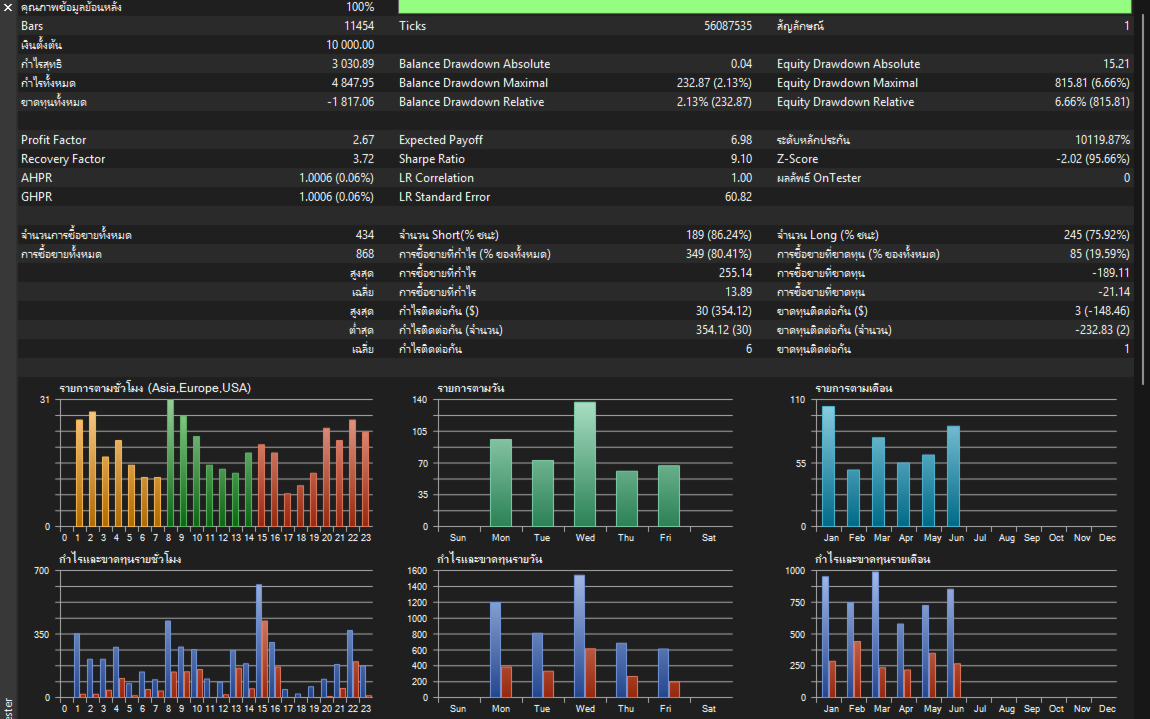
Overview Tom-Hedging v1 is a fully automated trading system built on statistical price action analysis and a dynamic grid mechanism. It evaluates market momentum through multi-timeframe data and utilizes an ATR-based dynamic distance calculation for position sizing. The EA features an auto-detection system, making it compatible with both Hedging and Netting account types.
Recommendations
-
Recommended Timeframes: H1 (Primary for stability) or M15 (For more frequent execution).
-
Recommended Symbols: EURUSD, XAUUSD (Gold), or major currency pairs.
-
Account Type: Hedging or Netting (EA adapts automatically). A Cent Account is highly recommended for balances under $1,000 to ensure proper grid margin management.
-
Execution Setup: A low-latency VPS is strictly recommended for continuous trailing stop and daily reset monitoring.
⚙️ SYSTEM PARAMETERS & TECHNICAL LOGIC
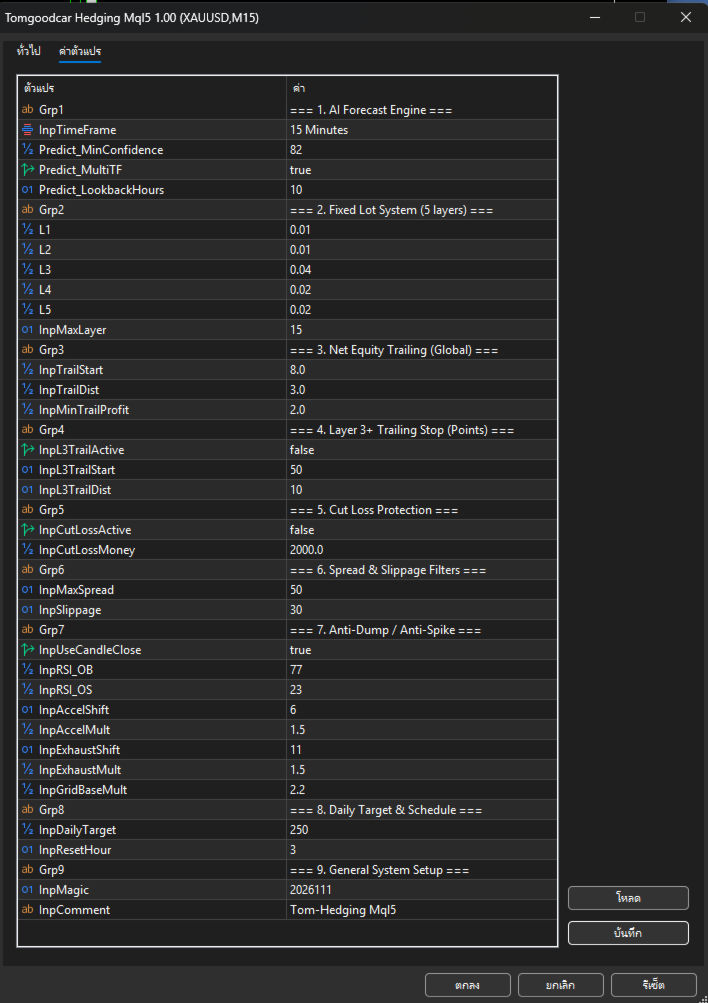
1. AI Forecast Engine (Entry Logic)
-
InpTimeFrame: The primary timeframe for indicator calculation.
-
Predict_MinConfidence: The minimum statistical probability percentage required to execute the first trade (Default: 60.0).
-
Predict_MultiTF: When enabled, the system aggregates momentum and volatility data across multiple timeframes (M1 up to H1) instead of relying on a single timeframe.
-
Predict_LookbackHours: The historical lookback period used for baseline calculations.
2. Fixed Lot System (Position Sizing)
-
L1 to L5: Defines the fixed volume (lot size) for each layer of the grid sequence, from the 1st position up to the 5th layer and beyond.
-
InpMaxLayer: The absolute maximum number of grid positions permitted per direction.
3. Net Equity Trailing (Global Basket Trailing)
-
InpTrailStart: The total floating profit threshold (in deposit currency) required to activate the global trailing mechanism.
-
InpTrailDist: The permitted drawdown distance from the peak equity to trigger a 'Close All' command.
-
InpMinTrailProfit: The minimum acceptable profit limit when the global trailing stop is executed.
4. Layer 3+ Trailing Stop (Advanced Grid Recovery)
-
InpL3TrailActive: Activates an independent trailing stop specifically for deep grid cycles (3 or more active orders in the same direction).
-
InpL3TrailStart: The distance in points from the break-even average price required to trigger this specific trailing stop.
-
InpL3TrailDist: The trailing distance in points to secure the basket profit before market reversal.
5. Cut Loss Protection (Portfolio Risk Management)
-
InpCutLossActive: Toggle to enable/disable the centralized floating loss limitation.
-
InpCutLossMoney: The maximum acceptable drawdown limit (in deposit currency). Exceeding this triggers a forced closure of all active positions.
6. Spread & Slippage Filters
-
InpMaxSpread / InpSlippage: The maximum allowable Bid/Ask spread and price deviation limits to prevent execution during abnormal market conditions.
7. Anti-Dump / Anti-Spike (Volatility Filters)
-
InpUseCandleClose: Delays order processing until the current candle closes, reducing false signals from intra-bar noise.
-
InpRSI_OB / InpRSI_OS: Relative Strength Index thresholds to prevent entering trades during heavily overbought or oversold extremes.
-
InpAccelMult / InpExhaustMult: Average True Range (ATR) multipliers designed to detect and block trades during sudden market spikes or exhaustion phases.
-
InpGridBaseMult: The dynamic multiplier used to calculate the distance for the next grid layer based on real-time ATR values.
8. Daily Target & Schedule
-
InpDailyTarget: The daily net profit target (in deposit currency). Once reached, the EA closes all trades and pauses operations. (Set to 0 to disable).
-
InpResetHour: The broker's server hour used to define the start of a new trading day (e.g., 3 = 00:00 GMT / 07:00 BKK).
9. General System Setup
-
InpMagic: A unique identifier ensuring the EA only manages its own positions.
-
InpComment: Custom text attached to each executed trade.
⚠️ IMPORTANT RECOMMENDATIONS & RISK WARNING
-
Margin Requirements: Because this system utilizes a grid recovery strategy, sufficient margin space is strictly required. Using a Cent Account is the best practice to maximize the system's ability to withstand market volatility and avoid over-leveraging.
-
Protection Limits: Users MUST configure the InpCutLossMoney parameter in proportion to their equity to protect against Black Swan events and extreme market anomalies.
-
Forward Testing Phase: Always test the EA on a Demo Account for at least 2-4 weeks to understand its entry logic, layer 3 trailing behavior, and daily reset mechanics before deploying real capital.
-
General Risk Warning: Financial trading carries a high level of risk. Historical backtest results are statistical representations of past performance and do not guarantee future returns. Only invest funds you can afford to lose.