MT5 Kill Zones Indicator
- Indicatori
-
Nordman Algorithms OÜ
 Algorithmic trading developer since 2018. Founder of Nordman Algorithms OÜ (Estonia).
Specialization:
→ Custom EAs & indicators for MT4, MT5, NinjaTrader 8
→ TradingView-to-terminal cloud webhooks (trade copiers)
→ Prop-firm risk management automation - Versione: 1.3
- Aggiornato: 30 aprile 2026
- Attivazioni: 5
MT5 Kill Zones Indicator is a session-based market structure tool for MetaTrader 5 that highlights major trading sessions and projects key reference levels derived from each zone. It supports Asia, London, New York, and Custom sessions, session high/low pivots, middle pivot levels, pivot extension logic, ten additional custom pivots, and flexible alerts including popup, sound, and email notifications.
Kill Zones Concept Explained
Kill Zones are predefined trading session windows widely used in ICT (Inner Circle Trader) and Smart Money Concepts (SMC) methodologies to focus on periods when market participation and price movement often increase. These zones are commonly aligned with sessions such as London open and New York open, where liquidity and directional activity can become more pronounced than during quieter hours.
From a market structure perspective, Kill Zones help organize the trading day into time-based segments. Instead of viewing all hours equally, traders can separate lower-activity periods from windows where stronger movement, sweeps of liquidity, or session expansions may occur.
Session highs and lows formed during a Kill Zone are often monitored as reference levels later in the day. Price returning to these boundaries may show rejection, breakout continuation, or renewed volatility around the level. The midpoint of a session range can also serve as an internal balance reference.
The MT5 Kill Zones Indicator automates this framework by marking selected sessions on the chart, plotting pivot levels derived from each zone, and maintaining custom time-based reference prices for structured session analysis.
MT5 Kill Zones Indicator — Key Features
Multi-Session Kill Zones
The indicator can display four independent session zones: Asia, London, New York, and one fully Custom Session. Each zone is plotted directly on the chart using user-defined start and end times, allowing the session framework to match personal schedules, broker feeds, or specific market hours.
Every session can be enabled or disabled individually. Session names can be edited, while colors and opacity levels can be adjusted for better visibility across different chart themes.
This makes it easy to focus only on the sessions that matter to your workflow.
Kill Zone Pivot Levels
For each completed Kill Zone, the indicator can project the session High Pivot, Low Pivot, and optional Middle Pivot derived from the session range.
When Pivot Extension is enabled, active pivot levels continue forward after the session ends and remain visible until price breaks the specific line or the next matching session begins.
Without extension, session levels disappear the moment the zone closes — often before price has a chance to revisit them. With Pivot Extension enabled, relevant levels remain available while they still matter.
Traders often monitor these active pivots for rejection, continuation, or renewed volatility when price revisits earlier session boundaries later in the day.
Pivot labels and line widths can also be customized for faster recognition.
Additional Custom Pivot Engine
Most session tools stop at standard highs and lows. This indicator adds up to 10 independent Custom Pivots, giving enough flexibility to track levels such as Day Open, True Day Open, London Open, lunch references, or instrument-specific price markers.
Each custom pivot captures price at a specified start time and projects that level horizontally until the selected end time.
Every custom pivot includes its own name, color, line style, and width settings.
Alert System
The indicator includes a flexible alert framework for active monitoring across multiple charts.
Available alerts include:
- popup notifications
- sound alerts
- email notifications
- session breakout alerts
- middle pivot cross alerts
Alerts can be combined or reduced depending on how much real-time feedback is needed.
Run it quietly, or use it as an active session-monitoring tool.
How to Interpret and Use the MT5 Kill Zones Indicator
Reading Kill Zones on the Chart
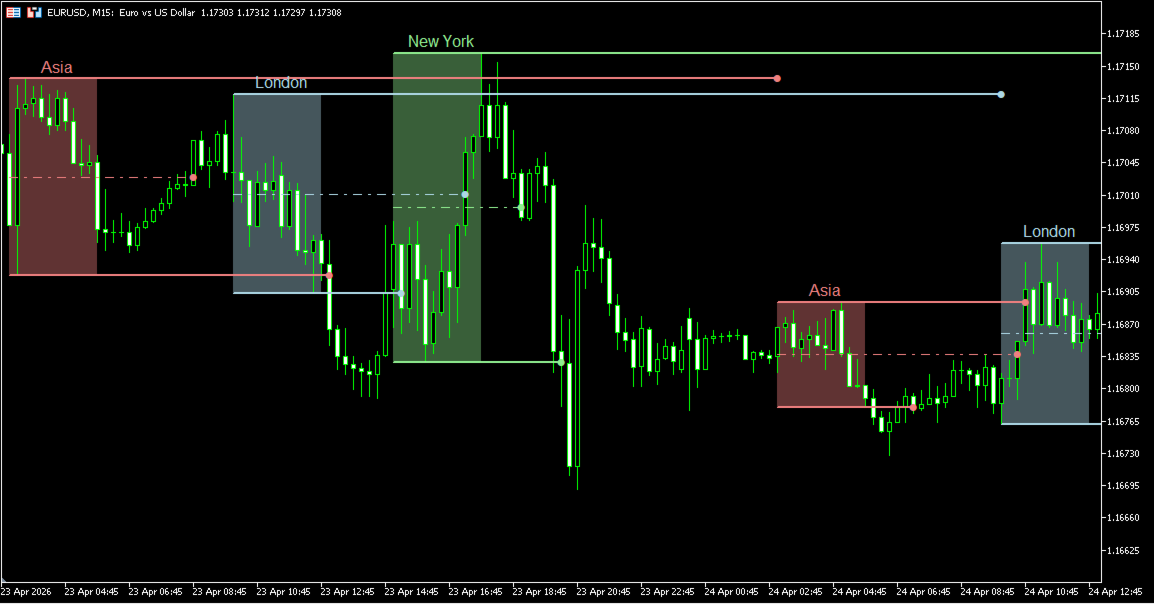
Each enabled Kill Zone is displayed as a shaded session window based on the selected start and end times. Standard presets include Asia, London, and New York, with an additional fully customizable session available.
These zones divide the trading day into structured time windows, making it easier to distinguish quieter hours from periods where participation and volatility may increase.
Many traders pay particular attention to London and New York overlaps, where session transitions can produce stronger movement.
Using Kill Zone Pivot Levels
After a session is completed, the indicator can plot the session High Pivot, Low Pivot, and optional Middle Pivot derived from that zone’s range.
When Pivot Extension is enabled, unbroken levels can remain active across future chart space until price breaches the level or the next same-named session begins.
These levels are often monitored when price revisits earlier session ranges later in the day. Common observations include rejection, breakout continuation, or renewed volatility around prior session boundaries.
Working with Additional Custom Pivots
Custom pivots capture price at a selected start time and extend that level until the chosen end time.
This can be used to maintain reference prices such as Day Open, True Day Open, London Open, Lunch Session Open, or any custom time-based level relevant to your workflow.
Because up to ten custom pivots are available, traders can build a personalized intraday framework directly on the chart.
Practical Chart Application
Kill Zones become most useful when price behavior and time align — and that is where structured session analysis becomes valuable.
Examples include:
- monitoring whether London session highs or lows are revisited during New York hours
- observing reactions around the session midpoint after range expansion
- tracking whether price accepts above or below prior session pivots
- using custom pivots as time-based reference levels during the day
The goal is not to treat zones as automatic signals, but to organize price behavior around time and location.
Indicator Settings & Parameters
Alerts
- Enable Pop Up Alert — Displays an on-screen popup when a selected alert event occurs.
- Enable Sound Alert — Plays a sound notification when an alert is triggered.
- Alert Sound File — Selects the sound file used for audio alerts.
- Enable Email Alert — Sends an email notification when supported alert events occur. Requires MetaTrader email settings to be configured.
Kill Zones Settings
- Session Enable Controls — Asia, London, New York, and Custom sessions can each be enabled or disabled independently.
- Session Names — Allows each Kill Zone to use a custom name.
- Session Start Time / End Time — Defines when each session begins and ends. All times use the indicator's session reference (EST in the default setup).
- Session Color — Sets the display color for each Kill Zone.
- Session Opacity — Controls transparency of the shaded session zone. Lower opacity keeps candles easier to read, while higher opacity emphasizes the time window.
Kill Zone Pivot Settings
- Enable Kill Zone Pivot — Displays the session High Pivot and Low Pivot after a Kill Zone is completed.
- Enable Kill Zone Middle Pivot — Displays the midpoint of the completed session range.
- Pivot Extension — Allows session pivot levels to continue forward after the Kill Zone ends. Each level remains active until price breaks that specific line or until the next matching session begins.
- Show Pivot Labels — Displays text labels for pivot levels directly on the chart.
- Enable Session Breakout Alerts — Triggers alerts when price breaks above or below a session pivot boundary.
- Enable Midline Cross Alert — Triggers an alert when price crosses the middle pivot.
- Outer Pivot Width / Middle Pivot Width — Controls line thickness for High/Low pivots and the middle pivot.
Additional Pivots Settings
- Enable Custom Pivot 01–10 — Enables up to ten independent custom pivots.
- Custom Pivot Name — Assigns a custom label such as Day Open, True Day Open, or London Open.
- Custom Pivot Start Time / End Time — Captures price at the selected start time and projects that level until the chosen end time.
- Custom Pivot Color — Sets the display color for each custom pivot.
- Custom Pivot Line Style — Controls the line appearance for each pivot, including solid, dashed, or dotted styles.
- Custom Pivot Width — Controls line thickness for each custom pivot.
Parameters
- Session Drawing Limit — Defines how many historical session zones remain visible on the chart. Lower values create a cleaner workspace, while higher values preserve more historical context.
- Label Font — Controls font size for session and pivot labels.