Stop Cluster Mapper
Stop Cluster Mapper is a custom MT5 indicator that identifies where stop orders are most likely concentrated in the market and ranks each level by probability. Rather than drawing flat support and resistance lines, it scores every detected swing point across five independent factors and renders a weighted heatmap directly on your chart.
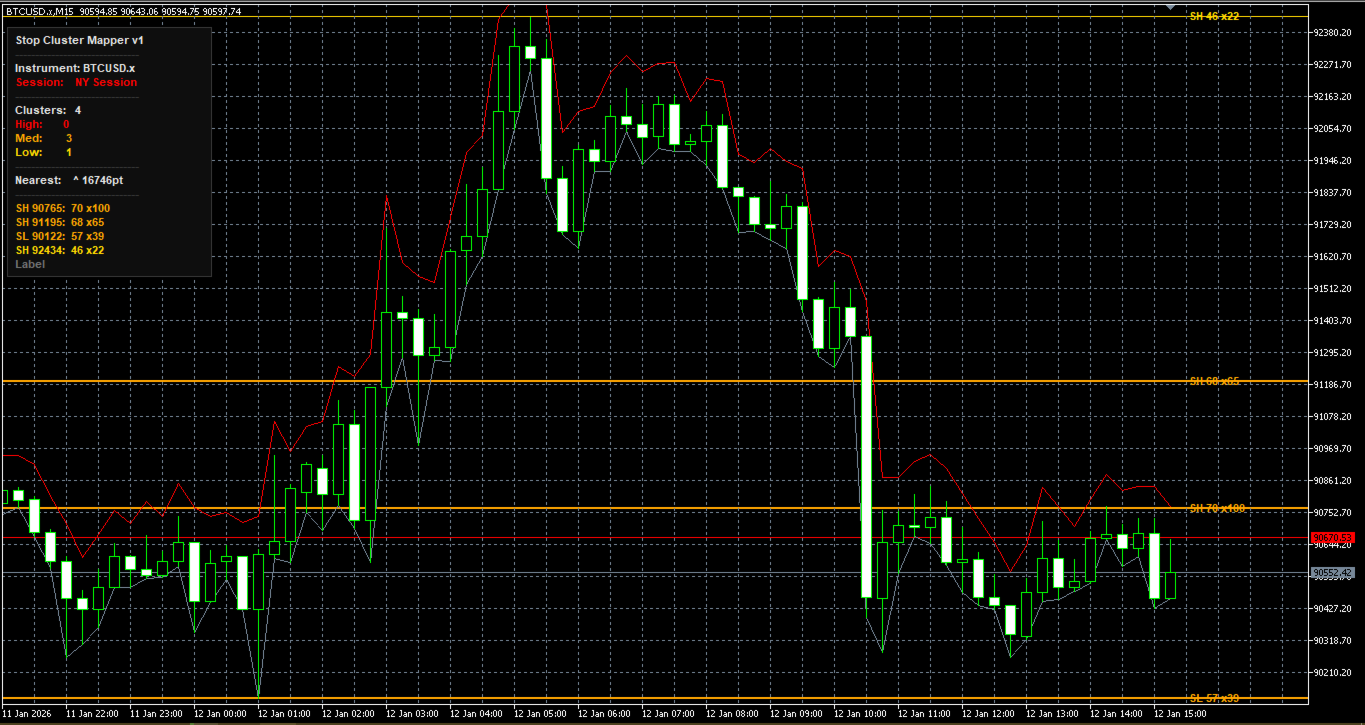
The result is a continuous score from 0 to 100 per level. High-scoring levels are drawn as thick red lines. Medium scores draw orange. Low scores draw thin gold. Levels that do not meet the minimum score threshold are suppressed entirely the chart stays clean regardless of how much history is loaded. Stop Cluster Mapper works on any instrument, any timeframe, and runs 24 hours across all sessions without modification. All distance parameters auto-calibrate to your instrument on load using a 50-bar median ATR. No manual setup is required when switching between instruments or brokers.
How it works
On every new bar close the indicator scans a configurable rolling window of price history and detects swing highs and lows. Each pivot is filtered for quality doji candles and micro-pivots on tight-range bars are rejected before scoring begins. Qualifying swings are scored across five independent factors and assigned a composite score from 0 to 100. The score maps directly to visual weight on the chart.
When two or more swing points form within the equal-level merge tolerance, they are treated as the same cluster. Tighter matches receive a proportional bonus up to +15 points. These confluenced equal highs and lows represent the highest-probability stop targets in the market. Lines expire automatically after a configurable number of bars with no price interaction. If price revisits a level, the idle counter resets and the score recalculates against current market context.
Scoring engine
Five factors determine the score of every level.
Recent swings score higher using exponential decay. A level formed five bars ago outranks an identical level from forty bars ago. MTF levels decay four times slower, reflecting the structural persistence of higher timeframe swings.
Every time price tests a level without breaking it, stops accumulate on both sides. Scores scale to five touches, with diminishing returns beyond that. Touch count carries the highest default weight.
Distance from price (15%)
Closer levels are more immediately actionable. Score decays linearly to zero at the auto-calibrated decay range.
Round number proximity (20%)
Retail traders and algorithmic systems place orders at psychologically significant round levels. The indicator auto-detects the appropriate interval per instrument class and scores levels by proximity within that interval.
Session open and close prices attract disproportionate order placement. Each session open is weighted by the size of its opening candle relative to the median ATR. A strong directional candle at the NY open contributes more than a doji at an Asia open. London receives a 1.3x multiplier. NY receives a 1.5x multiplier.
All five weights are fully configurable. The scoring function normalizes the weights automatically so they do not need to sum to any specific value.
Visual tiers
Score 75 to 100: Red line, configurable width (default 3px).
High-density cluster. Highest probability stop target.
Score 55 to 74: Orange line, configurable width (default 2px).
Medium-density cluster. Notable but below primary threshold.
Score 40 to 54: Gold line, configurable width (default 1px).
Low-density cluster. Contextual confluence only.
Below InpMinScore: Not drawn. No visual clutter.
Each line displays a label at the right edge showing the level type (SH = Swing High, SL = Swing Low), the score, and the touch count if greater than one. Hovering over any line shows the full tooltip with type, score, touch count, and idle bar count.
Dashboard panel
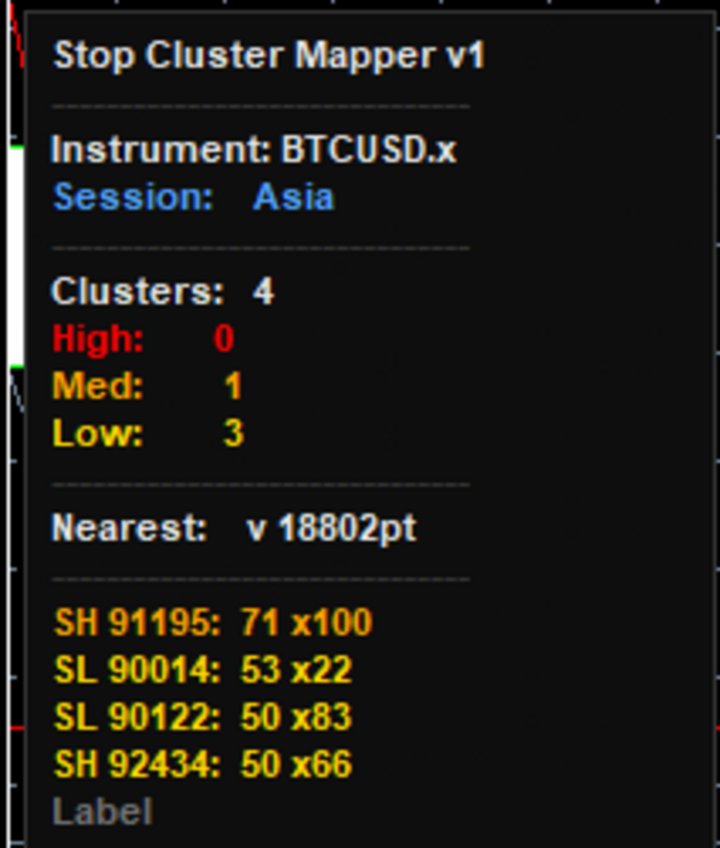
The indicator includes a live dashboard panel that shows a real-time summary of active clusters and market context.
The panel is draggable. Click and hold anywhere on the panel and drag it to any position on the chart. It stays where you leave it for the duration of the session.
Panel contents:
- Current active session (Asia, London, NY Session, Pre-Market)
with colour coding per session
- HTF overlay status and timeframe when enabled
- Active cluster counts by tier (High / Med / Low)
- HTF level count when overlay is enabled
- Distance and direction to the nearest cluster from current price,
highlighted in red when within alert proximity
- Ranked table of top clusters by score showing type, price, score,
and touch count
All panel colours are configurable through the input parameters.
Multi-timeframe overlay
Enable the HTF overlay to draw higher-timeframe swing levels directly on your current chart. HTF levels render in purple with a dashed line style, visually distinct from current-timeframe levels. HTF levels use a four-times slower recency decay than current-timeframe levels, reflecting their greater structural persistence. An H4 swing from twenty bars ago is more significant than an M15 swing from twenty bars ago, and the scoring reflects that. HTF levels are maintained in a separate scoring pool from current-timeframe levels. They are never cross-contaminated. Select any higher timeframe from the InpMTFTF dropdown.
Useful combinations:
M15 chart with H4 overlay, H1 chart with Daily overlay, H4 chart with Weekly overlay.
Instrument compatibility
Stop Cluster Mapper auto-calibrates to any instrument on load.
No parameter adjustment is needed when switching instruments.
Indices: NAS100, US500, US30, DAX40, FTSE100, Nikkei225
Forex: All major, minor, and exotic currency pairs
Metals: XAUUSD, XAGUSD, XPTUSD
Crypto: BTCUSD, ETHUSD, and other crypto CFDs on MT5
Other: Any symbol available on your broker's MT5 platform
Parameters reference
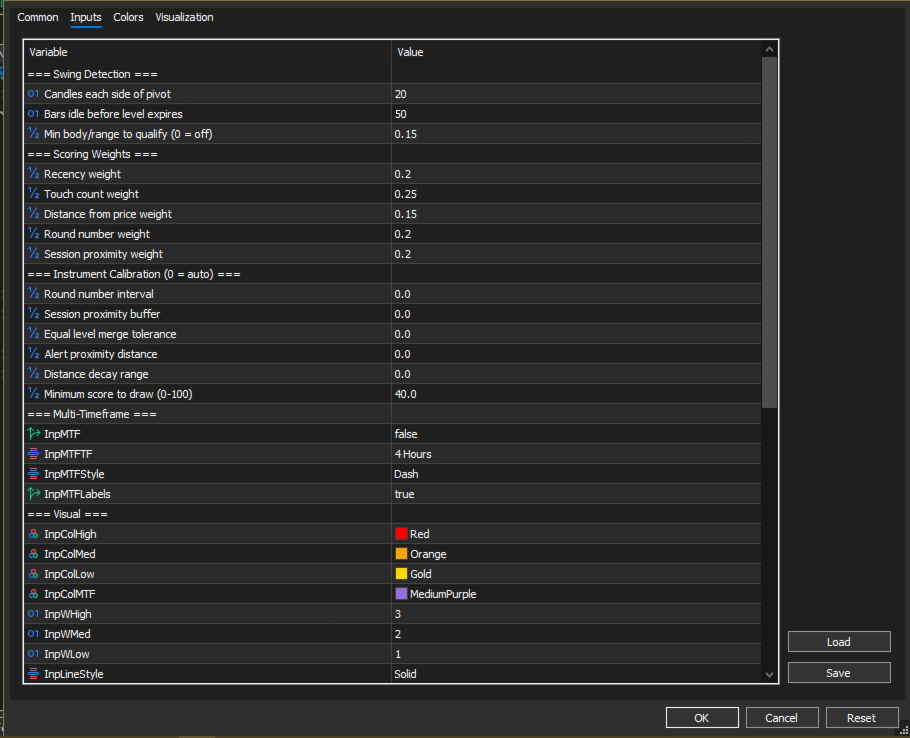
Swing Detection
InpSwingWindow (default 20): Candles each side of the pivot for swing detection. Increase for fewer, more significant levels.
Decrease for more levels at the cost of more noise.
InpExpiryCandles (default 50): Bars of no price interaction before a level is removed from the chart.
InpBodyFilter (default 0.15): Minimum body-to-range ratio for a pivot candle to qualify. Rejects doji and spinning top candles as cluster anchors. Set to 0 to disable this filter.
Scoring Weights
InpWtRecency (default 0.20): Weight for the recency factor.
InpWtTouches (default 0.25): Weight for touch count. Default highest repeated tests without break are the strongest signal.
InpWtDistance (default 0.15): Weight for distance from price.
InpWtRoundNum (default 0.20): Weight for round number proximity.
InpWtSession (default 0.20): Weight for session open proximity.
All weights are normalized automatically.
Instrument Calibration (set to 0 for automatic)
InpRoundInterval: Round number spacing. Auto-detects per instrument class based on digit count.
InpSessionBuffer: Proximity buffer around session opens.
Auto: median ATR x 0.40.
InpEqualBuffer: Equal-level merge tolerance. Auto: ATR x 0.10.
InpAlertDist: Alert trigger distance. Auto: ATR x 0.60.
InpDecayRange: Distance score decay range. Auto: ATR x 7.0.
InpMinScore (default 40): Minimum score to draw a level.
Raise to 50-60 to show only the most significant clusters.
Multi-Timeframe
InpMTF (default false): Enable HTF overlay.
InpMTFTF (default H4): HTF source timeframe.
InpMTFStyle (default STYLE_DASH): Line style for HTF levels.
InpMTFLabels (default true): Show labels on HTF levels.
Visual
InpColHigh/Med/Low/MTF: Line colors per tier.
InpWHigh/Med/Low: Line widths per tier.
InpLineStyle: Line style for current-TF levels.
InpLabels: Show score labels on lines.
InpTouches: Include touch count in labels.
Dashboard
InpDash: Show/hide the dashboard panel.
InpDashX/Y: Initial position. Panel is draggable at runtime.
InpDashRows: Number of rows in the cluster table (default 5).
InpDashBg/Border/Text/Dim: Panel colors.
Session Times (match your broker server time)
InpAsiaH/E: Asia session open and close hours.
InpLonH/E: London session open and close hours.
npNYH/E: NY session open and close hours.
Check the time in the bottom-right corner of your MT5 terminal
to determine your broker server timezone.
Alerts
InpAlert: Enable terminal alerts when price approaches a cluster.
InpPush: Enable push notifications to the MetaQuotes mobile app.
Requires MetaQuotes ID configured under Terminal > Options > Notifications.
Installation
- Purchase on MQL5 Market. The file downloads automatically to your MT5 platform via the Market tab in Navigator.
- Drag Stop Cluster Mapper from Navigator onto any chart.
- The indicator loads and auto-calibrates immediately.
- Adjust session hour inputs to match your broker server time.
- To enable the HTF overlay, set InpMTF = true and select your reference timeframe via InpMTFTF.
- The dashboard panel is draggable — click and drag it to your preferred position on the chart.
Important notes
Stop Cluster Mapper is a technical analysis tool. It does not place trades, generate buy or sell signals, or constitute financial advice. It is intended as a confluence tool to support your own analysis and trading decisions. Past performance of any scoring methodology does not imply future results. All trading involves risk of capital loss. Session scoring accuracy depends on correct session time configuration. Verify that InpNYH, InpLonH, and InpAsiaH match
your broker server time, not your local time.

 Enterprise Infrastructure, Cloud Security, Software Development