Gold Empire Expert
- Experts
- Versione: 2.0
- Attivazioni: 10

Gold Empire Expert – XAUUSD / Gold EA
Core Strategy: EMA200 + ADX + ATR (ONLY) – No Grid, No Martingale, No Repaint
Gold Empire Expert is a professional-grade MT5 Expert Advisor designed with a clean and robust trading framework using only three institutional-style tools:
-
EMA 200 – dominant trend direction filter
-
ADX – trend strength filter to avoid choppy/ranging markets
-
ATR – volatility engine for dynamic SL/TP and trade management
This EA is built for stability across brokers, with strict risk controls and market-safe execution logic.
Key Features
✅ MTF Pro Filter (Multi-Timeframe)
-
Trend bias from H4 EMA200
-
Trend strength confirmation from H1 ADX
-
Entry confirmation on your chart timeframe (H1/H4 recommended)
✅ Dynamic ATR SL/TP (with sanity caps)
-
ATR-based stop loss and take profit
-
Minimum/maximum SL caps to avoid extreme volatility issues
✅ Premium ATR Trade Management Suite
-
Break-even at configurable R-multiple
-
ATR trailing stop (volatility-based)
-
Partial close (scale-out) at configurable R
-
Time-stop to exit stagnant trades (optional)
✅ Market-Safe Protections
-
Spread filter (pips)
-
One-trade-per-bar mode (safer execution)
-
Max trades per day + cooldown bars after each trade
-
Auto lot normalization + hard lot cap
-
Margin-aware sizing using OrderCalcMargin() to reduce “No money” errors
-
Optional daily equity protection lock (max drawdown per day)
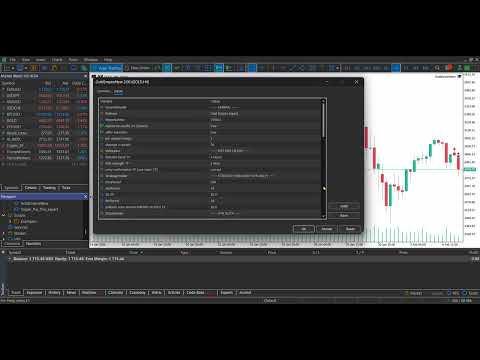
✅ Professional On-Chart Dashboard (Top-Left)
-
White background / black text for perfect readability
-
Live status: trend, ADX, ATR, spread, signal, trades today
-
WHY NO TRADE engine with clear reason codes (spread, hours, cooldown, ADX low, etc.)
Recommended Timeframes
-
H1 (Balanced) – best overall balance of frequency and quality
-
H4 (Conservative) – fewer trades, stronger filtering
Important Notes
-
Optimized for Gold / XAUUSD, but not restricted to any symbol.
-
No DLLs, no external files, no forbidden limitations.
-
Past performance is not a guarantee of future results. Always test on a demo account first.
✅ INSTALLATION CHECKLIST
-
Copy the EA .ex5 into: MQL5 → Experts
-
Restart MT5 (or right click Navigator → Refresh)
-
Open XAUUSD / GOLD chart (H1 or H4)
-
Enable Algo Trading
-
Drag the EA onto the chart
-
In Inputs, load a preset or use recommended settings
-
Make sure trading is allowed:
-
Tools → Options → Expert Advisors → Allow algorithmic trading
-
-
Start with Demo for 1–2 weeks before live trading
-
For best results: use a stable broker + VPS
Suggested broker conditions
-
Reasonable spreads for Gold
-
Good execution / low slippage
-
Enough margin and leverage
✅ FAQ
Q: Why is the EA not trading?
A: Check the on-chart panel “WHY NO TRADE”. Most common reasons are: spread too high, ADX too low, outside trading hours, cooldown active, daily limit reached.
Q: Does it repaint?
A: No. It uses closed-candle confirmation (optional) and does not use repaint logic.
Q: Why are lot sizes small or reduced?
A: The EA uses margin-aware sizing and safety caps. If margin is low, lots are automatically reduced to prevent “No money” errors.
Q: Can I run it on multiple charts?
A: Yes, but keep risk controlled. Use different MagicNumbers if needed.
Q: Netting vs Hedging accounts?
A: Supported. The EA manages positions safely on both account types.
Q: Best timeframe?
A: H1 for balanced trading, H4 for conservative trading.