Precision Assistant v2
- Experts
- Versione: 2.2
- Attivazioni: 5

🧭 Overview
PA v2 is an Expert Advisor for MT5 that assists traders in managing open positions. It is designed mainly for manual traders and scalpers who prefer to decide their entries but want the EA to handle trade management, averaging, and trailing automatically. The EA does not predict price direction or guarantee results. It works as a support tool to make trade handling easier and more consistent.
⚙️ Purpose
PA v2 monitors all active positions on the current symbol and applies the management rules defined by the user. If price moves against a position, the EA can place new trades at predefined intervals to reduce the average entry price within safe limits. It can also manage trailing stops and control the maximum drawdown for each trading session. The built-in EMA-based auto mode can be enabled for automatic entries based on EMA crossings, but it is fully optional and can be turned off when not needed.
📋 Main Functions
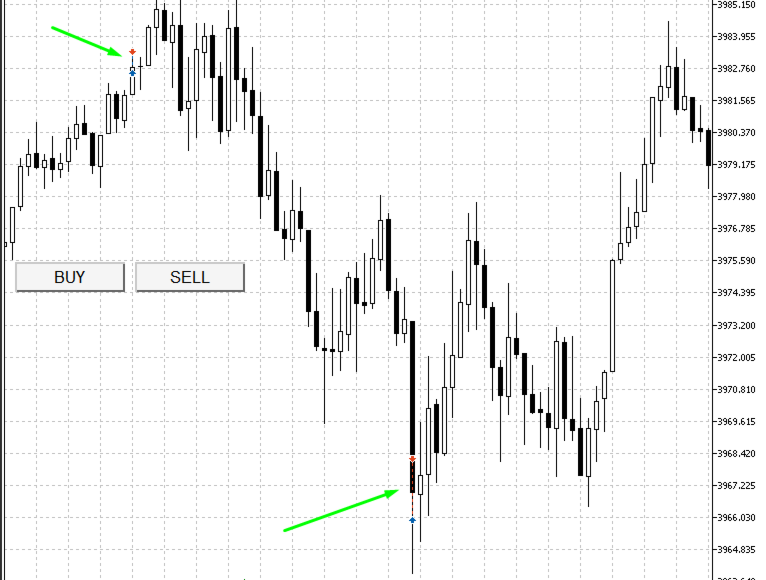
• One-click BUY and SELL buttons directly on the chart.
• Automatic detection of manual or external trades for the same symbol.
• Averaging add-ons during drawdown, with user-defined spacing and limits.
• Adaptive trailing stop that respects broker stop levels and tick size.
• Global drawdown protection in USD to close all positions if the limit is reached.
• Margin-aware lot calculation to avoid “not enough money” errors.
• Optional EMA auto-trading mode (default period 51).
• Compatible with both hedging and netting accounts.
• Works across forex, metals, indices, and crypto CFDs with automatic adjustment for digits and tick size.
🪄 How to Use
1. Attach PA v2 to any chart in MetaTrader 5.
2. Set your preferred lot size, add-on distance, trailing parameters, and drawdown limit.
3. Open trades manually from the chart or any connected terminal (including mobile).
4. The EA automatically detects open trades and begins managing them according to your settings.
5. If price moves favorably, the trailing function locks profit. If price moves against the trade, the EA can add new positions based on your configured spacing.
6. When the defined drawdown limit is reached, all positions are closed to protect equity.
7. The EMA auto-trading feature can be turned off if only manual control is desired.
💡 Recommended Usage
• For scalpers who prefer fast manual entries without setting SL/TP each time.
• For intraday traders who use structured averaging or recovery systems.
• For prop-firm accounts where strict drawdown limits must be respected.
• For traders who want consistent trailing and margin control on every position.
📈 Input Parameters
⚖️ Notes
• This EA is a trade management tool, not a signal generator.
• It does not provide guarantees of profitability or predict future market movements.
• Always test settings on a demo account before using them in live trading.
• The EA automatically adapts trailing and stop levels to each symbol’s broker limits to prevent “invalid stops.”
• Use appropriate leverage and margin for the instruments traded.
PA v2 is an Expert Advisor for MT5 that assists traders in managing open positions. It is designed mainly for manual traders and scalpers who prefer to decide their entries but want the EA to handle trade management, averaging, and trailing automatically. The EA does not predict price direction or guarantee results. It works as a support tool to make trade handling easier and more consistent.
⚙️ Purpose
PA v2 monitors all active positions on the current symbol and applies the management rules defined by the user. If price moves against a position, the EA can place new trades at predefined intervals to reduce the average entry price within safe limits. It can also manage trailing stops and control the maximum drawdown for each trading session. The built-in EMA-based auto mode can be enabled for automatic entries based on EMA crossings, but it is fully optional and can be turned off when not needed.
📋 Main Functions
• One-click BUY and SELL buttons directly on the chart.
• Automatic detection of manual or external trades for the same symbol.
• Averaging add-ons during drawdown, with user-defined spacing and limits.
• Adaptive trailing stop that respects broker stop levels and tick size.
• Global drawdown protection in USD to close all positions if the limit is reached.
• Margin-aware lot calculation to avoid “not enough money” errors.
• Optional EMA auto-trading mode (default period 51).
• Compatible with both hedging and netting accounts.
• Works across forex, metals, indices, and crypto CFDs with automatic adjustment for digits and tick size.
🪄 How to Use
1. Attach PA v2 to any chart in MetaTrader 5.
2. Set your preferred lot size, add-on distance, trailing parameters, and drawdown limit.
3. Open trades manually from the chart or any connected terminal (including mobile).
4. The EA automatically detects open trades and begins managing them according to your settings.
5. If price moves favorably, the trailing function locks profit. If price moves against the trade, the EA can add new positions based on your configured spacing.
6. When the defined drawdown limit is reached, all positions are closed to protect equity.
7. The EMA auto-trading feature can be turned off if only manual control is desired.
💡 Recommended Usage
• For scalpers who prefer fast manual entries without setting SL/TP each time.
• For intraday traders who use structured averaging or recovery systems.
• For prop-firm accounts where strict drawdown limits must be respected.
• For traders who want consistent trailing and margin control on every position.
📈 Input Parameters
| Category | Parameter | Description |
| Risk | FixedLot, UsePercentLot, RiskPercent | Choose between fixed or percentage-based lot size. |
| Averaging | AddOnDistancePips, MaxAddOns | Set spacing between additional orders and maximum allowed. |
| Trailing | TrailingTriggerPips, TrailingStepPips, TrailingOnlyOnPositive | Control activation and step of trailing stop. |
| Protection | CloseAllAtDD_USD, MinFreeMarginPct | Define global drawdown and margin protection. |
| Automation | AutoTradeEnabled, EMAPeriod | Enable or disable EMA auto-trading mode. |
| Interface | UI colors, Button font size | Customize the chart button appearance. |
⚖️ Notes
• This EA is a trade management tool, not a signal generator.
• It does not provide guarantees of profitability or predict future market movements.
• Always test settings on a demo account before using them in live trading.
• The EA automatically adapts trailing and stop levels to each symbol’s broker limits to prevent “invalid stops.”
• Use appropriate leverage and margin for the instruments traded.