Market Open ORB
- Indicatori
- Versione: 1.0
- Attivazioni: 5

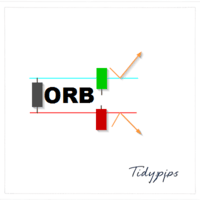
The Market Open ORB Indicator is a powerful and customizable tool designed for traders seeking to capitalize on the Opening Range Breakout (ORB) strategy. This indicator identifies the high, low, and midline of a user-defined time window after the market opens, providing clear visual cues for potential buy or sell opportunities when the price breaks out of these levels. Tailored for MetaTrader 5, it offers unmatched flexibility and precision for forex, stocks, and other markets.
Key Features
-
Customizable Time Window: Define your ORB session (e.g., 9:30–9:45 AM EST) with adjustable start and end times.
-
Multiple Instances: Track different ORB sessions (e.g., New York, London, Asia) by adding multiple instances with unique names.
-
Visual Clarity: Displays high, low, and midline levels with customizable colours (default: green, red, white) and line widths.
-
Historical ORBs: View up to 5 previous ORB sessions to analyse past breakouts and market behaviour.
-
Price Labels: Optional labels for high, low, and mid levels with customizable colours and offsets for better visibility.
-
Flexible Line Extensions: Extend ORB lines to the end of the trading day or beyond with user-defined settings.
-
Broker Time zone Support: Works seamlessly with your broker’s time zone (EST/EDT conversion included).
Why Choose Market Open ORB Indicator?
-
Precision Trading: Accurately marks critical price levels for breakout strategies.
-
User-Friendly: Intuitive input parameters and clear visual outputs.
-
Versatile: Suitable for day traders, scalpers, and swing traders across various markets.
-
Customizable: Tailor the indicator to your trading style with extensive input options.
Ideal For
-
Traders using breakout strategies.
-
Forex, stock, and commodity traders looking for time-based market analysis.
-
Professionals and beginners seeking reliable, visually clear trading signals.
Installation
-
Download and install the indicator via the MQL5 Market.
-
Attach it to your MT5 chart.
-
Configure the input parameters (e.g., ORB session times, colours, history) to match your trading preferences.
-
Start trading with clear ORB levels!
Notes
-
Ensure your broker’s time zone aligns with the indicator’s EST-based settings or adjust accordingly.
-
For multiple ORB sessions, add separate instances with unique names.
-
Check the MQL5 Market documentation for additional setup guidance.