Coppock Curve
- Experts
-
Abraao Moreira
 MQL5 Developer | Indicators, Expert Advisors and Trading Tools
 - Version: 1.50
Why use it
- It turns a classic long-term momentum study, the Coppock Curve, into a rule you can test and run on any timeframe.
- Risk controls are built in: stop loss and take profit on every position, plus a daily gain limit and a daily loss limit in money.
- A trading-hours window keeps the EA out of the market outside the hours you set.
- The curve is drawn as a green/red histogram, so you can see what the EA is reading.
The indicator
Rate of Change (ROC) measures the percentage change of the close over n periods:
ROC = (C − Cₙ) / Cₙ × 100%
Edwin Coppock (1965) combined two ROCs with a weighted moving average:
Coppock = WMA10 (ROC14 + ROC11)
Closing prices are used. The curve is shown in a separate window as a histogram: green above zero, red below zero.
Strategy
- The curve crosses above zero: buy.
- The curve crosses below zero: sell.
Coppock designed the study for buy signals on monthly index charts. Applying it to sells and to other timeframes is a common adaptation, so test it on your symbol and timeframe before using it on a live account.
Risk controls
- Stop loss / take profit: applied to every position when set to a value other than zero. They are based on Ask for buys and Bid for sells.
- Volume check: if the volume is not valid for the chart's symbol, a warning explains how to fix it and the trade is not sent.
- Trading hours: when enabled, positions are opened only between the start and stop times. If you attach the EA outside that window, a message shows the configured hours.
- Daily gain / loss limit: when either limit is reached, a message is shown, all open positions are closed and no new position is opened that day.
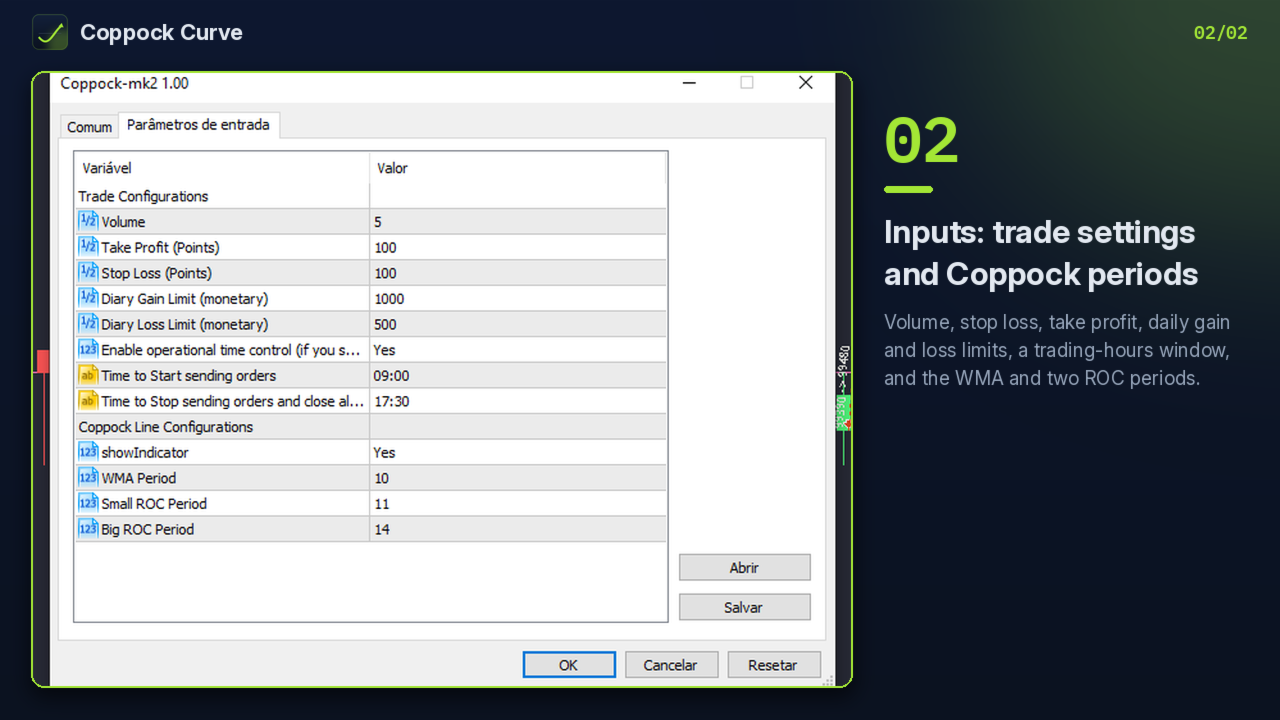
Parameters (labels as shown in the Inputs tab)
Trade Configurations
- Volume
- Take Profit (Points)
- Stop Loss (Points)
- Diary Gain Limit (monetary)
- Diary Loss Limit (monetary)
- Enable operational time control
- Time to Start sending orders (default 09:00)
- Time to Stop sending orders and close all positions (default 17:30)
Coppock Line Configurations
- showIndicator
- WMA Period (default 10)
- Small ROC Period (default 11)
- Big ROC Period (default 14)
FAQ
- Is past performance shown? No. Run it in the Strategy Tester on your own symbol and broker data.
- Can I use it on Forex? Yes, on any symbol. Set the volume to a value your broker accepts.
- What happens at the daily limit? Positions are closed and the EA waits for the next day.