RenkoSuperintelligence
- Experts
-
Olivier Nomblot
 I look at math and computers as ways to eliminate the emotional ups and downs of investing. “I don’t want to have to worry about the market every minute. I want models that will make money “.
WE TRADE THE FUTURE, NOT THE PAST. IMAGINATION TO SOFTWARE . - Version: 2.13
- Activations: 5
Renko SuperIntelligence: Renko trading for Gold, NDX and any symbol you choose
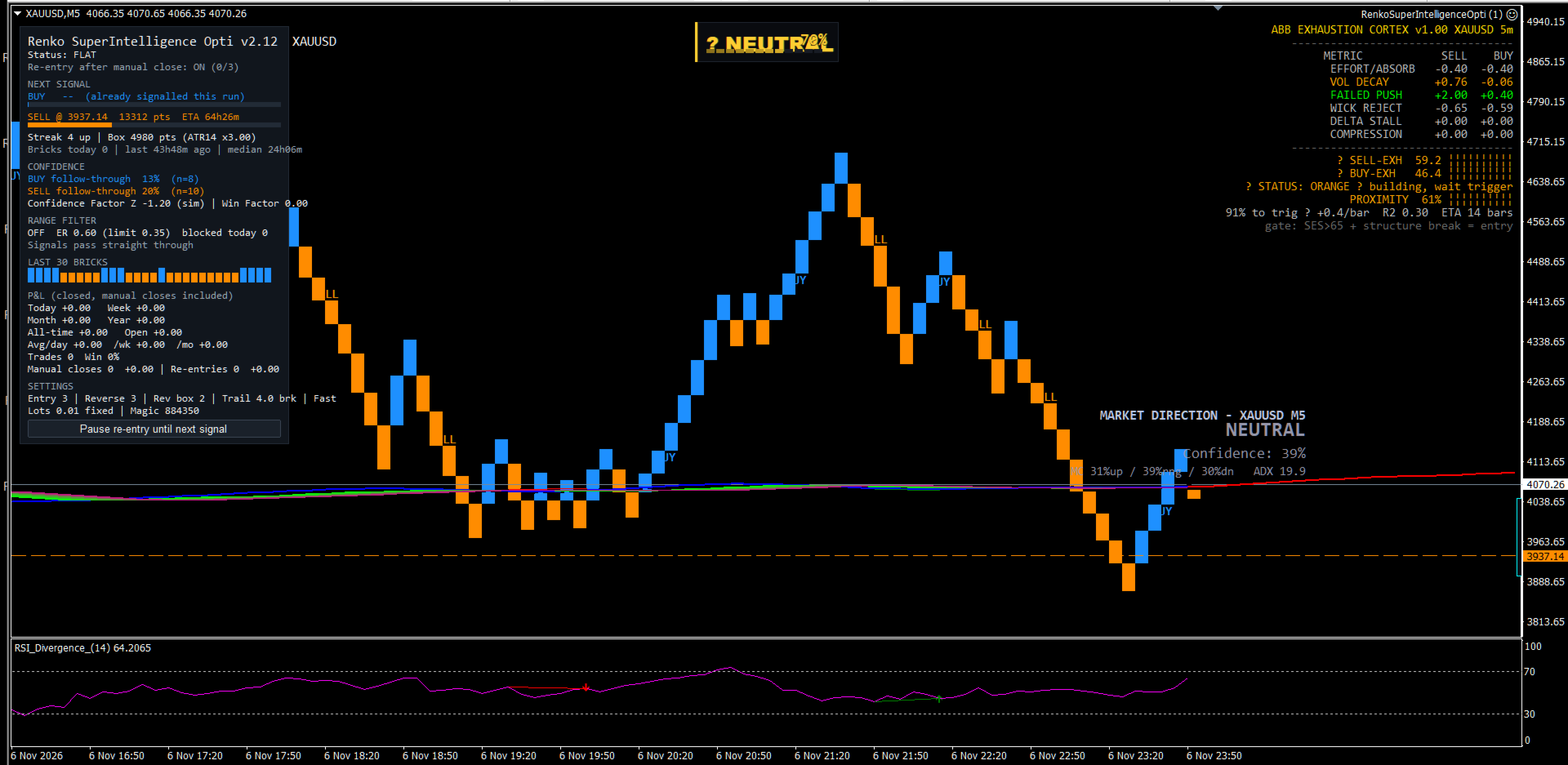
Renko is a Japanese charting method that ignores time and draws a new brick only when price has truly moved. It filters out the noise of ordinary candles and shows the trend as a clean staircase. I have traded with Renko for years, and Renko SuperIntelligence was built around one goal: never miss a real move in gold, the Nasdaq or any other pair you like.
The problem with Renko: chop
Every Renko trader knows the weakness. When the market hesitates, bricks flip back and forth, and a trend-following system gets stopped out and reversed again and again. So you face a choice:
- Take every signal so you never miss the trend, and accept a long series of small losses while the market ranges.
- Filter the signals, and risk being left behind when the real breakout finally comes.
A different approach
Renko SuperIntelligence takes a different route: instead of adding filter after filter, it changes how the trend is measured. Its default settings come from many years of real gold tick data, with real spreads and realistic fills. They were tuned on one period, then confirmed on a later period they had never seen. The result is a simple, robust method:
- Adaptive bricks. Brick size follows market volatility and is locked when each brick starts, so a brick cannot change size halfway through. Ordinary noise does not print a brick; only real moves do. Far fewer false signals reach the strategy.
- Fast entry on acceleration. When bricks start forming unusually quickly, the market is breaking out. The EA enters early instead of waiting for full confirmation, so V-shaped turns and news spikes are caught early.
- A trailing stop that ignores noise. The stop moves only when a brick completes, so price wiggles inside a brick cannot shake you out of a good trend. The stop is then placed with the broker, so the trade stays protected even if the terminal goes offline.
- Stop and reverse. When the trend genuinely turns, the EA closes and reverses, so it is never left on the wrong side of a new move.
What the EA does
- Builds its own Renko bricks inside the EA, from every tick, 24 hours a day. No offline chart, external generator or extra indicator is needed, and the EA backtests normally in the Strategy Tester.
- Draws up to ten years of brick history on your chart, so you can see how the method behaves across very different markets.
- Shows the trades it would have taken on the historical bricks, with entries, exits and the hypothetical result of each one, so you can judge the method before trading it.
- Re-joins the trend if you close a trade manually while the trend is still running. A Pause button lets you stay out whenever you choose.
- Recovers from disconnections: signals that occur while the terminal is offline are caught up on restart.
- Optional range filter for traders who prefer extra protection in sideways markets. It can be switched on or off at any time.
Built for real broker conditions
- Detects when the market is closed (daily gold break, weekends, holidays). It sends no orders and no stop changes during that time, then picks up normally when trading reopens.
- Respects the broker’s stop and freeze levels, lot limits and filling modes, and retries temporary errors with a growing pause between attempts.
- Lot size is checked against free margin before every order.
- Works on netting and hedging accounts, MT4 and MT5.
- A unique magic number keeps it separate from your other EAs.
Dashboard
- Next BUY and SELL trigger levels, with progress bars and an estimated time to the next signal.
- The last 30 bricks at a glance.
- Confidence Factor and Win Factor.
- P&L for today, week, month, year and all-time, plus averages per day, week and month. Manual closes and re-entries are included and shown separately.
- Changing colours or inputs redraws everything cleanly, with no restart needed.
Brick chart for your indicators
The EA writes its bricks to a dedicated chart. You can add Ichimoku, moving averages or any indicator there, calculated on the bricks themselves rather than on time candles.
Recommendations
- Symbols: XAUUSD, NDX/US100, or any liquid symbol.
- Works on any chart timeframe. For the full brick history, set “Max bars in chart” to the maximum in the terminal options.
- Fixed or risk-based lots.
- Use a VPS for continuous 24-hour operation.