TradeShield Position Manager Library
- Bibliothèque
-
AL MOOSAWI ABDULLAH JAFFER BAQER
 To trade successfully we need to go through the proven path that others had gone and reached!
Here are 17 quotes from such successful investors:
1- Limit your size in any position so that fear does not become the prevailing instinct guiding your judgment.
Joe Vidich - Version: 1.0
- Activations: 10
Try it before you decide: attach the free demo EA in the Strategy Tester with visual mode on, open a few manual trades and watch the gold TradeShield panel read every basket figure the library returns, tick by tick.
One compiled library that looks after the trades your Expert Advisor has already opened - so your own code can focus on when to enter, not on the dozens of small rules that decide whether a stop change or a close is accepted by the server.
Why it is called TradeShield
Opening a position is one line of code. Protecting it is where most EAs break: a stop moved inside the broker's stops level, a modification sent while the position is frozen, a partial close that leaves a remainder below the minimum lot, a trailing loop that grabs another EA's trades because it only checked the symbol. Each of these is a rejected request in the journal, a failed Market validation, or worse, a live account where two robots fight over the same positions. TradeShield puts a shield between your logic and the trade server: every request is normalised, checked against the symbol's own limits and only then sent, with retries where retrying makes sense.
Magic isolation, built into every call
Every basket function takes the symbol and the magic number as parameters and only reads or touches positions that match both. Run the same EA on EURUSD and XAUUSD with different magics, or three different robots on one symbol, and each one manages strictly its own trades. There is no shared state, no global variables and no files, so nothing leaks between charts.
What is inside - 26 functions in six groups
1. Safety and housekeeping. TS_Version returns the library version for your logs. TS_LastError returns a plain-language result of the last call - "OK", "Buy SL inside stops level", "Remainder would be below minimum", "Close failed, retcode ..." - ready for Print or an on-chart status line. TS_TradeAllowed checks connection, the terminal AutoTrading button, the program's permission, the account's expert-trading flag and the symbol trade mode in one call; every trading function runs it first, so nothing is sent when trading is not allowed.
2. Normalisation. TS_NormalizePrice rounds any price to the symbol's tick size (not only its digits, which matters on indices and metals). TS_NormalizeVolume floors a volume to the volume step, caps it at the maximum and returns 0 when it is below the minimum, so you never send an invalid lot.
3. Basket reading. TS_CountPositions, TS_BasketVolume and TS_BasketProfit (profit plus swap) work on all positions, buys only or sells only. TS_AveragePrice gives the volume-weighted entry of one side. TS_BreakevenPrice gives the price at which that side's basket, swap included, is exactly flat - the level a grid or averaging EA really needs. TS_LockedProfit tells you what the basket is guaranteed to return if every stop loss is hit, and TS_CountProtected how many positions already have their stop at or beyond the entry.
4. Broker limits. TS_StopsLevelPoints and TS_FreezeLevelPoints expose SYMBOL_TRADE_STOPS_LEVEL and SYMBOL_TRADE_FREEZE_LEVEL. TS_StopsLevelOK tells you whether a proposed SL and TP for a buy or a sell are far enough from the current close price. TS_FreezeLevelOK tells you whether a position can be modified or closed right now, or whether its current stop or target is inside the freeze zone.
5. Stop management. TS_ModifySLTP is the safe wrapper the rest of the library is built on: it normalises both prices, returns success without sending anything when nothing would change (no more "no changes" errors), validates the stops and freeze levels, sends the request and retries on requotes, price changes, timeouts and busy servers. TS_MoveToBreakeven moves the stop to entry plus a lock of your choice once a trigger distance is reached, and never moves a stop backwards. TS_TrailFixed trails at a fixed distance in points, starting after a profit threshold and moving only in steps you define, so the server is not flooded on every tick. TS_ATR returns the ATR of the last closed bar safely, and TS_TrailATR trails at ATR times a multiplier, so the stop breathes with volatility.
6. Closing. TS_ClosePosition closes one ticket with the filling mode the symbol supports. TS_PartialClose closes a percentage of a position, floored to the volume step, and refuses cleanly when the part or the remainder would fall below the minimum lot. TS_CloseAll closes every position of a symbol and magic, optionally one side only. TS_CloseBasketAtProfit and TS_CloseBasketAtLoss close the whole basket the moment its result reaches a money target or a money loss limit.
The demo EA and its panel
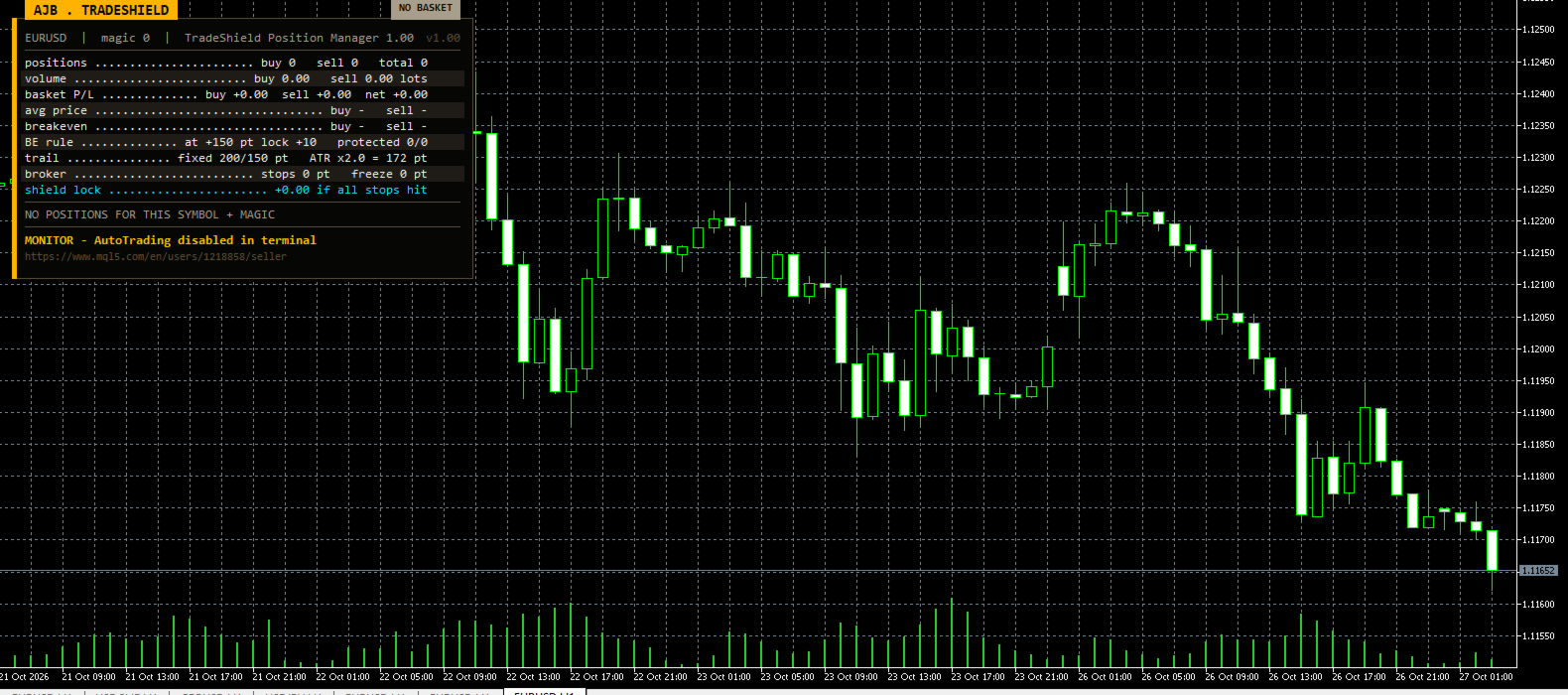
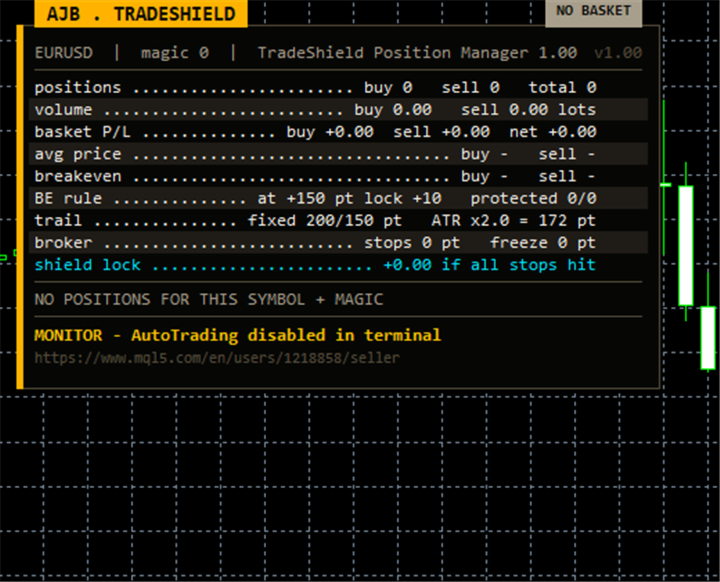
The screenshots show TradeShieldDemo, a small Expert Advisor included with the library. It is monitor-only: it never opens, modifies or closes a trade. It reads everything through the library and draws it in a compact gold-on-black card in the top-left corner, leaving the right side and the price scale free. Rows: positions per side, volume, basket profit per side and net, average prices, breakeven prices, the breakeven rule with how many positions are already protected, fixed and ATR trailing distances, the broker's stops and freeze levels, and a new Shield Lock row that shows the money already locked in by your current stops. Below it, a short list of the open positions marks each one as NO SL, a stop price, or BE OK. The card measures its own text and shrinks to fit any screen. Its settings: magic number to watch (0 = manual trades), breakeven trigger and lock in points, fixed trailing start and distance, ATR timeframe, period and multiplier, number of position rows, and panel corner, offsets and font size.
How to use it
1. Copy TradeShieldLib.ex5 into your terminal's MQL5\Libraries folder.
2. In your EA add an #import "TradeShieldLib.ex5" ... #import block with the functions you need (signatures below).
3. Call them from OnTick or OnTimer, always with your own symbol and magic, for example:
TS_MoveToBreakeven(_Symbol, Magic, 150, 10);
TS_TrailATR(_Symbol, Magic, PERIOD_H1, 14, 2.0);
if(TS_CloseBasketAtProfit(_Symbol, Magic, -1, 50.0) > 0) Print("basket banked");
if(!TS_ModifySLTP(ticket, sl, tp, 3)) Print(TS_LastError());
4. Compile. No DLL, no file access, no extra resources - and it works on hedging and netting accounts, any symbol and any account currency.
Function signatures
side: -1 = all, 0 = buys, 1 = sells.
string TS_Version()
string TS_LastError()
bool TS_TradeAllowed(string symbol)
double TS_NormalizePrice(string symbol, double price)
double TS_NormalizeVolume(string symbol, double lots)
int TS_CountPositions(string symbol, long magic, int side)
double TS_BasketProfit(string symbol, long magic, int side)
double TS_BasketVolume(string symbol, long magic, int side)
double TS_AveragePrice(string symbol, long magic, int side)
double TS_BreakevenPrice(string symbol, long magic, int side)
double TS_LockedProfit(string symbol, long magic, int side)
int TS_CountProtected(string symbol, long magic, int side)
int TS_StopsLevelPoints(string symbol)
int TS_FreezeLevelPoints(string symbol)
bool TS_StopsLevelOK(string symbol, bool isBuy, double sl, double tp)
bool TS_FreezeLevelOK(ulong ticket)
bool TS_ModifySLTP(ulong ticket, double sl, double tp, int retries)
bool TS_ClosePosition(ulong ticket)
bool TS_PartialClose(ulong ticket, double percent)
int TS_CloseAll(string symbol, long magic, int side)
int TS_CloseBasketAtProfit(string symbol, long magic, int side, double targetMoney)
int TS_CloseBasketAtLoss(string symbol, long magic, int side, double maxLossMoney)
int TS_MoveToBreakeven(string symbol, long magic, int triggerPts, int lockPts)
int TS_TrailFixed(string symbol, long magic, int startPts, int distPts, int stepPts)
double TS_ATR(string symbol, ENUM_TIMEFRAMES tf, int period)
int TS_TrailATR(string symbol, long magic, ENUM_TIMEFRAMES tf, int period, double mult)
Parameter notes
magic - the exact magic number of the positions to manage (0 for manual trades). triggerPts / lockPts - profit in points that arms breakeven, and the points of profit the stop then locks. startPts / distPts / stepPts - profit needed before trailing starts, distance kept behind price, and the minimum move before the stop is updated. mult - ATR multiplier. percent - share of a position to close (100 = all). targetMoney / maxLossMoney - basket profit target and loss limit in account currency, both positive numbers; 0 switches them off. retries - how many times a modification is resent after a requote or timeout.
Honest expectations
TradeShield does not decide when to enter or exit a market - that remains your strategy's job. What it does is make sure that the protective and closing actions your strategy asks for are calculated correctly, respect your broker's limits and stay inside your own magic number. Test it in the Strategy Tester with the demo EA and your own EA on your broker's data before trading live.
If TradeShield saves you development time or keeps your EA out of validation trouble, an honest review on this page would mean a lot - it is the most useful way to tell other developers whether this library is worth adding to their toolbox.