Position Duplicator
- Experts
- Version: 7.0
- Activations: 20

User Guide and Configuration Reference
The Position Duplicator is an Expert Advisor for MetaTrader 5 (MT5) designed to work with two main features:
1. Automatic duplication of trades within the same MT5 terminal;
2. Copy Trading between different MT5 terminals, using a locally shared file.
The EA also provides additional features for lot control, symbol mapping, asset filters, and protection based on the number of open positions and Drawdown (DD). Communication between terminals is performed through a shared CSV file.
Warning: The Position Duplicator is an extremely powerful EA, so it is important to test your configurations on a demo account!
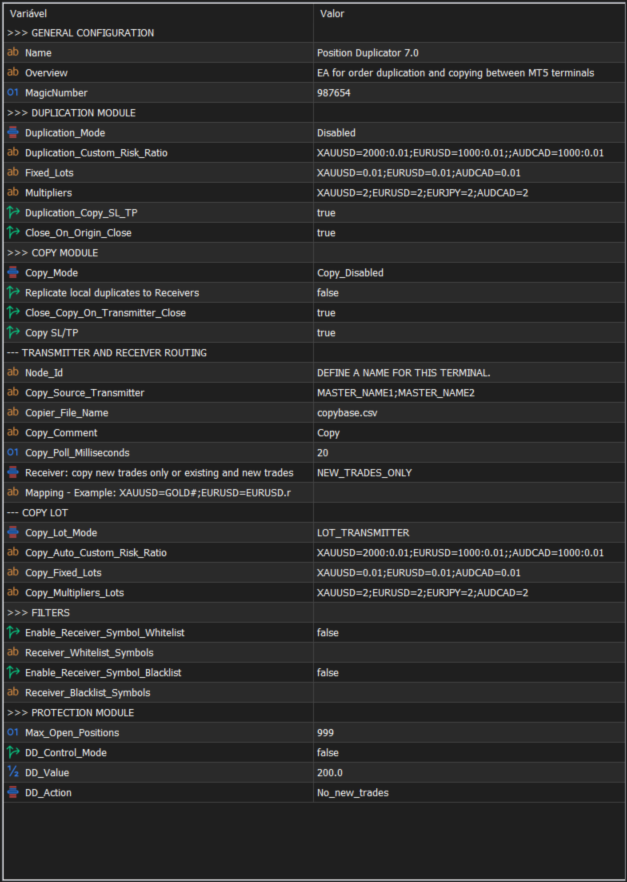
1. GENERAL CONFIGURATION
MagicNumber
Defines the Magic Number used by the EA to identify the trades created by the Position Duplicator modules.
This identifier is particularly important because it allows the EA to distinguish between:
- Original trades;
- Trades created by the duplication module;
- Trades opened by the Copy Trade module.
The EA uses this identifier to prevent, for example, a position created by the duplication module from being considered again as a new source position.
2. DUPLICATION MODULE
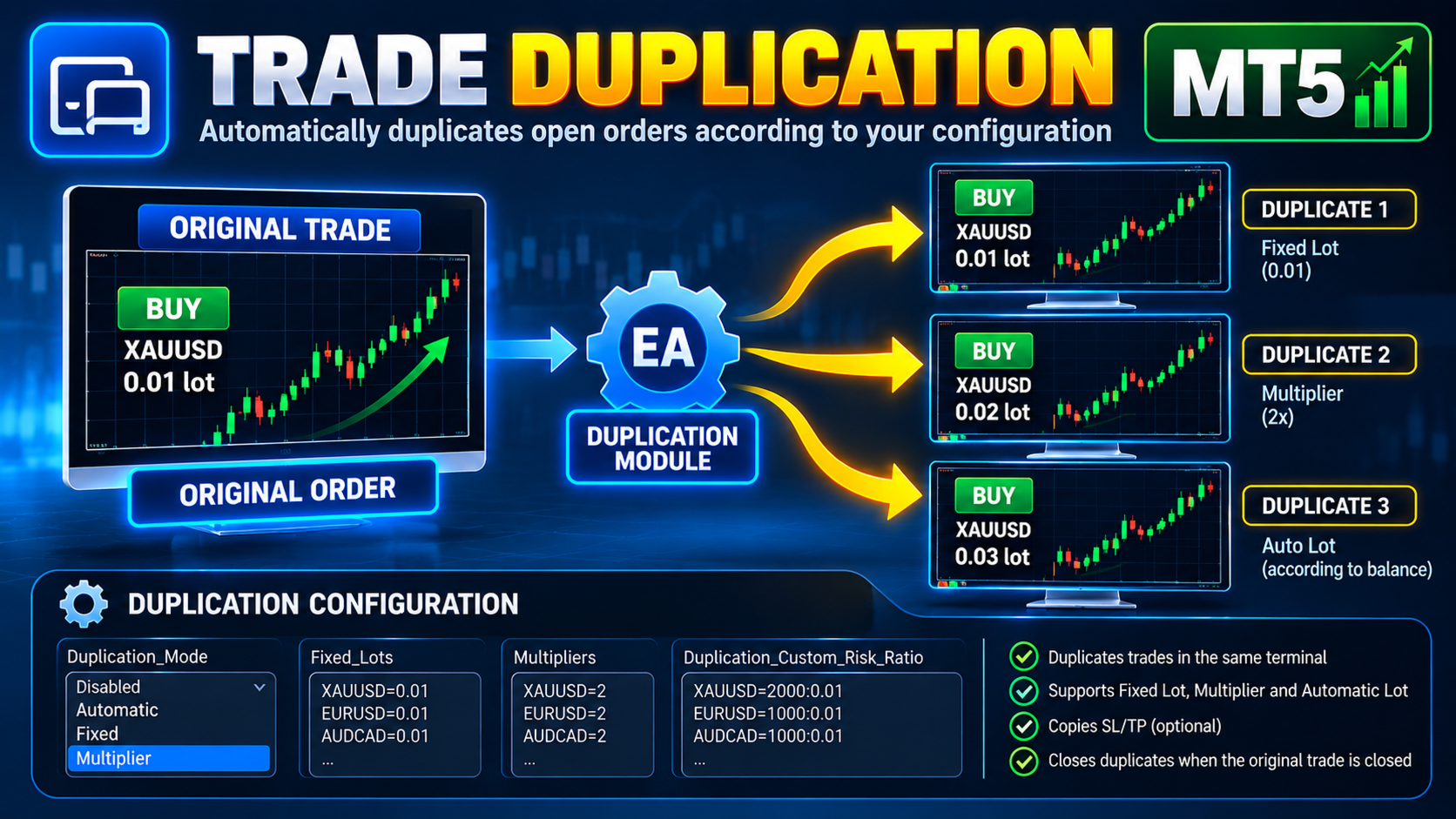
The Duplication Module is responsible for duplicating an open position within the same MT5 terminal.
Example:
Original position
XAUUSD BUY 0.01
↓
Position Duplicator
↓
Duplicated position
XAUUSD BUY 0.02
The duplication uses the same symbol as the original position. Lot rules are configured individually for each asset.
Duplication_Mode
Defines how the duplication module will operate.
Disabled
Completely disables duplication.
The EA can still use the Copy Trade module if it is enabled.
Automatic
Automatically calculates the lot size of the duplicated position using the account balance and an asset-specific rule.
Example:
XAUUSD=2000:0.01
This means:
Reference balance = 2000
Base lot = 0.01
If the balance is:
$2,000 → 0.01
$4,000 → 0.02
$6,000 → 0.03
$10,000 → 0.05
The calculation uses complete balance blocks.
For example:
XAUUSD=2000:0.01
Balance = 10,000
10,000 / 2,000 = 5
5 × 0.01 = 0.05 lot
The configuration is individual for each asset.
Fixed
Defines a fixed lot size for each asset.
Example:
XAUUSD=0.01
EURUSD=0.01
EURCAD=0.02
If the following position is opened:
XAUUSD BUY 0.50
the duplicated position may be:
XAUUSD BUY 0.01
regardless of the lot size of the original position.
Multiplier
Multiplies the lot size of the original trade.
Example:
XAUUSD=2
EURUSD=2
EURJPY=3
If the original trade is:
XAUUSD BUY 0.01
with:
XAUUSD=2
the duplicated position will be:
XAUUSD BUY 0.02
If the original position is:
EURJPY BUY 0.05
with:
EURJPY=3
the duplicated position will be:
EURJPY BUY 0.15
In the current implementation, the multiplier is limited between 2 and 20.
Duplication_Custom_Risk_Ratio
Used when:
Duplication_Mode = Automatic
Format:
ASSET=BALANCE_VALUE:BASE_LOT
Example:
XAUUSD=2000:0.01;EURUSD=1000:0.01;AUDCAD=1000:0.01
Each asset has its own balance-to-lot relationship.
If there is no rule for a specific asset, the EA cannot calculate the automatic lot size for that asset and therefore will not duplicate that asset.
Fixed_Lots
Used when:
Duplication_Mode = Fixed
Format:
ASSET=LOT
Example:
XAUUSD=0.01;EURUSD=0.01;EURCAD=0.02
Different lot sizes can be configured for different assets.
Multipliers
Used when:
Duplication_Mode = Multiplier
Format:
ASSET=MULTIPLIER
Example:
XAUUSD=2;EURUSD=2;EURJPY=3;AUDCAD=4
The duplicated lot size will be:
Original Lot × Multiplier
Duplication_Copy_SL_TP
Defines whether the Stop Loss (SL) and Take Profit (TP) of the original position should be copied to the duplicated position.
true
Copies the SL and TP.
false
The duplicated position will be opened without copying these levels.
Close_On_Origin_Close
Defines whether the duplicated position should be closed when the original position is closed.
true
Original position closes
↓
Duplicated position closes
false
The duplicated position remains open even after the original position is closed.
Default:
true
The EA internally maintains the relationship between the original position and its duplicate to perform this control.
3. COPY MODULE
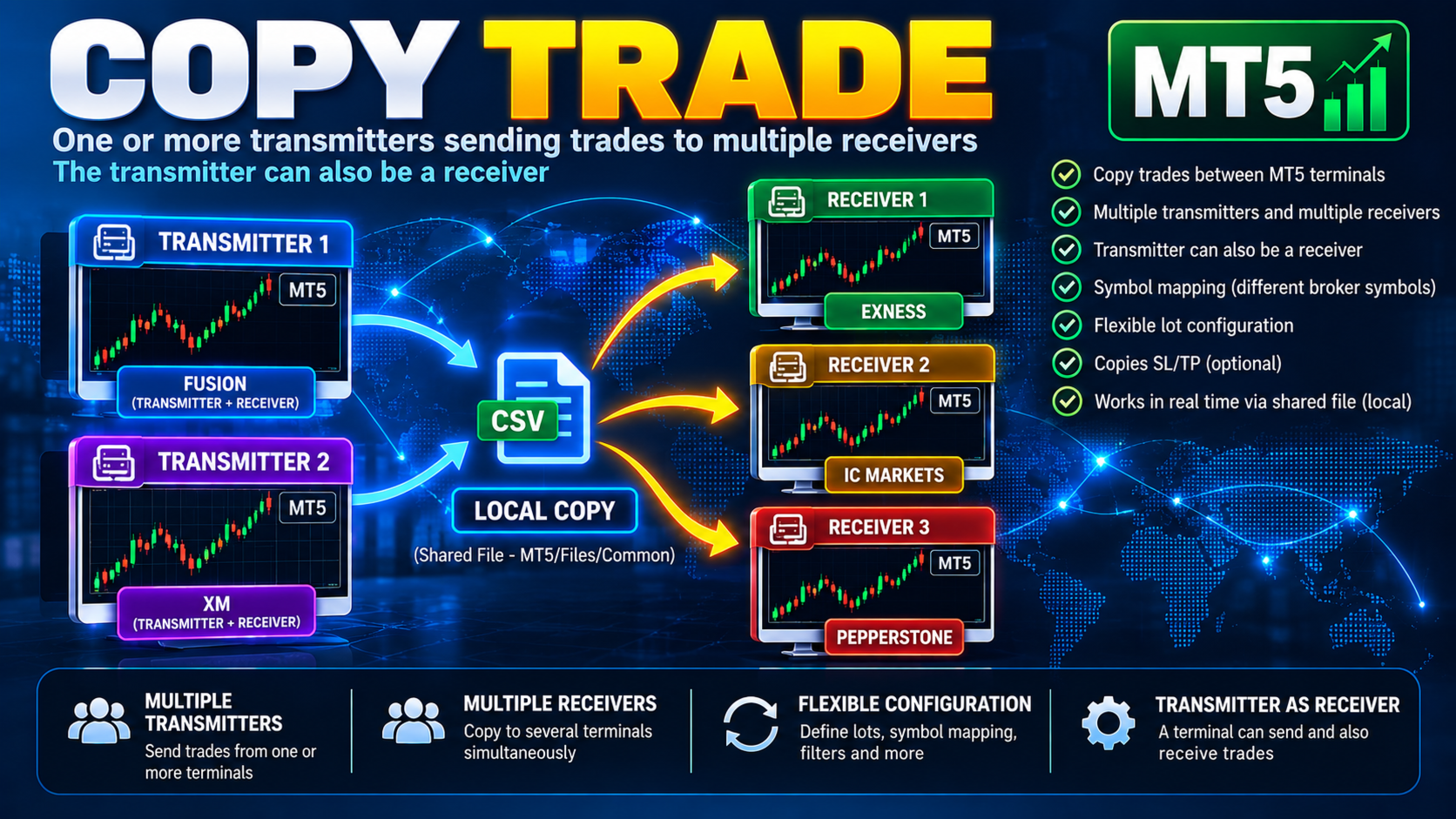
The Copy Module allows trades to be copied between different MT5 terminals.
Communication uses a shared CSV file.
Conceptually:
TRANSMITTER
↓
copybase.csv
↓
RECEIVER
It is possible to use multiple transmitters, multiple receivers, and also a terminal that simultaneously transmits and receives trades.
Copy_Mode
Defines the role of the terminal.
Copy_Disabled
Disables Copy Trading.
Copy_Transmitter
The terminal only sends its trades to other terminals.
Example:
MASTER1
TRANSMITTER
↓
↓
↓
MASTER2 / SLAVE1 / SLAVE2
RECEIVER
Copy_Receiver
The terminal only receives trades.
Copy_Transmitter_Receiver
The terminal can:
TRANSMIT
+
RECEIVE
This configuration allows an architecture such as:
MASTER2 ⇄ MASTER1
or a structure with multiple transmitters and receivers.
Copy_Transmitter_Duplicated_Positions
Defines whether positions created by the local duplication module should also be transmitted to receivers.
false
Only original trades are transmitted.
true
Duplicated trades may also be transmitted.
The EA identifies its own duplicated trades internally, preventing a position created by the EA from being retransmitted improperly.
Close_Copy_On_Transmitter_Close
Defines whether a position copied to the Receiver should be closed when the corresponding position on the Transmitter is closed.
false
The position on the Receiver remains open.
Copy_SL_TP
Defines whether the SL/TP of the Transmitter's trade will be sent to the Receiver.
true
Copies SL and TP.
false
Does not copy SL/TP.
4. TRANSMITTER AND RECEIVER ROUTING
This section determines who transmits to whom.
Node_Id
The unique identifier of the terminal within the Copy Trade network.
Example:
Node_Id = MASTER1
Another terminal:
Node_Id = MASTER2
Another:
Node_Id = SLAVE1
Each terminal must have its own unique identifier.
The terminal's own Node ID is not accepted as a valid event source by the Receiver.
Copy_Source_Transmitter
Defines which transmitters this terminal is authorized to receive trades from.
Example:
Copy_Source_Transmitter=MASTER1;MASTER2
This means:
Receive trades from:
MASTER1
MASTER2
If the transmitter is not listed, the event is rejected.
This allows networks with multiple transmitters:
MASTER1 ─────┐
├── RECEIVER
MASTER2 ─────┘
The system does not automatically accept any source existing in the shared file; the source must be explicitly configured.
Copier_File_Name
Defines the name of the file used for communication.
Default:
copybase.csv
The file is used through FILE_COMMON, allowing different MT5 terminals/installations on the same computer to access the same file.
Copy_Comment
Defines the base comment used on copied trades.
Internally, the EA adds source and ticket identification information to establish the relationship between the Receiver trade and the Transmitter trade.
Copy_Poll_Milliseconds
Defines how frequently the Receiver checks the CSV file.
The lower the value, the more frequently the file is checked.
The EA has an effective minimum timer value of 10 ms.
Startup_Copy_Mode
Defines the behavior when the Receiver is started.
NEW_TRADES_ONLY
The terminal ignores previously existing trades in the file and starts monitoring only new trades.
Existing positions are not copied.
EXISTING_AND_NEW
When started, the EA reconstructs the state of existing trades in the file and attempts to copy positions that are still open.
After that, it continues monitoring new trades.
This is especially useful when the Receiver is started after the Transmitter already has open positions.
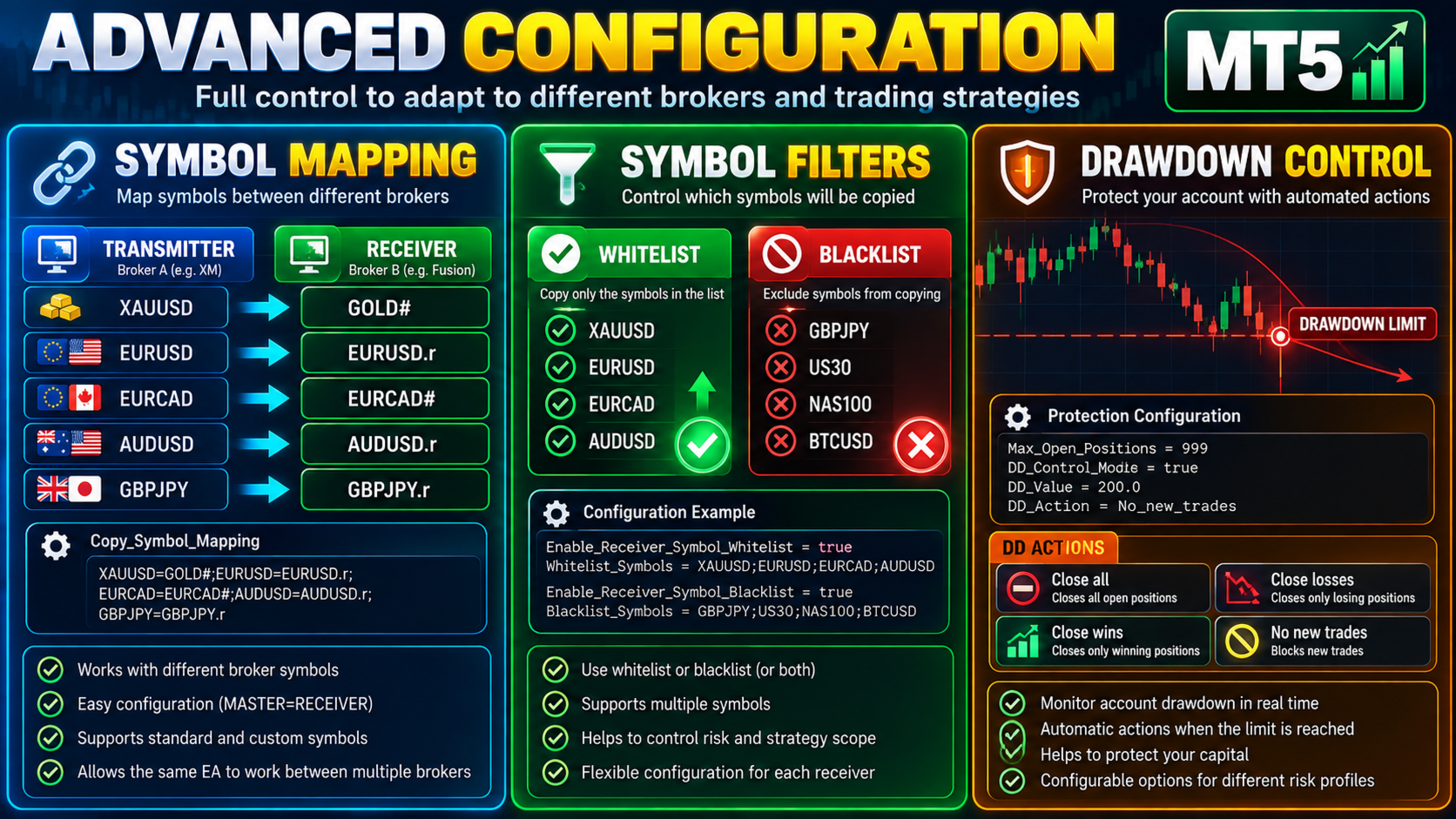
Copy_Symbol_Mapping
Allows the Transmitter symbol to be converted to the symbol used by the Receiver.
Example:
XAUUSD=GOLD#
EURUSD=EURUSD.r
EURCAD=EURCAD#
This allows:
TRANSMITTER
XAUUSD
to be copied as:
RECEIVER
GOLD#
This is especially important when different brokers use different names for the same asset.
The mapping is applied before the trade is opened on the Receiver.
5. COPY LOT
This section determines how the Receiver's lot size will be calculated.
Copy_Lot_Mode
There are four options:
LOT_TRANSMITTER
Uses exactly the same lot size as the Transmitter.
Example:
Transmitter:
XAUUSD 0.05
Receiver:
XAUUSD 0.05
LOT_AUTO
Automatically calculates the lot size on the Receiver using the Receiver account balance and the rules defined in:
Copy_Auto_Custom_Risk_Ratio
This allows accounts with different balances to use proportionally different lot sizes.
Example:
Transmitter:
0.10 lot
Receiver A:
balance = 10,000
→ 0.05 lot
Receiver B:
balance = 20,000
→ 0.10 lot
The calculation uses the same balance-block logic used by the Automatic duplication mode.
LOT_FIXED
Defines a fixed lot size for each asset.
Example:
XAUUSD=0.01
EURUSD=0.02
EURCAD=0.03
Regardless of the transmitted lot size, the Receiver will use the configured rule.
LOT_MULTIPLIER
Multiplies the received lot size.
Example:
XAUUSD=2
If the Transmitter sends:
0.01
the Receiver will open:
0.02
The multiplier is limited between 2 and 20 in the current implementation.
Copy_Auto_Custom_Risk_Ratio
Used when:
Copy_Lot_Mode = LOT_AUTO
Format:
ASSET=BALANCE_VALUE:BASE_LOT
Example:
XAUUSD=2000:0.01
EURUSD=1000:0.01
AUDCAD=1000:0.01
The calculation uses the Receiver account balance.
Copy_Fixed_Lots
Used when:
Copy_Lot_Mode = LOT_FIXED
Example:
XAUUSD=0.01
EURUSD=0.01
EURCAD=0.01
Copy_Multipliers_Lots
Used when:
Copy_Lot_Mode = LOT_MULTIPLIER
Example:
XAUUSD=2
EURUSD=4
EURCAD=3
6. FILTERS
The filters control which assets can be opened by the Receiver.
Enable_Receiver_Symbol_Whitelist
When false, there is no whitelist restriction.
When true, only the assets listed in:
Receiver_Whitelist_Symbols
can be opened.
Example:
Receiver_Whitelist_Symbols=
XAUUSD.r;EURUSD.r;EURCAD.r
In this case, other received assets will be rejected for opening.
It is important to use the symbol actually traded on the Receiver, especially when symbol mapping is being used.
Enable_Receiver_Symbol_Blacklist
When true, the assets defined in the blacklist cannot be opened.
Example:
Receiver_Blacklist_Symbols=
GBPJPY.r;NAS100;BTCUSD
Receiver_Blacklist_Symbols
List of prohibited assets.
Example:
GBPJPY.r;US30;XAGUSD.r
Priority
The blacklist has priority over the whitelist.
Therefore:
Whitelist = XAUUSD;EURUSD;EURCAD
Blacklist = EURCAD
results in:
XAUUSD → allowed
EURUSD → allowed
EURCAD → BLOCKED
The filters affect new trade openings.
Close events continue to be processed so that previously copied positions can be closed correctly.
7. PROTECTION MODULE
The Protection module controls account exposure and Drawdown.
It has two main mechanisms:
Max_Open_Positions
DD_Control_Mode
Max_Open_Positions
Defines the maximum number of open positions allowed.
Default:
999
The control considers PositionsTotal() and therefore acts as a general limit on the number of open positions in the terminal for new trades controlled by the EA.
DD_Control_Mode
Enables or disables Drawdown control.
false
DD Protection is disabled.
true
The EA continuously monitors the relationship between:
Highest Equity Recorded
↓
Current Equity
↓
Drawdown in monetary value
DD_Value
Defines the Drawdown limit in the account's monetary currency.
Example:
DD_Value = 200
This means the configured action will be triggered when Drawdown reaches:
200 monetary units of the account.
For example, if the account is in USD:
DD_Value = 200
represents USD 200.
The calculation is:
Drawdown =
Highest Equity Recorded − Current Equity
The EA updates the Equity peak whenever a new maximum Equity is reached.
DD_Action
Defines what the EA should do when the DD limit is reached.
Close_all
Closes all open positions selected by the Protection module.
Example:
DD = 200
↓
Close_all
↓
All positions are placed
in the closing queue
Close_losses
Closes only positions whose current result is negative.
Example:
XAUUSD -50 → close
EURUSD +20 → keep
EURJPY -30 → close
AUDUSD +15 → keep
Close_wins
Closes only positions whose current result is positive.
Example:
XAUUSD +50 → close
EURUSD -20 → keep
EURJPY +30 → close
AUDUSD -15 → keep
No_new_trades
Does not close existing positions.
Instead, when the DD limit is reached:
New trades
↓
BLOCKED
Existing positions remain open.
When the Drawdown falls below the limit, the block on new trades is released.
DRAWDOWN RESET / REARM
The Protection module also has a DD cycle rearm mechanism.
After an action such as:
Close_all
Close_losses
Close_wins
is executed, the EA does not immediately consider the closing process as a new cycle.
It waits for confirmation that the positions from the previous cycle have actually been closed.
The objective is to prevent the result of the asynchronous closing process itself from being prematurely interpreted as a new Drawdown event.
MULTI-TRANSMITTER / MULTI-RECEIVER
Copy Trade allows more complex networks to be created.
One transmitter to multiple receivers:
┌── RECEIVER A
│
TRANSMITTER ─┼── RECEIVER B
│
└── RECEIVER C
Multiple transmitters to one receiver:
TRANSMITTER A ──┐
├── RECEIVER
TRANSMITTER B ──┘
Transmitter also acting as Receiver:
┌──────────────┐
│ MASTER2 │
│ TX + RX │
└──────┬───────┘
↕
┌──────┴───────┐
│ MASTER1 │
│ TX + RX │
└──────────────┘
Trade identification uses the Source ID + Master Ticket, preventing identical tickets from different transmitters from being confused.
HEDGING AND NETTING
The current architecture was developed to work with the different position management models supported by MT5.
DISCLAIMER
Forex and CFD trading involves a high level of risk.
Past performance does not guarantee future results.
Always test the configured settings on a demo account first.
Use the tool wisely and responsibly.