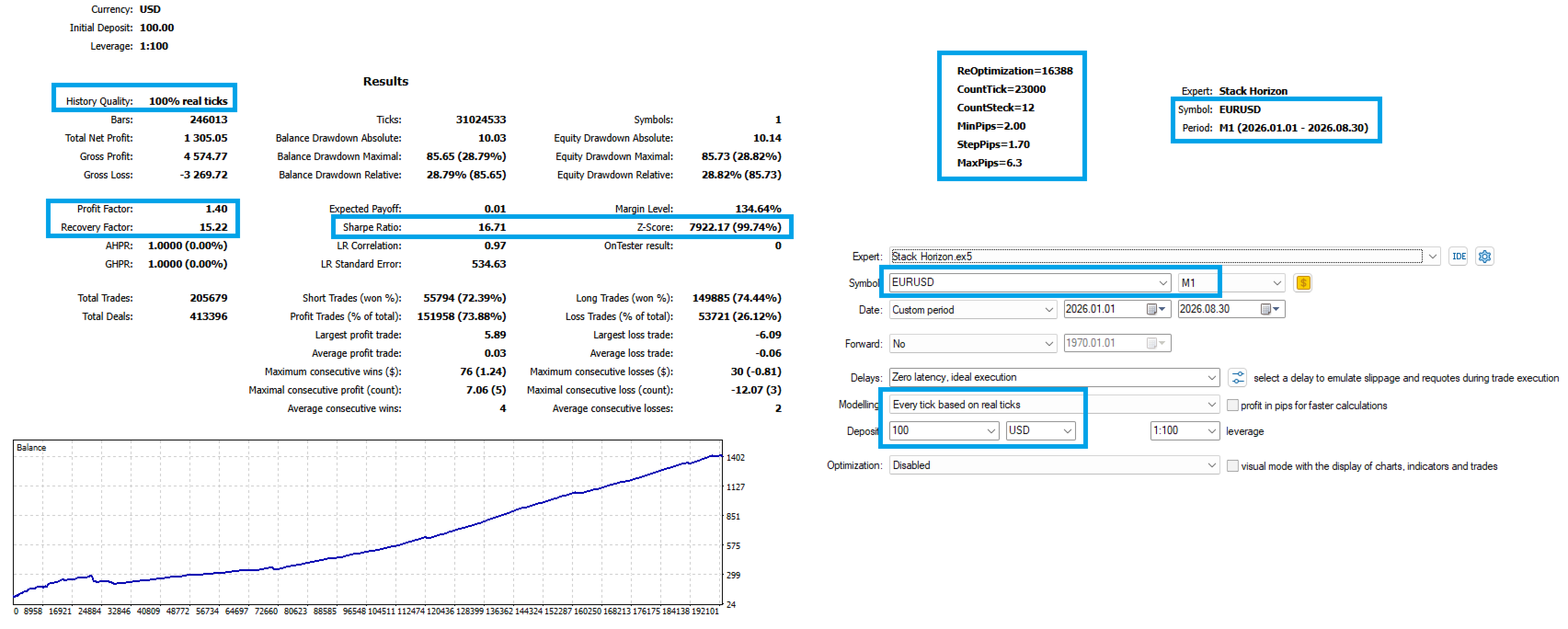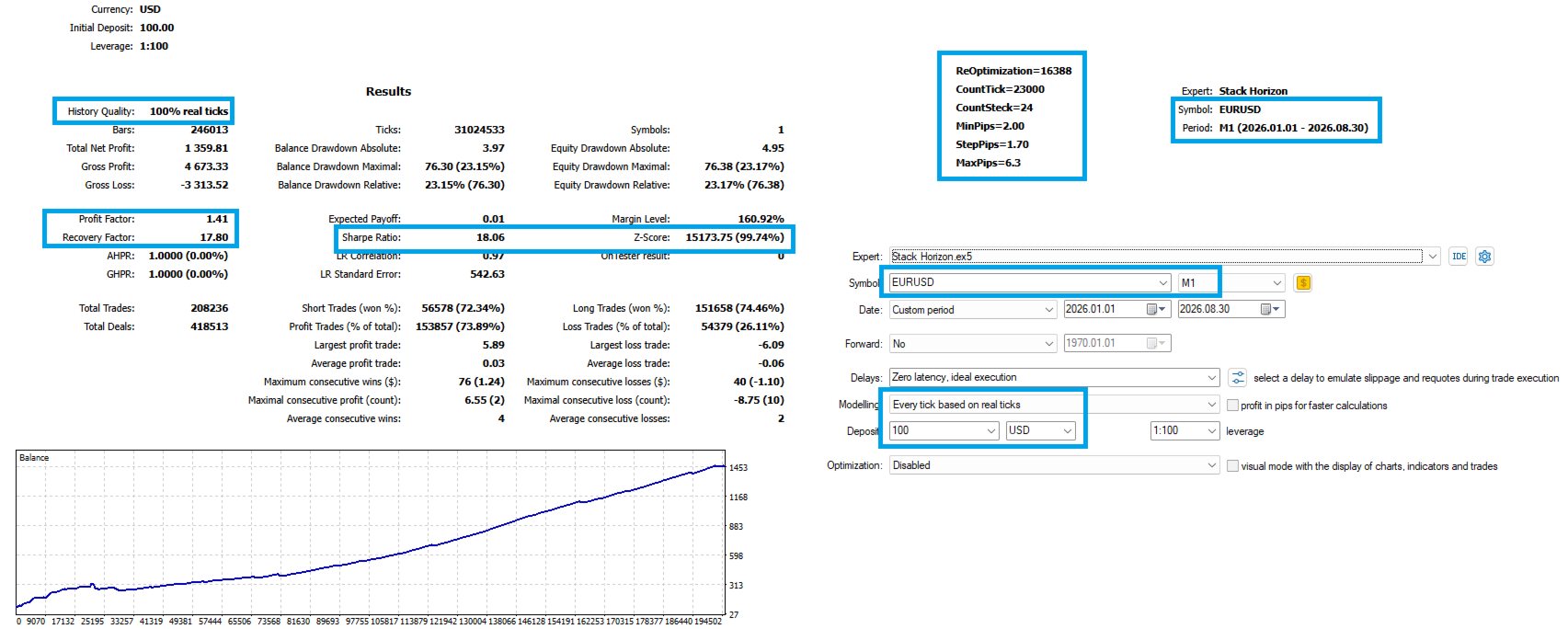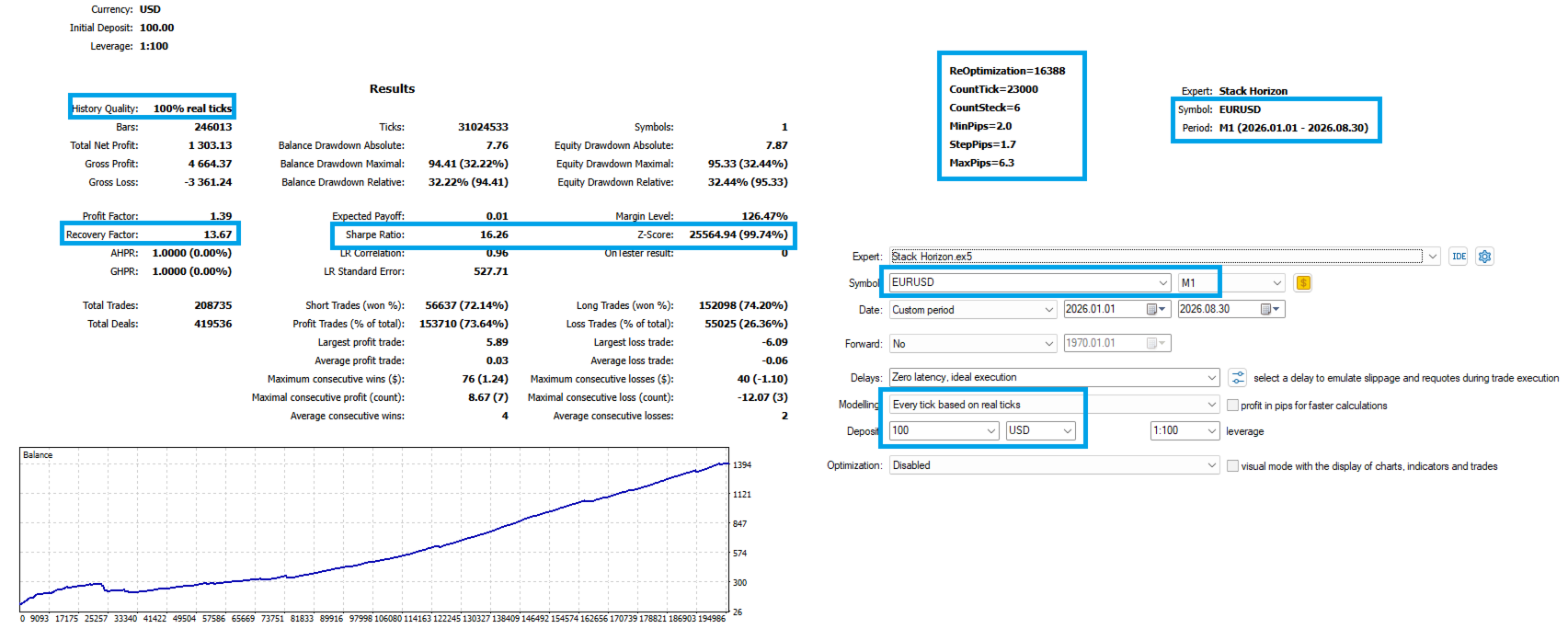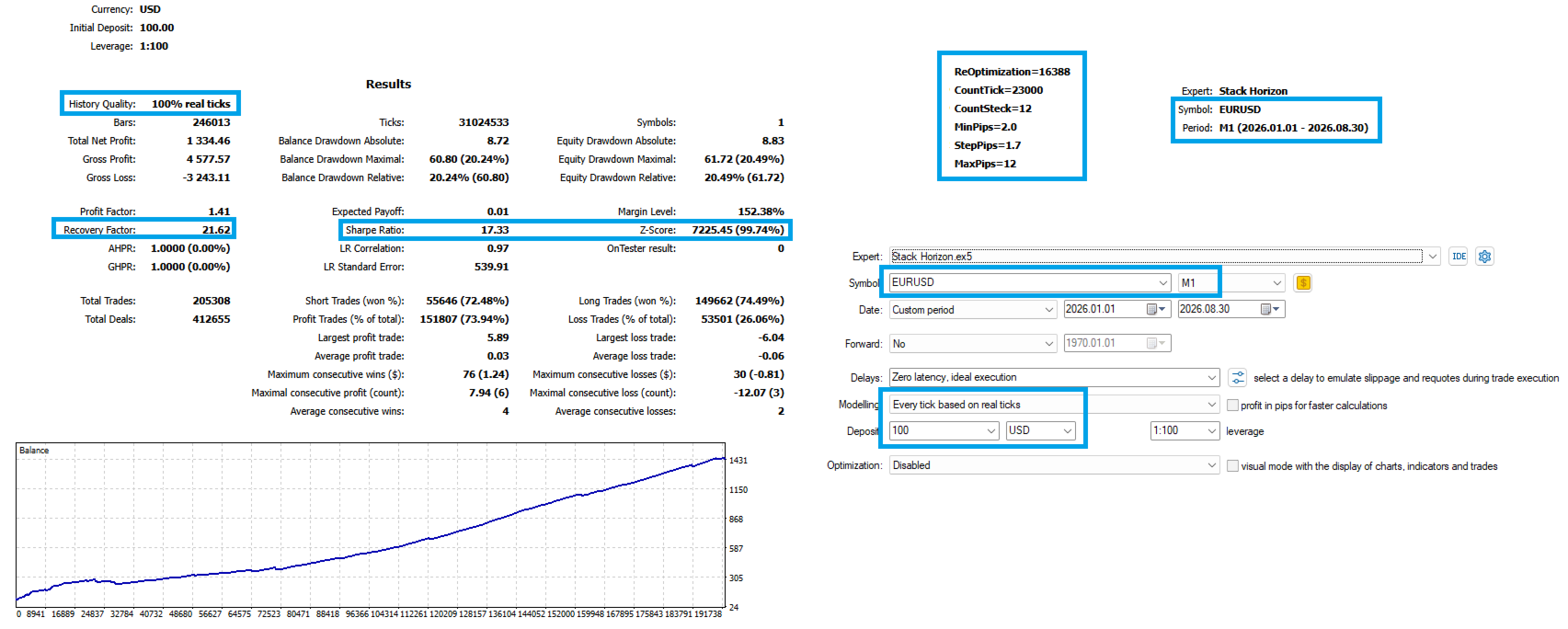
Stack Horizon
- Experts
- Version: 1.0
- Activations: 5

Next-Generation Tick Scalper for Traders Who Don't Want to Wait for the Bar to Close
How It WorksMost Expert Advisors operate primarily in a bar-based environment. They analyze the market when a new bar appears — every minute, five minutes, one hour, and so on.
Stack Horizon works directly with incoming price ticks.
The Expert Advisor monitors the sequence of real-time price updates and analyzes the formation of short-term price movements while they are developing, rather than waiting for a candle to close.
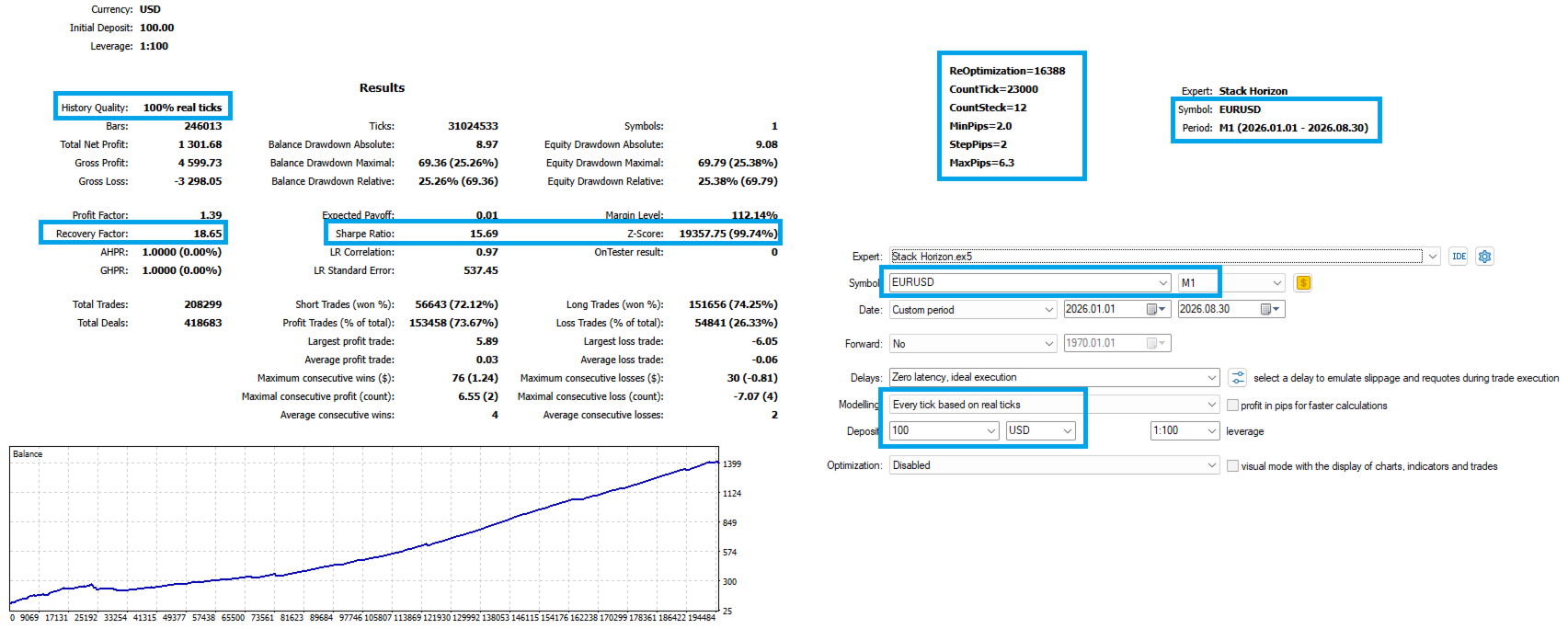
The core algorithm accumulates a sequence of tick impulses with configurable strength using:
-
CountTick
-
CountSteck
The resulting sequence is then evaluated against a configurable price-movement range defined by:
-
MinPips
-
StepPips
-
MaxPips
When a sequence of ticks develops into a sufficiently consistent micro-movement and passes the configured filters, Stack Horizon can act on that movement.
This is not an attempt to predict the market from a single price change. Stack Horizon analyzes the actual flow of quotes and the sequence of micro-movements developing in real time.
The result is a specialized tick-scalping Expert Advisor focused on reaction speed, execution conditions, and short-term market dynamics.
Why Trading Conditions MatterTick-based scalping places particularly high demands on the trading environment.
With this type of strategy, results depend not only on the algorithm itself, but also on the combination of:
Algorithm + Spread + Commission + Execution Speed + Quote Quality
Spread & Amplitude Protection⚠️ Stack Horizon is designed with ECN/Raw-style accounts with tight spreads and competitive commissions in mind.
On accounts with wide spreads or high trading costs, even a well-timed short-term entry may not provide enough price movement to cover execution expenses.
Before using the Expert Advisor on a live account, carefully evaluate your broker's conditions, including spread, commission, execution speed, minimum Stop Loss / Take Profit distances, and the overall quality of execution.
Stack Horizon includes a dedicated protection layer for unfavorable trading conditions.
The Spread/Amplitude Guard monitors abnormal spread expansion and excessive price-range conditions and can suspend new entries when the current market environment becomes unsuitable for short-term trading.
An additional parameter:
CriticalCostGuardOn
provides another layer of protection against situations where the estimated execution cost becomes critical for the strategy's trading logic.
Key FeaturesFull Directional Control
Long and Short exposure can be enabled independently through:
-
LongExposureEnabled
-
ShortExposureEnabled
This allows the strategy to:
-
operate Long only;
-
operate Short only;
-
trade both directions.
Institutional Execution Mode
InstitutionalExecutionMode is designed to provide more detailed handling of real-world execution conditions.
Depending on the broker configuration, the Expert Advisor can account for factors such as:
-
requotes;
-
trading commissions;
-
minimum stop distances;
-
actual order-execution requirements.
The objective is to make the strategy aware of the trading environment rather than relying exclusively on idealized tester conditions.
Capital ManagementStack Horizon supports automatic position sizing based on account balance.
The following parameters control percentage-based capital management:
-
AutoCapitalRegulationOn
-
MoneyManagementPercent
A fixed lot size can also be used when preferred.
This gives traders control over whether position sizing should remain fixed or adapt to account capital.
Profit & Loss ControlEach position can be managed using predefined profit and loss boundaries:
-
ProfitCeilingPoints — target profit distance in points;
-
LossFloorPoints — maximum loss distance in points.
These parameters define the intended operating range of a trade and provide an explicit framework for controlling individual-position risk.
Trading Session & News FilterTrading activity can be restricted to a defined trading session.
The additional parameter:
NewsBufferMinutes
provides a configurable buffer around important news events, allowing the strategy to reduce or suspend trading during periods of potentially elevated volatility.
Multi-Level Signal ConfirmationStack Horizon uses multiple layers of confirmation before opening a position.
Depending on the configuration, the decision process can consider:
-
the number of confirmation steps;
-
MinConfirmationSteps ;
-
MaxConfirmationSteps ;
-
price-cell size;
-
tick-impulse strength;
-
the permitted price-movement range.
This means the Expert Advisor does not necessarily react to every individual tick. A trade is considered only when the configured combination of conditions is satisfied.
Position Chain ManagementFor configurations that use progressive position building, Stack Horizon provides a structured position-chain mechanism.
The main parameters are:
-
PositionChainDepth — maximum number of positions in the chain;
-
PositionChainGrid — spacing between successive positions.
This allows the structure of additional entries to be defined in advance rather than relying on arbitrary position increases.
Important: adding positions increases total market exposure and must be incorporated into the overall risk-management plan.
Who Is Stack Horizon For?Stack Horizon is designed for traders who:
-
understand the characteristics and risks of tick-based scalping;
-
are prepared to pay close attention to broker and execution conditions;
-
are looking for a tool for active intraday trading;
-
prefer liquid instruments with competitive spreads;
-
want an Expert Advisor that reacts to the flow of price updates rather than waiting exclusively for candle closes;
-
value explicit and configurable strategy parameters;
-
prefer transparent risk controls over a completely opaque "black box".
1. Choose Appropriate Trading Conditions
For tick-based scalping, the following factors are especially important:
-
tight spreads;
-
competitive commissions;
-
stable execution;
-
reliable price feeds;
-
sufficient market liquidity.
2. Test Using Real Ticks
For backtesting, it is recommended to use:
Every tick based on real ticks
This is particularly important for a strategy that analyzes tick sequences and can be sensitive to execution characteristics.
3. Start Conservatively
Before moving to live trading:
-
test the Expert Advisor using historical data;
-
validate its behavior on a demo account;
-
evaluate actual trading costs;
-
start with a small position size;
-
only then adapt the parameters to the selected instrument and broker.
4. Monitor Total Exposure
When using position chains, consider not only the initial trade size but also the potential number of additional positions.
PositionChainDepth and PositionChainGrid should always be evaluated together with your overall capital-management and risk framework.
Important NoticeStack Horizon is a specialized tick-scalping Expert Advisor. It is not a universal trading system and does not guarantee profitable results.
Tick-based trading can be particularly sensitive to spread, commission, slippage, execution speed, quote quality, and market liquidity.
Backtesting results do not guarantee comparable performance in live trading.
Before using the Expert Advisor on a live account, thoroughly test it on the selected instrument, evaluate real trading costs, and make sure that the position-sizing and risk parameters are consistent with your acceptable level of risk.
Stack HorizonReal-time tick analysis.
Execution-aware design.
Structured risk control.
No promises of miracles — just a specialized tool for traders who want to work with the market at the tick level instead of waiting for the next bar to close.