EA SMC Master v18
- Experts
- Version: 1.18
- Activations: 10

Smart Money Concepts Automated Trading System
EA SMC Master v18 is an automated trading Expert Advisor for MetaTrader 5, designed around Smart Money Concepts (SMC) and Order Block-based market analysis.
The EA automatically analyzes price structure, identifies potential Order Block zones, evaluates confirmed setups, and executes trades according to the selected entry, take-profit, stop-loss, and risk-management settings.
The main concept is simple:
1 Order Block = 1 Opportunity
When a new Order Block is confirmed, the EA evaluates it once. After the zone has been used or skipped, the same Order Block will not continuously generate repeated entries.
This approach is designed to keep the trading logic structured and prevent the EA from repeatedly reacting to the same zone.
🔥 AUTOMATED ORDER BLOCK TRADING
EA SMC Master v18 focuses on Order Block-based execution.
Instead of relying on traditional indicator signals alone, the EA analyzes price structure and looks for areas where a potential institutional reaction may occur.
When a valid setup is detected, the EA can execute automatically according to the selected trading mode.
Available entry modes include:
Market Only — execute the trade when the setup is confirmed.
Pending Only — place a pending order and wait for price to return to the selected zone.
Hybrid — combine market and pending execution from the same setup.
This gives traders flexibility to choose between faster execution and more selective zone-based entries.
🎯 TAKE PROFIT & STOP LOSSEA SMC Master v18 provides several ways to manage Take Profit.
TP can be calculated using:
Fixed Risk : Reward
or
Manual Point Target
or
Opposite Order Block Zone
When the opposite Order Block provides a suitable target, the EA can use that zone as the Take Profit area, with R:R fallback when necessary.
Stop Loss is based on the structural Order Block level with an additional configurable point buffer.
The SL design is intentionally structural rather than ATR-based, allowing traders to control the buffer according to the symbol and timeframe being traded.
🧩 LADDER ENTRYFor traders who prefer to distribute an entry across several price levels, EA SMC Master v18 includes an optional Ladder feature.
Pending and Market Ladder can divide one setup into multiple entry levels.
This can be useful when traders want to spread execution throughout an Order Block instead of entering the entire position at one price.
The feature is optional and can remain disabled by using a ladder count of 1.
🛡️ RISK MANAGEMENTRisk management is an important part of the EA.
EA SMC Master v18 provides:
• Automatic risk-based lot calculation
• Manual lot option
• Maximum Daily Loss protection
• Maximum Drawdown protection
• Automatic Break Even
• Break Even offset
• Magic Number separation for multiple EA instances
The Daily Loss Guard can stop the EA from taking new signals after the configured daily loss limit has been reached.
The Drawdown Guard can also stop new entries after the configured maximum drawdown level is reached.
These features are designed to help traders maintain discipline and control exposure during changing market conditions.
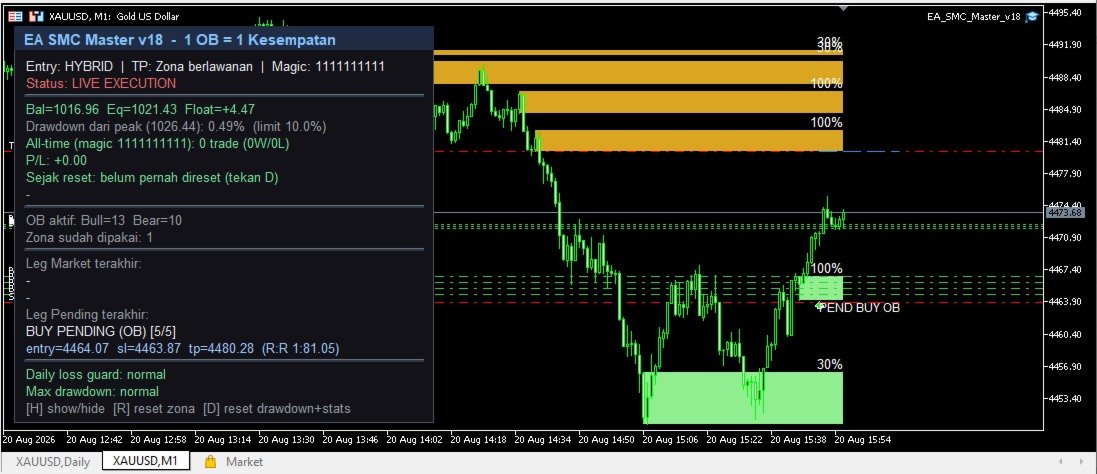
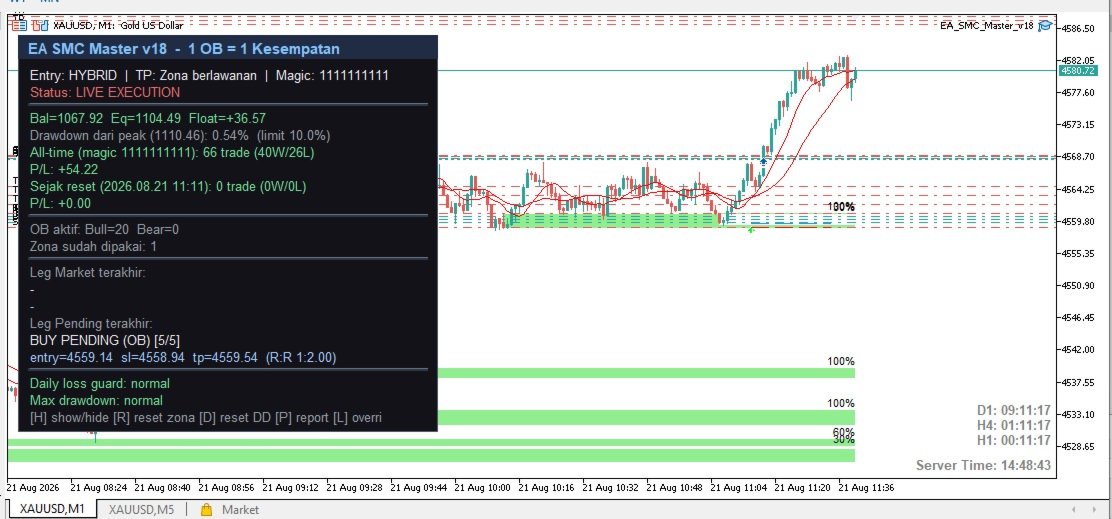
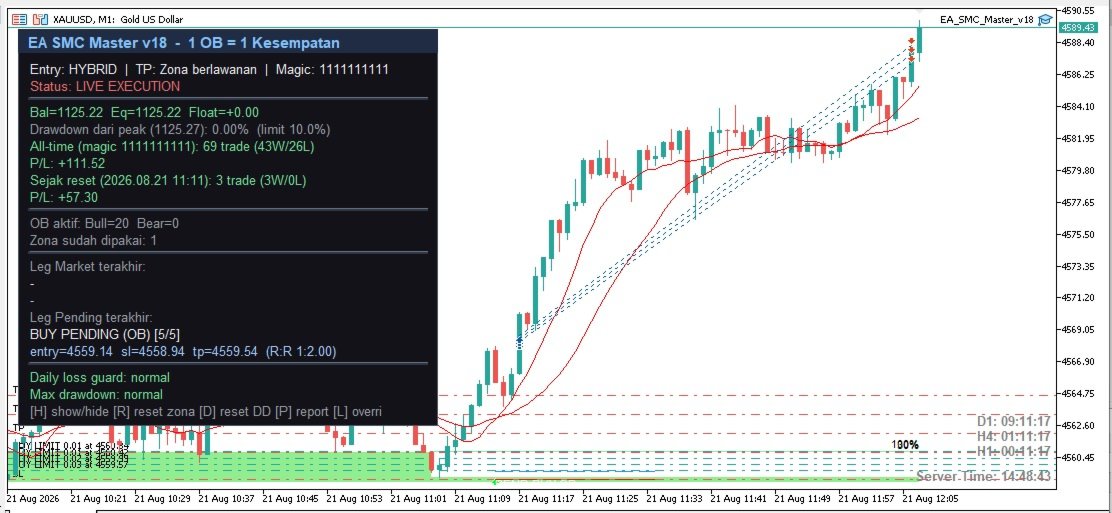
📊 LIVE DASHBOARDEA SMC Master v18 includes an on-chart dashboard for monitoring the EA directly from the MetaTrader 5 chart.
The dashboard provides information about the current trading engine, controls, and statistics.
Several control buttons are also available, including:
[H] — Hide / Show Dashboard
[R] — Reset used-zone records
[D] — Reset drawdown tracking
[P] — Generate trading report
[L] — Daily Loss Guard override
The All-Time statistics are calculated from broker history using the EA's Magic Number, allowing the statistics to remain available even after restarting the EA or reopening the chart.
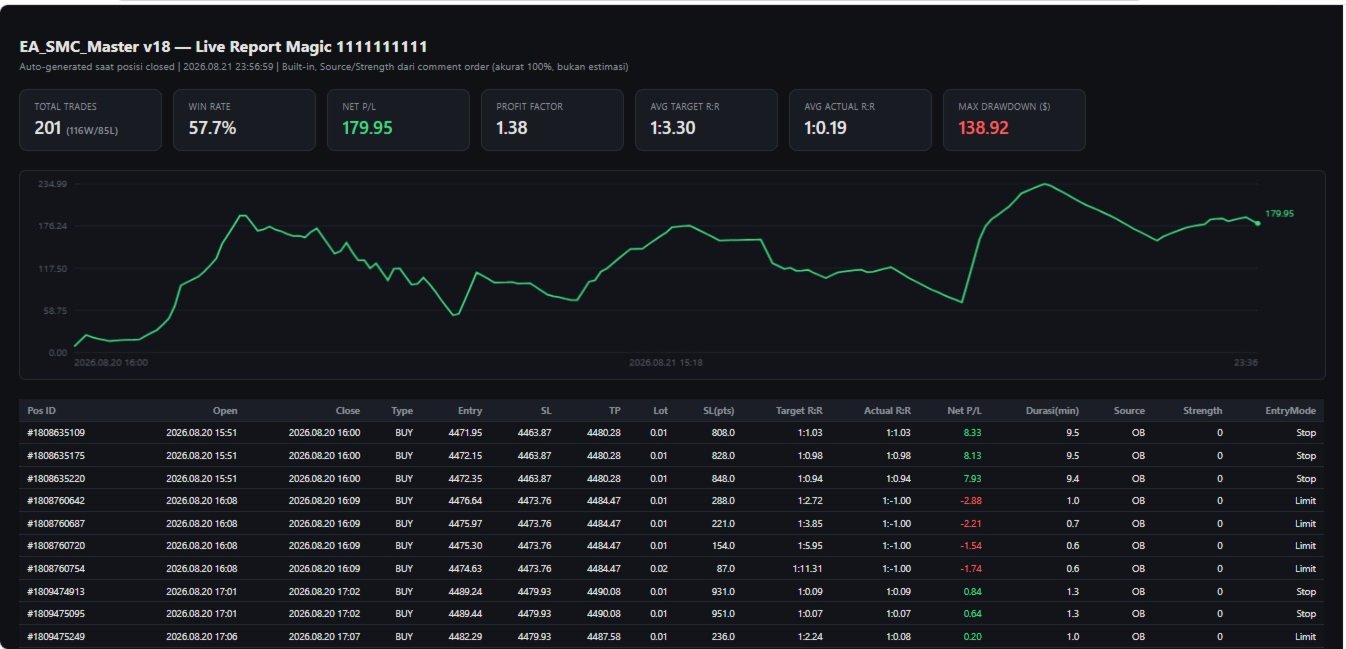
📑 REAL TRADING REPORT — CSV + HTMLOne of the important features of EA SMC Master v18 is its automatic trading report.
When trades are closed, the EA can automatically generate:
CSV Trading Report
and
HTML Live Trading Report
The report contains detailed information for each EA trade, including:
• Entry price
• Stop Loss
• Take Profit
• Lot size
• Trading direction
• Entry mode
• Order Block source
• Strength
• Target R:R
• Actual R:R
• Net Profit/Loss
• Trade duration
• Other trade statistics
The report data is taken from the actual broker order information and EA trade comments.
This allows traders to separate EA-generated trading activity from manual trading activity using the EA's Magic Number.
The HTML report is especially useful for monitoring live performance and documenting the actual trading history of the EA.
No simulated trade results are presented as live trading results.
👁️ RECOMMENDED COMPANION: ORDERBLOCK VISUAL
EA SMC Master v18 + OrderBlock Visual
For traders who want to see the Order Block zones visually, we also provide OrderBlock Visual, a separate MetaTrader 5 indicator.
OrderBlock Visual displays potential Bullish and Bearish Order Block zones directly on the chart, making it easier to visually understand where the EA's Order Block-based strategy is looking for potential trading opportunities.
Important:
OrderBlock Visual and EA SMC Master v18 are separate products.
The EA does not require OrderBlock Visual to operate.
EA SMC Master v18 contains its own internal Order Block detection and execution logic. Therefore, the EA can continue to analyze and trade even when OrderBlock Visual is not installed.
However, using both together provides a much clearer trading experience:
OrderBlock Visual → VISUALIZE THE ZONE
EA SMC Master v18 → EXECUTE THE TRADE
This combination allows traders to see the market zones visually while the EA handles automated execution.
👤 FOR DIFFERENT TYPES OF TRADERSEA SMC Master v18 is suitable for traders who want automated Order Block-based execution while maintaining control over their risk and trading parameters.
It can also be used for observation and testing through Signal-Only mode, where the EA displays signals without sending actual orders to the broker.
For manual traders, OrderBlock Visual can be used independently as a visual analysis tool.
For automated traders, EA SMC Master v18 can be used independently.
For traders who want both visual analysis and automation, the recommended setup is:
ORDERBLOCK VISUAL + EA SMC MASTER v18
⚙️ FLEXIBLE CONFIGURATIONThe EA provides flexible configuration for different trading styles and timeframes.
Examples include:
Scalping
Hybrid entry, small risk percentage, and single-level execution.
Swing Trading
Pending entry, larger R:R targets, and optional ladder execution.
The EA engine can operate across different timeframes, but point-based parameters such as SL Buffer and Ladder Spacing should be adjusted according to the symbol and timeframe being traded.
⚠️ IMPORTANT RISK DISCLAIMEREA SMC Master v18 is a trading automation tool based on Order Block and Smart Money Concepts analysis.
Trading financial markets involves significant risk, and past performance does not guarantee future results.
No Expert Advisor can guarantee profits.
Always test the EA on a demo account and understand the settings before using real funds.
Use appropriate risk management and never risk more than you can afford to lose.
EA SMC Master v18 — Bengkel Cuan
Smart Money Concepts • Order Block • Automated Execution • Risk Management