Session Spread HUD
- Indicateurs
- Version: 1.0

Session & Spread HUD
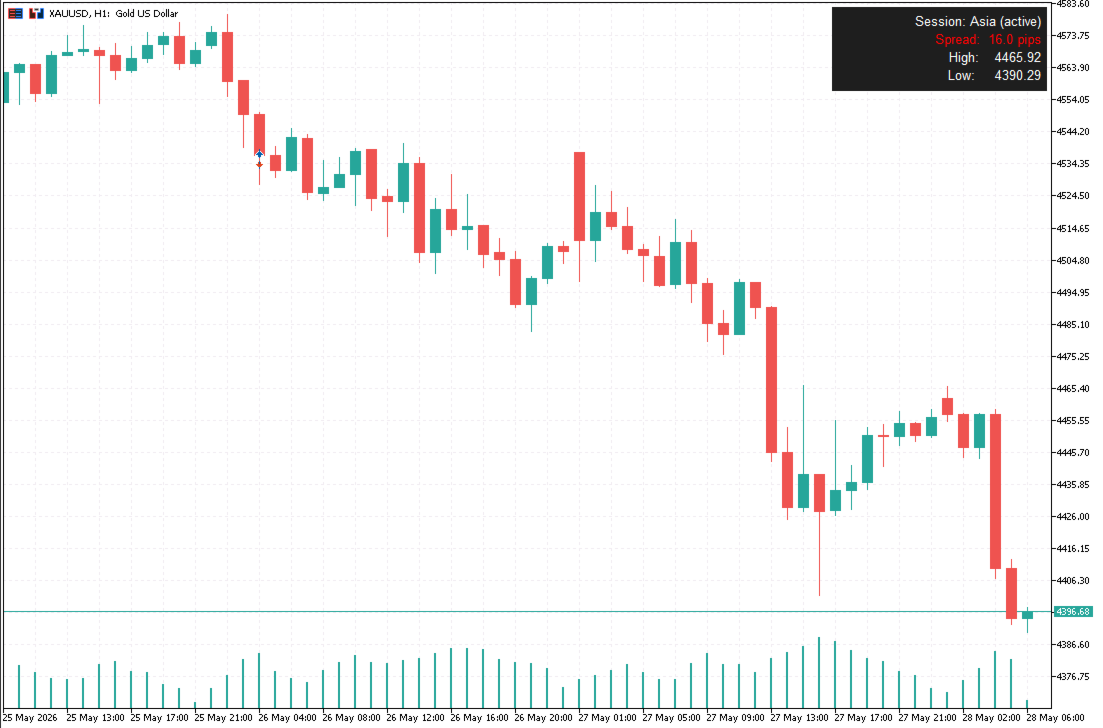
A lightweight display utility that places a real-time information panel in the top-right corner of any chart. No trading logic, no alerts — just clean, always-visible data while you trade.
What It Shows
The HUD displays four pieces of information, updated on every tick:
- Session — The currently active trading session based on your broker's server time. Automatically identifies Asia, London, New York, and the London/NY overlap. Displays "Closed" outside all sessions.
- Spread — Current spread in standard pips (works correctly with both 5-digit and 3-digit brokers). Turns green when the spread is within your threshold, red when it exceeds it.
- Daily High — Today's high for the current symbol, sourced from the D1 timeframe.
- Daily Low — Today's low for the current symbol, sourced from the D1 timeframe.
Key Features
- Works on any symbol and any timeframe
- Session times are fully configurable to match your broker's UTC offset
- Spread threshold is adjustable — useful for news events or low-liquidity periods
- All colors, font, and position are customizable
- Leaves no orphaned objects when removed from the chart
- No DLL imports, no external connections, no file I/O
Input Parameters
Session Hours (broker server time, 24-hour format)
| Parameter | Default | Description |
|---|---|---|
| Asia session start | 0 | Hour the Asia session opens |
| Asia session end | 9 | Hour the Asia session closes |
| London session start | 8 | Hour the London session opens |
| London session end | 17 | Hour the London session closes |
| NY session start | 13 | Hour the NY session opens |
| NY session end | 22 | Hour the NY session closes |
Spread
| Parameter | Default | Description |
|---|---|---|
| Spread alert threshold (pips) | 2.0 | Spread label turns green at or below this value, red above it |
Appearance
| Parameter | Default | Description |
|---|---|---|
| Text color | White | Color of all label text |
| Background color | Dark gray | Color of the panel behind the text |
| Font size | 10 | Label font size in points |
| Font name | Arial | Label font face |
| Pixels from right edge | 10 | Horizontal position of the HUD from the right side of the chart |
| Pixels from top edge | 10 | Vertical position of the HUD from the top of the chart |
Setup
- Attach the indicator to any chart
- Open the Inputs tab and adjust the session hours to match your broker's server time (check the clock in the top-left corner of MT5)
- Set your spread threshold to match the typical spread for the symbol you trade
- Adjust colors if needed to suit your chart theme
Compatibility
- MetaTrader 5 only
- Compatible with all symbols: forex pairs, indices, commodities, crypto
- Tested on EURUSD, XAUUSD, and US30