Trade Cockpit Pilot

Trade Cockpit Pilot — Signal Scanner + Position Sizing + Trade Management in a Tabbed Panel

Trade Cockpit Pilot is a Utility-category Expert Advisor with a minimal, purpose-driven design. It brings together a multi-timeframe signal confluence scanner, a precise position size calculator, one-click trade execution, and post-trade management — all organized in a clean, tabbed panel on your chart. No clutter. Only what matters.

Three tabs. One panel. Everything you need: what to trade (signal direction and strength), how much to trade (risk-based lot sizing), execute with one click, and manage your open positions (trailing stop, break-even, close any position).

What It Does

  • Signal Confluence Scanner — Scans 5 technical indicators (RSI, EMA Crossover, MACD, Stochastic, Bollinger Bands) across 7 timeframes (M1, M5, M15, M30, H1, H4, D1) and produces a composite score from -35 to +35. The full 5x7 signal matrix is displayed directly in the panel with each cell color-coded: green for bullish, red for bearish, grey for neutral.
  • Position Size Calculator — Enter your risk in USD (or use a percentage of your balance), set your stop-loss distance in points, and the panel calculates the exact lot size using the OrderCalcProfit engine. Works correctly on Forex, Metals, Stocks, Crypto, Indices, and Futures — any instrument MetaTrader 5 supports.
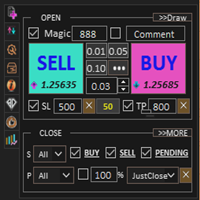
  • One-Click Execution — Click BUY or SELL to execute immediately. The panel handles stop-loss placement, take-profit (optional), minimum stop distance enforcement, filling mode detection, and automatic order splitting when your lot size exceeds the broker's maximum volume per order.
  • Trailing Stop — Enable the trailing stop and set your start distance and step size. Once a position reaches your profit target, the stop-loss follows price automatically, locking in gains as the trade moves in your favor.
  • Break-Even — Enable break-even and set a trigger distance and offset. When your position reaches the trigger profit, the stop-loss moves to your entry price plus the offset — removing risk from the trade.
  • Position Navigator — Browse through all your open positions on the current symbol using navigation arrows. See each position's direction, lot size, and profit. Close any specific position or close all positions at once.

Important: This Is a Manual Trading Utility

Trade Cockpit Pilot is a manual trading tool, not an automated trading robot. It provides you with signal information, precise position sizing, and post-trade management, but you decide when to trade by clicking the BUY or SELL button. It is categorized as a Utility because it does not open trades automatically.

Strategy Tester note: Since this is a panel-based utility, the interactive panel (buttons, spin edits, drag) works in live charts only. In the Strategy Tester's Visual Mode, the panel displays but buttons and inputs are not interactive — this is a known MetaTrader 5 platform limitation for CAppDialog-based panels. The product is designed for live chart use.

Three Tabs

  1. SIGNAL Tab — The full signal confluence view. Shows the composite score, direction (BULLISH / BEARISH / NEUTRAL), signal strength percentage, last signal details, and the complete 5x7 indicator matrix. Each indicator on each timeframe is color-coded individually so you can see exactly where agreement and disagreement lies across timeframes.
  2. TRADE Tab — Position sizing and execution. Three adjustable fields (Risk, Stop-Loss, Take-Profit) with spin controls. Below them: calculated lot size, actual dollar risk, risk as a percentage of balance, current balance, order count, and symbol information (minimum stop distance, cost per point). BUY and SELL buttons at the bottom with a status bar showing trade results.
  3. MANAGE Tab — Post-trade management. Enable or disable trailing stop and break-even with checkboxes. Configure trailing start distance, step size, break-even trigger, and offset — all adjustable from the panel. The position navigator shows your open positions with arrows to browse through them, plus CLOSE and CLOSE ALL buttons. A live status line shows whether trailing or break-even is active and how many positions are being managed.

Theme System

Choose between three visual themes: System (automatically matches your MetaTrader chart background), Light, or Dark. The entire panel — including the title bar, borders, backgrounds, text, buttons, and all controls — updates to a coordinated color palette. Every element remains readable regardless of which theme you choose.

Safety Features

  • BLOCKED status — If your stop-loss is below the broker's minimum distance, the status bar turns red and shows "BLOCKED". You cannot accidentally place a trade with an invalid stop-loss.
  • BLOCKED — Risk > Balance — If your risk amount exceeds your account balance, execution is blocked.
  • WARNING — If your risk exceeds 10% of your balance, the status bar turns orange with a clear warning. You can still execute if you choose to.
  • Over-Risk indicator — When even the minimum lot size risks more than your target, the panel highlights this so you know you are risking more than intended.
  • Order splitting — If your calculated lot size exceeds the broker's SYMBOL_VOLUME_MAX, the panel automatically splits it into multiple orders. You see the split count before executing.
  • Manual lot override — Enable the manual lot checkbox to type your own lot size directly, bypassing the calculator when you want full control.

Signal Engine Details

The confluence scanner evaluates 5 indicators on 7 timeframes (35 individual scores). Each cell scores +1 (bullish), -1 (bearish), or 0 (neutral):

  • RSI — Below oversold level = bullish (+1), above overbought = bearish (-1)
  • EMA Crossover — Fast EMA above slow = bullish, below = bearish
  • MACD — MACD line above signal line = bullish, below = bearish
  • Stochastic — Below oversold = bullish, above overbought = bearish
  • Bollinger Bands — Price below lower band = bullish, above upper band = bearish

Signals are generated on the confirmed (closed) M1 bar to avoid repainting. When the total score crosses your bullish or bearish threshold, a signal arrow can be drawn on the chart and alerts can be sent (desktop popup, push notification, and/or sound — all configurable).

Trade Management Details

  • Trailing Stop — When a position's profit (in points) reaches the trailing start distance, the stop-loss begins following price at the configured step interval. The stop only moves in your favor — it never moves backward. Both the start distance and step are adjustable from the panel.
  • Break-Even — When a position's profit reaches the trigger distance, the stop-loss moves to the entry price plus an optional offset (to cover spread/commission). Each position is moved to break-even only once. Break-even runs before trailing, so the trailing stop can take over after break-even is set.
  • Position Navigator — Shows position details in the format: "1/3 BUY 0.50 +$12.50". Use the arrow buttons to browse through all open positions. CLOSE removes the selected position. CLOSE ALL removes every position on the current symbol with your magic number.

How to Use

  1. Attach to any chart — Drag Trade Cockpit Pilot onto any symbol's chart (any timeframe). The panel appears in the top-left corner. You can drag it anywhere on the chart.
  2. Choose your theme — Select System, Light, or Dark in the Display Settings input to match your chart style.
  3. Read the signals (SIGNAL tab) — The signal matrix shows you the current market state across all 7 timeframes and 5 indicators. Green cells agree with a bullish bias, red with bearish.
  4. Size your position (TRADE tab) — Set your Risk ($) amount, Stop-Loss distance, and optional Take-Profit. The panel calculates the exact lot size and shows your actual risk.
  5. Execute — When ready, click BUY or SELL. The status bar confirms your fill with the lot size and dollar risk.
  6. Manage (MANAGE tab) — Enable trailing stop or break-even. Browse your positions with the navigator. Close individual positions or all at once.

Input Parameters

Every value is an input. Nothing is hard-coded.

Signal Thresholds

  • Bullish Threshold — composite score at or above which the panel reads BULLISH. Default 15.
  • Bearish Threshold — composite score at or below which the panel reads BEARISH. Default -15.

RSI Settings

  • RSI Period — averaging period. Default 14.
  • RSI Overbought Level — level counted as bearish pressure. Default 70.
  • RSI Oversold Level — level counted as bullish pressure. Default 30.

EMA Settings

  • Fast EMA Period — default 9.
  • Slow EMA Period — default 21. The crossover of these two produces the EMA signal.

MACD Settings

  • MACD Fast EMA — default 12.
  • MACD Slow EMA — default 26.
  • MACD Signal Period — default 9.

Stochastic Settings

  • Stochastic %K Period — default 14.
  • Stochastic %D Period — default 3.
  • Stochastic Slowing — default 3.
  • Stochastic Overbought — default 80.
  • Stochastic Oversold — default 20.

Bollinger Bands Settings

  • Bollinger Period — default 20.
  • Bollinger Deviation — default 2.0.

Risk Settings

  • Risk amount in USD — the cash you are willing to lose on the trade. Set to 0 to size by percentage instead. Default 50.
  • Risk as % of balance — used only when the USD figure is 0. Default 1.0.
  • SL distance in points — stop-loss distance used for the lot calculation and the order. Default 100.
  • TP distance in points — take-profit distance. Set to 0 for no take-profit. Default 0.

Execution Settings

  • Slippage tolerance — maximum accepted deviation in points. Default 10.
  • Magic number — identifies this panel’s trades. Default 2703030.
  • Trade comment — text attached to each order. Default TCPilot.

Trade Management

  • Enable Trailing Stop — off by default.
  • Trailing Start — profit in points before the trail begins. Default 50.
  • Trailing Step — minimum points the stop moves each step. Default 10.
  • Enable Break-Even — off by default.
  • BE Trigger — profit in points before the stop moves to entry. Default 30.
  • BE Offset — points above entry the stop is placed. Default 5.

Alert Settings

  • Desktop Alert — terminal popup. On by default.
  • Push Notification — sent to the MetaTrader mobile app. Off by default.
  • Sound Alert — on by default.

Display Settings

  • Panel Theme — System, Light or Dark. Default Dark.
  • Buy button color / Sell button color.
  • Only track own trades — when on, the MANAGE tab shows only trades opened by this panel. On by default.
  • Show signal arrows on chart — on by default.
  • Bullish Arrow Color / Bearish Arrow Color.
  • Arrow Size — 1 to 5. Default 3.
  • Arrow Offset — distance in pips from price. Default 20.
  • Show signal matrix — prints the 5x7 matrix in the chart Comment. Off by default.

Works On

Forex, Metals (Gold, Silver), Stocks, Indices, Crypto, Futures — any instrument available in your MetaTrader 5 terminal. The position size calculation adapts automatically to each instrument's specifications (tick value, tick size, volume step, digits).


Produits recommandés
Ultimate Pro Trading Panel — All-In-One Manual & Grid Trading Dashboard Pro Trading Panel   is an all-in-one on-chart control panel that gives discretionary and semi-automated traders a complete toolkit for entries, exits, risk management, and grid trading — without leaving the chart. Every function is visual, draggable, and updates in real time. If you want to test this utility feel free to download the basic preview version of this tool here:  https://www.mql5.com/en/market/product/181435 Who
Trade Assistant 38 in 1
Makarii Gubaydullin
4.91 (23)
Outil multifonctionnel : Calculateur de Lot, Ordres Grid, Ratio R/R, Gestionnaire de Trades, Zones d'Offre et de Demande, Price Action et bien plus Version Démo   |   Manuel d'Utilisation L'Assistant de Trading   ne fonctionne pas dans le testeur de stratégies : vous pouvez télécharger la   Version Démo ICI  pour tester l' utilitaire . Contactez-moi   pour toute question  / idée d'amélioration / en cas de bug détecté Si vous avez besoin d'une version MT4, elle est disponible ici Simplifiez, acc
This tool will perform Trailing stop loss and Break even management for orders. Helps you limit or reduce the time spend watching orders on the screen, especially when you need to go to sleep. Just add this EA to 1 chart, you can manage all pairs. You can filter orders by comment, magic number, symbol and order ticket number. When Breakeven it can add shift/offset pips (to cover the commission...). You can try in strategy tester before purchase. The EA will add Buy and Sell alternately, so you
Manus Pro
Itumeleng Mohlouwa Kgotso Tladi
MANUS PRO EA The Trading Revolution You've Been Waiting For Are you TIRED of watching other traders make consistent profits while your account bleeds red?   The financial markets don't wait for anyone – and neither should you. MANUS PRO isn't just another Expert Advisor... it's your   TICKET TO FINANCIAL FREEDOM . Why MANUS PRO is Different (And Why Everyone's Talking About It) FOR BEGINNERS: Your Trading Mentor That Never Sleeps Zero Learning Curve   – Install, activate, and watch it wo
Risk Trade Management Panel
Yim Chung Eric Liong Wee Kwong
Risk Panel is an on-chart position sizing, order execution and trade management utility for MetaTrader 5. It is built for discretionary traders who choose their own entries but want to calculate volume, prepare orders and manage positions directly from the chart. The panel does not provide trading signals and does not choose when to trade. How it works Enter the amount you want to risk, in money or as a percentage of your balance or equity. Position the Stop Loss and Take Profit lines on the cha
FREE
Expert TP SL v04 - Professional Trading Assistant with AI Motivation System Advanced manual trading tool with automatic risk management, overtrading protection, and intelligent psychological support for disciplined trading. PRODUCT OVERVIEW Expert TP SL v04 is a comprehensive trading assistant designed for manual traders who want to maintain emotional discipline while automating risk calculations. This isn't just another order placement tool - it's a complete trading psychology system that pr
Exp5 Duplicator
Vladislav Andruschenko
4.78 (9)
Duplicator pour MetaTrader 5 — système professionnel de duplication de positions dans un seul terminal Un Expert Advisor fiable conçu pour les traders qui veulent dupliquer automatiquement des positions déjà ouvertes dans MetaTrader 5, augmenter le volume global, appliquer leurs propres règles de lot et gérer les duplicatas avec une logique précise. C’est un outil pratique pour le trading manuel, les systèmes automatisés et la gestion plus flexible de positions déjà existantes dans un seul term
CYGNIX RISK GLADIATOR — Professional Trade Manager & Risk Guardian for MT5 Guard every position. Manage every trade. Sleep at night. Cygnix Risk Gladiator is a professional-grade position management Expert Advisor that watches every open trade on your account and automatically applies institutional-level risk controls in real time. It does not generate signals — it protects, manages, and exits trades opened by you, your strategies, or any other EA. Built for IC Markets and fully compatible w
Gold Flow Seconds Chart transforms MetaTrader 5 into a fast and convenient workspace for manual trading. The utility builds 5-second and 10-second candles from the tick data provided by your broker. M1, M5, M7, M15, M30, H1 and H4 views are also available in the same interface. MOUSE-DRIVEN CHART NAVIGATION • Drag the chart horizontally and vertically with the left mouse button. • Use the mouse wheel to change candle width. • Use Ctrl + mouse wheel to adjust the vertical scale. • Return to t
The Gold Space
Ayush V Jain
5 (7)
LIVE SIGNAL REACHED NEW HIGH Live Signal on Vantage https: // www.mql5.com/en/signals/2378090 https: // www.mql5.com/en/signals/2378091 live signal is running mode/option 1 with autolot 2 % risk. Join telegram group   https://t.me/+UaALtDiYMb4xYTk1 Overview:  The Gold Space is a fully automated, professional-grade Expert Advisor specifically engineered for the XAUUSD (Gold) market. Designed natively for MetaTrader 5, this EA capitalizes on high-probability volatility expansions using a precise,
King Trade Copier
Mohammed Maher Al-sayed Mohammed Ahmed Saleh
KingCopier – Lightning-Fast Local Trade Copier for MetaTrader (Master + Slave) KingCopier is a professional local trade copier that mirrors every trading action from one Master account to unlimited Slave accounts on the same PC or VPS — with an internal copy latency of just a few milliseconds. It was built by a real trader for daily real-money use, with one goal: whatever happens on the Master must happen on the Slave, instantly and without exceptions. Watch the demo video to see the real cop
| Fully-automated Smart Money Concept (ICT) inspired trading solution with multi-strategy capabilities | Built by a grid trader >> for grid traders.  This is MT5 version, click  here  for  Blue CARA MT4  (settings and logics are same in both versions)     Real monitoring signal  -->  Cara Gold Intro Blue CARA EA   ('CARA') - short for  C omprehensive  A lgorithmic   R esponsive   A dvisor is a next-gen  multi-currency    multi-timeframe  EA base on the widely known (and perhaps the most popul
The Stop Loss Manger - SL Mange With the Stop Loss Manager you can finally sleep peacefully while it effectively manages your risk in stock market trading. Simply set your individual stop loss limits and let the manager trade for you. Never worry about losses again - the Stop Loss Manager takes care of it for you! Get the ultimate support for your trading now and maximize your profits with ease. Join the community of successful traders who swear by Stop Loss Manager today. Function overview: 1.
TS Hunter (Rev4) is a premium, 100% automated quantitative trading algorithm engineered exclusively for the US500 (S&P 500 Index) on the 5-Minute (M5) timeframe. Unlike standard commercial Expert Advisors that cause dangerous overtrading or fall into chaotic tick loops, TS Hunter utilizes a surgical trend-rebuild logic and strict structural filters to execute precise mathematical entries at the most opportune moments. PROVEN LIVE SIMULATION METRICS (5-YEAR STRESS TEST - REAL TICKS): • Profit Fac
Pattern Recognition EA
Claudiu-georgian Zavera
Pattern Recognition EA - From Learn to Earn. The market repeats itself. This EA finds every past repeat of the current candle sequence - and lets history vote the direction. ONE SHAPE. EVERY REPEAT IN HISTORY VOTES. The last N candles on your signal timeframe form a shape. The EA scans the history you choose - a fixed number of bars or everything your broker provides - for the SAME shape, and checks what happened next, every single time. Only when enough repeats exist AND a clear majority of t
Bohemia Gold MT5
Vladislav Taska
4.75 (4)
Bohemia Gold MT5 is  Trend & Volatility EA trading system designed specifically for Gold (XAUUSD) . It combines higher-timeframe trend filtering , trend detection , volatility-based SL management , and advanced trade management to adapt market conditions. It uses style logic focused on trend strength, volatility, and capital protection. NOTE:   Based on backtests, I found better trading results with the following setup: D1/H4/H2 (Trend/ADX/ATR & trade). The SET file can be downloaded here … bohe
FREE
Overview Mirror Signals Service EA (Text only)   is a powerful monitoring Expert Advisor that automatically sends   real-time Telegram notifications   for all important trade events on your MetaTrader 5 account. It is engineered specifically for   signal providers ,   trade-copier operators ,   auditors ,   educators , and   professional trading services   that require immediate, detailed, and reliable reporting. Everything from   entries, exits, SL/TP changes, comment changes, trailing sto
Trading Utility for Forex Currency Pairs Only not for Gold  Functions Auto Lot Calculation based on Risk Auto stoploss  Auto TakeProfit Breakeven Auto Close Half % Close in percentage with respect to the PIPs Pending Orders BuyLimit Sell Limit with distances BuyStop Sell Stop    with distances Trading Informations Risk in percentage For Multiple trades Combine Takeprofit and Combine Stoplosses
Chart Pro Classic Dark v1.00 Chart Pro Classic Dark is a professional MT5 chart styling and customization tool designed to give your charts a clean, modern, and professional dark appearance. Key Features Dark Black Background — Applies a clean black background to the chart. ️ Candlestick Chart — Automatically configures the chart to use candlesticks. Bullish Candles — Green/Lime bullish candles. Bearish Candles — White bearish candles. Grid Removal — Hides the chart grid for a clean
FREE
MANAGING YOUR FOREX TRADING LIKE A PROFESSIONAL WITH   POSITION SIZE   CALCULATOR Position Size Calculator – an MT5 indicator, is a user-friendly tool that allows you to determine your required forex trading size for each trade based on how much you want to risk and available capital in your forex trading account. Load the calculator onto your chart and simply draglines to show your stop loss and take profit level. The calculator will automatically calculate the trade size instantly. This indica
Wulf BTC Bot
Riaan Adriaan Swanepoel
Wulf BTC Bot is a high-precision automated algorithmic trading system engineered for Bitcoin (BTC) on the H1 timeframe. It leverages a robust entry logic combining cyclical momentum and trend exhaustion via the Schaff Trend Cycle (STC) , dynamic breakout boundaries ( Lowest/Highest Price channels), and volatility-adaptive exits powered by ATR . The Expert Advisor is 100% Standalone , packing all custom indicators and math engines directly inside the .ex5 binary, requiring zero external dependenc
Stormer RSI 2
Ricardo Rodrigues Lucca
This strategy was learned from Stormer to be used on B3. Basically, 15 minutes before closing the market, it will check RSI and decided if it will open an position. This strategy do not define a stop loss. If the take profit reach the entry price it will close at market the position. The same happens if the maximal number of days is reached. It is created to brazilian people, so all configuration are in portuguese. Sorry Activations allowed have been set to 50.
Easy Trading Panel: Core Function Summary 1. Visual Trading This is the core selling point of the tool. It abandons the traditional way of placing orders by inputting prices and adopts an intuitive chart line drag-and-drop mode instead: • Drag Entry Line: Directly drag the line on the chart to set the pending order position. • One-click SL/TP Toggle: Quickly enable/disable stop loss and take profit lines via panel buttons. • Synchronous Calculation: When the lines are dragged, the panel will cal
Gold Beast Pro
Marc Henning Hruschka
Gold Beast Pro MT5 Gold Beast Pro MT5 is a professional automated trading system designed specifically for XAUUSD (Gold) on MetaTrader 5. The EA is built to operate fully automatically while maintaining stable trade execution and adaptive market behavior under different market conditions. Gold Beast Pro focuses on precision execution, intelligent market participation, and controlled risk management to provide a smooth and efficient automated trading experience. The system is optimized for trader
CoPilot dashboard MT5
Frederic Jacques Collomb
CoPilot — Tableau de bord de trading journalier Connaissez vos chiffres. Tradez avec clarté. MT4 version Qu'est-ce que CoPilot ? CoPilot est un assistant de trading de niveau professionnel qui affiche en temps réel toutes vos statistiques de performance journalière directement sur le graphique — avec une courbe d'équité live qui se met à jour trade par trade. Conçu pour les traders actifs qui ont besoin d'une visibilité instantanée sur leur session sans quitter le graphique, CoPilot agrège chaqu
Le DYJ MOBILE GAMING TRADING WINNER peut utiliser vos différents terminaux (TÉLÉPHONE MOBILE, WEB, TRADINGVIEW, MT5) pour le trading manuel, puis traité automatiquement par EA. Le trading mobile peut utiliser les différents modes de grille d'EA, le mode scalp, le mode d'arbitrage de couverture et le mode d'ordre indépendant pour ouvrir des positions manuellement, EA peut définir automatiquement le stop loss pour l'ouverture mobile. Et utilisez votre téléphone portable pour ouvrir une grille,
Risk Ruler
AL MOOSAWI ABDULLAH JAFFER BAQER
Risk Ruler Plan every trade with precision before you enter the market. Risk Ruler is a professional on-chart position sizing and risk management tool for MetaTrader that helps traders calculate the optimal trade size based on their predefined risk. By simply dragging the Entry, Stop Loss, and Take Profit lines directly on the chart, all essential trading calculations update instantly, allowing you to make informed decisions before placing a trade. Designed for both manual and professional trade
MNtradepro Trading Panel – Scalping Manager DESCRIPTION COURTE Gestionnaire de trading manuel pour MetaTrader 5 avec exécution rapide des ordres, contrôle TP/SL sur le graphique, Break Even, protection contre le spread et outils de gestion des risques. DESCRIPTION MNtradepro Trading Panel est un gestionnaire de trading manuel pour MetaTrader 5, conçu pour une exécution rapide et une gestion active des trades depuis un seul graphique. Le panneau permet d’ouvrir, gérer et protéger les trades à l
LotCalculatorPro
Reynaldo Jr Audencial Pascual
LotCalculatorPro + Smart Trading Panel LotCalculatorPro est un assistant de trading tout-en-un puissant , conçu pour simplifier la gestion du risque, le calcul de la taille des lots et l’exécution des trades directement depuis votre graphique. Cet outil aide les traders à contrôler leur risque, calculer des tailles de lots précises et gérer automatiquement leurs trades grâce à des fonctionnalités intelligentes comme le Break-Even, la fermeture partielle et la protection des profits/pertes journa
Bastion is a monitor-and-close-only risk manager for prop-firm traders. It watches your account against your firm's daily-loss and maximum-drawdown limits in real time and force-closes your open positions BEFORE you cross a line. It never opens a trade of its own, so it stays fully within the tools allowed by FTMO, FundedNext, The5ers, FTUK and FXIFY. Why traders fail challenges A large share of failed evaluations end on a single daily-loss breach: a moment of inattention, a news spike, one tra
Les acheteurs de ce produit ont également acheté
Trade Assistant MT5
Evgeniy Kravchenko
4.43 (215)
It helps to calculate the risk per trade, the easy installation of a new order, order management with partial closing functions, trailing stop of 7 types and other useful functions. Additional materials and instructions Installation instructions - Application instructions - Trial version of the application for a demo account Line function -   shows on the chart the Opening line, Stop Loss, Take Profit. With this function it is easy to set a new order and see its additional characteristics bef
Bienvenue sur Trade Manager EA, l’outil ultime de gestion des risques conçu pour rendre le trading plus intuitif, précis et efficace. Ce n’est pas seulement un outil d’exécution d’ordres ; c’est une solution complète pour la planification des trades, la gestion des positions et le contrôle des risques. Que vous soyez débutant, trader expérimenté ou scalpeur ayant besoin d’une exécution rapide, Trade Manager EA s’adapte à vos besoins, offrant une flexibilité sur tous les marchés, des devises et i
Farmed Hedge Yield Farming | All Markets (Manual - Hybrid - Semi/Automated EA) VERIFIED TRADING RESULTS - Farmed Hedge Yield Axi Copy:  https://www.mql5.com/en/signals/2356376 - Farmed Hedge Yield Exn Copy:   https://www.mql5.com/en/signals/2356404 - Farmed Hedge Yield V Copy:  https://www.mql5.com/en/signals/2357156 IMPORTANT NOTICE: FarmedHedge is a MANUAL-FOCUSED TRADING UTILITY ,not a fully automated EA. Results shown on this Signal include manual trades and overall strategic management.
Version Bêta Le Telegram to MT5 Signal Trader est presque prêt pour la sortie officielle en version alpha. Certaines fonctionnalités sont encore en développement et vous pourriez rencontrer de petits bugs. Si vous rencontrez des problèmes, merci de les signaler, vos retours aident à améliorer le logiciel pour tout le monde. Telegram to MT5 Signal Trader est un outil puissant qui copie automatiquement les signaux de trading depuis des chaînes ou groupes Telegram vers votre compte MetaTrader 5 .
Telegram to MT5 Multi-Channel Copier   copie automatiquement les signaux de trading de vos canaux Telegram directement vers MetaTrader 5. Pas de bots, pas d'extensions de navigateur, pas de copie manuelle. Un signal arrive sur Telegram et l'EA ouvre le trade dans votre terminal en quelques secondes. Et avant de copier un canal, le backtester intégré vous montre ce que ce canal aurait fait sur votre compte. Le produit comprend deux composants : une application Windows qui écoute vos canaux Telegr
TradePanel MT5
Alfiya Fazylova
4.88 (167)
Trade Panel est un assistant commercial multifonction. L'application contient plus de 50 fonctions de trading pour le trading manuel et permet d'automatiser la plupart des tâches commerciales. Instructions d'utilisation + tutoriel vidéo : https://www.mql5.com/fr/blogs/post/772371 Version d'essai de l'application pour un compte démo : https://www.mql5.com/fr/blogs/post/762644 Comment installer l'application : https://www.mql5.com/fr/blogs/post/762645 Comment tester l'application en mode visuel :
================================================================================ POC BREAKOUT - V20.72. Full Professional Grade Toolkit ================================================================================ POC Breakout is a full MetaTrader 5 trading dashboard for discretionary traders who want breakout signals, Point of Control (POC) context, volume profiles, order flow, market structure, news, alerts, and advanced trade planning in one professional workspace. Attached directly to you
Premium Trade Manager - Le panneau de trading avec un coach intégré Premium Trade Manager intègre un coach de trading directement dans votre graphique, avec un moteur d'exécution complet en dessous. Configurez le trade comme vous le faites toujours, puis laissez Max, votre coach de trading IA, analyser ce setup exact par rapport à votre compte en direct et vous donner un verdict clair avant de vous engager : le stop est-il discipliné, le risque est-il raisonnable, une publication à fort impact e
Welcome to ENTRY IN THE ZONE WITH SMC MULTI TIMEFRAME Entry In The Zone and SMC Multi Timeframe is a real-time market analysis tool based on Smart Money Concepts (SMC), designed to analyze market structure, price direction, and key trading zones. It supports both Single-Timeframe Analysis and Multi-Timeframe Analysis, providing a clearer view of the overall market structure across multiple timeframes, with real-time BUY / SELL signals that do not repaint. It is designed to help filter trading op
EA Overfitter
Stephen J Martret
5 (1)
That backtest looks great. But will it still be making money tomorrow, next week, next month? EA Overfitter re-runs your EA on 100 price histories it has never seen. One score tells you if the edge is real. A backtest tells you what an EA did on one price history — the one that happened to occur. What you cannot tell from it is how much of that result was the strategy and how much was the particular path. EA Overfitter answers that. It builds up to 100 synthetic price histories your EA has n
MT5 to Telegram Signal Provider est un utilitaire facile à utiliser et entièrement personnalisable qui permet l'envoi de signaux spécifiés vers un chat, un canal ou un groupe Telegram, transformant ainsi votre compte en fournisseur de signaux. Contrairement à la plupart des produits concurrents, il n'utilise pas d'importations DLL. [ Démonstration ] [ Manuel ] [ Version MT4 ] [ Version Discord ] [ Canal Telegram ]  New: [ Telegram To MT5 ] Configuration Un guide utilisateur étape par étape est
The product will copy all telegram signal to MT5 ( which you are member) , also it can work as remote copier.  Easy to set up, copy order instant, can work with almost signal formats, image signal,  s upport to translate other language to English Work with all type of channel or group, even channel have "Restrict Saving Content", work with  multi channel, multi MT5 Work as remote copier: with signal have ticket number, it will copy exactly via ticket number. Support to backtest signal. How to s
Grid Manual MT5
Alfiya Fazylova
4.73 (22)
Grid Manual est un panneau de trading permettant de travailler avec une grille d'ordres. L'utilitaire est universel, possède des paramètres flexibles et une interface intuitive. Il fonctionne avec une grille d'ordres non seulement dans le sens des pertes, mais aussi dans le sens de l'augmentation des profits. Le commerçant n'a pas besoin de créer et de maintenir une grille d'ordres, l'utilitaire le fera. Il suffit d'ouvrir une ordre et "Grid Manual" créera automatiquement une grille de ordres po
Anchor Trade Manager
Kalinskie Gilliam
5 (9)
Your EAs cannot see each other, but Anchor can. Anchor gives you one place to coordinate your EAs, manage risk, and decide when trading is allowed. It works alongside the trading bots you already use without any changes to them. The Problem One EA opens a trade. Then another starts trading. The next thing you know, you wake up to multiple grids built across your account. Each EA may be doing exactly what it was designed to do, but together they can place far more risk on your account than you in
FUTURES ORDERFLOW FOOTPRINT CHART Professional OrderFlow EA for MetaTrader 5 Version 1.01| Professional tool for real traders | Institutional-Grade Visualization STRATEGY TESTER USERS - PLEASE SELECT EVERY REAL TICK WHEN TESTING AND YOU HAVE DOWNLOADED HISTORICAL DATA. IF YOU SEE A WAITING SCREEN AND IT IS NOT DOWNLOADING, IT MEANS YOU HAVE LOW HISTORICAL DATA. TRY 1 MIN AND 5 MIN FIRST ON 1 DAY DATA. ONE DAY DATA SHOULD BE THE NEWEST AND MOST CURRENT DATE. PLEASE WAIT UNTIL THE MARKET HAS ROL
Footprint Chart Pro — Professional OrderFlow EA for MetaTrader 5 Version 6.34 | Professional tool for real traders | Institutional-Grade Visualization DEMO USERS - PLEASE SELECT EVERY TICK / REAL TICK WHEN TESTING AND YOU HAVE DOWNLOADED HISTORICAL DATA. IF YOU SEE A WAITING SCREEN AND IT IS NOT DOWNLOADING, IT MEANS YOU HAVE LOW HISTORICAL DATA. TRY 1 MIN AND 5 MIN FIRST ON 1 DAY DATA. ONE DAY DATA SHOULD BE THE NEWEST AND MOST CURRENT DATE. PLEASE WAIT UNTIL THE MARKET HAS ROLLED OVER PERIOD.
Timeless Charts
Samuel Manoel De Souza
5 (8)
Timeless Charts est un utilitaire de trading tout-en-un destiné aux traders professionnels. Il combine des types de graphiques personnalisés tels que les graphiques en secondes et Renko avec une analyse avancée du flux d’ordre s utilisant Footprints , Clusters , Profils de Volume , études VWAP et outils d’analyse ancrés pour une compréhension plus approfondie du marché. Le trading et la gestion des positions sont effectués directement depuis le graphique via un panneau intégré de gestion des ord
Trade Indicator Assistant   is a powerful MT5 utility designed to turn indicators into automated trading systems. Its main feature is the ability to automatically detect an indicator’s   BUY and SELL signal buffers , without requiring you to know the buffer numbers, search through indicator settings, or modify the indicator source code. Bonus Indicator:   After purchasing Trade Indicator Assistant, contact me to receive   Trade Signal Pro   completely free as a bonus indicator. [Download Demo V
Power Candles Strategy Scanner - Outil de recherche de configurations multi-symboles à optimisation automatique Le Power Candles Strategy Scanner utilise le même moteur d'auto-optimisation que celui qui alimente l'indicateur Power Candles, pour chaque symbole de votre Market Watch, en parallèle. Un panneau vous indique quels symboles sont statistiquement négociables à l'instant, quelle stratégie est la plus performante pour chacun, la paire Stop Loss / Take Profit optimale, et vous alerte dès qu
Trade Manager DashPlus
Henry Lyubomir Wallace
4.85 (13)
DashPlus est un outil de gestion de trading avancé conçu pour améliorer l'efficacité et la performance de vos transactions sur la plateforme MetaTrader 5. Il offre un ensemble complet de fonctionnalités, incluant le calcul des risques, la gestion des ordres, des systèmes de grilles avancés, des outils basés sur les graphiques et des analyses de performance. Fonctionnalités principales 1. Grille de récupération Implémente un système de grille flexible et de moyenne pour gérer les transactions dan
This Expert Advisor waits a position to be opened, no matter if you open manually or with the EA buttons or eventually via mobile: it creates a Grid in Anti Martingale with pending stop orders in the same direction of the first position. You can specify the number of orders, the size and the distance between the orders. You can also adjust the Monetary Target of the Grid, the monetary Stop Loss, the Intermediate Target (when reached the EA insert an order with opposite direction of the total pos
Trump Shock Guard
Thomas Christoph Lipka
TRUMP SHOCK – Real-Time Market Protection for MT5 TRUMP SHOCK is a MetaTrader 5 risk-management utility designed to react to sudden market-moving news and unexpected volatility. Markets such as Gold, Oil and USD-related instruments can move within seconds following major political statements or breaking news. TRUMP SHOCK monitors important Truth Social posts and general breaking news and can automatically trigger predefined protective actions in MetaTrader 5 — helping you reduce unwanted exposur
Assistant: Assistant commercial-MT4 (cliquez pour télécharger) Assistant commercial-MT5 (cliquez pour télécharger) Veuillez lire attentivement le mode d'emploi. Notions de base : Ouverture et fermeture rapides des positions, ouverture et fermeture des positions en un clic, passation d'ordres en un clic Commerce de lignes de tirage Auto sl/tp Symboles proches Bénéfices protégés Déplacer SL Protect Trailing SL Contrôle des risques liés au compte L'Ombre de l'Ordre Ajout automatique des comma
Copy your MT5 trades to Interactive Brokers You keep using MT5. Every order you open or close is sent to your IB account. In real time. No coding. No changes to your strategy or EA. Try it first Rent 1 month: $30. Test on a live or paper account. What it does Real-time copying: same direction, reverse, or one side only. Map any MT5 symbol to any IB symbol. Set a lot ratio for each. Forex, Futures, Stocks, CFDs, Metals and Crypto. Position sync: both accounts checked, any difference fixed. Optio
EchoTrade Telegram to MT5 Copier
Perpetual Chinemerem Vincent
5 (2)
EchoTrade Telegram to MT5 Copier Seamless, Instant, and Reliable Signal Copying - Direct from Telegram to MetaTrader 5! The product does not run in the strategy tester but you can get free trial version here  for testing before purchase. Tired of manually executing trades from Telegram signals? EchoTrade automates the process, instantly copying trades from any Telegram channel or group directly into your MT5 account—accurately, efficiently, and without delay. Key Features: Universal Compatibi
Ultimate Extractor
Clifton Creath
5 (8)
Ultimate Extractor - Professional Trading Analytics for MT5 *****this is the local HTML version of Ultimate Extractor. !!!!!it is not compatible with Cloud!!!! For the online version please reach out to me directly****** Ultimate EA manager also now available when you use cloud pro and above for free!! Ultimate Extractor transforms your MetaTrader 5 trading history into actionable insights with comprehensive analytics, interactive charts, and real-time performance tracking. What It Does Automa
AI Agent Supervisor is NOT an Expert Advisor. AI Agent Supervisor   is a   multi-agent AI risk & portfolio supervisor   that watches every EA on your account and intervenes in real time.  WANT AN AI PORTFOLIO MANAGER WATCHING YOUR FLEET 24/7?   Run your fleet on the same brokers I do:   IC MARKETS , IC TRADING   .  Unlike the centralized stock market, Forex has no single, unified price feed.  Every broker sources liquidity from different providers, creating unique data streams. The Supervisor r
YuClusters
Yury Kulikov
4.93 (43)
Attention: You can view the program operation in the free version  YuClusters DEMO .  YuClusters is a professional market analysis system. The trader has unique opportunities to analyze the flow of orders, trade volumes, price movements using various charts, profiles, indicators, and graphical objects. YuClusters operates on data based on Time&Sales or ticks information, depending on what is available in the quotes of a financial instrument. YuClusters allows you to build graphs by combining da
Trade Manager DaneTrades
Levi Dane Benjamin
4.23 (30)
Trade Manager pour vous aider à entrer et sortir rapidement des transactions tout en calculant automatiquement votre risque. Y compris des fonctionnalités pour vous aider à éviter le sur-trading, le trading de vengeance et le trading émotionnel. Les transactions peuvent être gérées automatiquement et les mesures de performances du compte peuvent être visualisées dans un graphique. Ces fonctionnalités rendent ce panneau idéal pour tous les traders manuels et contribuent à améliorer la plateforme
Quant AI Agents
Ho Tuan Thang
5 (1)
Quant AI Agents are independent trading Expert Advisors. Instead of trading using a fixed strategy like other conventional EAs, Quant AI Agents   is a   multi-agent AI trading framework   that turns natural-language strategy prompts into live.  WANT THE SAME RESULTS AS MY LIVE SIGNAL?   Use the exact same brokers I do:   IC MARKETS , IC TRADING   .  Unlike the centralized stock market, Forex has no single, unified price feed.  Every broker sources liquidity from different providers, creating un
Plus de l'auteur
Know Your Exact Lot Size Before Every Trade Universal Position Size Calculator solves the most common problem in manual trading:   "How many lots should I trade?" Set your dollar risk amount and stop-loss distance. The calculator instantly gives you the precise lot size — on   any symbol . Forex, stocks, crypto, metals, indices, futures. It handles them all correctly because it uses MT5's own   OrderCalcProfit()   function, not simplified pip-value formulas that break on non-Forex instruments. W
Filtrer:
Aucun avis
Répondre à l'avis