Auto Stop Loss All Trades MT5

4

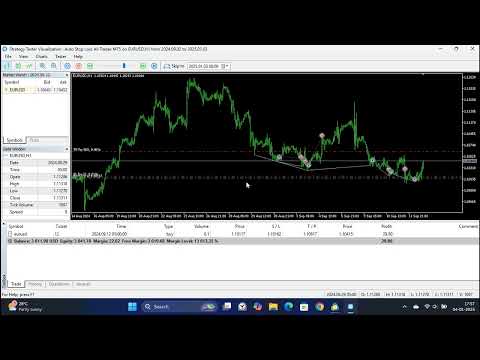
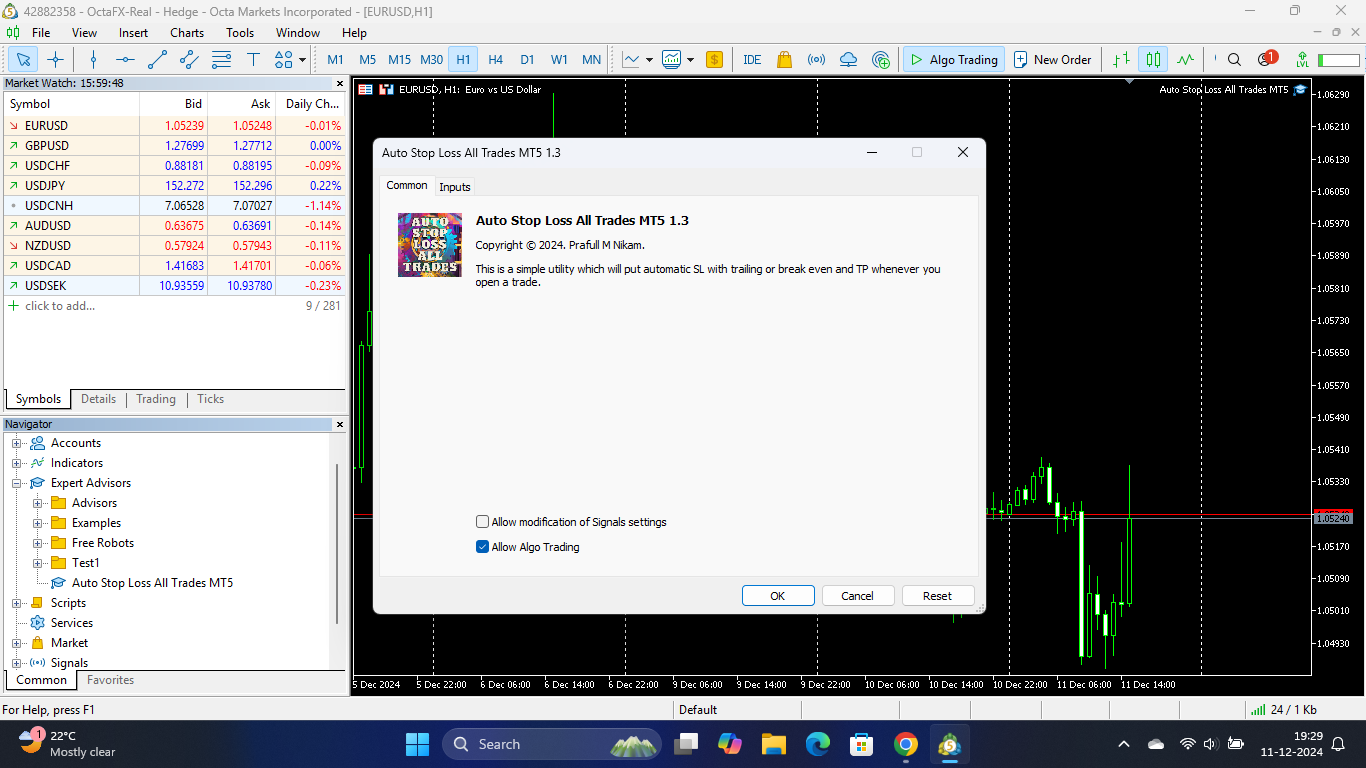
This is a simple utility which will put Automatic Stop Loss and Take Profit. It also has Trailing Stop Loss and Break Even features. The input value of the Stop Loss and Take Profit is in Pips. Whenever you open a trade it will put stop loss and take profit in pips automatically.

*If you need a more practical stop loss and take profit for your trades then you may like this ATR based stop loss utility, Here!

Inputs:

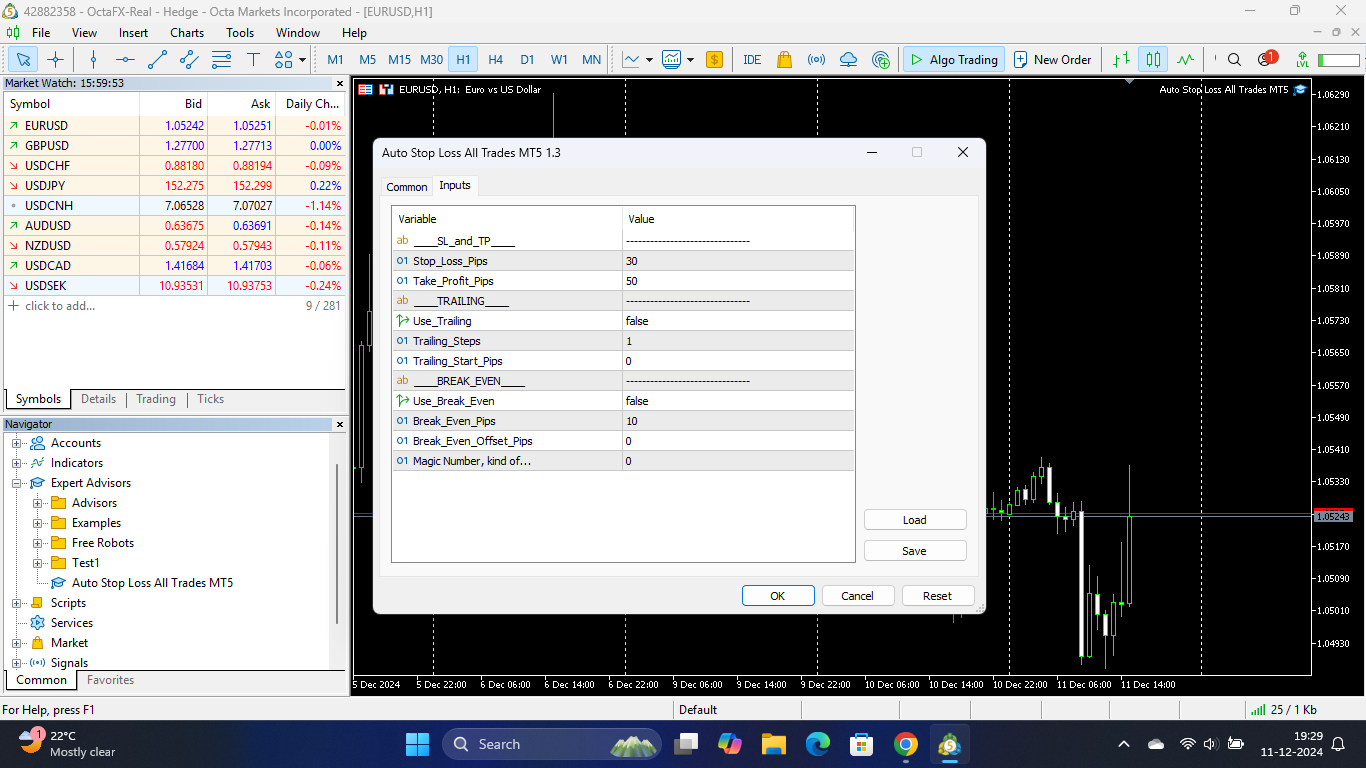
1. SL and Trailing SL - This is the Stop Loss value in Pips. Also used as Trailing Stop Loss if, "Use Trailing = true".

2. Trailing Steps - This is the steps value in pips for trailing the stop loss.

3. Take Profit pips - Take profit value in Pips.

4. Break Even pips - Take Profit value at which the stop loss gets moved to the break even point.

5. Break Even Offset Pips- 

"Break even price offset" is where to put SL in relation to Open Price. By default it puts it on the Open Price (offset pips set to 0). If offset pips is set to 2 pips, SL will be placed at OpenPrice+2pips. But you try to do that when the price is only 3 pips above Open Price.

6. Trailing Start Pips - Trade must reach certain profit in pips first, and only then the trailing the SL could be start.

*If you need a more practical stop loss and take profit for your trades then you may like this ATR indicator based stop loss utility, Here!

Stop Loss (SL) and Take Profit (TP) orders based on fixed pips are commonly used tools in trading to manage risk and lock in profits. These orders are not dependent on market volatility or indicators like the Average True Range (ATR). Instead, traders set fixed price levels for these orders. Here's an explanation of Stop Loss and Take Profit based on fixed pips:


1. **Stop Loss (SL): **

   - A stop loss is an order placed by a trader to limit potential losses on a trade by specifying a fixed price level at which the position should be automatically closed.

   - When setting a stop loss based on fixed pips, the trader determines how many pips they are willing to risk on a trade.

   - For example, if a trader enters a long position (buy) at 1.2000 on a currency pair and wants to limit potential losses to 20 pips, they would set their stop loss at 1.1980 (1.2000 - 20 pips).

   - The purpose of a stop loss is to protect the trader from excessive losses in case the market moves against their position.


2. **Take Profit (TP): **

   - A take profit is an order placed by a trader to lock in profits by specifying a fixed price level at which the position should be automatically closed.

   - When setting a take profit based on fixed pips, the trader determines how many pips they want to make as profit before closing the trade.

   - For example, if a trader enters a long position at 1.2000 and wants to take profit at 1.2040, they would set their take profit at 1.2040 (1.2000 + 40 pips).

   - The purpose of a take profit is to ensure that the trader captures a certain amount of profit when the market moves in their favor.

Avis 1
Mark Jones
515
Mark Jones 2025.11.21 18:21 
 

Just purchased and used this today. In terms of implementing and promoting positive risk management, its a really good, useful utility. So far it looks to be worth every cent of the purchase price and offers very good value. Can't offer full stars in the review as I've only had limited use and not needed support yet. :)

Produits recommandés
This indicator sends a message (notification), an email, and plays a custom sound when a Limit (Buy/Sell) or Limit Stop (Buy/Sell) or Take Profit, Stop Loss, Stop Out is executed. A user can change the sound file name, and select if they receive notifications/emails. It runs as an indicator, and only one indicator is locked (used) by a user account/login. Parameters soundFile - sound file Save your file at the terminal folder, for example: " C:\Program Files\MetaTrader 5\Sounds\Order Executed.
This utility provides the ability to use hot keys in manual trading instantly responding to the current market situation. You can assign hot keys to open/close positions by their type, open/close all positions on the current chart and remove all orders on the current chart. You can also assign hot keys for five predefined trade volumes and switch between them if necessary with no need to change the volume manually from time to time. It is also possible to set the auto calculation of a trade volu
Basket trading /Basket  SL TP  Automatic SL TP Calculation   This utility will calculate SL and TP based on 2 input parameters  PerUnitTP -This means what is per .01 TP like 1 $ per .01 Lot. SLToTP_Ratio-This what is ration SL to TP if this parameter is 3 that means if TP is 1 $ then SL will be 2$ (per .01 Lot) so if total portfolio summing to .05 lot that that means TP will be automatically become 5 $ and SL become 10 $. This is very good utility when you want set SL TP for many open trade
Risk Control Utility MT5 designed for manual trading. It helps to calculate and control your risks, transfer transactions to breakeven and accompany positions with trailing stop. Easy to set up and use. It can be used for calculating a trading lot, calculating stop loss and take profit levels. Works with currency pairs, CFDs, stocks, indices, futures, cryptocurrencies Displays   volume,   potential loss and profit before   placing an order Ability to set the expiration time of a pending order Tr
Trade Panel MT5 by PGS
Giancarlo Giuseppi Bejar
PGS Trade Panel – Professional Trade Management Tool for MT5 Take full control of your trading with structured execution, real-time feedback, and customizable automation, all directly on your chart. Profit Guard System Trade Panel is an advanced on-chart trading tool designed to give you discipline, clarity, and precision in every trade. It supports manual, semi-automated, and automated workflows with multiple strategies that can be enabled, customized, or disabled at any time. Automatic Take P
Horizontal Line Trade Assistant EA  Semi-Automated Trading Assistant      IMPORTANT :     On the main/purchased program a user can click on the Horizontal line and change it to Buy or Sell, and drag by double clicking on it. Please keep in mind that this option is not available on demo version, due to some restrictions/limitations of Strategy Tester, some Object related operations are not available in the  Strategy Tester. But, it will not prevent you from Testing, please drop an Object to chart
Cet outil peut vous aider à clôturer toutes les commandes ouvertes en un seul clic, cliquez simplement sur « Tout fermer ». Si vous souhaitez uniquement clôturer les ordres rentables, cliquez sur le bouton « Fermer les ordres rentables ». Après avoir cliqué, tous les ordres flottants seront fermés ; Si vous souhaitez uniquement clôturer les ordres avec des pertes flottantes, cliquez sur le bouton « Fermer les ordres perdants ». Après avoir cliqué, tous les ordres avec des pertes flottantes seron
Trade Control Panel
Jerry Jilun Anak Liban
Trade Control Panel Function Normal One Click Function Close All Close All Profit Close All Loss Close All Pending Order Close All Sell Close All Buy Advance One Click Function 1.  Close Partial Lot Sell by Percent It will help you partial close for all open position by desire percent you wanted. No longer partial close one by one for every open position Manual input for desire percent 2. Close Partial Lot Buy by Percent It will help you partial close for all open position by desire percent
Le service Telegram est une application de trading qui assure la communication entre ce conseiller expert (EA) et votre chaîne Telegram. Cette application génère des rapports, vous alerte lors de l'ouverture, la fermeture et la modification de positions, ouvre de nouvelles positions, ferme les positions ouvertes, modifie les positions existantes, affiche l'historique des transactions, récupère des captures d'écran des graphiques, et récupère les valeurs de stop loss et de take profit. Elle affi
Superior Telegram Signals Multi-Platform Trade Copier & Notification System   Available for MetaTrader 4 and MetaTrader 5 Superior Telegram Signals   is a utility that connects a trading terminal to the Telegram application. It is designed to send automated trade notifications, chart screenshots, and account status updates to a specified Telegram chat, channel, or group. Use Cases This tool can be used by: Signal Providers:   To automate the broadcasting of trade signals, modifications, and clos
Signals for Telegram
Elidio Xavier Guimaraes
It is a utility that posts customized messages on Telegram based on account trading activity. Once the utility is on the chart, with each new position opened from the same chart symbol the utility is added, a customized message will be sent to the Telegram group defined in the input parameters. The utility will post to the Telegram group if a new position is opened and if it is the same symbol as the chart the utility is running on. If you are using an Expert Advisor for Buy and Sell and want to
Trailing Stop Fast  Trailing Stop Fast EA locks trade profit once trade moves in profit by certain points(eg 100 points) by moving the Stop Loss in direction of trade. There are three inputs in EA to be provided by user to EA  TrailingStart  this input used as activator when trade moved 100 points towards profit, this EA will start shifting your stop loss towards profit. TrailingStop  input defines what should be the distance of stop loss from current market price once TrailingStart activated
Algosphere Terminal est un panneau de trading professionnel en un clic pour MetaTrader 5. Executez des ordres BUY et SELL instantanement avec Stop Loss et Take Profit predefinis en points. Fonctionnalites incluses: tailles de lot ajustables avec preselections rapides, surveillance du spread en direct avec alertes couleur, trailing stop avec activation configurable, fonction breakeven et outils de gestion des positions. Choisissez parmi quatre themes elegants: Obsidian, Emerald, Frost et Neon. Le
GS trade report
Aleksander Gladkov
5 (1)
3 in 1 : Report + monitoring + sending messages (Telegram, ...) to optimize trading and use of advisors. Monitoring: Panel on the chart Sending messages to Telegram Sending messages to Email Sending Notifications Sending pop-up messages Sound notifications when the established Profit/Loss levels are exceeded Monitoring is activated by pressing the Start button. Profit for the period by currency pairs, hours and Magic number for the current account. Forms four tables: by symbols, by magic number
The script creates account summary report in a separate window. The report can be created for all deals and on deals for selected financial instruments. It is possible to specify a time interval of calculation and save report to htm-file. The script creates account summary report in a separate window. The report can be created for all deals and for deals of the selected financial instruments. It is possible to specify a time interval of calculation and save report to htm-file. Input parameters
Arrêtez de laisser les courtiers chasser votre Stop Loss ! Êtes-vous fatigué de voir le prix toucher votre Stop Loss exactement au point mort, pour ensuite s'inverser immédiatement en votre faveur ? C'est souvent causé par le bruit du marché ou ce qu'on appelle la "chasse aux stops" (Stop Hunting). TrailGuardian est un gestionnaire de transactions professionnel "Stealth" (invisible) conçu pour protéger vos profits sans révéler vos niveaux de sortie au marché. Il crée une ligne de stop-loss vi
Ce conseiller est un tableau de bord qui vous permet de trader plusieurs paires en un seul clic. Cliquez sur       ouvrir       Ce bouton ouvre une commande pour la paire sélectionnée. Cliquez sur       fermer       Ce bouton ferme la commande pour la paire sélectionnée. Le lot de commande est le numéro saisi par l'utilisateur. Les nombres positifs correspondent aux ordres d’achat, tandis que les nombres négatifs correspondent aux ordres de vente. Cliquez sur   le bouton Fermer   pour fermer la
Spread and Swap monitor
Gennadiy Stanilevych
5 (1)
The indicator is intended for determining the spread and swap size, the distance for setting stop orders and stop losses from the current price allowed and the risk per 1 point in the deposit currency. The indicator informs a trader about possible additional expenses and profits connected with transferring a position to the next trade session of the financial instrument. It also informs about the spread size and the distance of pending orders, stop loss and trailing from the current price. In ad
This EA help trader to manage his pending orders, when you place many Pending Orders this utility monitor them and when of them get filed (executed) the EA cancel and delete all rest of pending orders, to avoid  opening of all of pending orders at the same time , and lose your risk management. this utility is very useful for trader when he /she is not available on the desk.
MT5 for Telegram Signals
Sergey Batudayev
5 (10)
The utility is designed to send signals from MT4 to Telegram. It has several unique features, allowing not only the sending of trade signals but also the following functionalities: Send messages directly from the terminal to Telegram Send emojis along with custom text Send text and images from Telegram All of these features enable users to manage a signal channel while focusing on trading and finding quality signals. Customizable Signal Messages You can fully customize the signal message: Specif
Virtual TP SL TS
Andrei Sviatlichny
Make your Take Profit, Stop Loss, and Trailing Stop levels invisible to the broker! Main option: STEALTH MODE Virtual Trailing Stop Virtual Take Profit Virtual Breakeven Virtual Stop Loss Virtual Orders Lifetime WARNING: The Expert Advisor does not place orders by itself. You must open orders yourself (including through the Expert panel) or use a third-party Expert on another chart of the same currency pair. Please specify the Magic number "-1" in the Expert settings for the Expert to process th
This utilities can constantly monitors and handle the equity/ balance account to prevent drawdowns and protect your account. This Utilities can handle manually order and automatically order by other Expert Advisors.  If the conditions are reached, the open position will be close/ all close (depending your setting). How to use : attach this utilities on new chart (same pair) you need to handle make sure magic number is same with other EA you need to handle entry magic number '0' if you need han
This is a simple utility which will put automatic Stop Loss and Take Profit on every new trade based on ATR values. It also has Stop Loss Trailing and Break Even function. Whenever you open a trade, it will put ATR times Stop Loss and Take Profit automatically. Stop loss and take profit are two important tools used by traders to manage risk and set profit targets in financial markets. The Average True Range (ATR) indicator can be a valuable tool in helping traders determine appropriate levels fo
Script for deleting pending orders If you need to delete all pending orders you placed, this script will do it for you! Allow AutoTrading before running the script. Usage: Run the script on a chart. Input parameters: Language of messages displayed (EN, RU, DE, FR, ES) - language of messages displayed (English, Russian, German, French, Spanish). Use Magic: (0 - ignore Magic, else - only this Magic) - if set to zero, the magic number is not considered. Otherwise the script deletes only orders wit
Smart Bulk Order Closer
Muhammad Hassan Muhammad Ahmad Atiyah
Smart Bulk Order Closer Script MT5 – Fermeture de positions selon PnL Présentation Smart Bulk Order Closer est un script pour MetaTrader 5 qui ferme les positions selon leur profit ou perte flottant actuel. Le script s’exécute une seule fois lors de son lancement et ferme uniquement les positions répondant aux conditions PnL définies par l’utilisateur. Il ne fonctionne pas en arrière-plan, ne modifie pas Stop Loss ou Take Profit, et n’ouvre pas de positions. Fonctionnalités Chaque position est
One Click Trader  is a tool designed for MetaTrader 4 platform, which enables you to take your trading to the next level. It enables you to open, manage and close your trades in simple an efficient way by just one click of your mouse button. "-"   ,  "+"  change OCT window size  Up arrow minimizes the OCT panel Down arrow maximizes the OCT panel Right arrow displays the next panel with additional features Left arrow hides the panel with additional features Red  SELL  button enables you to open s
The utility is designed to save funds on your trading account. There is support for three levels of minimum equity and free margin. For each level, you can set partial (by a certain percentage) or complete closing of all market orders. The partial close percentage is applied for each order separately based on its current size (i.e. the size at the time the equity or free margin reaches the appropriate level). Upon reaching the last third level, the utility can close all charts, which will make i
Cet Expert Advisor (EA) pour MetaTrader 5 (MT5) a été conçu pour gérer automatiquement les Stop Loss (SL) et Take Profit (TP). Fonctionnalités principales Détection Automatique des Positions Manuelles : Surveille les nouvelles positions manuelles sans SL/TP et applique les règles configurées. Ordres Multiples : Ouverture d'ordres multiples aux mêmes conditions que la position originale hidden  SL/TP : le mode hidden permet de créer SL/TP invisibles pour votre broker Equity protection  : permet
Description Easy Trader Assistant est un panneau d'exécution manuelle pour MetaTrader 5 conçu pour trader plus rapidement avec un contrôle clair du risque. Tout est géré depuis le graphique : entrée, sortie et ajustements, sans perdre de temps à changer de fenêtres. Il intègre le calcul de la taille des lots, la gestion des sl/tp et la visualisation directe du risque avant d'ouvrir une position. L'idée est simple : réduire les erreurs et rendre l'exécution plus précise. Approche Utilisé en tradi
This utility sends notification to trader’s MT5 (for MT4 version, checkout this link ) mobile app, to remind traders about their open positions. Super useful for part time traders to keep track and not forget any positions. To turn on notification, please visit   this link   (https://www.metatrader4.com/en/trading-platform/help/setup/settings_notifications) Features Keep track on open orders (pending orders, running orders) Customize time to send notification Customize notification interval (se
Les acheteurs de ce produit ont également acheté
Trade Assistant MT5
Evgeniy Kravchenko
4.43 (211)
It helps to calculate the risk per trade, the easy installation of a new order, order management with partial closing functions, trailing stop of 7 types and other useful functions. Additional materials and instructions Installation instructions - Application instructions - Trial version of the application for a demo account Line function -   shows on the chart the Opening line, Stop Loss, Take Profit. With this function it is easy to set a new order and see its additional characteristics bef
Bienvenue sur Trade Manager EA, l’outil ultime de gestion des risques conçu pour rendre le trading plus intuitif, précis et efficace. Ce n’est pas seulement un outil d’exécution d’ordres ; c’est une solution complète pour la planification des trades, la gestion des positions et le contrôle des risques. Que vous soyez débutant, trader expérimenté ou scalpeur ayant besoin d’une exécution rapide, Trade Manager EA s’adapte à vos besoins, offrant une flexibilité sur tous les marchés, des devises et i
TradePanel MT5
Alfiya Fazylova
4.87 (156)
Trade Panel est un assistant commercial multifonction. L'application contient plus de 50 fonctions de trading pour le trading manuel et permet d'automatiser la plupart des tâches commerciales. Avant l'achat, vous pouvez tester la version de démonstration sur un compte de démonstration. Télécharger la version d'essai de l'application pour un compte de démonstration : https://www.mql5.com/fr/blogs/post/762644 . Instructions complètes ici . Commerce. Permet d'effectuer des opérations commerciales e
Version Bêta Le Telegram to MT5 Signal Trader est presque prêt pour la sortie officielle en version alpha. Certaines fonctionnalités sont encore en développement et vous pourriez rencontrer de petits bugs. Si vous rencontrez des problèmes, merci de les signaler, vos retours aident à améliorer le logiciel pour tout le monde. Telegram to MT5 Signal Trader est un outil puissant qui copie automatiquement les signaux de trading depuis des chaînes ou groupes Telegram vers votre compte MetaTrader 5 .
AI Agent Supervisor is NOT an Expert Advisor. AI Agent Supervisor   is a   multi-agent AI risk & portfolio supervisor   that watches every EA on your account and intervenes in real time.  WANT AN AI PORTFOLIO MANAGER WATCHING YOUR FLEET 24/7?   Run your fleet on the same brokers I do:   IC MARKETS , IC TRADING   .  Unlike the centralized stock market, Forex has no single, unified price feed.  Every broker sources liquidity from different providers, creating unique data streams. The Supervisor r
Exp COPYLOT CLIENT for MT5
Vladislav Andruschenko
3.91 (33)
Copieur professionnel de trades pour MetaTrader 5 Un copieur de trades rapide, professionnel et fiable pour MetaTrader . COPYLOT permet de copier des trades Forex entre les terminaux MT4 et MT5 avec prise en charge des comptes Hedge et Netting . La version MT5 de COPYLOT prend en charge : - MT5 Hedge → MT5 Hedge - MT5 Hedge → MT5 Netting - MT5 Netting → MT5 Hedge - MT5 Netting → MT5 Netting - MT4 → MT5 Hedge - MT4 → MT5 Netting Version MT4 Description complète + DEMO + PDF Comment acheter Comme
Farmed Hedge Yield Farming | All Markets (Manual - Hybrid - Semi/Automated EA) MULTI-ASSET SUPPORT Trade any asset available on your broker - Forex: Major, Minor, Exotic pairs - Crypto: BTC, ETH, XRP, SOL, BNB - Stocks: Apple, Tesla, Amazon, Google, etc. - Commodities: Gold, Silver, Oil, Gas - Indices: US30, NAS100, SPX500, DAX40 - Any CFD your broker offers VERIFIED TRADING RESULTS - Farmed Hedge Yield Axi Copy:  https://www.mql5.com/en/signals/2356376 - Farmed Hedge Yield Exn Copy:   https:/
The News Filter MT5
Leolouiski Gan
4.78 (23)
Ce produit filtre tous les conseillers experts et les graphiques manuels pendant les heures de publication des actualités, de sorte que vous n'avez pas à vous soucier des pics de prix soudains qui pourraient détruire vos configurations de trading manuelles ou les transactions entrées par d'autres conseillers experts. Ce produit est également livré avec un système de gestion des ordres complet qui peut gérer vos positions ouvertes et vos ordres en attente avant la publication de toute actualité.
Footprint Chart Pro — Professional OrderFlow EA for MetaTrader 5 Version 6.34 | Professional tool for real traders | Institutional-Grade Visualization DEMO USERS - PLEASE SELECT EVERY TICK / REAL TICK WHEN TESTING AND YOU HAVE DOWNLOADED HISTORICAL DATA. IF YOU SEE A WAITING SCREEN AND IT IS NOT DOWNLOADING, IT MEANS YOU HAVE LOW HISTORICAL DATA. TRY 1 MIN AND 5 MIN FIRST ON 1 DAY DATA. ONE DAY DATA SHOULD BE THE NEWEST AND MOST CURRENT DATE. PLEASE WAIT UNTIL THE MARKET HAS ROLLED OVER PERIOD.
Quant AI Agents
Ho Tuan Thang
5 (1)
Quant AI Agents are independent trading Expert Advisors. Instead of trading using a fixed strategy like other conventional EAs, Quant AI Agents   is a   multi-agent AI trading framework   that turns natural-language strategy prompts into live.  WANT THE SAME RESULTS AS MY LIVE SIGNAL?   Use the exact same brokers I do:   IC MARKETS , IC TRADING   .  Unlike the centralized stock market, Forex has no single, unified price feed.  Every broker sources liquidity from different providers, creating un
Prop Firm Os
Gayathiri Gopalakrishnan
5 (1)
PROP FIRM OS Structured Trading Assistant for MetaTrader 5 PROP FIRM OS is a structured trading assistant designed for MetaTrader 5 users who prefer rule-based market analysis and organized trading workflows. The Expert Advisor combines market analysis tools, scanner functions, dashboard monitoring, alerts, risk-control settings, and trade management features inside one system. PROP FIRM OS is designed to help traders follow selected rules, filters, and monitoring conditions during trading activ
Power Candles Strategy Scanner - Outil de recherche de configurations multi-symboles à optimisation automatique Le Power Candles Strategy Scanner utilise le même moteur d'auto-optimisation que celui qui alimente l'indicateur Power Candles, pour chaque symbole de votre Market Watch, en parallèle. Un panneau vous indique quels symboles sont statistiquement négociables à l'instant, quelle stratégie est la plus performante pour chacun, la paire Stop Loss / Take Profit optimale, et vous alerte dès qu
AntiOverfit PRO MT5
Enrique Enguix
5 (6)
Avant d’acheter un EA, vérifiez s’il tient vraiment la route ou s’il a simplement eu de la chance en backtest. La plupart des robots se vendent avec un beau backtest. Une courbe qui monte. Un bon profit factor. Très peu de doutes. Et pourtant, beaucoup de ces EA s’effondrent dès que le marché cesse de se comporter comme dans cet historique précis. Pourquoi ? Parce qu’un backtest ne prouve qu’une seule chose : que cette stratégie a fonctionné sur un parcours de prix bien précis. Il ne prouve pas
SMC Trade Pilot MT5 Assistant de trading semi-automatique pour les traders Smart Money Concepts. Recevez les signaux directement sur Telegram avec capture du graphique, puis placez le trade en un seul appui. Gérez vos positions depuis votre téléphone, même loin de votre ordinateur. Le problème résolu Les setups Smart Money n'attendent pas. Les Order Blocks et les Liquidity Sweeps se forment pendant l'ouverture de Londres, de New York ou en plein milieu de la session asiatique, souvent quand vous
Premium Trade Manager - Gestion de trades rapide et disciplinée pour MetaTrader 5 Premium Trade Manager est fait pour les traders qui veulent garder leur attention sur la décision pendant que le panneau prend en charge la routine : dimensionnement, placement, partiels, trailing, actualités et limites de prop firm, traités de la même façon disciplinée à chaque trade. C'est un panneau rapide sur le graphique pour MetaTrader 5 qui supprime le travail mécanique de chaque trade. Vous décidez de la di
Custom Alerts AIO : Surveillez tous les marchés à la fois — sans aucune configuration Présentation Custom Alerts AIO est une solution de surveillance du marché prête à l’emploi, sans configuration nécessaire. Tous les indicateurs requis — FX Power, FX Volume, FX Dynamic, FX Levels, IX Power — sont directement intégrés. Aucun graphique n’est affiché, ce qui rend cet outil idéal pour la génération d’alertes en temps réel. Il prend en charge toutes les classes d’actifs proposées par votre courtie
MT5 to Telegram Signal Provider est un utilitaire facile à utiliser et entièrement personnalisable qui permet l'envoi de signaux spécifiés vers un chat, un canal ou un groupe Telegram, transformant ainsi votre compte en fournisseur de signaux. Contrairement à la plupart des produits concurrents, il n'utilise pas d'importations DLL. [ Démonstration ] [ Manuel ] [ Version MT4 ] [ Version Discord ] [ Canal Telegram ]  New: [ Telegram To MT5 ] Configuration Un guide utilisateur étape par étape est
Trade Manager DaneTrades
Levi Dane Benjamin
4.28 (29)
Trade Manager pour vous aider à entrer et sortir rapidement des transactions tout en calculant automatiquement votre risque. Y compris des fonctionnalités pour vous aider à éviter le sur-trading, le trading de vengeance et le trading émotionnel. Les transactions peuvent être gérées automatiquement et les mesures de performances du compte peuvent être visualisées dans un graphique. Ces fonctionnalités rendent ce panneau idéal pour tous les traders manuels et contribuent à améliorer la plateforme
YuClusters
Yury Kulikov
4.93 (42)
Attention: You can view the program operation in the free version  YuClusters DEMO .  YuClusters is a professional market analysis system. The trader has unique opportunities to analyze the flow of orders, trade volumes, price movements using various charts, profiles, indicators, and graphical objects. YuClusters operates on data based on Time&Sales or ticks information, depending on what is available in the quotes of a financial instrument. YuClusters allows you to build graphs by combining da
Poc Breakout Signal: The Ultimate Institutional Order Flow & Price Action System Elevate your trading with Poc Breakout, a comprehensive technical analysis tool designed to bridge the gap between retail trading and institutional market understanding. This all-in-one system combines powerful Buy/Sell signals, advanced Volume Profile analysis, real-time Order Flow (Depth of Market), and critical macroeconomic data to give you a clear, unambiguous edge in the markets. Poc Breakout Signal decodes c
Telegram to MT5 Multi-Channel Copier copie automatiquement les signaux de trading de vos canaux Telegram directement dans MetaTrader 5. Pas de bots, pas d'extensions de navigateur, pas de copie manuelle. Vous recevez un signal sur Telegram et l'EA ouvre la position sur votre terminal en quelques secondes. Le produit comprend deux composants : une application Windows qui écoute vos canaux Telegram, et cet Expert Advisor qui exécute les signaux sur votre terminal MT5. Une version MT4 est également
The product will copy all telegram signal to MT5 ( which you are member) , also it can work as remote copier.  Easy to set up, copy order instant, can work with almost signal formats, image signal,  s upport to translate other language to English Work with all type of channel or group, even channel have "Restrict Saving Content", work with  multi channel, multi MT5 Work as remote copier: with signal have ticket number, it will copy exactly via ticket number. Support to backtest signal. How to s
Telegram To MT5 Receiver
Levi Dane Benjamin
4.31 (16)
Copiez les signaux de n'importe quel canal dont vous êtes membre (y compris les canaux privés et restreints) directement sur votre MT5.  Cet outil a été conçu en pensant à l'utilisateur et offre de nombreuses fonctionnalités nécessaires pour gérer et surveiller les trades. Ce produit est présenté dans une interface graphique conviviale et attrayante. Personnalisez vos paramètres et commencez à utiliser le produit en quelques minutes ! Guide de l'utilisateur + Démo  | Version MT4 | Version Disc
FUTURES ORDERFLOW FOOTPRINT CHART Professional OrderFlow EA for MetaTrader 5 Version 1.01| Professional tool for real traders | Institutional-Grade Visualization STRATEGY TESTER USERS - PLEASE SELECT EVERY REAL TICK WHEN TESTING AND YOU HAVE DOWNLOADED HISTORICAL DATA. IF YOU SEE A WAITING SCREEN AND IT IS NOT DOWNLOADING, IT MEANS YOU HAVE LOW HISTORICAL DATA. TRY 1 MIN AND 5 MIN FIRST ON 1 DAY DATA. ONE DAY DATA SHOULD BE THE NEWEST AND MOST CURRENT DATE. PLEASE WAIT UNTIL THE MARKET HAS ROL
Timeless Charts
Samuel Manoel De Souza
5 (6)
Timeless Charts est un utilitaire de trading tout-en-un destiné aux traders professionnels. Il combine des types de graphiques personnalisés tels que les graphiques en secondes et Renko avec une analyse avancée du flux d’ordre s utilisant Footprints , Clusters , Profils de Volume , études VWAP et outils d’analyse ancrés pour une compréhension plus approfondie du marché. Le trading et la gestion des positions sont effectués directement depuis le graphique via un panneau intégré de gestion des ord
EA Auditor
Stephen J Martret
5 (2)
EA Auditor is an independent analysis tool for traders evaluating Expert Advisors and trading signals on MetaTrader 5. It audits backtest reports, reviews posted developer signals, and cross-verifies the two against each other to help traders assess strategies before committing capital. The MQL5 market offers a wide range of Expert Advisors from many developers, with varying approaches, quality, and transparency. EA Auditor provides a consistent, data-driven framework for reviewing them, answer
Take a Break MT5
Eric Emmrich
4.75 (24)
News filter, equity guard & session control for all your EAs — one tool, full protection — Free Demo | Latest Updates Take a Break has evolved from a basic news filter into a comprehensive account protection solution . It pauses your other Expert Advisors during news events or based on custom filters. When trading resumes, it automatically restores your entire chart setup , including all EA settings. New in v10: an integrated AI Trade Assessment evaluates each new trade entry directly on your ch
Signal TradingView to MT5 Pro Automator Exécution professionnelle instantanée entre TradingView et MetaTrader 5 Automatisez votre stratégie de trading avec le pont de communication le plus robuste entre les alertes TradingView et l'exécution réelle sur MT5. Conçu pour les traders qui exigent vitesse, flexibilité et une gestion des risques impeccable, cet Expert Advisor transforme tout message d'alerte en un ordre au marché ou à cours limité précis. POINTS FORTS ET AVANTAGES Moteur d'analyse univ
Telegram to MT5 Coppy
Sergey Batudayev
5 (9)
Télégramme vers MT5 :   la solution ultime pour copier des signaux Simplifiez votre trading avec Telegram vers MT5, l'outil moderne qui copie les signaux de trading directement des canaux et chats Telegram vers votre plateforme MetaTrader 5, sans DLL. Cette solution puissante garantit une exécution précise des signaux, de nombreuses options de personnalisation, un gain de temps et une efficacité accrue. [ Instructions and DEMO ] Caractéristiques principales Intégration directe de l'API Telegram
AlgoRadar
Stephen J Martret
5 (4)
AlgoRadar is an on-chart analytics dashboard for MT5 that aggregates Expert Advisor performance across multiple accounts, brokers, and platforms, including both MT4 and MT5 data, into a single live view on your MT5 chart. All analysis runs from the chart interface, with no external applications or manual report processing required. EA Analysis and Ranking For traders running multiple Expert Advisors, AlgoRadar provides a consolidated view of each EA's performance across accounts. Active EAs a
Plus de l'auteur
This is a simple utility which will put Automatic Stop Loss and Take Profit. It also has Trailing Stop Loss and Break Even features. The input value of the Stop Loss and Take Profit is in Pips. Whenever you open a trade it will put stop loss and take profit in pips automatically. *If you need a more practical stop loss and take profit for your trades then you may like this ATR based stop loss utility,  Here! Inputs: 1. SL and Trailing SL - This is the Stop Loss value in Pips. Also used as Traili
Modern Donchi MT4
Prafull Manohar Nikam
The indicator is based on the concept of price channels, which are formed by plotting the highest high and lowest low prices over a specified period of time. The Donchian Channel Indicator consists of three lines: an upper channel line, a lower channel line, and a middle channel line. The upper channel line represents the highest high over a specified period, while the lower channel line represents the lowest low. The middle channel line is the average of the two and can be used as a reference f
FREE
PraNik EA macd levels MT5
Prafull Manohar Nikam
Easy to use EA designed to auto trade. Works in every market condition. It uses reliable levels of MACD indicator combined with unique logic to perform fully automatic trading operations. *For MT4 version please go here! *If you don't like automated system and only need an alert system to help you in trading. Please check this arrow with alert system  here! FEATURES: Dangerous methods like martingale, hedge, grid or scalping are NOT used. Each position has Stop Loss and Take Profit. Positional
FREE
Multi Cross 4
Prafull Manohar Nikam
M ulti Cross Alert! on your smartphone. Use multiple indicators to get a crossover signal on chart as well as on MetaTrader app. You can use all crossovers at the same time but it is not recommended cause your chart will look messy. Instead use combination of two indicators which will be better. IMP NOTE:- More indicators will be added in future updates. Any suggestions regarding indicators are welcome!   Indicators List: 1. MA (Cross) 2. RSI (OB/OS) 3. MACD Lines (Main Line & Signal Line Cross)
FREE
Trade BTN
Prafull Manohar Nikam
T his is an ON CHART trade management panel. In other words, ON CHART Lot Size, Buy, Sell, Stop Loss, Take Profit, Close Buy, Close Sell and Close All buttons! *IMPORTANT NOTE: Input settings are NOT usable. You can change or insert Stop Loss and Take Profit values only on the chart panel. (See the below video!) This one is MT5 version! BUTTONS List: 1. Lot Size - (0.01) is default click on it and insert the lot size with which you want to open a trade. 2. Stop Loss - (0.0) is default click on
FREE
Trade BTN 4
Prafull Manohar Nikam
This is an ON CHART trade management panel. In other words, ON CHART Lot Size, Buy, Sell, Stop Loss, Take Profit, Close Buy, Close Sell and Close All buttons! *IMPORTANT NOTE: Input settings are NOT usable. You can change or insert Stop Loss and Take Profit values only on the chart panel. (See the below video!) This one is MT4 version! BUTTONS List: 1. Lot Size - (0.01) is default click on it and insert the lot size with which you want to open a trade. 2. Stop Loss - (0.0) is default click on i
FREE
Modern Donchi MT5
Prafull Manohar Nikam
The indicator is based on the concept of price channels, which are formed by plotting the highest high and lowest low prices over a specified period of time. The Donchian Channel Indicator consists of three lines: an upper channel line, a lower channel line, and a middle channel line. The upper channel line represents the highest high over a specified period, while the lower channel line represents the lowest low. The middle channel line is the average of the two and can be used as a reference f
FREE
S imple arrow with alert on chart. This is NOT an entry indicator but a direction indicator. It uses MACD signal line to show you possible future direction of a trend. Please use it with other filters or confirmations to trade properly. Recommended for scalping and short term trades. Made for EURUSD M5 but it should work on every major pair on M5 timeframe. For MT4 version please go here! *If you need fully automated trading system. Please check this EA  here! FEATURES: Very simple directional i
FREE
S imple arrow with alert on chart. This is NOT an entry indicator but a direction indicator. It uses MACD signal line to show you possible future direction of a trend. Please use it with other filters or confirmations to trade properly. Recommended for scalping and short term trades. Made for EURUSD M5 but it should work on every major pair on M5 timeframe. For MT5 version please go here! *If you need a fully automated trading system. Please check this EA here! FEATURES: Very simple directional
FREE
PraNik EA macd levels MT4
Prafull Manohar Nikam
Easy to use EA designed to auto trade. Works in every market condition. It uses reliable levels of MACD indicator combined with unique logic to perform fully automatic trading operations. *For MT5 version please go   here! *If you don't like automated system and only need an alert system to help you in trading. Please check this arrow with alert system  here! FEATURES: Dangerous methods like martingale, hedge, grid or scalping are NOT used. Each position has Stop Loss and Take Profit. Positiona
FREE
Multi Cross 5
Prafull Manohar Nikam
M ulti Cross Alert! on your smartphone. Use multiple indicators to get a crossover signal on chart as well as on MetaTrader app. You can use all crossovers at the same time but it is not recommended cause your chart will look messy. Instead use combination of two indicators which will be better. IMP NOTE:- More indicators will be added in future updates. Any suggestions regarding indicators are welcome!   Indicators List: 1. MA (Cross) 2. RSI (OB/OS) 3. MACD Lines (Main Line & Signal Line Cross)
FREE
Scalper Marti 4
Prafull Manohar Nikam
S imple scalping EA which uses martingale lot system. Scalping happens on candlestick pattern and candle size in pips. This is a full automatic trading system which has auto money management option too. FEATURES: 1. Martingale 2. NO Grid 3. Scalping 4. Hard Stop Loss 5. Easy Take Profit 6. Uses Candlestick Pattern Important Note : - As name suggests it is a Martingale System. Always better to use minimal/proper martingale settings and proper trading capital otherwise it can easily blow your acco
Count MACD 4
Prafull Manohar Nikam
Easy to use EA capable of full automatic trading. NO Martingale (Original Strategy), NO Grid, High Win Rate, Low Drawdown EA. It uses multiple signal confirmation of MACD indicator to open a trade. (Ideal Buy-Sell Count i.e. BS Count = 3)! *Important:   1. Do not use Auto Stop Out (keep it false!) if you want to get better results from this expert advisor. Because (BS Count=3) has relatively high win rate so you don't need to worry about drawdowns. 2. Do not use Martingale & Visible SL-TP. (Not
EMA Scalper 4
Prafull Manohar Nikam
V ery simple EA uses the famous trend scalping i.e. EMA Crossover scalping to open trades with martingale lot system. It includes 03 EMA i.e. Exponential Moving Averages to decide which direction to trade. It also checks distance of a fast moving average from the trend moving average. After all these conditions get fulfilled it opens a position. Single position at a time with hard stop loss and take profit. Features: 1. Martingale 2. Uses trend indicators 3. Automatic Trading 4. Hard Stop Loss
Bolli Plus 4
Prafull Manohar Nikam
T his EA trades with trend so it has high win percentage. Uses trend indicators like Bollinger Bands and Moving Averages. This is NO Martingale system but it uses lots multiplier to increase the gains. You can easily disable the lots multiplier by changing it to 1.   Features: 1. NO Martingale 2. NO Grid 3. High Win Rate Strategy. 4. Low Drawdown. 5. Uses STOP OUT Percent instead of usual Stop Loss. 6. But uses the usual Take Profit in pips.   Account Requirements: 1. Minimum Balance - 1000 USD
BB Scalper 4
Prafull Manohar Nikam
This is a trend scalping EA because it uses trend indicators like Bollinger Bands and Moving Average. Easy to use forex expert advisor designed for EURUSD H1 but fully capable of trading other forex pairs and other timeframes too.  Features: 1. NO Grid 2. NO Martingale 3. Smart Lot Sizing 4. Auto Take Profit in Money 5. Auto Stop Out at % of Balance 6. Minimal Inputs 7. Can trade 100 USD Account too. 8. High Win Rate 9. Positive Equity Curve Account Requirements: *Broker - Any *Account type - He
MACD Level Alert MT4
Prafull Manohar Nikam
This is a simple arrow system based on MACD indicators Main/Base line and MACD Levels. It gives you alerts when MACD's Main Line crosses above/below certain level. Which type of alerts available? 1. It paints on chart Up/Down Arrows. 2. Popup message and sound alert in trading terminal window. 3. Push notification or Alert on your android and ios mobile phones (requires MT4 or MT5 app installed!)
This is a simple arrow system based on Engulfing Candlestick Pattern. It gives you alerts on your smartphone when there is an engulfing candlestick pattern happens. Which type of alerts available? 1. It paints on chart Up/Down Arrows. 2. Popup message and sound alert in trading terminal window. 3. Push notification or Alert on your Android and IOS mobile phones (requires MT4 or MT5 app installed!) *Note: Use it on higher timeframes like H4 (4 hours), D1 (1 Day) then find trade opportunities on s
Base MACD 4
Prafull Manohar Nikam
This is a modern MACD indicator based on regular MACD indicator. It also has alert system included. This indicator gives you alerts when base line of MACD indicator crosses above or below Zero level so you can look for Buy or Sell opportunity. Available Alerts: 1.          Audible Alerts on Chart / Trading Terminal window. 2.          Alerts on your email. 3.          Alerts on your mobile phone. Type of Alerts Explained: 1. Audible_Chart_Alerts   - Audible alerts and Popup message on your compu
If you are using naked eyes to find candlestick patterns on your chart it's a good thing but it requires your time and attention and still you miss some patterns here and there. Don't worry! This indicator will help you to find "Harami Candlestick Pattern" on your chart very easily. *Note:   Default inputs are set for EURUSD H1 (1 hour) timeframe. This is an alert system which gives you alerts whenever harami candlestick pattern happens. Types of alerts it can give you are: 1. Audible Alerts   -
ICT Zone Alert MT4
Prafull Manohar Nikam
This indicator uses candlesticks with large real bodies to predict possible market structure shift. Displacement is a very powerful move in price action resulting in strong selling or buying pressure. Generally speaking, displacement will appear as a single or a group of candles that are all positioned in the same direction. These candles typically have large real bodies and very short wicks, suggesting very little disagreement between buyers and sellers. Often, a displacement will occur just af
ATR Stop Loss All Trades MT4
Prafull Manohar Nikam
5 (1)
This is a simple utility which will put automatic Stop Loss and Take Profit on every new trade based on ATR values. It also has Stop Loss Trailing and Break Even function. Whenever you open a trade, it will put ATR times Stop Loss and Take Profit automatically. Stop loss and take profit are two important tools used by traders to manage risk and set profit targets in financial markets. The Average True Range (ATR) indicator can be a valuable tool in helping traders determine appropriate levels fo
EMA Martingale MT4
Prafull Manohar Nikam
This is a simple EA which works on the EMA crossover strategy. It uses fixed pips to put hard Stop Loss and Take Profit levels on every trade. Warning! This is a martingale system which may or may not wipe your trading account. If you want to take the risk anyway then must use it with proper money and risk management. NOTE: Martingale is good for compounding the account in less time. In other words, “Grow it or Blow it!” POINTS: 1. Martingale System 2. Works in all markets. 3. Very Risky! 4. Ha
RSI Level Alert MT4
Prafull Manohar Nikam
Simple alert system which will alert you on your mobile terminal, email and on the chart whenever RSI crosses below the overbought level or above the oversold level. Use this alert system, so you don’t have to watch the chart all day for the RSI levels to break. INPUTS: 1.        RSI Period- (Default is 14). Number of candles the RSI indicator will look back for the calculations. 2.        OB Level- (Default is 70). This is the Overbought level or Upper level for the RSI indicator. 3.        OS


Xgrid Scalper MT4
Prafull Manohar Nikam
This trading robot is strictly made for 10K Capital Trading Account and EURUSD H1. DO NOT use it on smaller accounts, because it has minimum free margin limit i.e. Free Margin > 500 (this value is in "actual money" not in "percentage"!) This is a Simple Grid Trading System which works on ADX indicator's volatility and with High Winrate. IMPORTANT: Default input settings are the bare minimum settings (not ideal) instead use the recommended settings (OR find your own best settings) provided in th
ATRx Martingale EA 4
Prafull Manohar Nikam
This is a simple trading robot which works on the EMA crossover strategy. It uses ATR indicator based hard Stop Loss and Take Profit levels on every trade. Also uses very risky Martingale Lot System. As mentioned early, this is a martingale system which may or may not wipe your trading account. You must use it with proper input settings and proper money-risk management. Symbol: EURUSD Timeframe: H1 ACCOUNT REQUIREMENTS: Minimum balance             =    $1000 Minimum leverage            =     1
H1 Hedge EA 4
Prafull Manohar Nikam
This is a very simple EA which uses distance from EMA Crossover strategy to open automatic trades. It has NO stop loss but has the take profit in money feature. This is an optional martingale system, it has a lot multiplier option if you want to use it to increase the successive trade volume. Don't trust the description, just download the demo today and test it yourself to know more about this trading robot.  (Backtest on longer periods like 5-10-20 years with 99-100% tick quality). Recommended:
BB Martingale EA MT4
Prafull Manohar Nikam
Warning! This is a Martingale Trading System. This EA uses the Bollinger Bands indicator to open automatic trades on your account. If price crosses the upper/lower Bollinger band with certain distance (in pips), it opens an initial trade. After that initial trade, if price moves certain distance (in pips) from the initial trade, EA will open next trade with Martingale Lot and so on. Not recommended to use it on trading accounts smaller than 10K. Even on 10K+ account you have to use it with caut
If you prefer manual trading and open multiple trades then this utility is just made for you. This is a simple utility which will close all your open trades at TP1, TP2 and TP3 by the given input percentage. NOTE: - This utility is helpful for multiple trades only (not for a single trade). You can set three Take Profit levels/targets at three Percentages to close trades partially. Inputs Explained: 1. TP 1 Pips - here you can set the first Take Profit Target in Pips for all trades combined. 2. 
Hey there! If you are using Moving Average indicator into RSI indicator's window and always wondering if there could be a way to get alerts on your smartphone when those two indicators get a crossover that would be great, right!? Then you have found the right tool for that. This indicator is nothing but a mix of MA indicator and RSI indicator into one indicator window as well as it will give you alerts for crossovers on your smartphone app, email and also on your trading terminal's (desktop) cha
Filtrer:
Mark Jones
515
Mark Jones 2025.11.21 18:21 
 

Just purchased and used this today. In terms of implementing and promoting positive risk management, its a really good, useful utility. So far it looks to be worth every cent of the purchase price and offers very good value. Can't offer full stars in the review as I've only had limited use and not needed support yet. :)

Prafull Manohar Nikam
6293
Réponse du développeur Prafull Manohar Nikam 2025.11.22 01:45
Thank you, Sir! Your feedback is valuable for the product development. If you have any suggestions or need any new feature to be added, just let me know. I am here to help.
Répondre à l'avis