 MetaTrader 5
 Experts
 Indicateurs
 Bibliothèque
 Utilitaires
 Widgets
 Règles
Regardez les tutoriels vidéo de Market sur YouTube
Comment acheter un robot de trading ou un indicateur
Exécutez votre EA sur
hébergement virtuel
hébergement virtuel
Test un indicateur/robot de trading avant d'acheter
Vous voulez gagner de l'argent sur Market ?
Comment présenter un produit pour qu'il se vende bien
Utilitaires de trading gratuits pour MetaTrader 5 - 26
 Vous trouverez ci-dessous des programmes de trading simplifiant le trading dans MetaTrader 5. Passez la souris sur un utilitaire pour lire sa description et son objectif.
SEREDINA est votre outil polyvalent pour l’évaluation et le contrôle des positions ! Ce script calcule automatiquement le prix moyen des positions ouvertes d'achat (BUY) et de vente (SELL) pour tout instrument de trading sur la plateforme MetaTrader 5, affichant non seulement des données précises mais aussi des niveaux visuels sur le graphique, vous permettant de voir instantanément le niveau moyen d'entrée de vos positions. Avec SEREDINA , vous pouvez : Identifier le point de "prix moyen" pour
FREE

Market Grid View is a utility to replace the original 'Market Watch' window. It was designed to be fast and give the user the ability to navigate over all symbols with just a click, while watch the price change or last trade value. To use it, configure your "Market Watch" window with all the symbols you want to monitor, and you can close it. Then insert the indicator in the graph. The parameters window need to be configured: Columns: the number of columns you want to be drawn ShowInfo: the type
FREE

Do not use Windows 7 with this EA MT5toTLGRM EA only sends text messages to a Telegram group or channel of your choice. The messages are customizable to show information about any trading activity in the account. Also it shows a daily PnL report. Several instances of this EA can be used simultaneously in the same MT5 terminal for sending messages to different Telegram group/channel but ensure that each one has a different number in [B13] setting. Following are the features of MT5toTLGRM EA send
FREE

Black Volume By ZeeAM Khan
a Multi-Engine EA
Professional Multi-Timeframe Volume & Breakout Trading System Black Volume Multi-Engine EA is an advanced automated trading system that combines volume analysis, spread analysis, liquidity sweeps, support/resistance breakouts, and multi-basket trade management into one powerful Expert Advisor. The EA continuously scans higher-timeframe candles to identify significant market activity, automatically draws key support and resistance zones, and executes
FREE

Hi you, I need your help! Be my Patron, let's make it possible!
https://www.patreon.com/joaopeuko https://github.com/Joaopeuko/Mql5-Python-Integration
Channel: English version - Versão Inglês:
https://www.mql5.com/en/channels/Mql5_Python_Integration_EN
Portuguese version - Versão Português:
https://www.mql5.com/en/channels/Mql5_Python_Integration_PT
Free version with 5 indicators: https://www.mql5.com/en/market/product/57574
This version has 38 indicators, 5 from the free version plus
FREE

Dashboard Premium Pro – Account Dashboard & Close All Panel for MT5 Dashboard Premium Pro puts everything you need to monitor your account in one clean panel on your chart: floating profit, daily results, buy/sell exposure, your last closed trade and real-time drawdown. One click closes every position, and a pause switch lets your own Expert Advisors know when to stop opening new trades. What the dashboard shows Floating P/L Current open profit or loss for the whole account, in large green or re
FREE

PropCorrelation shows whether your open positions are really different trades. Three index shorts feel like three trades; most days they are one bet, sized three times. The panel puts the number on your chart: the correlation between every pair of open positions, signed by direction, next to the money each of them risks to its stop. Free. Setup takes a minute: attach it to one chart, and the matrix appears for whatever is open on the account. No inputs are required to start. Try it first
It is
FREE

R.E.A. Automatic Risk Monetary (MT5) – Per-symbol manager for manual entries & pending orders Summary (hero) Automate risk management for manual trades (magic 0) and pending orders on the chart’s symbol : SL/TP by % of balance or fixed amount , BreakEven and Trailing (for positions), with instant reaction on order placement/execution. What it does Locked to the symbol where you attach it, this EA manages only: Your manual positions on that symbol. Your pending orders on that symbol (limit/stop/s
FREE

MT5 Trade Copier Master - Free Trade Broadcaster Require Slave EA: https://www.mql5.com/en/market/product/178686 This Master EA broadcasts trades but CANNOT copy them by itself. You MUST purchase and install the SyncTrade Copier Slave EA on a second MT5 terminal to copy trades. Without the Slave EA, this product does nothing useful on its own. Both MT5 terminals must be installed on the SAME computer for file sharing to work. They cannot be on different computers or VPS instances.
What This Ma
FREE
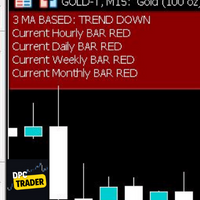
This Utility Bot is for New Traders, that struggle to spot the Trend direction. It also make you conscious about different Timeframes Bar Status. Utility have 3 Moving Averages totally configurable by input parameters. 3MA Based Trend is shown for the current Timeframe selected on the chart. (Line 1) 3MA Based Trend for Daily Timeframe. (Line 2nd) Also provide quick information about the currently Hourly Daily and Weekly Candle Status. Utility work on 1 Min Bar control, so comment section info
FREE

Trailer Is a reduced version of my EA bull scalper but will handle trailing loss and risk management
use the ai trailing tool to effect the trailing start or chose manual mode to start the trailing and the spread of the sl behind it
check out the EA Bull Scalper for full position Management position opening and extreme performance
https://www.mql5.com/en/market/product/116071?source=Site+Profile+Seller
FREE

Complete Trade Logger records every trade you close into a clean, ready-to-analyze CSV file. Unlike timer-based loggers, it is fully event-driven, so it captures everything: partial closes, fast round-trips, stop-loss and take-profit hits, manual closes, and margin stop-outs.
For each closed trade it records: - Open and close time, and trade duration - Symbol, direction, and volume - Open price, close price, and the entry stop-loss / take-profit - Profit, commission, swap, and net result - Exi
FREE

Posh Sessions is indicator which displays sessions in broker time or your local time. You can set up to 5 sessions, assign name, start time, end time and color of each session. There is session's range to help you make a chart analysis.
Settings for a session: Show: To show or not the session on chart Title: The title/name of the session Timezone: Select between broker or local time to implement the session's period Start time: The session start time End time: The session end time Co
FREE

PulseBar is a visual trading tool designed for MT5/MT4 that eliminates guesswork when planning your trades. It draws an interactive horizontal line on your chart that instantly calculates and displays the projected PnL (Profit/Loss) of your open positions (long or short) if the price were to reach that exact level. It is ideal for Price Action traders, Scalpers, and Day Traders who need to quickly and cleanly visualize Take Profit targets, partial exit levels, or risk zones without leaving the
FREE

Titan Dual Mode Utility is a high-performance trading assistant designed for traders who require speed, precision, and flexibility in the MetaTrader 5 terminal. This utility was developed to solve the delay of manual order entry, providing a professional interface for modern scalpers and intraday traders. The main innovation of this tool is the Dual Mode System , which allows the user to switch between two different execution strategies instantly: Protected Mode: This mode is designed for conser
FREE

This is a simple indicator type thing to track potential total risk if all the stop losses to be hit. It gives the sum of the total stop losses for a certain currency in positions and orders. These are the functions. (I will add more functions later, eg - total profits per symbol etc.) ( Add a comment if you need any feature. I will add it ) Total risk exposure - This is the total risk that can happen if all the stop losses in positions and open orders were to hit. Total positions risk - This is
FREE

Assistant Manuel TP (Manual Helper TP) Cet outil est conçu pour vous aider à protéger vos profits et à diminuer votre risque. Il placera un Stop Loss et gérera un Trailing Stop (Stop Suiveur) pour vos trades. Comment l'utiliser Attachez-le au graphique du symbole que vous tradez, et il gérera vos positions selon vos règles. Tous les réglages sont en points. Il est important de les ajuster pour votre symbole et votre stratégie. Le paramétrage par défaut peut fonctionner avec XAUUSD. Pour le scalp
FREE

TradeBridge EA — Automated Trade Execution for the MyFXRoom Community Important: TradeBridge EA is part of a 2-stage system built specifically for the MyFXRoom trading community. It will not function as a standalone EA. It works in conjunction with the MyFXRoom Bridge application to receive and execute trade alerts automatically. For information on accessing the Bridge, please visit the author's MQL5 profile. Overview TradeBridge EA is a professional automated execution layer for MetaTrader 5.
FREE

TickQuant Panel - Calculadora de Lotaje y Gestión de Riesgo Profesional TickQuant Panel es una herramienta esencial diseñada para traders que entienden que el éxito en el trading radica en una gestión de riesgo impecable. Este panel elimina las conjeturas matemáticas antes de una operación, permitiéndole calcular el lotaje exacto automáticamente basado en su Stop Loss visual en el gráfico. Ya sea que opere Scalping, Day Trading o Swing Trading, TickQuant le permite colocar órdenes con la tranqui
FREE

Equity Ratchet FX Stealth Profit Manager & Smart Scalping Assistant "Lock your profits in stealth mode. The ultimate safety net for manual scalpers and grid strategies." What Is Equity Ratchet FX? Equity Ratchet FX is a professional trade management utility built for: Manual Scalpers who want fast execution with structured risk management Grid & Martingale Traders who need a smart, silent profit-locking system This is NOT another traditional trailing stop. Instead, it uses a Virtual Stop
FREE

COS COPY TRADE EA: USER MANUAL It must be used in conjunction with the master file. Cos copy trade client | Buy Trading Utility for MetaTrader 5
1. System Overview & Architecture The COS Copy Trade system is a local, high-speed copying solution designed to replicate trades across accounts running on the same computer . It fully supports copying between different brokers and can mirror trades from an Investor Password account. 2. Installation & Setup Guide Step 1: Deploying the Mas
FREE
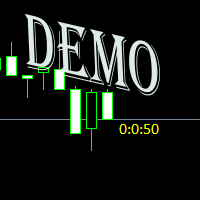
Простая утилита показывающая время до формирования свечи. Может быть очень полезна, если вход в сделку завязан на начале/завершении свечи. Демо версия работает на валюте EURUSD Входные параметры FontColor - Цвет текста. FontSize - Размер текста. FontName - Шрифт текста. TimeOnly - Указывать только время, без дополнительного текста. TypeOfDrawing - Тип отображения информации Важно : возможна задержка в 1 сек.
FREE

The script is intended for synchronization and loading into the Terminal of the desired (or maximum possible) history of quotes of the timeframes specified by the user for the symbols in the "Market Watch" window. The first download of the full history for one "new" symbol takes approximately one and a half to two minutes.
Input parameters for running the script: 1. Desired history length (bars) - here we indicate the number of bars in the quote history that we would like to receive from t
FREE

-- This Utilities is for those using Desktop user want to switch timeframe quickly.
Using Keyboard(1,2,3,4,5) to quick switch TimeFrame 1m,5m,15m,1h,4h
Free to Use.
Once download just drag in to your MT5 Application.
Go to MT5 right click mouse "refresh" will see that indicator where u put.
========================= ENJOY ==================== =====
FREE

This tool plots the following time-based horizontal lines on the DAX Index CFD or futures:
- Daily open - 08:00 Opening (Frankfurt) - 09:00 Opening (Frankfurt spot market) - 10:00 Opening (US equities pre-market open) - 14:00 opening (US morning session open)
Configuration options:
- Colour and width of the lines - Number of days for which the lines should be displayed in the past - Server time offset, as MT5 server times often do not match the trader’s
FREE

Graph the take profit and stop loss levels of closed and open trades. Green rectangles for the take profit zone and red rectangles for the stop loss zone. It updates automatically when opening a trade and extends the rectangle to the last open candle. Useful for analyzing whether the trade limits have been chosen correctly. Its only input parameter is the date from which you want to start graphing, in the format year-month-day.
FREE

Telegram Notification Worker (v5.31) Telegram Notification Worker is a high-performance, professional utility designed to bridge the gap between your MetaTrader 5 terminal and Telegram. It acts as a dedicated background worker that forwards custom alerts, trade events, and system status messages from any of your Expert Advisors (EAs) directly to your Telegram chat or channel. Key Technical Features: Asynchronous Messaging Engine: Unlike standard notification scripts, this worker uses an asynchr
FREE

The MetaTrader 5 script to set TP and SL for all positions during volatile market conditions in the current chart It is able to modify or close Key Features Absolute prices only
Leave as 0.0 if you don't want to change a particular value
No confirmation. The script executes immediately
Current symbol only. The script only affects positions in the chart the script is dragged to Use Cases Emergency exit
Risk management by changing SL and TP of all orders
FREE

Average Range Time mede a amplitude média das barras (volatilidade) dentro de um período de tempo definido pelo usuário. Diferente dos indicadores tradicionais, que calculam a média das últimas barras, ele analisa uma janela de tempo específica, oferecendo uma referência mais precisa da volatilidade daquele período. Pode ser utilizado para definir o range mínimo para operar, posicionar stops e projetar alvos.
FREE

XFChart simplifies trading strategies with customizable options for informed decision-making across various styles, from scalping to position trading.
1. Risk Management: - XFChart offers automatic breakeven and trailing stop features to protect profits and reduce emotional decisions. - Auto Breakeven is disabled by default and can be enabled through the indicator properties window. - The "Auto Trailing Stop Loss" adjusts the stop loss based on market movement, facilitating profit lock
FREE
Conversion of ".set" files created in the MT5 terminal for use in the MT4 terminal. The script is great for cross platform experts.
How to work: place the source files ".set" in the local terminal folder\MQL5\Files run the script the ".set" files for the MT4 terminal appeared in the local terminal folder (the end of the file name "* -MT4.set")
Created on MT5 build 1755 from 18/01/18 Please leave your feedback after using.
FREE

Tetris remains one of the most fun and addictive pieces of software to ever grace the computing scene. That's right, everything that everyone loves about Tetris can now be experienced on MT5 platform. Its beautiful simplicity and surprisingly fast-paced gameplay make it an exceptionally easy thing to just pick up and play on short notice. This version comes with everything everyone loves about Tetris. It has all six of the classic tetrimino shapes, the steadily growing level of challenge tha
FREE

Symbol Carousel EA provides a clear and structured way to monitor all your active trades. The Expert Advisor automatically cycles through all open orders, positions, both or all symbols in the Market Watch and switches the chart symbol accordingly. Each symbol is displayed for a defined amount of time before moving on to the next one, creating a clean and intuitive carousel-style view of your trading activity. This EA is designed purely for visual trade monitoring and does not open, modify, or c
FREE

O Average Range mede a amplitude média das barras dentro de um período definido pelo usuário. Diferente do ATR tradicional, ele não considera gaps . O indicador oferece dois modos de exibição : Apenas Average Range : mostra somente o histograma com a amplitude média das barras. SL e TP : sobrepõe ao histograma os níveis de Stop Loss (vermelho) e Take Profit (verde) calculados a partir do Average Range multiplicado pelos fatores definidos pelo usuário, facilitando o posicionamento de stops e
FREE

This MQL4 code is a custom indicator that draws multiple colored rectangles on a chart, spaced apart by a defined pip distance, and projected into the future. Here's a brief breakdown: Purpose: Draws several horizontal rectangles (zones) starting from a specified price. Rectangles are spaced apart vertically by a pip distance. Colors alternate between FirstColor and SecondColor . Rectangles can be drawn behind candles and optionally filled. Each rectangle extends into the future for a specif
FREE

ManualRecoveryBETrailingXAUUSD is a semi-automatic trade management tool designed to manage positions using a grid-averaging and basket-closure algorithm. This utility can be used for manual trades or in conjunction with other Expert Advisors to handle drawdown recovery. The EA is optimized for high-volatility symbols like XAUUSD (Gold) . Once an initial trade is opened, the EA manages subsequent recovery orders based on user-defined parameters to reach a combined profit target. Technical Featu
FREE

Tele Notify can help you send notifications for opened & closed trades to a Telegram channel or your personal Telegram. (see Master Notify for full options of notifications/alerts: indicator data, price, news, etc. Get more EAs here )
Update: Now you can check your account info anytime from your Telegram by simple command: /check. This option is only valid when you use your Telegram User ID on EA inputs *******************************************************************************************
FREE

SL Maestro - Forex Expert Advisor SL Maestro - Forex Expert Advisor with Advanced Stop-Loss Features Introducing SL Maestro , the ultimate Forex Expert Advisor (EA) designed to enhance your trading strategy by adding stop-losses to existing trades with precision and flexibility. SL Maestro is not just limited to simple pips-based stop-losses; it incorporates a variety of advanced techniques to ensure optimal protection for your trades. Key Features: Pips-Based Stop-Loss : Easily set a stop-loss
FREE

TradeCopier is an application for automated copying of trades for different accounts in MetaTrader 5 terminal with flexible rules of filtering and modification. With TradeCopier, copying, filtering and transformation of trades are realized and processed via the server . It means that copying trades is possible within one or several computers. How can you boost your trading results with TradeCopier? Your convenience and speed Average speed of copying: 100 ms Working with MetaTrader 5 Working with
FREE

Account Guard – Trading Account Protection for MT5 Account Guard is a safety layer for prop firm and funded accounts.
It automatically closes positions at day end and enforces daily loss limits to prevent rule violations and account breaches. Account Guard is designed to protect traders from costly operational mistakes such as forgetting to close positions before the trading day ends or exceeding daily drawdown limits. It does not open trades and does not interfere with your strategy logic — it
FREE

VTB High Watermark Drawdown INFO Indicator for MT5 Advanced Account Monitoring & Drawdown Information Dashboard VTB High Watermark Drawdown INFO is a professional account monitoring indicator designed to display drawdown statistics, account performance, and risk management information directly on the chart. Unlike Expert Advisors, this indicator does not interfere with trading activity. It does not open or close positions, modify orders, or block trading. Its sole purpose is to provide a clear a
FREE

The TradeHistoryParsing is a utility for working with the trade history obtained from the MetaTrader 5 terminal. The product is based on the " RegularExpressions in MQL5 " library. It allows to quickly get the required data on your trading history. The filtering results are displayed as a table, a summary of mathematical statistics is provided below the table.
Working with the tool Export the trade report as an html file and place it into the "sandbox". After that, when launching the EA, specif
FREE

This indicator get all events/countries/values from metatrader terminal calendar and print veritical lines at chart, you can configure anything with inputs (string to filter names/url/code/countries/currencies), select period to filter, nws interval before and after current time (every information about time is seconds based), you can filter importance, type, sector, unit, multiplier, impact, timemode, frequency, forecast/previous % increase/decrease interval, actual/previous % increase/decrease
FREE

The utility opens an order in the opposite direction from already open positions on the currency pair on which it is launched, creating a lock of orders. The utility has a simple interface and is easy to use. MT4 version of the utility - https://www.mql5.com/en/market/product/78127 If you like this utility, take a look at my other products - https://www.mql5.com/en/users/nina_yermolenko/seller
FREE

you can close all your positions in profit or lost when you use this robot. 1.you set your max profit and max lost for all your positions. 2.the robot show you in a window beside your chart. 3.when your equity reach your target close all your positions. 4.you can use one of them or both (profit or lost)togather. 5.this robot close all your positions. ((if you have any idea or want somthing i can help you)) i hope you win in all your times of life. best regard
FREE

This system is a semi- automatic trend following system that operates during the days of highest probable market volatility aiming to capitalize on major retracements and reversals that occur midweek. It can operate on full autopilot, act as just a signal generator, or any customized user preference based on the needs of the user and the functionality of the program. It is capable of risk management with an inbuilt lot size calculator with adjustable risk pecentage to suit the user's unique apet
FREE

Indicador que calcula e exibe dois níveis de preço: o preço médio das posições atualmente abertas e o preço de cobertura, definido como o preço necessário para zerar ou manter o lucro acumulado em determinado período. O cálculo do preço médio considera o volume e o preço de entrada das operações abertas, enquanto o preço de cobertura é ajustado dinamicamente conforme o lucro ou prejuízo realizado e não realizado no período analisado.
Versão MT4: https://www.mql5.com/pt/market/product/139409
FREE

- Download historical rates via `CopyRates()` for many symbols and timeframes. - Works with Market Watch symbols or explicit symbol list. - Optional CSV export into the terminal `Files` folder (per symbol/timeframe). - Configurable retries, pause and exponential backoff. - Verbose logging and progress comments for convenience.
## Usage 1. Copy `AutoHistoryDownloader_mq5.mq5` into `MQL5/Scripts` or open in MetaEditor. 2. Attach / run the script from the Navigator (Scripts). 3. Configure inputs:
FREE

"Twits Price speedometer" is an indicator designed to measure current "speed" and directional efficiency of price movement in real time. It has been developed as an Expert Advisor (EA) because it reacts to every incoming tick, making it independent from traditional chart time frames and capable of analyzing markets with extremely high precision, even at the level of individual ticks or milliseconds. The operating principle is simple yet highly effective. Within a user-defined analysis window (fo
FREE

input double MaxDailyLoss = 500.0; // Maximum floating loss in account currency input double SafetyBufferMoney = 10.0; // Trigger at MaxDailyLoss - SafetyBufferMoney input int CheckEverySeconds = 2; input bool is_debugged = false; // Print additional messages in the Terminal
input bool is_Closing_All_Positions = false; // if false for each open position, each new reversed position with the same symbol & lot size will be opened.
This EA will then remove itself from the Chart
FREE

A manual trading tool that places buy, sell, stop, and limit orders. Easily configure your settings for risk, take profit, stop loss, break-even, and trailing stops. It works in any timeframe and serves as a highly reliable tool for manual trading. Settings can be changed easily right on the panel—no more clicking the small Expert Advisor icon in the corner of the screen.
FREE

Portfolio Aggregator - one dashboard, total clarity across all your trading accounts Portfolio Aggregator unifies account data from multiple brokers and currencies into a single, transparent dashboard, giving real-time visibility into equity, margin, P&L, and risk metrics so traders can maintain control and confidence across diversified strategies. It converts all values into a chosen base currency using live FX rates, and displays equity, balance, unrealized P&L, margin usage, and open position
FREE

Le Confluence Timer Core est un indicateur multi-unité de temps de niveau institutionnel conçu pour MetaTrader 5 (MT5), qui calcule et affiche des minuteurs de compte à rebours en temps réel sur des échelles de temps sous-horaires, intrajournalières et macro (de M1 jusqu'au mensuel MN1, les unités de temps supérieures — HTF — commençant strictement à partir de H1). Il intègre des modes d'actifs avancés (Forex Standard, Or Standard et un mode spécialisé « Gold Shifted » ancré à 01:00 avec une cou
FREE

Main Features Automatically closes open positions at a specified time. Symbol filter: close positions only for a selected instrument (or leave blank to affect all). Magic number filter: close only positions with the specified magic number (or all, if set to -1). Displays operational status and parameters directly on the chart . ...and many other interesting features
FREE

Noetrix Guard
## Risque du compte et actions de protection dans un seul tableau de bord MT5
Noetrix Guard réunit la surveillance du risque, les limites de trading configurables et les actions de protection dans une interface native MetaTrader 5. Il est conçu pour les traders manuels, les portefeuilles automatisés et les comptes d'évaluation qui souhaitent visualiser clairement leur risque sans modifier leur stratégie de trading.
Il suffit d'attacher Guard à un seul graphique pour surveiller
FREE

Script Universal Counter is a utility script for the MetaTrader 5 terminal designed to instantly count the number of bars (candlesticks) within a specified historical range. Key Features: Timeframe Selection: Supports all 21 standard MT5 timeframes (from M1 to MN1) via a drop-down menu. Precise Dates: Allows you to set the exact start and end time of the calculation period. Convenient Output: Automatically displays the total bar count in a pop-up window (Alert) and duplicates detailed informatio
FREE

Pairs Navigator is a simple and easy-to-use tool that allows you to view all of your charts in a single window. This eliminates the need to open multiple charts from the Market Watch window, saving you time and effort. Pairs Navigator is also very lightweight, so it will not put a strain on your RAM or cause your MT4/5 platform to hang. To use Pairs Navigator, simply drag and drop the currency pairs you want to view into the Pairs Navigator window. You can then easily switch between charts by
FREE

EA Manager RP is a simple yet powerful tool that can help protect your account from other EA's that don't have the features. This came about because I personally use a 3rd party EA for trading but it just doesn't have all the bells and whistles so this was my work around and it works great. I started off with a fully automated EA but unfortunately we can't have DLL imports here so this is the next best thing. What this EA does: Add a start and stop time Maximum open trades Days of the week you w
FREE

Description The indicator based on Average True Range (ATR) is designed to accurately determine the possible range of price fluctuations on a selected timeframe. This tool is ideal for both beginner traders and experienced professionals looking to effectively plan their trades. Key Features: Displays possible price fluctuation levels on the chart, simplifying visual analysis. Utilizes the power of the ATR algorithm to calculate precise volatility values. Adapts to any timeframe, providing releva
FREE

You only need to load this EA into a single chart. Key Features Session Lockdown Blocks ALL trades outside London/NY sessions Instant position closing at session end NEW: Pre-close alerts (configurable minutes before session end) Smart Daily Limits Profit Target: Set $ or % goals to lock in gains Loss Limit: Hard-stop protection against bad days NEW: Choose between Balance (closed P&L) or Equity (including floating P&L) Dual-Layer Protection Prevention: Stops orders before execution Elimination
FREE

Trade With Price is a powerful and user-friendly MetaTrader 5 Expert Advisor designed to simplify and accelerate your trading execution. This EA provides a smart one-click trading panel that allows traders to instantly place BUY, SELL, and pending orders directly at the current market price—eliminating the need to calculate distances in pips. Key Features One-click BUY & SELL execution Place pending orders based on market price instead of pips Clean and intuitive trading panel interface
FREE

Connector Solutions Binance is a utility program for copying trades on the Binance exchange.
It will be helpful if you trade in MetaTrader 5 but want your trades to be placed on a cryptocurrency exchange like Binance.
Connector Solutions Binance copies trades from the demo account placed through MetaTrader 5 (on this demo account must be cryptocurrencies with which you want to work).
This version of Connector Solutions Binance is free and, therefore, only works with AAVEUSDT so that you can
FREE
Cet utilitaire vous aidera à éviter de perdre de l'argent sur vos transactions lorsque votre terminal perd la connexion avec le courtier ou que votre VPS/ordinateur entre en mise à jour et n'ouvre pas automatiquement votre client MetaTrader après la mise à jour. En quoi ce produit est-il différent des autres alertes de déconnexion ? Celui-ci vous enverra un e-mail et/ou un SMS même lorsque votre client MetaTrader est déconnecté d'Internet ou ne répond pas ! Votre client est surveillé en externe
FREE

Script for deleting pending orders If you need to delete all pending orders you placed, this script will do it for you! It doesn't have any input parameters. Allow AutoTrading before running the script. Usage:
Run the script on a chart. If you need a possibility to adjust parameters of the script, use the version with input parameters https://www.mql5.com/en/market/product/627 You can download MetaTrader 4 version here: https://www.mql5.com/en/market/product/2782
FREE

Breakup ZeeAM Khan Advanced multi-timeframe breakout Expert Advisor based on a proprietary higher-timeframe pattern and lower-timeframe confirmation system. Features dynamic lot sizing, multi-target profit management, break-even automation, momentum filtering, and fully customizable risk controls. This is the Best for All Brokers. Contact for Set Files or See the Screen Shots
WhatsApp: Text only +447716409196
Best for XAUUSD on All Brokers Key Features Proprietary Multi-Timeframe Strategy Det
FREE
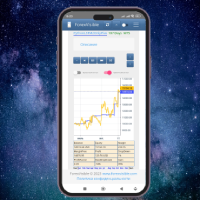
This client utility is intended for sharing and copying signals, as well as for monitoring your Expert Advisor on the site https://forexvisible.com . The Android version of the site can be downloaded here The version for the MT4 terminal can be downloaded here https://www.mql5.com/en/market/product/106509 There are many reasons to use this application in your trading, and these are: 1. If you have many trading advisors and many accounts, it is very difficult to track them and monitor everythin
FREE

Overview The script displays information about the trade account: Information about the trade account: Account - account number and type (Real, Contest or Demo); Name - name of the account owner; Company - name of a company that provide the access to trading; Server - trade server name; Connection State - connection state; Trade Allowed - shows whether trading is allowed on the account at the moment; Experts Allowed - shows whether it is allowed to trade using Expert Advisors; Balance - account
FREE

Stop guessing your performance. Track your wins and losses instantly, directly on your charts! As traders, keeping an accurate, real-time pulse on our psychological and execution performance is key to staying disciplined. DaBhoza Win Rate Tracker is a lightweight, intuitive, and highly visible on-chart utility designed to help you log and monitor your trade outcomes manually with a single click. Whether you are testing a new manual strategy, practicing on a demo account, or keeping track of your
FREE

Simple countdown indicator for the next candle. Only claim is to be light! The indicator inserts a text object to the right of the current price and calculates how much time is left for the new bar, showing this to the trader. Leave your comment if the indicator helped you in any way! If you have any suggestions, let me know to evaluate the improvements. Success and Good Trades!
FREE
Botti Tools features
1 - Automatically places Take Profit and Stop Loss values, previously defined, in Pending Orders and in Market Positions
2 - Based on the amount of Stop Loss points defined and the specified monetary value it calculates what volume should be used for that order.
3 - After X points he puts the order on breakeven
4 - It cancels the Take Profit at X points away from it and places the Stop Loss in such a way as to guarantee Y gain points
5 - If the fourth option is selecte
FREE
MetaTrader Market - les robots de trading et les indicateurs techniques pour les traders sont disponibles directement dans votre terminal de trading.
Le système de paiement MQL5.community est disponible pour tous les utilisateurs enregistrés du site MQL5.com pour les transactions sur les Services MetaTrader. Vous pouvez déposer et retirer de l'argent en utilisant WebMoney, PayPal ou une carte bancaire.

Vous manquez des opportunités de trading :
- Applications de trading gratuites
- Plus de 8 000 signaux à copier
- Actualités économiques pour explorer les marchés financiers
Inscription
Se connecter
Vous acceptez la politique du site Web et les conditions d'utilisation
Si vous n'avez pas de compte, veuillez vous inscrire