Taras Slobodyanik / Perfil
- Información
|
10+ años
experiencia
|
60
productos
|
240
versiones demo
|
|
629
trabajos
|
0
señales
|
0
suscriptores
|
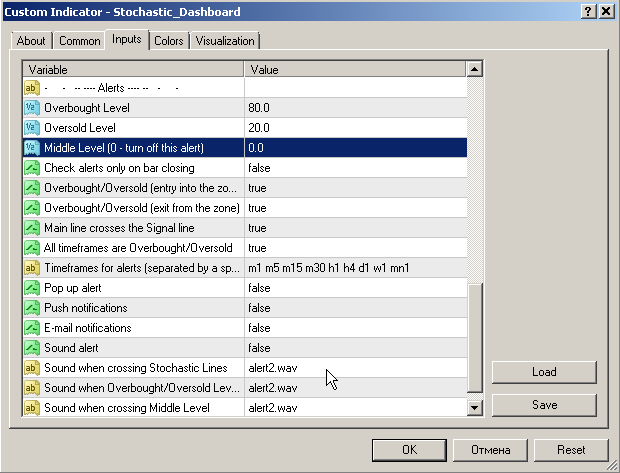
1) Added third level check - Medium level (only alert).
2) Added a choice of sounds for each type of sound alert.
------------------------------------------------------------
Dashboard Stochastic Multicurrency (обновление 2.7)
1) Добавлена проверка третьего уровня — Средний уровень (только алерт).
2) Добавлен выбор звуков для каждого типа звукового алерта.
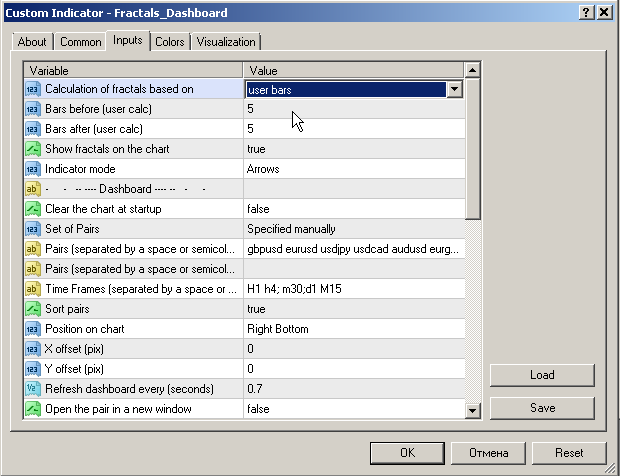
1) Added calculation of fractals by custom number of bars.
------------------------------------------------------------
Fractals Dashboard (обновление 1.8)
1) Добавлен расчет фракталов по пользовательскому количеству баров.
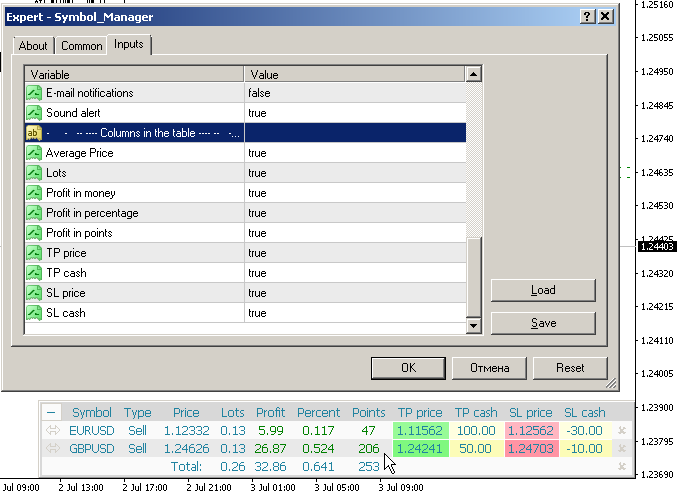
1) Added options for hiding / showing columns in the table.
2) Added column "Points", showing the profit in points.
3) Added column "Percent", showing the percentage of profit from the current balance.
4) Fixed error calculating profits on indices.
------------------------------------------------------------
Symbol Manager
1) Добавлены параметры для скрытия/показа колонок в таблице.
2) Добавлена колонка "Points", показывающая прибыль в пунктах.
3) Добавлена колонка "Percent", показывающая процент прибыли от текущего баланса.
4) Исправлена ошибка подсчета прибыли на индексах.
El Tetris - el más famoso mata-tiempo está ahora en MT. El juego desarrolla la lógica activa, la atención y la rapidez en la toma de decisiones. Esta es una versión clásica del juego, sin florituras, pero todavía se puede ajustar el tamaño del cristal, la escala del juego, el color de las figuras, y la velocidad deseada. El juego está hecho como un indicador. Teclas de control: 'WASD' o 'Cursor' o 'NUMPAD'. S - Empezar nueva partida. C - Continuar juego anterior. P - activar / desactivar la
El Tetris - el más famoso mata-tiempo está ahora en MT. El juego desarrolla la lógica activa, la atención y la rapidez en la toma de decisiones. Esta es una versión clásica del juego, sin florituras, pero todavía se puede ajustar el tamaño del cristal, la escala del juego, el color de las figuras, y la velocidad deseada. El juego está hecho como un indicador. Teclas de control: 'W,A,S,D' o 'Cursor' o 'NumPad'. S - Empezar nueva partida. C - Continuar juego anterior. P - activar / desactivar la
Modificación multidivisa y multitemporal del indicador Bandas de Bollinger. En el tablero puedes ver rupturas y toques de las Bandas de Bollinger. En los parámetros puede especificar las monedas y plazos que desee. El indicador también puede enviar notificaciones cuando el precio toca las Bandas de Bollinger, cuando la volatilidad actual cambia (se expande o cae) y cuando el precio toca todas las bandas. Al hacer clic en una celda con un punto, se abrirá este símbolo y punto. Este es el escáner
1) Added the option "Change the opening of bars". Now you can see the virtual candles.
------------------------------------------------------------
Levels of Timeframes (обновление 2.10)
1) Добавлен параметр "Изменить открытие баров". Теперь вы можете видеть виртуальные свечи.
Symbol Manager o Grid Manager, diseñado para agrupar órdenes en una posición (por Símbolo o por Número Mágico). Esta utilidad será útil para los traders multidivisa (muchos EAs), que pueden tener múltiples órdenes en varios pares. Podrá ver el número total de lotes, el beneficio total, y establecer stop loss y take profit virtuales. Para establecer un TP (o SL) real, primero debe establecer el valor virtual, y luego introducir el comando en esta celda: "Si desea establecer un TP/SL real para
1) Separate settings for alerts so that you can disable each separately.
------------------------------------------------------------
Dashboard Stochastic Multicurrency (обновление 2.4)
1) Отдельные настройки для оповещений, чтобы вы могли отключить каждое по отдельности.
1) Added visualization options to hide the Square on the specified periods of the chart.
------------------------------------------------------------
Gann Square of 144 (обновление 2.6)
1) Добавлены параметры отображения, для скрытия Квадрата на заданных периодах чарта.
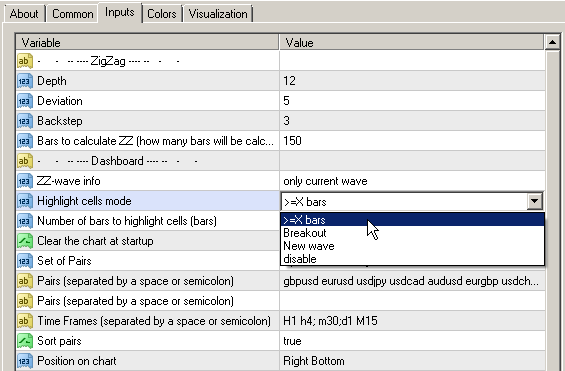
1) Added cell highlighting if the number of bars in the wave >= X bars.
2) Added alert if the number of bars in the wave >= X bars.
------------------------------------------------------------
1) Добавлена подсветка ячеек если количество баров в волне >=Х баров.
2) Добавлен алерт если количество баров в волне >=Х баров.
1) Changed the alert algorithm when the indicator starts.
When the symbol (period) is switched, there will be no alert, but if a new intersection occurs on the current bar, the alert will appear immediately.
------------------------------------------------------------
Обновление панелей (RSI / CCI / Stochastic)
1) Изменен алгоритм алертов при запуске индикатора.
При переключении символа (периода) не будет алерта, но если произойдет новое пересечение на текущем баре, то алерт появится тут же.
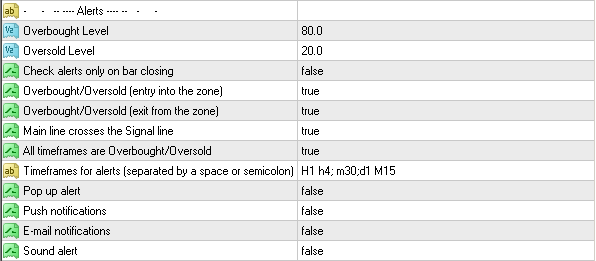
1) Added periods for alerts - "Timeframes for alerts".
2) Added parameter for clearing the chart at startup - "Clear the chart at startup".
3) Added center alignment of the panel - "Centered".
4) Added offsets for the panel - "X offset (pix)" and "Y offset (pix)".
5) Reverse the order of pairs of "Market Watch" without sorting.
------------------------------------------------------------
Dashboard RSI Multicurrency (MT4 & MT5) (обновление 1.8)
1) Добавлены периоды для алертов - "Timeframes for alerts".
2) Добавлен параметр для очистки чарта при старте - "Clear the chart at startup".
3) Добавлено выравнивание панели по центру - "Centered".
4) Добавлены смещения для панели - "X offset (pix)" и "Y offset (pix)".
5) Перевернут порядок пар для "Market Watch" без сортировки.
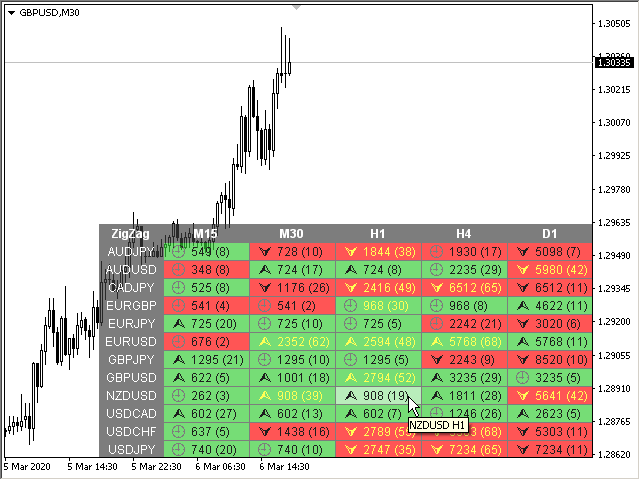
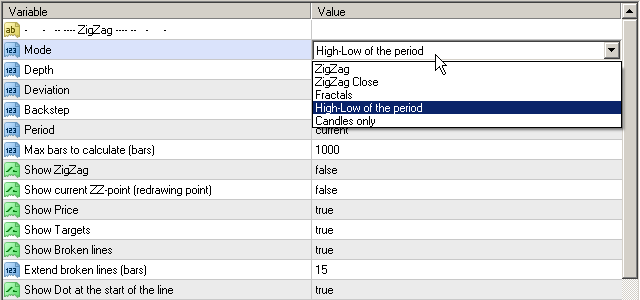
1) Added a new mode "High-Low of the period".
2) Code optimization.
------------------------------------------------------------
ZigZag Lines MTF (MT4 & MT5) (обновление 3.5)
1) Добавлен новый режим "High-Low of the period".
2) Оптимизация кода.
1) Added parameter: "Check Lines crossing only in OB/OS zones".
------------------------------------------------------------
Dashboard Stochastic Multicurrency (обновление 2.0)
1) Добавлен параметр: "Определять пересечение Линий только в зонах Перекупленности/Перепроданности".
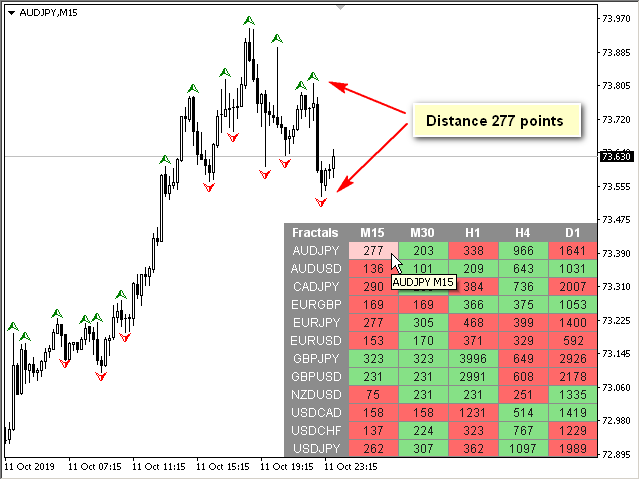
1) Added a new indicator mode: Distance between fractals.
2) Code optimization.
------------------------------------------------------------
Fractals Dashboard (обновление 1.3)
1) Добавлен новый режим индикатора: Дистанция между фракталами.
2) Оптимизация кода.
1) Added the crossing of the Main line and the Signal line (display in the table and alert).
------------------------------------------------------------
Dashboard Stochastic Multicurrency (обновление 1.9)
1) Добавлено пересечение Основной линии и Сигнальной линии (отображение в таблице и алерт).
Este es un indicador multidivisa y multitiempo que calcula el ángulo entre dos puntos. Los puntos para medir el ángulo pueden tomarse del ZigZag (los dos últimos puntos), o de la Media Móvil (entre dos barras dadas), o pueden ser los precios de cierre de las barras. La medición del ángulo es posible en grados o en radianes. Puede seleccionar la escala para el cálculo. Para una mejor comprensión del indicador, puede estudiar el indicador gratuito Angle High Low . En los parámetros puede