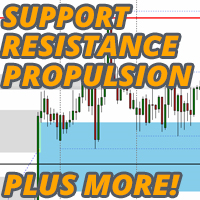
Support Resistance Propulsion Targets
35 USD
Descargado demo:
357
Publicado:
20 abril 2023
Versión actual:
1.30
¿No ha encontrado el robot adecuado?
Encargue el suyo
en la bolsa Freelance.
Pasar a la bolsa
Encargue el suyo
en la bolsa Freelance.
Cómo comprar un robot comercial o indicador
Inicia el robot en el
hosting virtual
hosting virtual
Pruebe un indicador/robot comercial antes de comprarlo
¿Quieres ganar en el Market?
Cómo ofrecer un producto para que lo compren

Está perdiendo oportunidades comerciales:
- Aplicaciones de trading gratuitas
- 8 000+ señales para copiar
- Noticias económicas para analizar los mercados financieros
Registro
Entrada
Usted acepta la política del sitio web y las condiciones de uso
Si no tiene cuenta de usuario, regístrese
Dear Author, just bought I like it, see pic the symbol and text note overlap, please help add a gap option field between the symbol and comment note
so that we can increase gap size to resolve the issue, the comment note is super good very helpful we can add our own note to the chart now, Excellent I like this comment note feature very very much, Thanks and looking forward to 2 thing:
1. MT5 version
2. please add gap option for symbol and comment note
Big Thank you for this super useful tool, luv it!
Dear Author, just bought I like it, see pic the symbol and text note overlap, please help add a gap option field between the symbol and comment note
so that we can increase gap size to resolve the issue, the comment note is super good very helpful we can add our own note to the chart now, Excellent I like this comment note feature very very much, Thanks and looking forward to 2 thing:
1. MT5 version
2. please add gap option for symbol and comment note
Big Thank you for this super useful tool, luv it!
I suspect you are using a high resolution monitor there. Fix for text overlaps due to scaling issues with your monitor can be achieved using this method here: https://www.youtube.com/watch?v=3T3XZDy5Vk0
Will look at an option to maybe put a distance in though in the next update. Thanks for pointing out. ;)
I suspect you are using a high resolution monitor there. Fix for text overlaps due to scaling issues with your monitor can be achieved using this method here: https://www.youtube.com/watch?v=3T3XZDy5Vk0
Will look at an option to maybe put a distance in though in the next update. Thanks for pointing out. ;)
Thanks Author but my vps provider resolution is fix
unable to change also I prefer current resolution
so the best solution is to put a distance in next update for below 2 items:
=-=-=-=-
1. yes please very much please help add this put distance option it will helps alot :)
2. also please make MT5 waiting....
=-=-=-=-
Big Thank you once again and looking forward to above 1+2 soon.....can't wait to start hah....
Thanks Author but my vps provider resolution is fix
unable to change also I prefer current resolution
so the best solution is to put a distance in next update for below 2 items:
=-=-=-=-
1. yes please very much please help add this put distance option it will helps alot :)
2. also please make MT5 waiting....
=-=-=-=-
Big Thank you once again and looking forward to above 1+2 soon.....can't wait to start hah....
ah yes beside the put distance for item 1 above, please add another put distance for item 2 above see pic, also overlap as I prefer to display
the candle pip, candle timer and spread all on lower right but now all 3x info overlap so a put distance option will helps alot, also can you please
add a spread option field to display the spread value also allow us to place the spread detail on the lower right and include distant option for spread also, as above looking forward to the next update soon.... Thanks so much again :)
Thanks Author but my vps provider resolution is fix
unable to change also I prefer current resolution
so the best solution is to put a distance in next update for below 2 items:
=-=-=-=-
1. yes please very much please help add this put distance option it will helps alot :)
2. also please make MT5 waiting....
=-=-=-=-
Big Thank you once again and looking forward to above 1+2 soon.....can't wait to start hah....
This is a scaling issue, not the indicator. Your VPS provider does not have this issue either, it is the machine you connect to the VPS from.
Please research online, not an issue with the indicator and does not need fixing, but will consider an update in the future. You can fix now though with the link I have supplied.
oh Thanks Author has just try your video fix scaling to check on the box for dpi but doesn't work see above now my screen become blurish, so hope you can add the put distance soon, see the candle timer still overlap... and my screen now is blurish oops, upon I revert back again everything will overlap so really hope you can add put distance option for all value above okie please help Thanks so much :)
oh Thanks Author has just try your video fix scaling to check on the box for dpi but doesn't work see above now my screen become blurish, so hope you can add the put distance soon, see the candle timer still overlap... and my screen now is blurish oops, upon I revert back again everything will overlap so really hope you can add put distance option for all value above okie please help Thanks so much :)
Glad it's fixed it though and look percent now as it does on normal terminals.
Dear Author,
I've just purchased this indicator. However, I have a suggestion. Can you make an update so that we have the ability to set different color for the PrevDaily H/L?
Hello Lee, Facing this issue.
Probably trying to do calculations on data you dont have, try reducing the propulsion gap lookback from 1500 to something like 100 or so.
Probably trying to do calculations on data you dont have, try reducing the propulsion gap lookback from 1500 to something like 100 or so.
Thanks, did the change. It works now.
Hi Lee,
I love this indicator.
Can I ask a favor, please. One of the options "Bars back to show gaps" I change to a small value from the default 1500 but those gaps outside the period do not disappear automatically only after I click on the indicator then Edit and then OK. Can you fix this issue, please.
I appreciate your help.
Regards, Robert
Hi Lee
This is a great indicator. Will it be possible to add an option of Multi-timeframe for the propulsion gaps?
Regards
Andre