EA Morpheus MT5
110 USD
Descargado demo:
1 444
Publicado:
3 septiembre 2020
Versión actual:
6.23
¿No ha encontrado el robot adecuado?
Encargue el suyo
en la bolsa Freelance.
Pasar a la bolsa
Encargue el suyo
en la bolsa Freelance.
Cómo comprar un robot comercial o indicador
Inicia el robot en el
hosting virtual
hosting virtual
Pruebe un indicador/robot comercial antes de comprarlo
¿Quieres ganar en el Market?
Cómo ofrecer un producto para que lo compren

Está perdiendo oportunidades comerciales:
- Aplicaciones de trading gratuitas
- 8 000+ señales para copiar
- Noticias económicas para analizar los mercados financieros
Registro
Entrada
Usted acepta la política del sitio web y las condiciones de uso
Si no tiene cuenta de usuario, regístrese
-----------------------------------------------------------------------------------------------------------------------------------------------------------------------------------------
EA can show to you not suitable trading cost, so you can save money before you start trading on high volume with not suitable broker.
File \ Open Date Folder \ MQL5 \ Files \ EA Morpheus[ Spread+Commissions+Slippages] \ "name your server".
-----------------------------------------------------------------------------------------------------------------------------------------------------------------------------------------
-----------------------------------------------------------------------------------------------------------------------------------------------------------------------------------------
EA can show to you not suitable trading cost, so you can save money before you start trading on high volume with not suitable broker.
File \ Open Date Folder \ MQL5 \ Files \ EA Morpheus[ Spread+Commissions+Slippages] \ "name your server".
-----------------------------------------------------------------------------------------------------------------------------------------------------------------------------------------
Hi Ruslan!, I do not find this panel with the trading cost...
This file is empty:
File \ Open Date Folder \ MQL5 \ Files \ EA Morpheus[ Spread+Commissions+Slippages] \ "name your server".
Thank you!
Hi Ruslan!, I do not find this panel with the trading cost...
This file is empty:
File \ Open Date Folder \ MQL5 \ Files \ EA Morpheus[ Spread+Commissions+Slippages] \ "name your server".
Thank you!
Hi,
I do not find this panel with the trading cost...
Information on the slippage PANEL will appear after 10 or more trades.
This file is empty:
File \ Open Date Folder \ MQL5 \ Files \ EA Morpheus[ Spread+Commissions+Slippages] \ "name your server".
Information about each deal is recorded in the text file.
Most likely you did not have any open trades.
Hi,
Information on the slippage PANEL will appear after 10 or more trades.
Information about each deal is recorded in the text file.
Most likely you did not have any open trades.
Ok, thank you!
Not looking good this far :(
Got the exact same setup as you.
Not looking good this far :(
Got the exact same setup as you.
Do you have an ECN account from zero spread ?
Do you have an ECN account from zero spread ?
Yes, IC Markets SC, VPS 3ms, my trades match your signals, so just not lucky this week
Yes, IC Markets SC, VPS 3ms, my trades match your signals, so just not lucky this week
Let EA work for a few weeks.
Can you add fixed Stop loss and fixed Take profit ( or disable trailing stop option )?
yes, you can, but keep in mind that an average spread is added to the SL. ( this option cannot be disabled via settings)
For TP, the average spread is not added.
( or disable trailing stop option )?
yes, you can, but keep in mind that an average spread is added to the SL. ( this option cannot be disabled via settings)
For TP, the average spread is not added.
disabling the Trailing Stop:I set fixed stoploss and take profit as 30, pair EURCHF, M5, and the backtest result is below, if we invert the order, it can be win. so pls add invert option :(((.
I set fixed stoploss and take profit as 30, pair EURCHF, M5, and the backtest result is below, if we invert the order, it can be win. so pls add invert option :(((.
It's impossible.
The EA was created as a breakout and everything is sharpened under the breakout algorithm.
Take advantage of this product it uses a similar breakout algorithm with reverse orders: https://www.mql5.com/ru/market/product/20189
It's impossible.
The EA was created as a breakout and everything is sharpened under the breakout algorithm.
Take advantage of this product it uses a similar breakout algorithm with reverse orders: https://www.mql5.com/ru/market/product/20189
I only use MT5, i will check if u have MT5 version
There is no version for MT5.
I purchased EA Morpheus MT5, and I used it in my real account. I have questions below:
Is it okay to use (1) EA Morpheus into two chart with each has different magic number?
Is it okay to set max spread value of 15, and max slippage value of 10?
I am experiencing multiple consecutive losses on my real account using the EA Morpheus MT5. Maybe my settings is not correct. I set risk mm value of 5% per each chart, using only one EA Morpheus MT5 on single instance of MetaTrader 5.
Hidden SL and TP does not work. Is there any ways to fix this.
Hello Ruslan Pishun,
I purchased EA Morpheus MT5, and I used it in my real account. I have questions below:
Is it okay to use (1) EA Morpheus into two chart with each has different magic number?
Is it okay to set max spread value of 15, and max slippage value of 10?
I am experiencing multiple consecutive losses on my real account using the EA Morpheus MT5. Maybe my settings is not correct. I set risk mm value of 5% per each chart, using only one EA Morpheus MT5 on single instance of MetaTrader 5.
Hi,
Is it okay to use (1) EA Morpheus into two chart with each has different magic number?
yes.
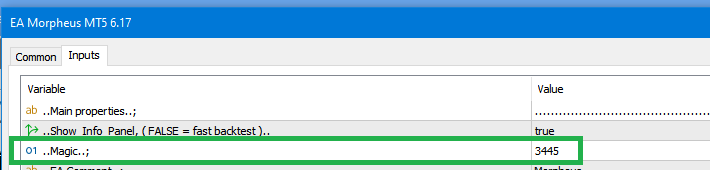
Is it okay to set max spread value of 15, and max slippage value of 10?
yes.
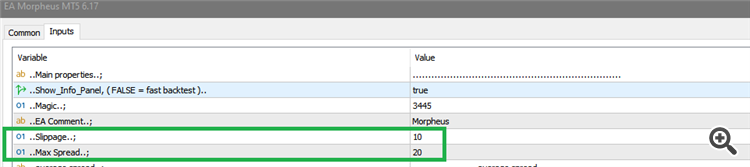
Hidden SL and TP does not work. Is there any ways to fix this.
yes.

Hi,
yes.
yes.
yes.
Hello,
Thanks for letting me know. I set wrong parameters that's why I am making losses on my real account. Finally, I am able to set the right parameters. Thanks Ruslan.
I used your Morpheus EA in real account. I takes a lot of losses. I already stop the ea after 10% loss. Morpheus EA does not support non-ECN broker, but when I used it in an ECN broker it takes fewer losses but still a risky strategy.
Hello Ruslan,
I used your Morpheus EA in real account. I takes a lot of losses. I already stop the ea after 10% loss. Morpheus EA does not support non-ECN broker, but when I used it in an ECN broker it takes fewer losses but still a risky strategy.
Hi,
EA in real account. I takes a lot of losses. I already stop the ea after 10% loss.
There are also economically bad months where EA does not get good breakouts and may be slightly in the red at the end of the month.
A does not support non-ECN broker
For example: weltrade has a low spread and no commission, "Account PRO".