CAP Gold Albatross EA MT5

30 USD
El autor ha sido privado del derecho a vender los productos
Descargado demo:
51
Publicado:
5 abril 2019
Versión actual:
4.9
¿No ha encontrado el robot adecuado?
Encargue el suyo
en la bolsa Freelance.
Pasar a la bolsa
Encargue el suyo
en la bolsa Freelance.
Cómo comprar un robot comercial o indicador
Inicia el robot en el
hosting virtual
hosting virtual
Pruebe un indicador/robot comercial antes de comprarlo
¿Quieres ganar en el Market?
Cómo ofrecer un producto para que lo compren

Está perdiendo oportunidades comerciales:
- Aplicaciones de trading gratuitas
- 8 000+ señales para copiar
- Noticias económicas para analizar los mercados financieros
Registro
Entrada
Usted acepta la política del sitio web y las condiciones de uso
Si no tiene cuenta de usuario, regístrese
What is the recommended timeframe ?
M1
Good Morning,
Thank you very much for publishing GOLD ALBATROSS for free !
I apologise for my questions which are those of a Newbei. Thank you again for your generosity and your help.
Good Morning,
Thank you very much for publishing GOLD ALBATROSS for free !
I apologise for my questions which are those of a Newbei. Thank you again for your generosity and your help.
Hi you must add http://ec.forexprostools.com and https://time.is/UTC here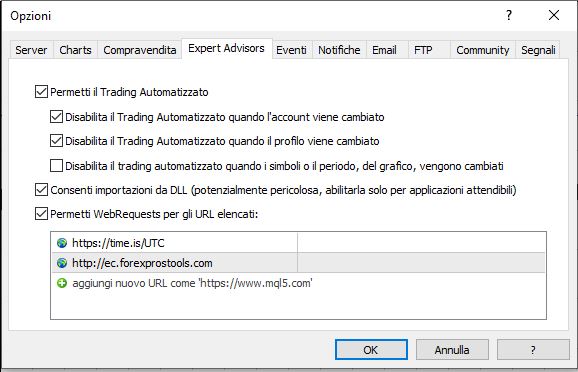
Hi Giordan,
Thank you very much for your kindness and your instruction I followed immediately.
May I ask you if you use this bot yourself ? I would be glad to inform you about my results.
For the moment being the bot doesn't take any position. My demo account is with MQL5.
Sincerely, Yours
Hello,
I'm most interested to join a group for discussion on this EA (which still doesn't take any position).
My e-mail is: hvluthy@sunrise.ch
Dear Mohammad Ali,
Would you be good enough telling me what could be the reason for non-entering the market although I fixed my error about URL. All other settings are default parameters.
I am eager watching your EA on my demo account MQL5 !
Thank you !
Same with me. Tested on EURUSD on M1 and not a single position open.
Checked URLs and also suggested "trade signal" option. Even at 50 no opened positions.
The EA does not seem to keep the setting for back test. it resets back to the default as soon as I switch tabs. For example, I go to the Inputs tab (MT5) and set the LotSize to "Equity Percentage". I switch tabs to Settings, and then back to Inputs, the value of LotSize has reset to the default of Fixed Lotsize. Same for other parameters. I tried saving, saving to a file, loading to a file, same behavior. This is on a VM, connected to an FxChoice demo account. The same functionality works on a different PC, still MT5, connected to a Meta Quotes demo account.
Any ideas why the settings reset?
Thanks!
Saving/Restoring Input values/Parameters into a *.set doesn't work (tester). thanks
The EA does not seem to keep the setting for back test. it resets back to the default as soon as I switch tabs. For example, I go to the Inputs tab (MT5) and set the LotSize to "Equity Percentage". I switch tabs to Settings, and then back to Inputs, the value of LotSize has reset to the default of Fixed Lotsize. Same for other parameters. I tried saving, saving to a file, loading to a file, same behavior. This is on a VM, connected to an FxChoice demo account. The same functionality works on a different PC, still MT5, connected to a Meta Quotes demo account.
Any ideas why the settings reset?
Thanks!
Can you give me any screenshot with this problem. Please PM me