GW CRT Candle Range Theory
- Experts
- Version: 3.1
- Updated: 9 September 2026
- Activations: 5

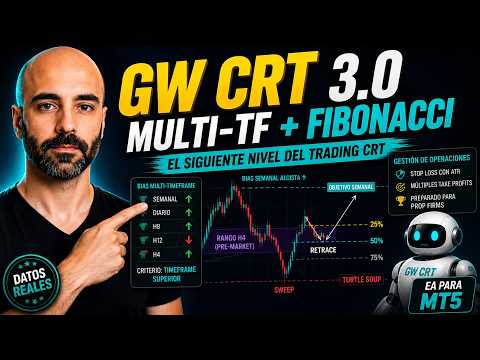
GW CRT is an Expert Advisor for MetaTrader 5 based on Candle Range Theory (CRT), a liquidity pattern from the ICT / Smart Money Concepts approach: a false breakout of a session range, a reclaim of the range, and an entry on the retrace, trading against the initial breakout.
It is not a high-frequency or scalping system. It trades at most once a day per symbol, and only when the full pattern is confirmed — it prioritizes signal quality over trade frequency.
I built this EA because the CRT pattern has become very popular within the ICT / Smart Money Concepts space, but it's rarely accompanied by verifiable backtests — it's claimed that "this is how it's traded," and that claim is backed by the appearance of success and lifestyle of whoever teaches it, not by data. With the EA GW CRT Candle Range Theory I wanted to give the community a direct way to trade the pattern automatically, without having to go through the whole design and coding process, with the test results laid out on the table instead of plain claims.
How it works
- Session (configurable time range) — during the window you define (for example, the London or New York open), the EA builds the CRT-High / CRT-Low range from the highs and lows of the chosen analysis timeframe.
- Breakout + reclaim (two separate candles, not a single wick) — a candle must break outside the range, and a later candle must close back inside without crossing the midpoint. This confirms the direction of the pattern. Breakout confirmation is configurable: a candle close beyond the level (default, filters out simple rejection wicks) or its high/low beyond the level (looser, earlier trigger).
- Reclaim level, two modes — the full CRT range (default) or a Fibonacci percentage of the swept range (e.g. 50%), so you can require a shallower or deeper reclaim before the setup is considered valid.
- Retrace → entry — price must return to touch (or close beyond, depending on the mode chosen) the swept level before the trade is opened — entry never happens at the moment of the breakout. The retrace level itself can also be set as a Fibonacci percentage of the range instead of the raw level.
- Multi-timeframe bias engine (optional filter) — reads a list of timeframes you define yourself (comma or pipe-separated, any combination, e.g. H4,H6,H8,H12,D1,W1,MN1), using a 2-3 candle accumulation/manipulation read on each one, then resolves the final directional bias from the highest timeframe in your list with a confirmed signal ("Higher TF Always Wins"). Minimum-range and body-ratio ATR filters are configurable per bias timeframe, to discard candles that don't show enough conviction.
- Only one trade per symbol per day: once the pattern triggers (or is discarded) the EA won't try again until the next day.
Exit management — up to 3 simultaneous modes
GW CRT lets you activate any combination of:
- Opposite level of the CRT range (with a minimum Reward:Risk ratio)
- Midpoint of the CRT range (with a minimum Reward:Risk ratio)
- Fixed Reward:Risk ratio
If you activate more than one mode, each one opens its own independent position with its own magic number and its own share of the total configured risk — which is why, as soon as more than one mode is active, the account must be a hedging account (a netting account cannot hold two simultaneous positions on the same symbol).
Risk management
- Position size calculated by percentage account risk, not a fixed lot — automatically split across the active exit modes.
- Stop Loss always present, placed beyond the real extreme of the sweep (with a configurable ATR buffer) and with a minimum safety distance to avoid broker rejections for "invalid stops."
- Lot size is automatically adjusted to available free margin and to the broker's own volume limits (min/max/step and maximum aggregate volume per symbol) before being sent — an order is never sent with a volume the broker would reject.
- No martingale, no grid, no averaging down. Every trade is an independent decision with its own SL and TP defined at the moment it opens.
Controls built for prop firm accounts
- Daily loss limit (configurable %, based on balance or equity), with an optional forced close of positions once reached.
- Profit target (configurable %) with an optional forced close once reached.
- Time-based forced close ("force-flat") for accounts that don't allow holding positions outside an intraday window.
Flexibility
- Works on any symbol (forex, gold, indices, whatever your broker offers) — the session time range and the analysis timeframe are input-configurable, not tied to a single market. My own verified tests were run on NDX (Nasdaq 100), GDAXI (DAX 40) and NI225 (Nikkei 225), using Darwinex broker historical data; on other symbols the behavior hasn't been tested by me, and will depend on the configured session actually making sense for that specific symbol.
- Configurable trade direction: long and short, long only, or short only.
- Configurable entry timing: can trigger on the breakout, on the reclaim, or (by default) on the retrace.
- Configurable breakout confirmation: candle close beyond the CRT level (default) or candle high/low beyond it (wick) — independent of which entry timing you choose.
- Configurable reclaim and retrace levels: the full CRT range (default) or a Fibonacci percentage, independently for each.
- Optional on-chart visual panel showing session status, the bias-by-timeframe breakdown, the range, and active trades.
About the backtests
GW CRT doesn't rely on any external data source or on WebRequest — all logic runs on the symbol's own price data, so Strategy Tester behavior is representative of live account behavior, subject to the normal spread/execution/slippage differences between brokers.
Since this is a broker-time session window model, verify that your broker's timezone matches the one you used when configuring the time range before trading live.
Test setup: broker Darwinex (Tradeslide Trading Tech Limited), M1 analysis timeframe, period 2019.01.01 – 2026.08.01 (7 years), initial deposit €5,000, leverage 1:100, history quality 97-98%.
Results below are shown per symbol, each with its own configuration — illustrating the pattern working across different markets rather than a single curve-fit setup. Additional setups per symbol are included as graphic material for the listing.
| NDX (Nasdaq 100) | GDAXI (DAX 40) | NI225 (Nikkei 225) | |
|---|---|---|---|
| Net profit | €2,120.15 | €3,798.83 | €641.95 |
| Max drawdown (balance / equity) | 3.54% / 4.14% | 6.49% / 7.29% | 2.10% / 2.38% |
| Profit factor | 1.55 | 2.00 | 1.46 |
| Trades (% winning) | 317 (73.19%) | 418 (63.40%) | 437 (64.07%) |
| Sharpe ratio | 11.88 | 16.41 | 9.40 |
Screenshots include a step-by-step visual walkthrough of the pattern (session range formation, liquidity sweep, reclaim, retrace, the multi-exit in action, the multi-timeframe bias engine, and the full input list), plus Strategy Tester reports for NDX, GDAXI and NI225.
Past backtest performance, subject to normal market and execution conditions — not a guarantee of future results.
Live sessions
You can watch the EA trading live on our YouTube channel — search for the username "greaterwaves".
FAQ
1. What symbols can I use GW CRT on?
Any symbol your broker offers. The CRT pattern is a range/liquidity behavior, not exclusive to one market. My own tests were run on NDX (Nasdaq 100), GDAXI (DAX 40) and NI225 (Nikkei 225) using Darwinex data; on other symbols I have no verified results, so before trading live on a different market, test on demo first and make sure the session range you configure actually makes sense for that symbol.
2. Do I need a hedging account?
Only if you activate more than one exit mode at once. With a single mode active, it works the same on netting accounts.
3. Does it use grid, martingale, or averaging?
No. Every trade is independent, with its own SL and TP fixed at opening. At most one new trade per symbol per day.
4. Can I use my own risk settings?
Yes — risk per trade, minimum Reward:Risk ratios per exit mode, the SL buffer, the reclaim/retrace levels, and the multi-timeframe bias filter are all input-configurable.
5. Are backtest results representative of live trading?
The EA doesn't rely on any external data source (no WebRequest), so yes, within the normal spread/execution/slippage differences between brokers. That said, since it's a time-window model, confirm your broker's time matches the one configured.
6. Is there support after purchase?
Yes. You can post any question about setup or issues with the EA in the Product's comments section here on MQL5.
7. Are updates free?
Yes. Updates to GW CRT (fixes and improvements within this version) are free for life for anyone who has purchased the product.
Risk warning
Trading carries a risk of loss. No automated system guarantees profits, and past performance does not guarantee future results. Test the EA on a demo account and review its parameters before using it on a live account.