NOVA Line Pro EA
- Experts
- Khac Thanh Bui
- Version: 1.7
- Updated: 19 May 2026
NOVA LINE EA
A trend-following expert advisor for MetaTrader 5 built around a proprietary adaptive moving average that adjusts responsiveness to live price momentum, with three signal confirmation modes, an optional higher-timeframe trend filter, ATR-based risk management, and break-even automation.
NOVA LINE EA trades directional trends on major and minor currency pairs. At its core runs the NOVA algorithm — a nonlinear weighted moving average where each bar's contribution is determined by a sigmoid excitation function scaled to current ATR. Bars with strong directional movement are weighted more heavily; quiet, ranging bars are suppressed. The result is a line that accelerates into genuine trend changes and flattens during consolidation, without manual mode switching.
Overview
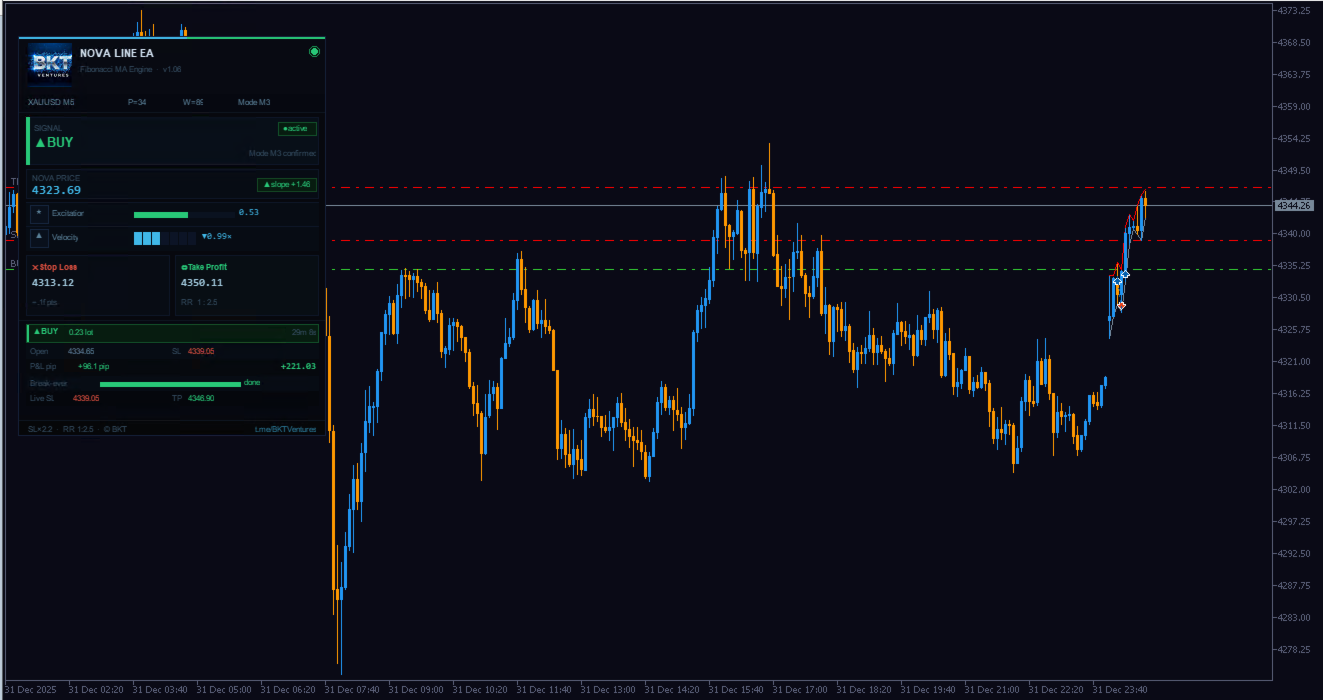
The NOVA algorithm computes a weighted average over a lookback window sized by the Fibonacci ratio of the base period. Each bar receives a weight from three components: an exponential time-decay factor, a sigmoid excitation score that measures the price move relative to current ATR, and a kinematic velocity factor that aligns the update speed with prevailing momentum. The combination produces a line that accelerates during strong directional moves and flattens during indecision.
Signals are generated when the NOVA line enters a strong directional state that meets both an excitation threshold and a minimum slope. Three confirmation modes are available: color change alone, color change with excitation confirmation, or the strictest mode which also requires price to be positioned on the correct side of the NOVA line. All signals are evaluated on confirmed closed bars, ensuring no repainting.
Key Features
- Adaptive NOVA algorithm: A nonlinear weighted moving average that responds to genuine directional momentum and remains stable during sideways price action, with no manual mode switching required.
- Three signal confirmation modes: Color-change only, excitation-confirmed, or the full Mode 3 filter that also checks price position relative to the NOVA line — allowing control over signal frequency and entry selectivity.
- ATR-scaled stops: Stop loss and take profit adjust automatically with current volatility, maintaining consistent risk exposure across instruments and timeframes.
- Break-even and trailing stop: Once profit reaches a configurable ATR multiple, the stop loss moves to entry automatically. A trailing stop then follows price at a fixed ATR distance to capture extended moves.
- Higher-timeframe trend filter: An optional secondary NOVA calculation on a higher timeframe blocks entries that trade against the broader trend bias.
- Percentage-based risk sizing: Lot size is derived from a fixed percentage of account balance and the monetary value of the stop loss, scaling automatically with account equity.
- Multi-layer protection: Spread filter, daily loss limit, free margin check, and terminal-level trading permission checks run before every order.
- Live information panel: A draggable canvas panel shows the current NOVA value, excitation score, velocity reading, stop loss and take profit levels, and open position data including real-time P&L, hold time, and break-even progress.
How It Works
On each new bar, the EA evaluates market conditions using the NOVA line and a set of configurable confirmation criteria. When a qualifying signal is detected, the EA verifies trading conditions — spread, session window, daily loss status, and available margin — before placing a market order. The stop loss and take profit are set automatically based on current ATR, scaled by the configured multipliers.
Once a position is open, break-even and trailing stop routines run on every tick. When the floating profit reaches the break-even trigger, the stop loss moves to entry to eliminate downside risk. The trailing stop then continues to follow price, locking in gains as the trend extends. If a signal in the opposite direction appears, the current position is closed before the new order is placed.
All order operations include a retry mechanism that refreshes the current price and retries up to three times on transient broker errors before reporting a failure.
Recommended Settings
The following instrument and timeframe combinations have shown consistent behavior during testing:
- EURUSD — H1 and H4
- GBPUSD — H1
- USDJPY — H1
- XAUUSD (Gold) — H1
An ECN or Raw Spread account with spread below 15 points is recommended. A VPS is advised for consistent tick-level trailing and break-even execution. Minimum suggested balance is 500 USD at default 1% risk per trade.
Input Parameters
NOVA Core
- Base period — Lookback period; Fibonacci values recommended: 13, 21, 34, 55 — Default: 34
- Excitation threshold — ATR-normalized move size at 50% excitation — Default: 0.45
- Sigmoid steepness — Sharpness of excitation transition — Default: 5.0
- Velocity memory weight — Momentum alignment factor; 0 = disabled — Default: 0.50
Signals
- Signal confirmation mode — 1: color change; 2: color and excitation; 3: color, excitation, and price side — Default: 3
- Minimum excitation score — Excitation required on a signal bar — Default: 0.52
- Minimum NOVA slope — ATR-normalized slope for a strong color state — Default: 0.30
Trade
- Lot sizing mode — Fixed lot or percentage of balance — Default: percentage of balance
- Risk per trade — Balance percentage risked per trade — Default: 1.0
- Stop loss multiplier — Stop loss as a multiple of ATR — Default: 2.0
- Risk/reward ratio — Take profit as a multiple of stop loss — Default: 2.5
Break-Even and Trailing Stop
- Break-even trigger — Profit in ATR multiples to move SL to entry — Default: 1.0
- Break-even offset — Points beyond entry for the break-even stop — Default: 2
- Trailing distance — Trailing stop distance as a multiple of ATR — Default: 1.5
Filters and Protection
- Higher timeframe — Timeframe for the optional trend bias filter — Default: H4
- Maximum spread — Order blocked if spread exceeds this value in points; 0 = disabled — Default: 30
- Daily loss limit — Trading halted when daily loss reaches this percentage; 0 = disabled — Default: 3.0
- Session start and end hour — Trading window in server time — Default: 8 to 20
Backtesting and forward testing results depend on instrument, timeframe, broker conditions, and market regime. Past results obtained during optimization do not guarantee future performance. Use risk settings appropriate to your account size and risk tolerance.