 All orders
 Rules
Rules
Watch how to order a trading robot
Read the Rules before you post an order or execute it
How to Order a Trading Robot in MQL5 and MQL4
See a sample Requirements Specification to order a robot
New orders in the category:
1000 - 5000 USD
100 - 2000 USD
30 - 35 USD
30 - 50 USD
Specification
EA will open trades based on the following rules:
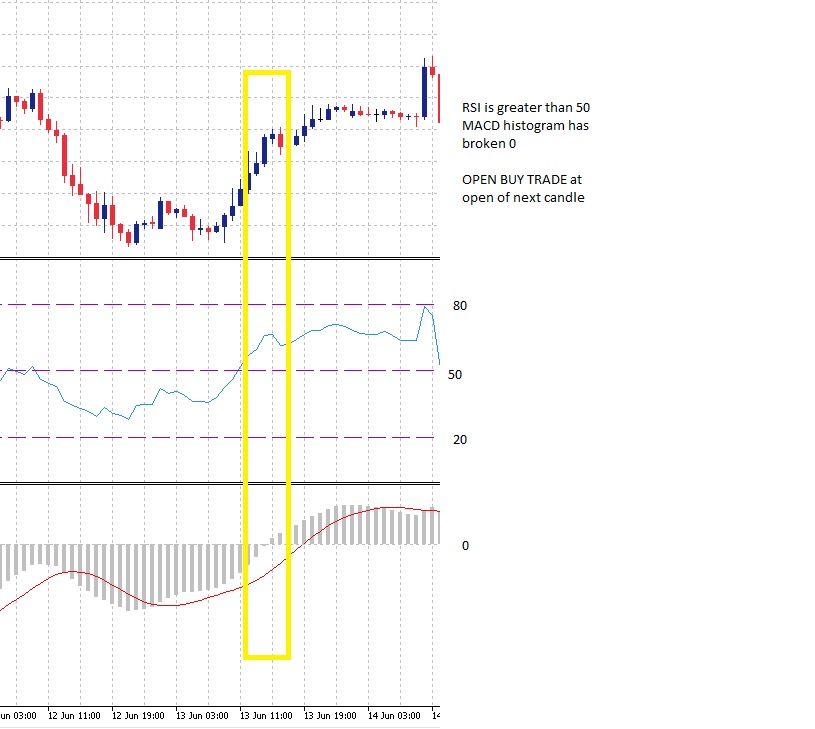
BUY (see image 001 for example)
RSI crosses through 50 and closes above 50 for previous bar
+
MACD Histogram is greater than 0
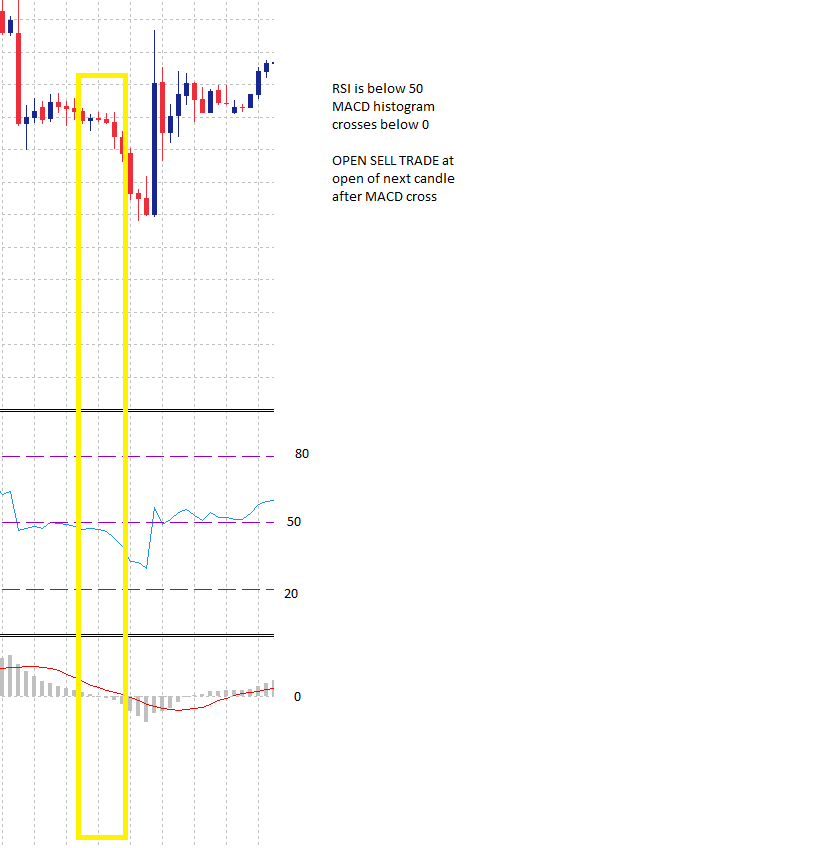
Sell (See image 002 for example)
RSI crosses through 50 and closes below 50 for previous bar
+
MACD Histogram is less than 0
The following features must be supported in the followig gorupings:
| Heading | Feature | Options / Selections | Notes for developer |
|---|---|---|---|
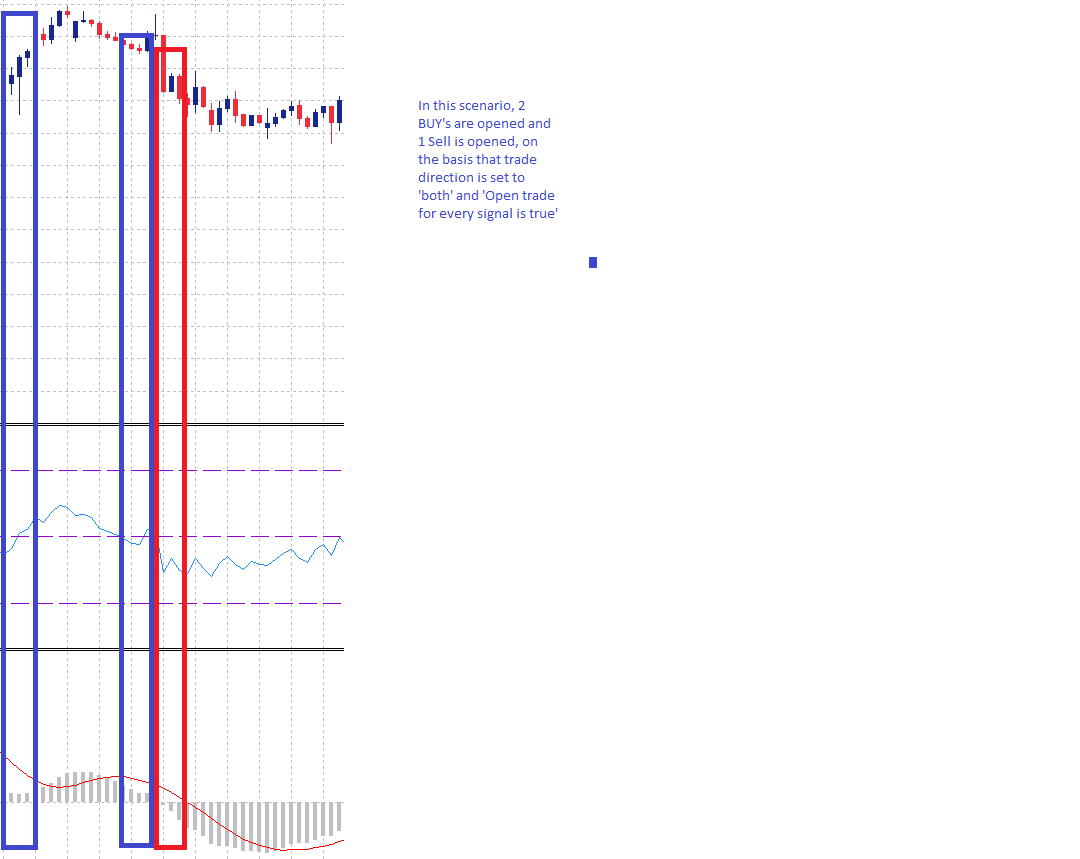
| INITIAL TRADE SETTINGS | Trade Direction | Buy Sell Both | Will determine whether trades are opened in 1 or both directions |
| Initial lots | Fixed lotsize Lots per $1,000 balance | How the position size for the initial trade in the series will be calculated. Is either a fixed value set by the user, or a value determined by the size of the account | |
| Fixed Lot | Free text | Is the size of each initial trade for each new series, eg: 0.01 | |
| Lots per $1,000 balance | Free text | Is the rule which will calculate the initial trade size for each new series. Eg: if balance = $2,000 and value in field is 0.01, then initial trade size will be 0.02 | |
| Max lots (0 disabled) | Free text | Is the maximum lotsize that can be opened for the initial trade. Eg: if set to 1, then the EA will never open an initial trade greater than 1 lot. | |
| Comission per lot | Free text | The amount of comission paid per lot traded, for example 1 lot = $7, a micro lot =$.08 | |
| Close on Opposite Signal | True False | Will close open trades if a reversal signal is generated | |
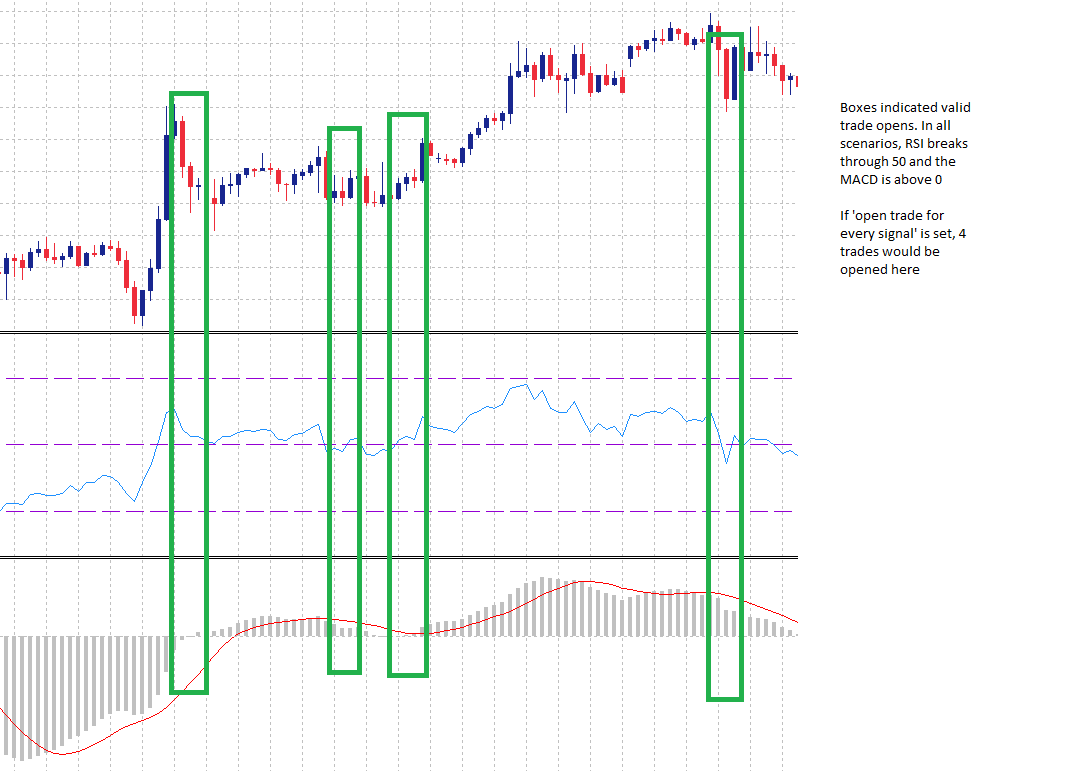
| Open trade for every signal | True False | Will open a new trade each time a valid signal is generated, even if there is already a trade open. Does not take into account grid. See image EA 003/EA 004 | |
| INITIAL TRADE STRATEGY | Activate MACD | True False | Will set whther the MACD settings are used to determine an appropriate open for a trade. If set to true then the MACD will be used to help filter new initial trades If set to false then the MACD will not be used to filter trades |
| Fast EMA | Free text | ||
| Slow EMA | Free text | ||
| MACD SMA | Free text | ||
| Apply to | Close Open | ||
| Activate RSI | True False | Will set wither the RSI settings are used to determine an appropriate open for a trade If set to true then the RSI will be used to help filter new initial trades If set to false then the RSI will not be used to filter trades | |
| RSI Signal level | Free text (numbers) | This is the signal generator for the RSI. For example, if set to 50, then when the RSI crosses and closes above or below 50, a different signal will be generated that will be validated by the MACD, if enabled. | |
| Traditional RSI Buy (0 disable) | Free text | If set then a Buy trade will be opened when this level is hit. Can be used in conjunction with RSI signal level | |
| Tradition RSI Sell (0 disable) | Free Text | If set then a Sell trade will be opened when this level is hit. Can be used in conjunction with RSI signal level | |
| GRID SETTINGS | Max Grid trades (0 disabled) | Free text | The maximum number of grid trades that can be opened in a series. 0 means no grid |
| Grid Type | Fixed distance Custom | Fixed distance applies the same number of points to each subsequent grid trade. for example, if set to 200 points, the first grid would be opened 200 points from the initial trade, the second @ 400 points, the 3rd at 600 points etc etc The user can specify their grid distances | |
| Fixed distance (points) | Free text | The distance each new grid will be opened for the fixed grid option | |
| Custom Grid Disance | Free text | User is able to enter their grid settings, for example 100;200;300;400;500;600. This would cause the first grid trade to be opened 100 points from the inital trade, the second grid trade to be opened 200 points from the initial trade etc etc | |
| Open new Grid trade on new candle only | True False | If true new grid trades will only be opened on a new candle where the grid distance is valid If false grid trades will be opened when the grid distance is met | |
| Lot multiplier for Grid | Multiple Add Lots Fixed Lots | Multiple will use a multiplier to set next trade value Will add a set number of lots to each subsequent order Will used a fixed value for all grid traes | |
| Multiplier value | Free text | Is the value that will be used to multiply by most recent trade to determine value of next trade. for example: if initial trade is 1.0, and multiplier is 1.5, then first grid trade will be 1.5 lots, second grid will be 2.25 lots etc. When max lots is reached then all new trades will be opened at the maximum size until maximum number of grids has been opened. | |
| Add lots | Free text | Will add the value provided to the previous trade volume. For example: if initial trade is 0.01 and value for 'add lots' is 0.01, then the first grid trade will be opened at 0.02 lots | |
| Fixed lots | Free text | Sets the value for all grid trades. For example, if set to 0.75, all grid trades opened will be 0.75, regardless of the value of the initial trade | |
| PROFT & LOSS | Take Profit | Individal Averaging | Will close each trade individually as they hit TP Will close all open trades in a given direction (or both) once average TP hit |
| Averaging behaviour | Single direction All trades | Single Side: Will average profit for all trades in a single direction. For example, if there are 4 BUY trades opened, 2 at a loss and 2 in profit, if profit value is reached then close all 4 trades All Trades: Will average profit for all trades currently opened. For example: if there are 3 BUY and 1 SELL trades opened with 1 in profit and 3 at loss, if profit value is reached, close all trades. | |
| Individual TP | Free text | The TP in points for each opened trade | |
| Averaging TP | Free text | The TP in points when averaging | |
| Stop Loss | Individal Averaging | Individual will assign a SL to each trade individually and if hit the single trade will be closed Averaging will close all open trades when the 'average' stop loss is hit | |
| Averaging behaviour | Single direction All trades | As above for TP | |
| Trailing Stop | Enable Disable | Will enable or disable trailing stop | |
| Trail Start | Free text | The value in points that the trade must be in profit before trail will begin. for example, if set to 50, when trade is 50 points in profit the trail will begin waiting for the first step | |
| Trail Step | Free text | The size of the step for the trailing stop. For example, if set to 50, then once a trade reaches 100 points profit the trailing stop will move to 50 points (because trail start was set to 50) | |
| Trade Settings | Trade Sunday | True False | |
| Trade Monday | True False | ||
| Trade Tuesday | True False | ||
| Trade Wednesday | True False | ||
| Trade Thursday | True False | ||
| Trade Friday | True False | ||
| Trade Saturday | True False | ||
| EA Config | Max Spread | free text | the maximum allowable spread. If spread is higher than this value, EA will not open trade |
| Magic Number | free text | ||
| Initial Trade Comment | free text | ||
| Grid trade comment | free text | ||
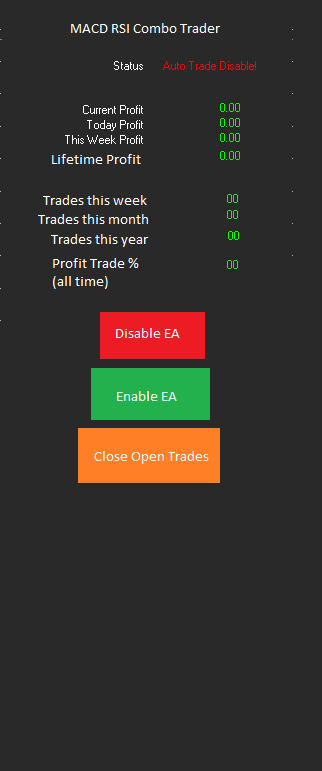
| EA Info Display | Display info panel | True False | Will display the info panel on the chart. See attached image EA Display for design |
| Display positioning | TLHS BLHS TRHS BRHS | Top Left Hand Side Bottom Left Hand Side Top Right Hand Side Bottom Right Hand Side | |
| Font size (0 auto) | free text | ||
| font colour | Colour picker | ||
| Show trade lines | True False | Will draw line between open and close price when trade is closed | |
Responded
1
Rating
Projects
137
36%
Arbitration
16
13%
/
69%
Overdue
9
7%
Free
2
Rating
Projects
23
0%
Arbitration
6
17%
/
83%
Overdue
2
9%
Free
3
Rating
Projects
200
12%
Arbitration
39
38%
/
33%
Overdue
5
3%
Free
Published: 2 codes
4
Rating
Projects
370
42%
Arbitration
145
17%
/
41%
Overdue
124
34%
Free
Published: 38 codes
5
Rating
Projects
92
24%
Arbitration
8
75%
/
13%
Overdue
44
48%
Free
6
Rating
Projects
3552
88%
Arbitration
73
40%
/
15%
Overdue
268
8%
Free
Similar orders
MarketMind Breakout Pro XAUUSD H1 — Donchian Breakout EA Project type: Personal EA development and backtesting Platform: MetaTrader 5 Instrument: XAUUSD Timeframe: H1 Strategy: Donchian Channel breakout with EMA 200 Project overview This project evaluates a Donchian breakout trading strategy for XAUUSD on the H1 timeframe. The system uses channel-based breakout conditions and an EMA 200 trend filter. Historical
مستشار خبير في التحليلات الفنيه وإدارة الصفقات
80 - 400 USD
فيما يخص المتداولين من سلطان التداول وحتى المبتدى والضائع في أكبر سوق عالمي في التداول ااوكد لكم ان الاستشاره البسيطه من من يملك الاستراتيجيه المثلى في التداول والخبره الطويله في مجال التداول قد تغير مستقبلك
Ninjascript strategy tester
30+ USD
Hi, I need NinjaTrader 8 Strategy Analyzer backtests on two of my strategies, each over 1 year AND 3 years of data. Please quote the full job. Common settings: NT8 Strategy Analyzer, MCL (Micro WTI Crude Oil) continuous front-month contract (MCL ##-##), 5-minute bars, 1yr + 3yr of the most recent data, $2.50 round-turn commission per contract. Deliverables per run: full Strategy Analyzer summary (net profit, profit
a { text-decoration: none; color: #464feb; } tr th, tr td { border: 1px solid #e6e6e6; } tr th { background-color: #f5f5f5; } Project Description I need an Expert Advisor (EA) for MetaTrader 5 (MT5) that can automatically trade Gold (XAUUSD) and major Forex pairs. The EA must analyze market conditions, open and close trades automatically, manage risk effectively, and be fully compatible with the MT5 Strategy Tester
To create a unique description that meets the freelance site's requirements, you can type the following: "I am looking for an experienced MQL5 developer to create a custom Forex Expert Advisor. The trading strategy should be based on a moving average crossover system, filtered by the Relative Strength Index indicator. The expert advisor needs to feature distinct strategy modules with adjustable settings for the
Scalping bort
30+ USD
GOLD SCALPING BOT STRATEGY Symbol: XAUUSD (Gold vs USD) Broker: Exness Account: Standard Starting Balance: $20 1. TIMEFRAME - Trend analysis: M15. - Entry timeframe: M5. - Trade only when the market has a clear direction. 2. INDICATORS - EMA 50 - EMA 200 - RSI 14 - Support and Resistance 3. BUY RULES The bot must open a BUY trade only when all these conditions are met: 1. EMA 50 is above EMA 200 on M15. 2. Price is
Request for an Existing Automated Trading System (Expert Advisor) I am looking to acquire an existing, fully functional Expert Advisor (EA) that trades Forex CFDs, with the option of trading other CFDs if the strategy supports them safely. Performance objectives Target average net monthly return: 1.5%. A consistent 1.0% monthly return may be considered if the system demonstrates strong risk control and credible
Economic Event Analysis
30 - 60 USD
Economic Event Analysis Back ground . I have an app which downloads economic event data from a website called MyFXBook, using a script. But currently this website does not allow any script to be used. So, I have to go back to manually downloading a .csv file that shows the economic events scheduled to occur in the coming week Python . This job requires Python. Execution of this job by any other method that does not
I want to create ninjtrader bot
30+ USD
Are you able to build one bot for stock and one for ninja trader and tell me the win rate on it. I need ninja trader bot that enter buy and exit according the move to do not stay long in the market in each entry . That can follow the smart money concept or other if you have a good one
I need a fully automated custom Expert Advisor for MetaTrader 5 (MQL5). The EA is intended for use on a The5ers $100,000 2-Step prop-firm account. IMPORTANT DELIVERY REQUIREMENT: I must receive the complete editable .mq5 source code as well as the compiled .ex5 file. Compiled-only delivery is NOT acceptable. The EA must be coded specifically for this project and must not copy trades, use external trading signals or
Project information
Budget
50 - 150 USD
Deadline
from 5 to 20 day(s)