 全部订单
全部订单
 规则
规则
类别中的新订单:
30+ USD
1000 - 5000 USD
100 - 2000 USD
30 - 35 USD
指定
EA will open trades based on the following rules:
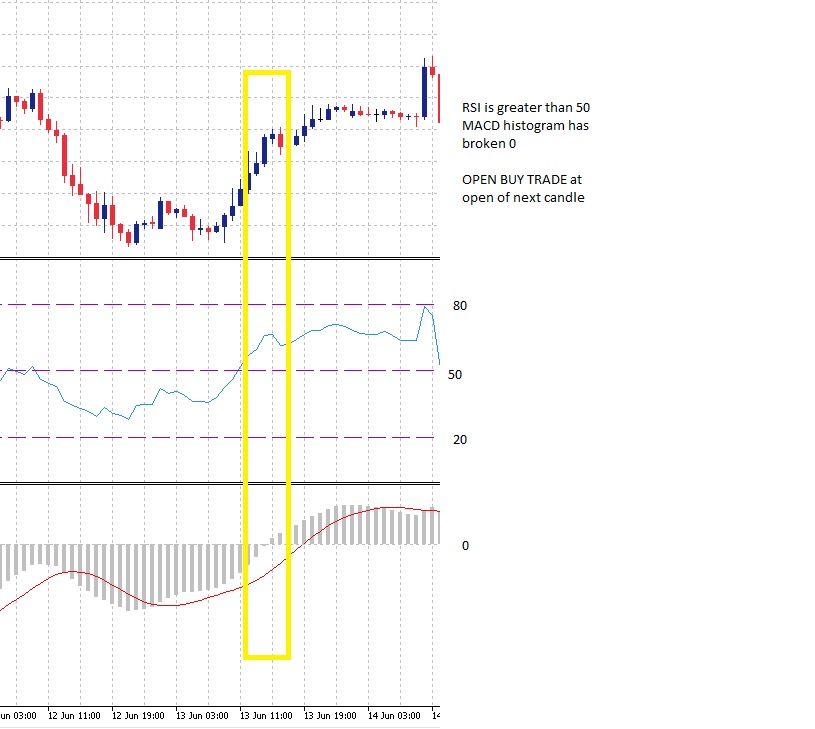
BUY (see image 001 for example)
RSI crosses through 50 and closes above 50 for previous bar
+
MACD Histogram is greater than 0
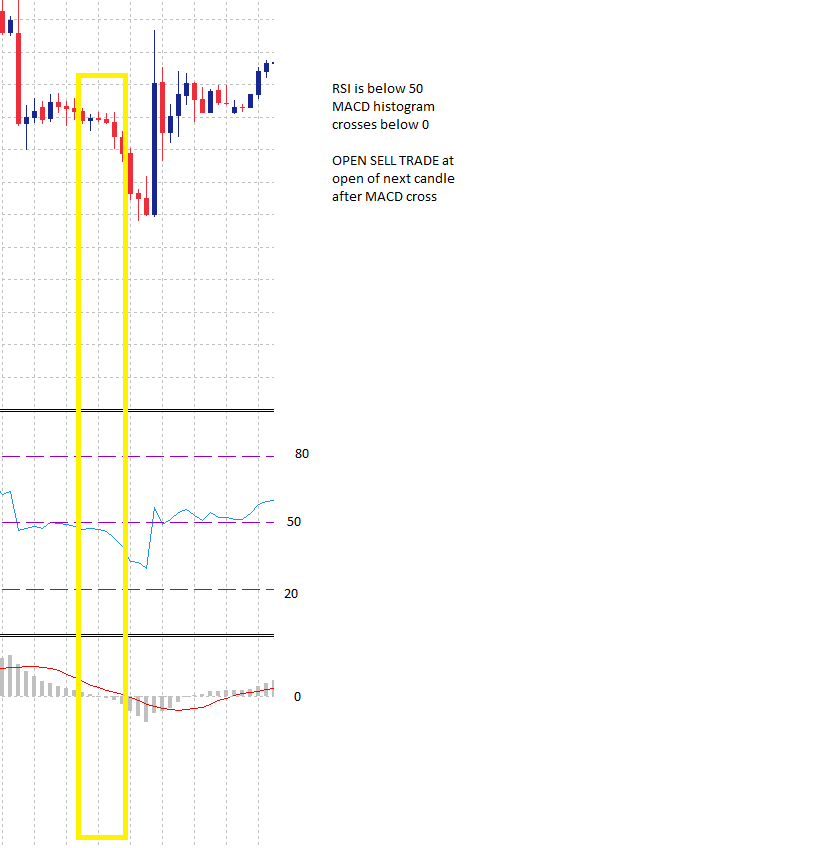
Sell (See image 002 for example)
RSI crosses through 50 and closes below 50 for previous bar
+
MACD Histogram is less than 0
The following features must be supported in the followig gorupings:
| Heading | Feature | Options / Selections | Notes for developer |
|---|---|---|---|
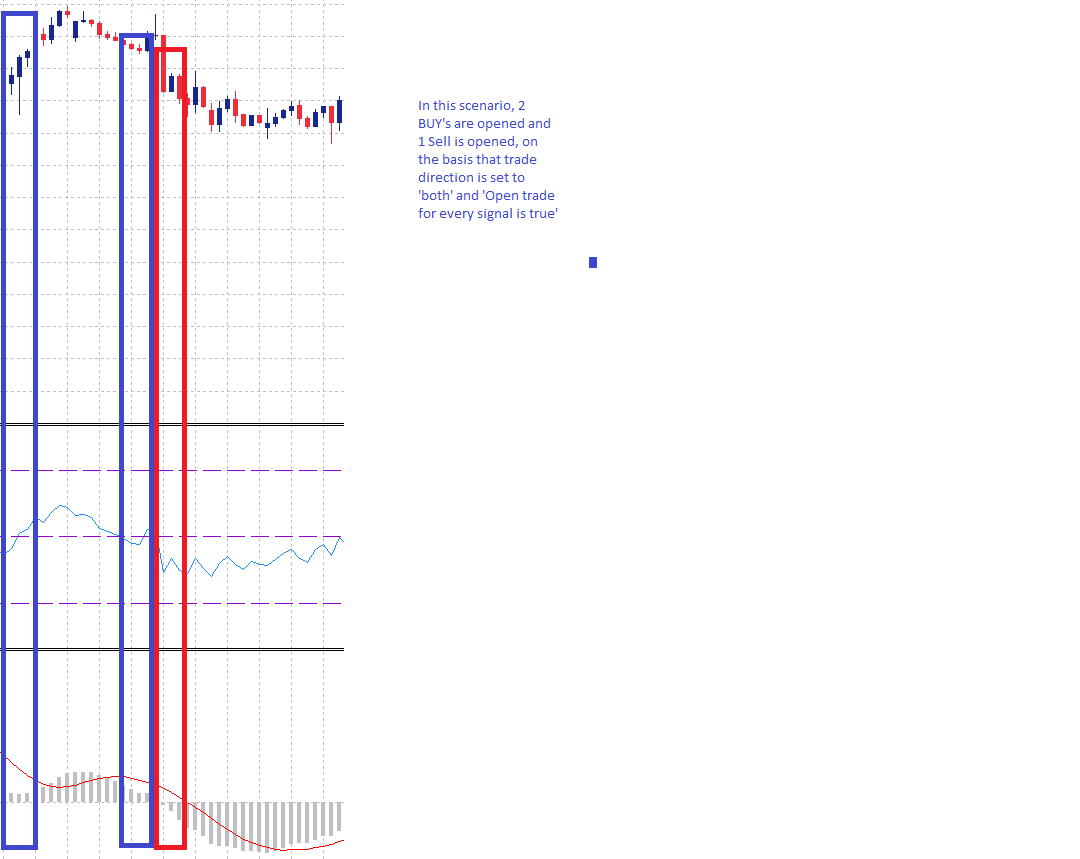
| INITIAL TRADE SETTINGS | Trade Direction | Buy Sell Both | Will determine whether trades are opened in 1 or both directions |
| Initial lots | Fixed lotsize Lots per $1,000 balance | How the position size for the initial trade in the series will be calculated. Is either a fixed value set by the user, or a value determined by the size of the account | |
| Fixed Lot | Free text | Is the size of each initial trade for each new series, eg: 0.01 | |
| Lots per $1,000 balance | Free text | Is the rule which will calculate the initial trade size for each new series. Eg: if balance = $2,000 and value in field is 0.01, then initial trade size will be 0.02 | |
| Max lots (0 disabled) | Free text | Is the maximum lotsize that can be opened for the initial trade. Eg: if set to 1, then the EA will never open an initial trade greater than 1 lot. | |
| Comission per lot | Free text | The amount of comission paid per lot traded, for example 1 lot = $7, a micro lot =$.08 | |
| Close on Opposite Signal | True False | Will close open trades if a reversal signal is generated | |
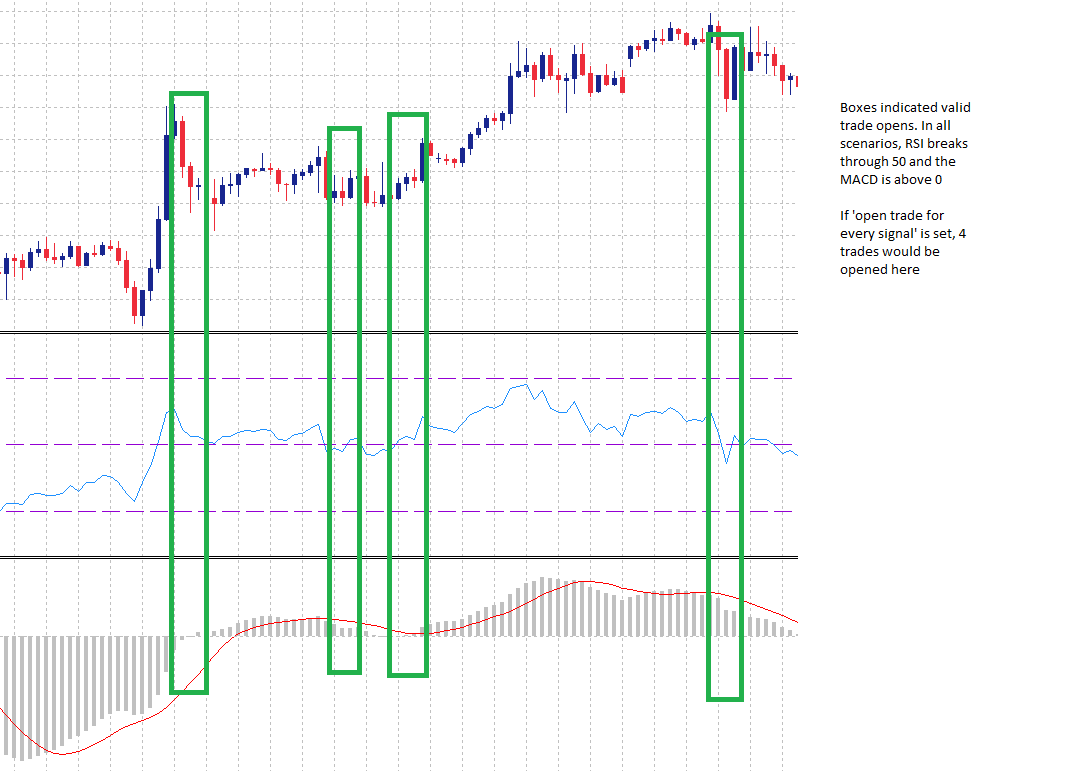
| Open trade for every signal | True False | Will open a new trade each time a valid signal is generated, even if there is already a trade open. Does not take into account grid. See image EA 003/EA 004 | |
| INITIAL TRADE STRATEGY | Activate MACD | True False | Will set whther the MACD settings are used to determine an appropriate open for a trade. If set to true then the MACD will be used to help filter new initial trades If set to false then the MACD will not be used to filter trades |
| Fast EMA | Free text | ||
| Slow EMA | Free text | ||
| MACD SMA | Free text | ||
| Apply to | Close Open | ||
| Activate RSI | True False | Will set wither the RSI settings are used to determine an appropriate open for a trade If set to true then the RSI will be used to help filter new initial trades If set to false then the RSI will not be used to filter trades | |
| RSI Signal level | Free text (numbers) | This is the signal generator for the RSI. For example, if set to 50, then when the RSI crosses and closes above or below 50, a different signal will be generated that will be validated by the MACD, if enabled. | |
| Traditional RSI Buy (0 disable) | Free text | If set then a Buy trade will be opened when this level is hit. Can be used in conjunction with RSI signal level | |
| Tradition RSI Sell (0 disable) | Free Text | If set then a Sell trade will be opened when this level is hit. Can be used in conjunction with RSI signal level | |
| GRID SETTINGS | Max Grid trades (0 disabled) | Free text | The maximum number of grid trades that can be opened in a series. 0 means no grid |
| Grid Type | Fixed distance Custom | Fixed distance applies the same number of points to each subsequent grid trade. for example, if set to 200 points, the first grid would be opened 200 points from the initial trade, the second @ 400 points, the 3rd at 600 points etc etc The user can specify their grid distances | |
| Fixed distance (points) | Free text | The distance each new grid will be opened for the fixed grid option | |
| Custom Grid Disance | Free text | User is able to enter their grid settings, for example 100;200;300;400;500;600. This would cause the first grid trade to be opened 100 points from the inital trade, the second grid trade to be opened 200 points from the initial trade etc etc | |
| Open new Grid trade on new candle only | True False | If true new grid trades will only be opened on a new candle where the grid distance is valid If false grid trades will be opened when the grid distance is met | |
| Lot multiplier for Grid | Multiple Add Lots Fixed Lots | Multiple will use a multiplier to set next trade value Will add a set number of lots to each subsequent order Will used a fixed value for all grid traes | |
| Multiplier value | Free text | Is the value that will be used to multiply by most recent trade to determine value of next trade. for example: if initial trade is 1.0, and multiplier is 1.5, then first grid trade will be 1.5 lots, second grid will be 2.25 lots etc. When max lots is reached then all new trades will be opened at the maximum size until maximum number of grids has been opened. | |
| Add lots | Free text | Will add the value provided to the previous trade volume. For example: if initial trade is 0.01 and value for 'add lots' is 0.01, then the first grid trade will be opened at 0.02 lots | |
| Fixed lots | Free text | Sets the value for all grid trades. For example, if set to 0.75, all grid trades opened will be 0.75, regardless of the value of the initial trade | |
| PROFT & LOSS | Take Profit | Individal Averaging | Will close each trade individually as they hit TP Will close all open trades in a given direction (or both) once average TP hit |
| Averaging behaviour | Single direction All trades | Single Side: Will average profit for all trades in a single direction. For example, if there are 4 BUY trades opened, 2 at a loss and 2 in profit, if profit value is reached then close all 4 trades All Trades: Will average profit for all trades currently opened. For example: if there are 3 BUY and 1 SELL trades opened with 1 in profit and 3 at loss, if profit value is reached, close all trades. | |
| Individual TP | Free text | The TP in points for each opened trade | |
| Averaging TP | Free text | The TP in points when averaging | |
| Stop Loss | Individal Averaging | Individual will assign a SL to each trade individually and if hit the single trade will be closed Averaging will close all open trades when the 'average' stop loss is hit | |
| Averaging behaviour | Single direction All trades | As above for TP | |
| Trailing Stop | Enable Disable | Will enable or disable trailing stop | |
| Trail Start | Free text | The value in points that the trade must be in profit before trail will begin. for example, if set to 50, when trade is 50 points in profit the trail will begin waiting for the first step | |
| Trail Step | Free text | The size of the step for the trailing stop. For example, if set to 50, then once a trade reaches 100 points profit the trailing stop will move to 50 points (because trail start was set to 50) | |
| Trade Settings | Trade Sunday | True False | |
| Trade Monday | True False | ||
| Trade Tuesday | True False | ||
| Trade Wednesday | True False | ||
| Trade Thursday | True False | ||
| Trade Friday | True False | ||
| Trade Saturday | True False | ||
| EA Config | Max Spread | free text | the maximum allowable spread. If spread is higher than this value, EA will not open trade |
| Magic Number | free text | ||
| Initial Trade Comment | free text | ||
| Grid trade comment | free text | ||
| EA Info Display | Display info panel | True False | Will display the info panel on the chart. See attached image EA Display for design |
| Display positioning | TLHS BLHS TRHS BRHS | Top Left Hand Side Bottom Left Hand Side Top Right Hand Side Bottom Right Hand Side | |
| Font size (0 auto) | free text | ||
| font colour | Colour picker | ||
| Show trade lines | True False | Will draw line between open and close price when trade is closed | |
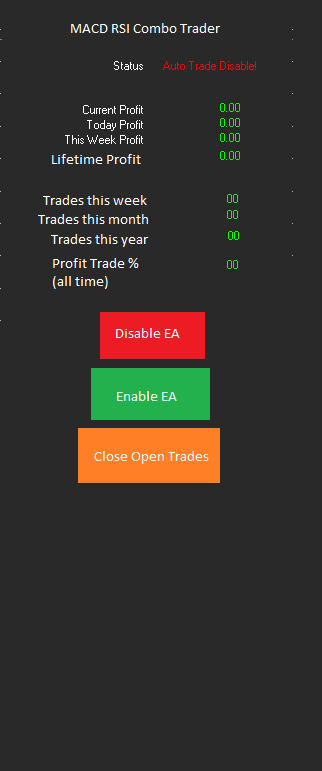
反馈
1
等级
项目
137
36%
仲裁
16
13%
/
69%
逾期
9
7%
空闲
2
等级
项目
23
0%
仲裁
6
17%
/
83%
逾期
2
9%
空闲
3
等级
项目
200
12%
仲裁
39
38%
/
33%
逾期
5
3%
空闲
发布者: 2 代码
4
等级
项目
370
42%
仲裁
145
17%
/
41%
逾期
124
34%
空闲
发布者: 38 代码
5
等级
项目
92
24%
仲裁
8
75%
/
13%
逾期
44
48%
空闲
6
等级
项目
3552
88%
仲裁
73
40%
/
15%
逾期
268
8%
空闲
相似订单
PROJECT: Automatic Gold and Forex Trading Robot for MetaTrader 5 (MQL5) I want a fully automated Expert Advisor (EA) for MetaTrader 5 that can analyze the market and automatically open, manage and close trades on Gold and selected Forex currency pairs. 1. TRADING INSTRUMENTS - Gold: XAUUSD - Forex: EURUSD, GBPUSD and USDJPY, subject to broker availability. - Allow the user to enable or disable each trading symbol. -
Looking for a Complete Forex & Gold Signal System — Telegram Automation + Performance Tracking I’m looking for a complete automated trading signal solution for Forex pairs, including EUR/USD, GBP/USD and others, as well as gold (XAU/USD). Requirements: • An average of 2–3 quality signals per day across the selected instruments. Quality matters more than generating signals just to meet a quota. • A high win rate
I need a robot that will grow small accounts to bigger amounts like this one in this link, https://youtu.be/d38pMbJihew?si=3NeIOVyrlwDr4X_o. Please click the link and watch how this EA grow small accounts. Then create a robot like that. I will test it on demo first then if it does what i want, i will take it. Please it must be simply to use. It must set targets, for example, once it reaches $500 profit, it must
Here is a professional, detailed requirements specification draft for your MQL5 freelance order based on your prompt: Strategy Objective: Develop an automated Expert Advisor (EA) featuring a 1:3 Risk-to-Reward ratio optimized for a small starting budget. Core Trading Logic: Execute automatic Buy and Sell trades using high-probability entry signals. Target a strict 90% theoretical win-rate structure through
i want to fix my gold martingale bot MT5. RSI 14 ENTRY 30 BUY 70 SELL Lot 0.02 0.04 0.07 TP 150 for all SL 90 30 30 once total daily profit is 200$ stop trading stop trading once 2 consecutives total losses stop trading if spread exceeded 30 and between hour 15 & 17 PM Move SL to breakeven point once the profit exceeded 50 from from breakeven thanks
MarketMind Breakout Pro XAUUSD H1 — Donchian Breakout EA Project type: Personal EA development and backtesting Platform: MetaTrader 5 Instrument: XAUUSD Timeframe: H1 Strategy: Donchian Channel breakout with EMA 200 Project overview This project evaluates a Donchian breakout trading strategy for XAUUSD on the H1 timeframe. The system uses channel-based breakout conditions and an EMA 200 trend filter. Historical
The purpose of this order is ONLY to test and implement my H1 POI (Point of Interest) identification logic correctly. I am not requesting the complete EA at this stage. I will provide the exact rules for identifying the H1 POI after selecting the developer. The developer must convert those rules into clear, deterministic MQL5 logic. Requirements: Analyze H1 candles according to the rules I provide. Identify and mark
Title: Fully Automatic MT5 Trading Bot (Expert Advisor) with Risk Management I want a fully automated trading robot (Expert Advisor) for MetaTrader 5, written in MQL5. The bot must automatically analyse market data, identify trading opportunities, execute BUY and SELL orders, manage open positions, and close trades according to predefined rules without requiring manual confirmation for each trade. Requirements
Hello, I’m looking for an experienced developer to research, build, test, and install a fully automated MetaTrader 5 trading bot for gold, XAUUSD. My total development and installation budget is $300, including all agreed work and fees. My goal is to pass a $100,000 FTMO US Two-Step Standard evaluation and sustainably maintain the funded account. I need a day-trading strategy that can buy in bullish markets and sell
MT4 expert advisor
500+ USD
I have three indicators that operate independently. I want to combine them into one indicator with custom expert programming that automatically enters trades when a signal is generated by one of the indicators. I will pay for this service Thanks you
项目信息
预算
50 - 150 USD
截止日期
从 5 到 20 天