MT5 Cannot Open XAUUSD Chart on My Demo Account
Besides, your Metatrader is not connected to the broker's server:
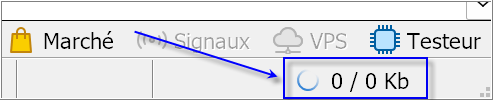
--------------------
It means that your demo account with them may be expired, or try on Moonday (or open the other demo account with them and try it).
Hi Rajo,
Had this exact headache when I first set up my gold charts on a demo, so here is the order I would check things in.
First, the connection. Look at the bottom-right corner of the terminal. If it shows 0/0 Kb or an offline icon, you are not actually connected to the broker's server, and no chart will load data. Demo logins expire quietly too - if the account is dead, open a fresh demo on the same server (File -> Open an Account) and log in again. Sergey already pointed at this and it is the most common cause.
Second, get the symbol into Market Watch the right way. Right-click in Market Watch, open Symbols, find XAUUSD under Metals and make sure it is actually shown. Then drag it from Market Watch onto the chart area, or right-click it and pick Chart Window. Double-clicking alone sometimes does nothing, especially under Wine.
Third, watch the broker's naming. Not every broker calls it plain XAUUSD. Some use XAUUSDm, XAUUSD., GOLD, or XAU/USD. If there is a similar-looking name with a suffix in the Symbols list, that is usually the tradable one - the plain XAUUSD entry can be a placeholder with no quotes behind it.
Fourth, the weekend. Metals have no quotes from the Friday close until Sunday evening, and some brokers cut the feed even earlier. If you tested on a Saturday or Sunday, an empty chart is completely normal. Try again during market hours.
One gold-specific thing worth knowing before you attach your EA: on most brokers one standard lot of XAUUSD is 100 ounces, so a $1 move is $100 per lot. Real risk per trade is nothing like EURUSD. Once the chart is up, right-click XAUUSD in Market Watch -> Specification and note the contract size, tick value and typical spread. EAs that size positions like forex pairs get into trouble fast on gold.
If the Journal tab shows connection or 'account disabled' errors after a reconnect attempt, that points at the login rather than the chart. Post what the Journal says and it is usually easy to pin down from there.

You are missing trading opportunities:
- Free trading apps
- Over 8,000 signals for copying
- Economic news for exploring financial markets
Registration
Log in
You agree to website policy and terms of use
If you do not have an account, please register
Hello everyone,
I am having a problem with MetaTrader 5 on my Mac using Wine.
I can see the XAUUSD symbol (Gold vs US Dollar) in the Symbols list, but I cannot open or display the XAUUSD chart. However, the EURUSD chart opens normally.
I am also trying to use my custom Expert Advisor (EA), but I need to get the XAUUSD chart working first.
I have already checked that XAUUSD exists in the symbol list, but the problem persists.
Could anyone please help me understand why the XAUUSD chart does not open and explain how I can fix this issue?
Please let me know if you need any screenshots or logs from the Experts or Journal tabs.
Thank you for your help!