How to hide TOOLTIP
Move your mouse.
I know that. The tooltip doesn’t appear all the time — it only shows up when I move my mouse over a candle.
But that’s exactly the problem. I’m analyzing the candles, so I need to move my cursor to whatever position I want to inspect. If I move the mouse away just to get rid of the tooltip, I completely lose my train of thought while I’m focused on analyzing the chart.
What I’m looking for is a way to disable/hide the tooltip while keeping the cursor where I need it, rather than having to move the mouse away.
And do you notice that the tooltip is covering the green price label right there? That is the problem. I need to be able to keep my cursor there while still seeing the price.
What I would really like is a constant/API option in MQL5 that allows me to hide or disable the tooltip.
For example, something like:
ChartSetInteger(0, CHART_SHOW_TOOLTIP_BAR_CANDLE..v..v.., false);
Or whatever the appropriate constant name would be.
This way, I could disable the tooltip directly from my MQL5 code without having to move the mouse away from the candle.
Thank you support !
I know that. The tooltip doesn’t appear all the time — it only shows up when I move my mouse over a candle.
But that’s exactly the problem. I’m analyzing the candles, so I need to move my cursor to whatever position I want to inspect. If I move the mouse away just to get rid of the tooltip, I completely lose my train of thought while I’m focused on analyzing the chart.
What I’m looking for is a way to disable/hide the tooltip while keeping the cursor where I need it, rather than having to move the mouse away.
And do you notice that the tooltip is covering the green price label right there? That is the problem. I need to be able to keep my cursor there while still seeing the price.
What I would really like is a constant/API option in MQL5 that allows me to hide or disable the tooltip.
For example, something like:
ChartSetInteger(0, CHART_SHOW_TOOLTIP_BAR_CANDLE..v..v.., false);
Or whatever the appropriate constant name would be.
This way, I could disable the tooltip directly from my MQL5 code without having to move the mouse away from the candle.
Thank you support !
I don't think it's currently possible in any way.
The tooltip is triggered when near the "Close" of a candle, maybe that information can help to avoid the tooltips. Stay near to Open 😉
What I’m looking for is a way to disable/hide the tooltip while keeping the cursor where I need it, rather than having to move the mouse away.
And do you notice that the tooltip is covering the green price label right there? That is the problem. I need to be able to keep my cursor there while still seeing the price.
What I would really like is a constant/API option in MQL5 that allows me to hide or disable the tooltip.
For example, something like:
ChartSetInteger(0, CHART_SHOW_TOOLTIP_BAR_CANDLE..v..v.., false);
Suggested to MetaQuotes. Thank you.
Thank you very much. Please also suggest a solution for indicators.
What I mean is that we need to distinguish between different types of elements, such as Objects, Bars, Indicator Plots, etc. I still need the Tooltip to be displayed for some of them, while hiding it for others.
So, if possible, could you suggest a way to handle the Tooltip separately for Objects, Bars, Indicator Plots, and other types of elements?
Objects...
Forum on trading, automated trading systems and testing trading strategies
Vladislav Boyko, 2023.11.16 18:46
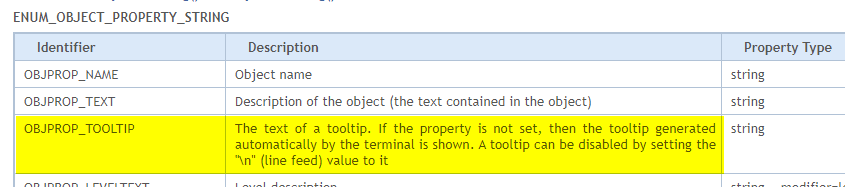
https://www.mql5.com/en/docs/constants/objectconstants/enum_object_property
Bars...
Indicator Plots...
Forum on trading, automated trading systems and testing trading strategies
MQL5 - Indicator - Hide indicator name and current buffer values
Alain Verleyen, 2018.06.07 21:11
   PlotIndexSetInteger(i,PLOT_SHOW_DATA,false);         //--- repeat for each plot
   IndicatorSetString(INDICATOR_SHORTNAME," ");
Of course the drawback is your indicator shortname isn't very useful and the plot data are not displayed in Data Window either.
In case you need them, there is a relatively easy workaround, you are certainly able to find it ;-)
Edit: Also comment out or delete any indicator buffer labels in the indicator source code.
[O]ther types of elements...

- www.mql5.com
Thank you very much. Please also suggest a solution for indicators.
What I mean is that we need to distinguish between different types of elements, such as Objects, Bars, Indicator Plots, etc. I still need the Tooltip to be displayed for some of them, while hiding it for others.
So, if possible, could you suggest a way to handle the Tooltip separately for Objects, Bars, Indicator Plots, and other types of elements?
You must be kidding right ? 🤣
I will not dare to ask that to a MateQuotes developer for sure.


- Free trading apps
- Over 8,000 signals for copying
- Economic news for exploring financial markets
You agree to website policy and terms of use
Please help me, i want hide tooltip