CAccountInfo check if account is valid/open...
An invalid account is no more connected, so you can check with :
TerminalInfoInteger(TERMINAL_CONNECTED)Of course, no connection doesn't mean the account is invalid. I don't think there is a way to know that directly.
An invalid account is no more connected, so you can check with :
Thank you Alain,
I just found IsConnected() which looks like the same thing as TerminalInfoInteger(TERMINAL_CONNECTED); I'd like to have found an AccountIsValid() or AccountConnected() function - but hey! I suppose I'll have to make do.
I had a good look at all the AccountInfo functions and what they can do - they seem to have missed this feature, perhaps a feature request is in order? It's not an unreasonable thing to want to check.
Thank you for looking, I'll get back to fixing my bad coding 🙄.
With my best regards and thanks, ESB.

- www.mql5.com
I just added this if it's any use to anybody:
bool connected_can_trade(const bool show_message = false)
{
   if( !TerminalInfoInteger(TERMINAL_CONNECTED) ) {
      if ( show_message )
         printf("%s[%d], %s: Terminal %s is not connected!", __FILE__, __LINE__, __FUNCTION__, TerminalInfoString(TERMINAL_NAME));
      return false;
   }
   if( !AccountInfoInteger(ACCOUNT_TRADE_ALLOWED) ) {
      if ( show_message )
         printf("%s[%d], %s: Trading is forbidden for the account %s", __FILE__, __LINE__, __FUNCTION__, AccountInfoInteger(ACCOUNT_LOGIN));
      return false;
   }
   return true;
}
I haven't run it yet and it might benefit from using ACCOUNT_TRADE_EXPERT instead of ACCOUNT_TRADE_ALLOWED.
WMBR, ESB.
A couple of refinements to connected_can_trade(): ACCOUNT_LOGIN returns a long, not a string, so the %s specifier in your printf won't print the login correctly – use %d (or %I64d for very large login numbers) instead.
On ACCOUNT_TRADE_ALLOWED vs ACCOUNT_TRADE_EXPERT – they check different things. ACCOUNT_TRADE_ALLOWED reflects whether trading is permitted for the account itself (e.g. an expired demo, or a read-only investor password). ACCOUNT_TRADE_EXPERT reflects whether the account specifically permits algorithmic/EA trading – a live account can allow manual trading while EA trading is disabled. For your invalid-account scenario I'd check both, since either one being false should stop the EA from sending orders.
Worth adding a third check too: MQLInfoInteger(MQL_TRADE_ALLOWED). That one reflects the "Allow Algo Trading" toggle in the terminal/program properties itself, which is an independent switch that can silently block orders even when the account is connected and both account flags are true.
A couple of refinements to connected_can_trade(): ACCOUNT_LOGIN returns a long, not a string, so the %s specifier in your printf won't print the login correctly – use %d (or %I64d for very large login numbers) instead.
On ACCOUNT_TRADE_ALLOWED vs ACCOUNT_TRADE_EXPERT – they check different things. ACCOUNT_TRADE_ALLOWED reflects whether trading is permitted for the account itself (e.g. an expired demo, or a read-only investor password). ACCOUNT_TRADE_EXPERT reflects whether the account specifically permits algorithmic/EA trading – a live account can allow manual trading while EA trading is disabled. For your invalid-account scenario I'd check both, since either one being false should stop the EA from sending orders.
Worth adding a third check too: MQLInfoInteger(MQL_TRADE_ALLOWED). That one reflects the "Allow Algo Trading" toggle in the terminal/program properties itself, which is an independent switch that can silently block orders even when the account is connected and both account flags are true.
Thank you for this Mobina, I haven't been too excited by the revelations afforded with either TerminalInfoInteger(TERMINAL_CONNECTED) or AccountInfoInteger(ACCOUNT_TRADE_EXPERT), so I am still fishing for information. I can see AccountInfoInteger(ACCOUNT_LOGIN) returns a long containing the account number, good spot and fixed.
I noticed that TerminalInfoInteger(TERMINAL_CONNECTED) seems to take 'quite a long time' to notice a broken connection, so I asked Grok to build a test skeleton which I tweaked to demonstrate this sluggish behaviour; it's below. I test this by removing the network cable and then waiting - it takes about 10 seconds to notice that it no longer has a connection, and about 5 seconds to notice reconnection - YMMV dependent on hardware etc.,
I seem to have completely misunderstood AccountInfoInteger(ACCOUNT_TRADE_EXPERT); I thought if I disabled Algo trading checkbox either on the Common tab when starting the EA, or if I disabled Algo trading on the MT5 toolbar, this call would fail. It doesn't.
What I have been trying to do is make sure I have a reliable operational connection the the backend servers, the account is open and I can trade. This seems harder than I thought, I would welcome constructive ideas.
/* Example taken from AccountInfoInteger example in the MQL5 documentation */
   bool EATradeAllowed=AccountInfoInteger(ACCOUNT_TRADE_EXPERT);

//--- Find out if it is possible to trade on this account by Expert Advisors

   if(EATradeAllowed)

      Print("Trade by Expert Advisors is permitted for this account");

   else

      Print("Trade by Expert Advisors is prohibited for this account!");
Here is the demo EA:
//+------------------------------------------------------------------+
//|                                    Connection_Test_Harness.mq5   |
//+------------------------------------------------------------------+
#property copyright "Test harness by Grok, tweaked by ESB"
#property version   "1.02"
#property strict

#define PREFIX "ConnTest_"

//+------------------------------------------------------------------+
int OnInit()
{
   if(CreateStatusBar())
   {
      ChartRedraw(0);
      Print("Status bar initialized successfully.");
   }
   else
      Print("Failed to create status bar. Error: ", GetLastError());

   EventSetMillisecondTimer(100);   /* event timer fires off every 100ms */
   return(INIT_SUCCEEDED);
}

//+------------------------------------------------------------------+
void OnDeinit(const int reason)
{
   EventKillTimer();
   ObjectsDeleteAll(0, PREFIX);
   ChartRedraw(0);
}

//+------------------------------------------------------------------+
bool CreateStatusBar()
{
   int x = 20, y = 20, w = 340, h = 55;
   string bg = PREFIX + "BG";

   if(!ObjectCreate(0, bg, OBJ_RECTANGLE_LABEL, 0, 0, 0)) return false;
   ObjectSetInteger(0,bg,OBJPROP_XDISTANCE,x);
   ObjectSetInteger(0,bg,OBJPROP_YDISTANCE,y);
   ObjectSetInteger(0,bg,OBJPROP_XSIZE,w);
   ObjectSetInteger(0,bg,OBJPROP_YSIZE,h);
   ObjectSetInteger(0,bg,OBJPROP_BGCOLOR,clrDarkSlateGray);
   ObjectSetInteger(0,bg,OBJPROP_COLOR,clrSilver);
   ObjectSetInteger(0,bg,OBJPROP_BACK,false);
   ObjectSetInteger(0,bg,OBJPROP_SELECTABLE,false);

   // Label 1
   string l1 = PREFIX + "Conn";
   if(!ObjectCreate(0,l1,OBJ_LABEL,0,0,0)) return false;
   ObjectSetInteger(0,l1,OBJPROP_XDISTANCE,x+10);
   ObjectSetInteger(0,l1,OBJPROP_YDISTANCE,y+8);
   ObjectSetInteger(0,l1,OBJPROP_FONTSIZE,10);
   ObjectSetString(0,l1,OBJPROP_FONT,"Arial Bold");
   ObjectSetInteger(0,l1,OBJPROP_COLOR,clrWhite);   // initial color

   // Label 2
   string l2 = PREFIX + "Algo";
   if(!ObjectCreate(0,l2,OBJ_LABEL,0,0,0)) return false;
   ObjectSetInteger(0,l2,OBJPROP_XDISTANCE,x+10);
   ObjectSetInteger(0,l2,OBJPROP_YDISTANCE,y+30);
   ObjectSetInteger(0,l2,OBJPROP_FONTSIZE,10);
   ObjectSetString(0,l2,OBJPROP_FONT,"Arial Bold");
   ObjectSetInteger(0,l2,OBJPROP_COLOR,clrWhite);

   return true;
}

void OnTimer()
{
   // Connection
   bool conn = TerminalInfoInteger(TERMINAL_CONNECTED);
   string cTxt = StringFormat(conn ? "Server %sconnected: latency = %dms":"Server %sconnected", conn ? "":"dis", TerminalInfoInteger(TERMINAL_PING_LAST)/1000);
   ObjectSetString(0, PREFIX+"Conn", OBJPROP_TEXT, cTxt);
   ObjectSetInteger(0, PREFIX+"Conn", OBJPROP_COLOR, conn ? clrLime : clrRed);

   // Algo Trading
   bool expert = AccountInfoInteger(ACCOUNT_TRADE_EXPERT);
   string aTxt = StringFormat("Expert Trading is %sabled", expert ? "en":"dis");
   ObjectSetString(0, PREFIX+"Algo", OBJPROP_TEXT, aTxt);
   ObjectSetInteger(0, PREFIX+"Algo", OBJPROP_COLOR, expert ? clrLime : clrRed);

   ChartRedraw(0);
}

//+------------------------------------------------------------------+
void OnTick()
{
   ;
}
A couple of refinements to connected_can_trade(): ACCOUNT_LOGIN returns a long, not a string, so the %s specifier in your printf won't print the login correctly – use %d (or %I64d for very large login numbers) instead.
On ACCOUNT_TRADE_ALLOWED vs ACCOUNT_TRADE_EXPERT – they check different things. ACCOUNT_TRADE_ALLOWED reflects whether trading is permitted for the account itself (e.g. an expired demo, or a read-only investor password). ACCOUNT_TRADE_EXPERT reflects whether the account specifically permits algorithmic/EA trading – a live account can allow manual trading while EA trading is disabled. For your invalid-account scenario I'd check both, since either one being false should stop the EA from sending orders.
Worth adding a third check too: MQLInfoInteger(MQL_TRADE_ALLOWED). That one reflects the "Allow Algo Trading" toggle in the terminal/program properties itself, which is an independent switch that can silently block orders even when the account is connected and both account flags are true.
Hello Mobina,
I thought MQLInfoInteger(MQL_TRADE_ALLOWED) is interesting, so I added it to my ea test harness with an on-chart display. I have noticed the following:
- TerminalInfoInteger(TERMINAL_CONNECTED) takes up to ~30 seconds to notice the connection has dropped (I have unplugged the network cable), and ~5-10s to notice reconnection
- AccountInfoInteger(ACCOUNT_TRADE_EXPERT) doesn't seem to respond to either disconnection or the setting of the algo flag in MT5 or the algo setting flag on the Common page of the EA. I am really not sure under what circumstances it might return false
- MQLInfoInteger(MQL_TRADE_ALLOWED) is interesting. It does respond to the state of the Algo trading button on start up, but doesn't notice if it is pressed whilst the EA is running (see below).
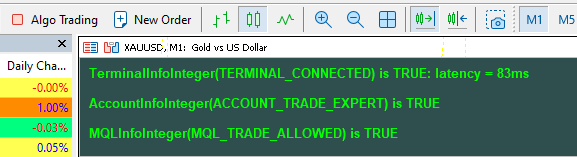
Quite interesting, and I still can't see what AccountInfoInteger(ACCOUNT_TRADE_EXPERT) does or what triggers it to return false. Yours still confused,
With my best regards, ESB.
Latest version,
I have learnt as much as I can from the very simple harness, so this will be the last version. Comments are:
- TerminalInfoInteger(TERMINAL_CONNECTED) Affected by disconnection after ~30 seconds, reconnection noticed after ~5-10s
- MQLInfoInteger(MQL_TRADE_ALLOWED) Affected by Algo Trading button on EA toolbar, or by the algo trading check box on the EA start up dialog. Only affects EA on start up, subsequent changes to the Algo Trading button do not affect the return value.
- TerminalInfoInteger(TERMINAL_TRADE_ALLOWED) Affected immediately by the Algo Trading button
- AccountInfoInteger(ACCOUNT_TRADE_ALLOWED) Affected by disconnection, seems to mirror TerminalInfoInteger(TERMINAL_CONNECTED)
- AccountInfoInteger(ACCOUNT_TRADE_EXPERT) Seems unaffected by anything - I'd be interested to know under what circumstances this call responds.
WMBR, ESB

- Free trading apps
- Over 8,000 signals for copying
- Economic news for exploring financial markets
You agree to website policy and terms of use
Hello All,
I am working with a friend on an EA; I design & write the code (what could go wrong? 😂) and he investigates trading scenarios. Our two minds are very different and up to a point it works.
However we have recently encountered a problem which I had handled badly in the code 😳 - and I am about to rectify that problem.
I use CAccountInfo to discover information about the account. All good. However it's only all good until it is not; it looks like the demo account has been expired by ICM and we are getting the following message in the log:
authorization on ICMarketsSC-Demo failed (Invalid account)
Great! but there doesn't seem to be a method/property in CAccoundInfo or in any other call I can find to check the validity/open status of an account.
To my great shame, because I hadn't checked a divisor the EA was being killed with a divide by zero failure. Yup, it's shameful, I am embarrassed.
So I want to be able to check the account validity/open status.
Google searches aren't proving helpful and I can't find what I want in the documentation; please can some kind individual put me out of my misery and show me the way.
With my embarrassed best regards, ESB.