MQL5 VPS problem
Im able to connect to the Vps with my EA but it will not oprate properly like the setup file. it will not multiple the orders or follow other setting in the file.
I tried few time to full migrate with no change. feels like the setup file dont load fully.
anyone experience this before?
The EA should be attached to the chart with the settings to be used, and after that - migrate. And setup file has nothing to do with it (because all the settings/parameters are defined during the attaching the EA to the chart).
----------------
Forum on trading, automated trading systems and testing trading strategies
Eleni Anna Branou, 2025.09.11 06:26
...
i tried for the past couple of days. it will not multiple the lot order.
for example if i strat with lot 0.01 the next order should be 0.02 instead it keep opening 0.01.
the Algo Trading on my computer is off (not sure if i need to turn it on) because it run when it off.
i did full migrant few time sync few time
what can be the problem?
what can be the problem?
MQL5 VPS is your other Metatrader but in cloud ... yes, it is Metatrader.
Migration/synchronization is the moving your home Metatrader's environment to this Metatrader in cloud.
It means: if your EA is trading in wrong way on MQL5 VPS (in Metatrader iin cloud) so it may be something with your settings or with the code of this EA.
------------------------
You can check the journals (there are two MQL5 VPS journals) for possible errors for example.
I did check for errors it all look fine.
when i run it on my local computer it run smooth and correct to the setting.
on migrate it will not multiple. it use the setting of the lot size but thats all from all the setting.
any how there is something wrong that i can not figure out why it behave like that.
i wish you could help.
If your EA is using indicators so those indicators should be included to EA as the resources, for example:
Forum on trading, automated trading systems and testing trading strategies
Eleni Anna Branou, 2021.04.21 10:18
You need to include your indicator in your EA's code as a resource.
#resource "\\Indicators\\Indicator_Name.ex4"
Forum on trading, automated trading systems and testing trading strategies
Vladimir Karputov, 2021.07.02 07:17
Have a look at the topic Using #resource. Probably there is a solution to your question.

- 2021.08.26
- www.mql5.com
it doesnt multiple the lot as it set in the setting file.
Im on MT5
i just tried it again and it the same problem.
you did not experience something like this before?
everthing migrate fine but it just dont work as the EA set up.
you did not experience something like this before?
everthing migrate fine but it just dont work as the EA set up.
I used MQL5 VPS as well, and no any problem at all.
Some users reported about the issue with MQL5 VPS long time ago but finally - it was the issue with their code of their EAs.
If your EA is using indicators so those indicators should be inserted in EA as the resource.
---------------------
It is all that I know.
Im able to connect to the Vps with my EA but it will not oprate properly like the setup file. it will not multiple the orders or follow other setting in the file.
I tried few time to full migrate with no change. feels like the setup file dont load fully.
anyone experience this before?
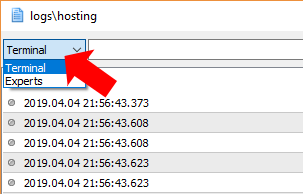
Make sure that your EA doesn't require DLL calls and post a screenshot of your MQL5 VPS >> Journal, and MQL5 VPS >> Experts logs, after your migration.

- Free trading apps
- Over 8,000 signals for copying
- Economic news for exploring financial markets
You agree to website policy and terms of use
I tried few time to full migrate with no change. feels like the setup file dont load fully.
anyone experience this before?