How to ignore friend requests effectively
Anyway, if you receive spam in your private messages, just click the "complain" button on the message containing the spam. It's the most effective thing you can do. And it's literally 3 clicks.
in the other thread i mentioned invites, not message.
these are spam too. there is no complaint button there. these are spam because these are contact from a seller without previous permission or request for them to contact me. both us and australia has laws against this; besides the legal side, it is very annoying having to remove 5 in 1 day from users, 3 out of 5 are sellers. If all these invites were from plain users, then it would be just be annoying.
If i wanted to add to my friends list every day, then i would be sitting on facebook like so many others do today. or if i wanted to be hounded by sellers every day, then... well... i wouldnt. if this site become like other sites riddled by sellers and scammers, then, i would delete my account, as would many other long time users of the site. Like i said on the other thread, this has been increasing slowly since around covid. i think the sites policy has either changed, or consequences are not as harsh as in the past.
ignore the big honking number with a yellow circle under my avatar when i put my mouse on there?
In my personal opinion, you're exaggerating😁. If I didn't want to accept friend requests, after a couple of days I would get used to the fact that that number is always there and my brain would stop paying attention to that number.
That number is only displayed when you hover your mouse over your avatar, after all.In my personal opinion, you're exaggerating😁. If I didn't want to accept friend requests, after a couple of days I would get used to the fact that that number is always there and my brain would stop paying attention to that number.
That number is only displayed when you hover your mouse over your avatar, after all.i think if i was going to get used to it, then, i think that after 9 years or however long i had this account open -- then, i would have "gotten over it" by now.
only way to go back to respond to messages is to hover my mouse "there" to get to the messages page. so, there! 😁
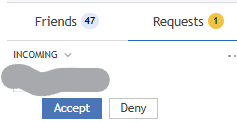
SEE! another 1. just deleted 3 of these yesterday. and yes, its a seller. he/she created a thread, i made a comment, and they then send me a request, as if i had given them permission to send me their spam.
By the way, I don't have a birthday listed on Telegram. I'm used to the "Add your birthday" banner always being there; my brain doesn't pay attention to that "advertisement." This thing is clearly larger than the friend request number and doesn't require mouseover.
only way to go back to respond to messages is to hover my mouse "there" to get to the messages page. so, there! 😁
https://www.mql5.com/en/users/ausimike/messages
You can add this page to your browser's bookmarks bar to avoid having to hover your mouse over your avatar.
By the way, I don't have a birthday listed on Telegram. I'm used to the "Add your birthday" banner always being there; my brain doesn't pay attention to that "advertisement." This thing is clearly larger than the friend request number and doesn't require mouseover.
https://www.mql5.com/en/users/ausimike/messages
You can add this page to your browser's bookmarks bar to avoid having to hover your mouse over your avatar.
i have my tg window narrow so that only the 1 group shows and the list and that b'day notice only shows when i am changing between groups and chats.
ok. added that page to my pinned sites. this is a good workaround, but it is not a fix.

- Free trading apps
- Over 8,000 signals for copying
- Economic news for exploring financial markets
You agree to website policy and terms of use