Backtesting in MT5, data file opened but no data generated
Please consider which section is most appropriate — https://www.mql5.com/en/forum/172166/page6#comment_49114893
Your have not explained your issue clearly and in sufficient detail.
If you are back-testing against external data, then you would have to first create a Custom Symbol. To build such a symbol, you will need both a tick data file and M1 OHLC data file. If you only have the tick data, then you will need to generate the M1 data from it first (or build the Custom Symbol programmatically).
You will also need to specify the contract specifications for the Custom Symbol.
Only after building the Custom Symbol properly, can you then run a back-test against that symbol using the "Every tick based on real ticks".
Thank you Fernando. I am trying to backtest Micro Emini-NQ with external data. The brokers I use either don't trade futures or don't offer MT5.I have created a custom symbol and filled the contract specifications. I did not create the M1 data file though, so I will try it now. What's the point of the M1 data file? When referring to the data file in the EA, which file should be called, the tick file or the M1 file? For clarification, my EA uses the tick data to build a 2000 tick per candle chart, and then applies some indicators to generate signals.
Both the M1 and tick data are needed because they are treated separately. All OHLC bar data (for the various time-frames) is built from M1 data (not tick data). The tick data is then only used when you select "Every tick based on real ticks", but OHLC data is still needed.
Both the M1 and tick data are needed because they are treated separately. All OHLC bar data (for the various time-frames) is built from M1 data (not tick data). The tick data is then only used when you select "Every tick based on real ticks", but OHLC data is still needed.
You don't refer to data file in the EA. You use the standard functions to access indicators, time-series data and tick data as you would normally for any standard/normal symbol.Thank you again. I want the EA to read the data from the file as whenever I import the tick data to the custom symbol the chart remains empty as if there was no data imported. I will try to import both the M1 data and tick data to the custom symbol. Moreover The reason I want the EA to access the tick data is to build the 1000 ticks per candle chart which is the one I need to use for my trading strategy.
No! Don't try to solve problem "Y" when your real problem is "X". Fix "X", not "Y" (The XY Problem).
So, first you need to properly import both the M1 and Tick data into a Custom Symbol so that it does not remain empty.
However, you have not provided any information of what steps you are taking to produce the Custom Symbol. So, unless you do that we will not be able to guide you.
- Custom Financial Instruments - For Advanced Users - Trading Operations - MetaTrader 5 Help
- MetaTrader 5 Build 1640: creating and testing custom symbols
More importantly, as I have stated before, there are brokers that offer trading futures, so open a demo account with one of them and make life easier for yourself.
Here is one such broker (AMP Futures for the US market and AMP Global for the rest) advertised by MetaQuotes, but there are others ...
Forum on trading, automated trading systems and testing trading strategies
MetaTrader 5 trading platform is now available for AMP Futures clients wanting to trade futures
MetaQuotes, 2017.05.03 15:29
AMP Futures has officially announced the launch of the MetaTrader 5 platform for trading futures. AMP Futures is a US regulated Chicago-based Futures Commission Merchant (FCM) providing access to the global electronic futures markets for individual traders, as well as US and foreign Introducing Brokerages from 150+ countries around the world.
AMP Futures offers over a 100 regulated futures contracts on the following futures exchanges:
- Chicago Mercantile Exchange (CME)
- Chicago Board of Trade (CBOT)
- New York Mercantile Exchange (NYMEX and COMEX)
- Intercontinental Exchange (ICE-US, ICE-UK and ICE-LIFFE)
- European Exchange (EUREX)
- Osaka - Japan (JPX)
- Singapore Exchange (SGX)
- Australian Securities Exchange (ASX).
If you would like to try for free, real-time demo of futures markets trading using MetaTrader 5, sign up here.
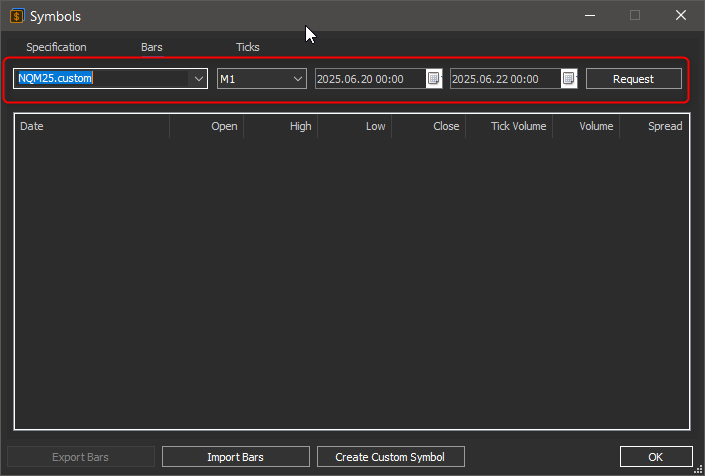
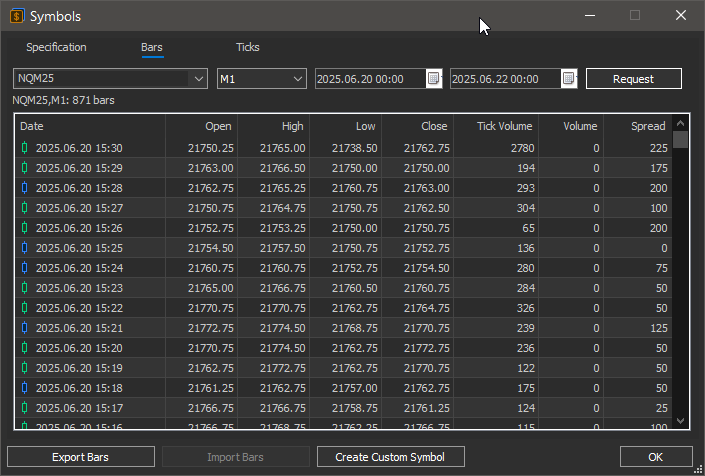
After importing the data, return to the "Symbols" dialogue window, and request periods of "Bar" and "Tick data, and confirm whether they were imported correctly.
The following screenshots are just mock-ups to help explain ...


- Free trading apps
- Over 8,000 signals for copying
- Economic news for exploring financial markets
You agree to website policy and terms of use
Hi guys, I hope you are doing well. A newbie here. I am backtesting a trading strategy on some MNQ tick data stored in a csv file. When launched, the EA opens the file successfully but I receive the message "0 ticks, 0 bars generated". Any idea why the data is not being read. I am using MT5 on a Mac.
Thank you.