2- TERMINAL_VPS returns TRUE even when executing backtest locally.
3- I compile an EA using "AVX2+FM3" normally, but when I compile an MQH file alone, the LOG shows "cpu=X64 Regular". Why this difference occurs?
4- I've been testing an EA for some weeks, and suddenly it started to report less PROFITS and ENTRIES radically, I mean, now I achieve just 30% of entries and profits than before when backtesting and using the same parameters! Can it be related to some floating-point problems? Important: I do not have any errors during the tests and I check all values accordingly (NormalizeDouble, TickSize, and so forth). I have noorders rejected due to wrong prices or stops. Important to say that the older results were consistent with local and NETWORK AGENTS. It's really weird!
5- In EDITOR I set some "breakpoints" that disappear when I execute the code, while others remain.
Order Properties - Trade Constants - Constants, Enumerations and Structures - MQL5 Reference - Reference on algorithmic/automated trading language for MetaTrader 5
2- TERMINAL_VPS returns TRUE even when executing backtest locally.
Can't be reproduced. Not problem on my side.
3- I compile an EA using "AVX2+FM3" normally, but when I compile an MQH file alone, the LOG shows "cpu=X64 Regular". Why this difference occurs?
It's logical, a mqh file compiling doesn't result in any ex5 produced. The reason to compile is mainly to check the code is ok, no need for any additional optimization.
When operating elements in the window, MT5 crashes directly
The situation is like this, before updating to MT5 build 3950, my EA program was running normally for several years. After updating MT5 build 3950, MT5 crashed directly when loading my EA program.
During single-step debugging, I found that a crash occurred when executing this command line; I tried executing this command line in an empty EA file, but it was normal.
Because my EA will add a lot of elements to the chart window, but the previous version can run normally.
I don’t know why, but after updating the MT5 version, MT4 becomes unresponsive or crashes directly.
Alain Verleyen #: Can't be reproduced. Not problem on my side. Can't be reproduced. Not problem on my side. It's logical, a mqh file compiling doesn't result in any ex5 produced. The reason to compile is mainly to check the code is ok, no need for any additional optimization.
Thank you Alain. Even after another update some minutes ago, I'm having the same issues:
Related to the point #3, I understood and makes sense... Tks!
//+------------------------------------------------------------------+//| test no compiler error.mq5 |//| Calli |//| https://www.mql5.com/de/users/gooly |//+------------------------------------------------------------------+#property library#property copyright"Calli"#property link"https://www.mql5.com/de/users/gooly"#property version"1.00"//+------------------------------------------------------------------+//| My function |//+------------------------------------------------------------------+// int MyCalculator(int value,int value2) export// {// return(value+value2);// }//+------------------------------------------------------------------+// add a given struckt to an arraytemplate<typename T>
int ArrayAdd(T &arr[], const T &itm)
{
int i = ArraySize(arr),
j = ArrayResize(arr, i + 1);
if(i // <= no error?if(j<i) { Print(FunLine,"ArrayAd() FAILED: ",_LastError); return(-1); }
arr[i] = itm;
return(i);
}
Result of compilation:
'test no compiler error.mq5' test no compiler error.mq5 1 1 code generated 1 1 0 errors, 0 warnings, 133 msec elapsed, cpu='AVX2 + FMA3' 1 1
Terminal: Released new MetaTrader 4 and 5 installers for Linux. 👍
Updated the ALGLIB library up to 3.19. Unfortunately, the changes in the ALGLIB library version 3.19 for MQL5 were quite significant, so there is no backward compatibility. If your codes use the ALGLIB library for MQL5 version 3.5, you need to explicitly check your programs and make the necessary changes. 😓
Allow the use of cookies to log in to the MQL5.com website.
Please enable the necessary setting in your browser, otherwise you will not be able to log in.
You are signed in. Two-factor authentication has been disabled. Set it up again and scan a new QR code, or continue with two-factor authentication disabled.
Hi!
Today I received the latest version with a lot of enhancements in METATRADER - congrats!
But, unfortunately, I also see some issues, like:
1- TerminalInfoString(TERMINAL_CPU_ARCHITECTURE) returns nothing.
2- TERMINAL_VPS returns TRUE even when executing backtest locally.
3- I compile an EA using "AVX2+FM3" normally, but when I compile an MQH file alone, the LOG shows "cpu=X64 Regular". Why this difference occurs?
4- I've been testing an EA for some weeks, and suddenly it started to report less PROFITS and ENTRIES radically, I mean, now I achieve just 30% of entries and profits than before when backtesting and using the same parameters! Can it be related to some floating-point problems? Important: I do not have any errors during the tests and I check all values accordingly (NormalizeDouble, TickSize, and so forth). I have no orders rejected due to wrong prices or stops. Important to say that the older results were consistent with local and NETWORK AGENTS. It's really weird!
5- In EDITOR I set some "breakpoints" that disappear when I execute the code, while others remain.
Just in time: I do not use "beta releases".
Hi!
Today I received the latest version with a lot of enhancements in METATRADER - congrats!
But, unfortunately, I also see some issues, like:
1- TerminalInfoString(TERMINAL_CPU_ARCHITECTURE) returns nothing.
2- TERMINAL_VPS returns TRUE even when executing backtest locally.
3- I compile an EA using "AVX2+FM3" normally, but when I compile an MQH file alone, the LOG shows "cpu=X64 Regular". Why this difference occurs?
Forum on trading, automated trading systems and testing trading strategies
MT5 build 3950 crashes directly
Hao Chen, 2023.09.17 14:46
When operating elements in the window, MT5 crashes directly
The situation is like this, before updating to MT5 build 3950, my EA program was running normally for several years. After updating MT5 build 3950, MT5 crashed directly when loading my EA program.
During single-step debugging, I found that a crash occurred when executing this command line; I tried executing this command line in an empty EA file, but it was normal.
Because my EA will add a lot of elements to the chart window, but the previous version can run normally.
I don’t know why, but after updating the MT5 version, MT4 becomes unresponsive or crashes directly.
int pp = ObjectFind(chart_ID,name)
Online help, please help me,
Can't be reproduced. Not problem on my side.
It's logical, a mqh file compiling doesn't result in any ex5 produced. The reason to compile is mainly to check the code is ok, no need for any additional optimization.
Thank you Alain.
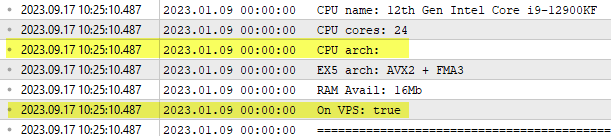
Even after another update some minutes ago, I'm having the same issues:
Related to the point #3, I understood and makes sense... Tks!
Thank you Alain.
Even after another update some minutes ago, I'm having the same issues:
Related to the point #3, I understood and makes sense... Tks!
I confirm about "architecture" with the Strategy Tester (on a live chart it's ok), but not the "vps".
At least for me AVX2 support is not properly detected and the terminal launches in AVX mode instead:
This mqh compiles with no error (b.3958):
Result of compilation:
code generated 1 1
0 errors, 0 warnings, 133 msec elapsed, cpu='AVX2 + FMA3' 1 1
This mqh compiles with no error (b.3958):
Templates and macros are not checked until they are called.