Strategy Tester Returning Wrong Tick Value
You don't listen to anyone and you keep making the same mistakes.
1. You must provide information about the terminal and operating system. Example:
Forum on trading, automated trading systems and testing trading strategies
Vladimir Karputov, 2021.03.16 04:20
If you have a question, first of all you should show the first three lines from the 'Journal' tab

(select these lines, copy to the clipboard and paste into the message using the button  ). It should look like this:
2021.03.16 05:13:07.133 Terminal        MetaTrader 5 x64 build 3003 started for MetaQuotes Software Corp.
2021.03.16 05:13:07.134 Terminal        Windows 10 build 19042, Intel Core i7-9750H  @ 2.60GHz, 26 / 31 Gb memory, 842 / 947 Gb disk, IE 11, UAC, GMT+2
2021.03.16 05:13:07.134 Terminal        C:\Users\barab\AppData\Roaming\MetaQuotes\Terminal\D0E8209F77C8CF37AD8BF550E51FF075
2. You must change your code. (read help: Enable Required Symbols in Market Watch for Multi-Currency Expert Advisors #)
//+------------------------------------------------------------------+
//|                                                     Expert 1.mq5 |
//|                              Copyright © 2021, Vladimir Karputov |
//|                      https://www.mql5.com/en/users/barabashkakvn |
//+------------------------------------------------------------------+
#property copyright "Copyright © 2021, Vladimir Karputov"
#property link      "https://www.mql5.com/en/users/barabashkakvn"
#property version   "1.00"
//--- input parameters
input int      Input1=9;
//---
string array_symbols[];
//+------------------------------------------------------------------+
//| Expert initialization function                                   |
//+------------------------------------------------------------------+
int OnInit()
  {
//--- create a timer with a 5 second period
   EventSetTimer(5);
   ArrayResize(array_symbols,8);
   array_symbols[0] = "NZDCAD";
   array_symbols[1] = "AUDCHF";
   array_symbols[2] = "EURJPY";
   array_symbols[3] = "AUDUSD";
   array_symbols[4] = "CHFJPY";
   array_symbols[5] = "EURUSD";
   array_symbols[6] = "NZDJPY";
   array_symbols[7] = "AUDJPY";
   int size=ArraySize(array_symbols);
   for(int i=0; i<size; i++)
      SymbolSelect(array_symbols[i],true);
   Print(AccountInfoString(ACCOUNT_SERVER));
//---
   return(INIT_SUCCEEDED);
  }
//+------------------------------------------------------------------+
//| Expert deinitialization function                                 |
//+------------------------------------------------------------------+
void OnDeinit(const int reason)
  {
//---
  }
//+------------------------------------------------------------------+
//| Expert tick function                                             |
//+------------------------------------------------------------------+
void OnTick()
  {
//---
  }
//+------------------------------------------------------------------+
//| Timer function                                                   |
//+------------------------------------------------------------------+
void OnTimer()
  {
   int size=ArraySize(array_symbols);
   for(int i=0; i<size; i++)
     {
      double tick_value=SymbolInfoDouble(array_symbols[i],SYMBOL_TRADE_TICK_VALUE);
      int digits=(int)SymbolInfoInteger(array_symbols[i],SYMBOL_DIGITS);
      Print(array_symbols[i]+" Tick Value: "+DoubleToString(tick_value,digits));
     }
  }
//+------------------------------------------------------------------+
3. You should test the 'Expert 1' advisor on the 'MetaQuotes-Demo' server.
4. Testing mode - every tick
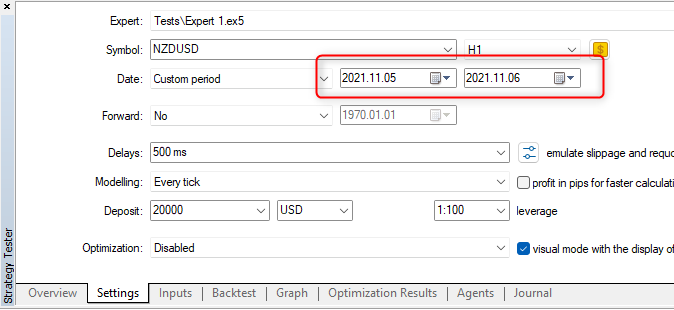
Result:
| Server | Online | Tetster (Every Tick) | ||
|---|---|---|---|---|
| MetaQuotes-Demo | NZDCAD Tick Value: 0.80276 AUDCHF Tick Value: 1.09624 EURJPY Tick Value: 0.882 AUDUSD Tick Value: 1.00000 CHFJPY Tick Value: 0.882 EURUSD Tick Value: 1.00000 NZDJPY Tick Value: 0.882 AUDJPY Tick Value: 0.882 NZDCAD Tick Value: 0.80276 AUDCHF Tick Value: 1.09624 EURJPY Tick Value: 0.882 AUDUSD Tick Value: 1.00000 CHFJPY Tick Value: 0.882 EURUSD Tick Value: 1.00000 NZDJPY Tick Value: 0.882 AUDJPY Tick Value: 0.882 | NZDCAD Tick Value: 0.80261 AUDCHF Tick Value: 1.09583 EURJPY Tick Value: 0.879 AUDUSD Tick Value: 1.00000 CHFJPY Tick Value: 0.879 EURUSD Tick Value: 1.00000 NZDJPY Tick Value: 0.879 AUDJPY Tick Value: 0.879 NZDCAD Tick Value: 0.80259 AUDCHF Tick Value: 1.09584 EURJPY Tick Value: 0.879 AUDUSD Tick Value: 1.00000 CHFJPY Tick Value: 0.879 EURUSD Tick Value: 1.00000 NZDJPY Tick Value: 0.879 AUDJPY Tick Value: 0.879 | ||
| RoboForex-ECN | NZDCAD Tick Value: 0.80263 AUDCHF Tick Value: 0.00000 EURJPY Tick Value: 0.882 AUDUSD Tick Value: 1.00000 CHFJPY Tick Value: 0.882 EURUSD Tick Value: 1.00000 NZDJPY Tick Value: 0.882 AUDJPY Tick Value: 0.882 NZDCAD Tick Value: 0.80263 AUDCHF Tick Value: 1.09527 EURJPY Tick Value: 0.882 AUDUSD Tick Value: 1.00000 CHFJPY Tick Value: 0.882 EURUSD Tick Value: 1.00000 NZDJPY Tick Value: 0.882 AUDJPY Tick Value: 0.882 | NZDCAD Tick Value: 0.80261 AUDCHF Tick Value: 1.09570 EURJPY Tick Value: 0.879 AUDUSD Tick Value: 1.00000 CHFJPY Tick Value: 0.879 EURUSD Tick Value: 1.00000 NZDJPY Tick Value: 0.879 AUDJPY Tick Value: 0.879 NZDCAD Tick Value: 0.80261 AUDCHF Tick Value: 1.09570 EURJPY Tick Value: 0.879 AUDUSD Tick Value: 1.00000 CHFJPY Tick Value: 0.879 EURUSD Tick Value: 1.00000 NZDJPY Tick Value: 0.879 AUDJPY Tick Value: 0.879 | ||
| Alpari-Demo03 | NZDCAD Tick Value: 0.69396 AUDCHF Tick Value: 0.94772 EURJPY Tick Value: 0.762 AUDUSD Tick Value: 0.86451 CHFJPY Tick Value: 0.762 EURUSD Tick Value: 0.86451 NZDJPY Tick Value: 0.762 AUDJPY Tick Value: 0.762 NZDCAD Tick Value: 0.69396 AUDCHF Tick Value: 0.94772 EURJPY Tick Value: 0.762 AUDUSD Tick Value: 0.86451 CHFJPY Tick Value: 0.762 EURUSD Tick Value: 0.86451 NZDJPY Tick Value: 0.762 AUDJPY Tick Value: 0.762 | NZDCAD Tick Value: 0.69467 AUDCHF Tick Value: 0.94833 EURJPY Tick Value: 0.761 AUDUSD Tick Value: 0.86549 CHFJPY Tick Value: 0.761 EURUSD Tick Value: 0.86549 NZDJPY Tick Value: 0.761 AUDJPY Tick Value: 0.761 NZDCAD Tick Value: 0.69467 AUDCHF Tick Value: 0.94830 EURJPY Tick Value: 0.761 AUDUSD Tick Value: 0.86552 CHFJPY Tick Value: 0.761 EURUSD Tick Value: 0.86552 NZDJPY Tick Value: 0.761 AUDJPY Tick Value: 0.761 | ||
Please note: all symbols on all servers are Forex symbols!

- www.metatrader5.com
You don't listen to anyone and you keep making the same mistakes.
1. You must provide information about the terminal and operating system. Example:
2. You must change your code. (read help: Enable Required Symbols in Market Watch for Multi-Currency Expert Advisors #)
3. You should test the 'Expert 1' advisor on the 'MetaQuotes-Demo' server.
4. Testing mode - every tick
Result:
| Server | Online | Tetster (Every Tick) | ||
|---|---|---|---|---|
| MetaQuotes-Demo | ||||
| RoboForex-ECN | ||||
| Alpari-Demo03 | ||||
Please note: all symbols on all servers are Forex symbols!
Thank you Vladimir. Running the strategy tester on Metaquotes-Demo did the trick. So it must be a problem with my broker. In fact I tried two brokers and both of them did the same thing. Would you recommend that I do all my strategy testing on MetqQuotes-Demo without a broker?
I would recommend taking a close look at this picture:
Thanks Vladimir.
Initially I ran it with exactly the same settings as what you have shown. Still my broker's server gave the wrong results.
However, when running on MetaQuotes server it gave the correct results. I then changed the Time frame to H4 and Modelling to "Open Price Only" which is how I would like my other EA to run. Tick Values remained the same with these changes
Hello! Apologies that Im little off this topic, but is still in regards with strategy tester.
During the strategy testing, the times recorded for the trades are computer time or market time?! Some strange things is happening since we changed clocks for winter time...before changing clocks, the tester was running fine on my EA, taking trades on Set Timer, which is from 01:00 to 01:20 everyday. And I was testing my EA since 2017 to present. But since we changed to winter time, the strategy tester is only taking trades after 06/06/2021...nothing from before...if I set the EA trade Timer to 02:00 to 02:20, it will take the trades normally...Anyone can explain this phenomenon? Thanks
In an EA that I am developing in MQL5, I use the function SymbolInfoDouble(symbol,SYMBOL_TRADE_TICK_VALUE) to get the tick value of pairs that I am trading.
It gives me the correct tick value when I run the EA normally. However, when I run it on the strategy tester the function returns wrong tick values.
To illustrate my problem, I have created a simple EA which is attached here to. Results from that EA are also given below.
Can someone help me resolve this issue please.
Please note that I have posted this query elsewhere in the Forum earlier but couldn’t find an answer to the problem.
I don't know whether this problem still exists for people, but it did for me, even if I was testing something on a single symbol. The problem may be caused by the fact that I initialize the GMT time (as my EA relies on this) with the help of the XAUUSD symbol, making my backtest multi symbol, eventhough I'm just trading one. I don't think that testing everything on Metaquotes Demo is the real solution, as strategy results will differ depending on which broker one uses.
Fortunately I've found a relatively good solution for this, which is to change the symbols parameters when you are running a backtest, by adjusting the tick value by the smallest possible value.
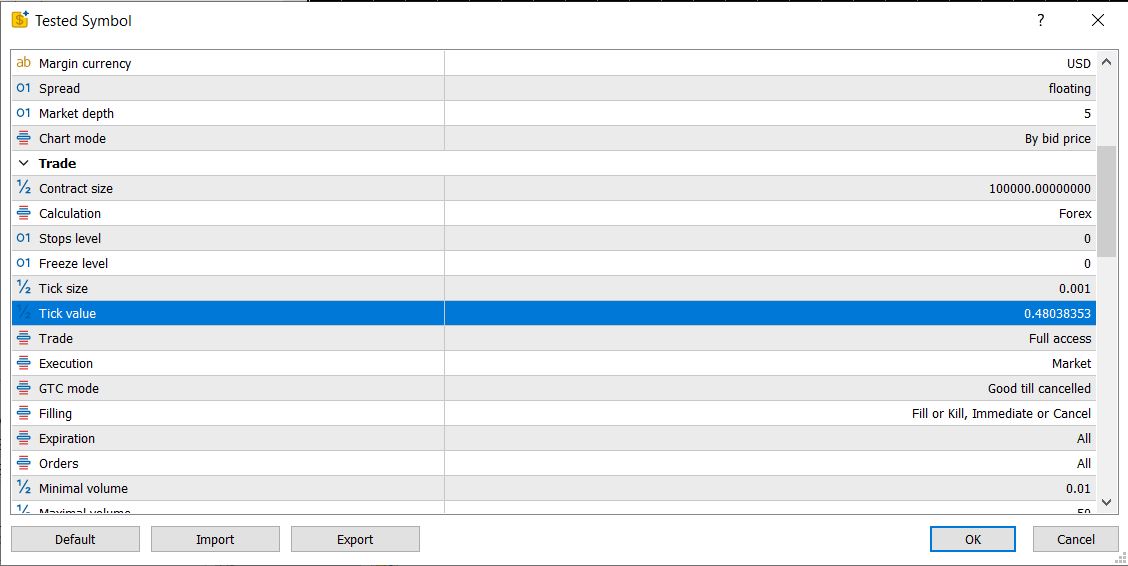
Here for example the current tick value of my USDJPY symbol was 0.48...4 and I changed it to 0.48...3, and now the tester sees this as the real tick value. The real problem is that while this may be a relatively good solution, the SymbolInfoDouble() function always returns the servers current value (or the value set by the user in this case). For example you can't get the swap for 2 years ago, just for today, even in the backtest. This is (I assume) the same for the Tick value, which makes it a constant throughout your backtest, even if the tick value depends on the current price of a traded security, if the base currency is not your account currency. (In that case the tick value is constant through time).
I hope my answer was helpful.

- Free trading apps
- Over 8,000 signals for copying
- Economic news for exploring financial markets
You agree to website policy and terms of use
In an EA that I am developing in MQL5, I use the function SymbolInfoDouble(symbol,SYMBOL_TRADE_TICK_VALUE) to get the tick value of pairs that I am trading.
It gives me the correct tick value when I run the EA normally. However, when I run it on the strategy tester the function returns wrong tick values.
To illustrate my problem, I have created a simple EA which is attached here to. Results from that EA are also given below.
Can someone help me resolve this issue please.
Please note that I have posted this query elsewhere in the Forum earlier but couldn’t find an answer to the problem.