Toolbox Appearing as a floating window
Hi Been trying to find a way to restore my toolbox window to open in the bottom of the screen as usual and not as a floating window with no success.
Anyone help please.
Files:
Screenshot_from_2020-03-25_12-07-28.png
75 kb
Saul_C:
Hi Been trying to find a way to restore my toolbox window to open in the bottom of the screen as usual and not as a floating window with no success. Anyone help please.
Hi Been trying to find a way to restore my toolbox window to open in the bottom of the screen as usual and not as a floating window with no success. Anyone help please.
Drag it down slowly with the mouse until it is about the place that you want it to be at the bottom of the screen.
When you see the shape change to a short wide rectangle, take your finger off of the mouse key.
Hello,
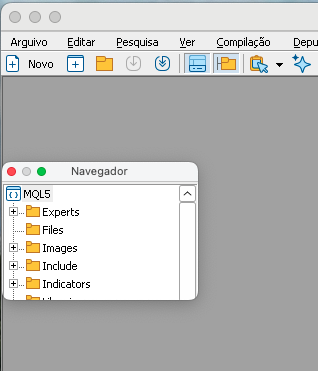
This is not the first time that I accidentally move the mouse and end up moving a docked window and it becomes undocking (floating). This happened in both MT5 and EDITOR.
From what I read, you can just drag and drop it again, but it doesn't work in Wine (MacOS). I got it back once by doing some random movement that I didn't remember, obviously.
I need help.
Here is an example.
THIRDAWESOME #:
Hello,
This is not the first time that I accidentally move the mouse and end up moving a docked window and it becomes undocking (floating). This happened in both MT5 and EDITOR.
From what I read, you can just drag and drop it again, but it doesn't work in Wine (MacOS). I got it back once by doing some random movement that I didn't remember, obviously.
I need help.
Here is an example.
This is the procedure about -
Forum on trading, automated trading systems and testing trading strategies
Alain Verleyen, 2017.10.21 18:25
I had similar problem and solve it this way :
- Terminal started.
- File menu->Open Data Folder
- Double click on "Config" to open the folder.
- Close the MT5 terminal.
- Delete the file Terminal.ini
- Restart your Terminal, problem should be fixed (you could have to set your toolbars/windows as you like the first time).
How to find DataFolder in MacOS -
Forum on trading, automated trading systems and testing trading strategies
MT5 Build 4120 MacOS M1-Data Folder Copy Paste Issue
Julia Lopez, 2023.12.31 19:22
The MQL5 data folder on macOS is typically located in the "Library" folder, which is hidden by default. To access it, follow these steps:
1. Open the "Finder."
2. In the menu bar, click on "Go."
3. Press and hold the "Option" key to reveal the "Library" option, then click on it.
4. Navigate to "Application Support" > "MetaQuotes" > "Terminal" > "Common" > "Files."
This is where you should find the MQL5 data folder.
