Francesco Rubeo
Francesco Rubeo
5 (46)
  • Information
8+ Jahre
Erfahrung
14
Produkte
132
Demoversionen
47
Jobs
0
Signale
0
Abonnenten
Minerva Management is a company composed by software engineers, especially in MQL4 by 6 years, and 6 years experienced traders.
We develop strategies for "third party clients" with the purpose of being at traders service to develop their own indicators, expert advisors or tools for their own way to trade.

Our feedbacks:
https://www.mql5.com/en/users/minervainc/feedbacks

To commit us a personal job just do a personal job and search for minervainc.

Our goal is to research and research to develop indicators and automatic systems to have a strategical advantage on the markets and so augment trading success rate.

Our best indicators:

M.M.Deepness Arrows: This indicator will give you advices on buys and sells after having analized the deepness of the market. Link-> https://mql5.com/59h5o
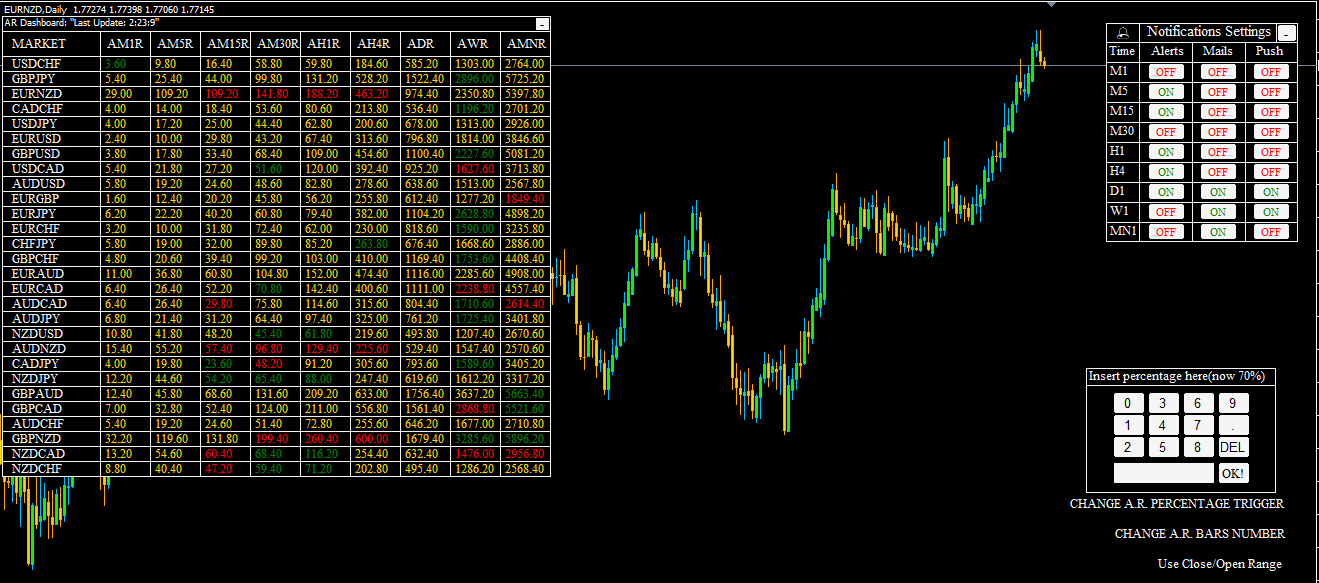
A.R.Dashoard: The Average Range Dashboard will show you the average range of all desired markets (till 50) with one click!! Link-> https://mql5.com/59h5u
Swing Reader: Read Elliott wave principle automatically. Link-> https://mql5.com/59h6k
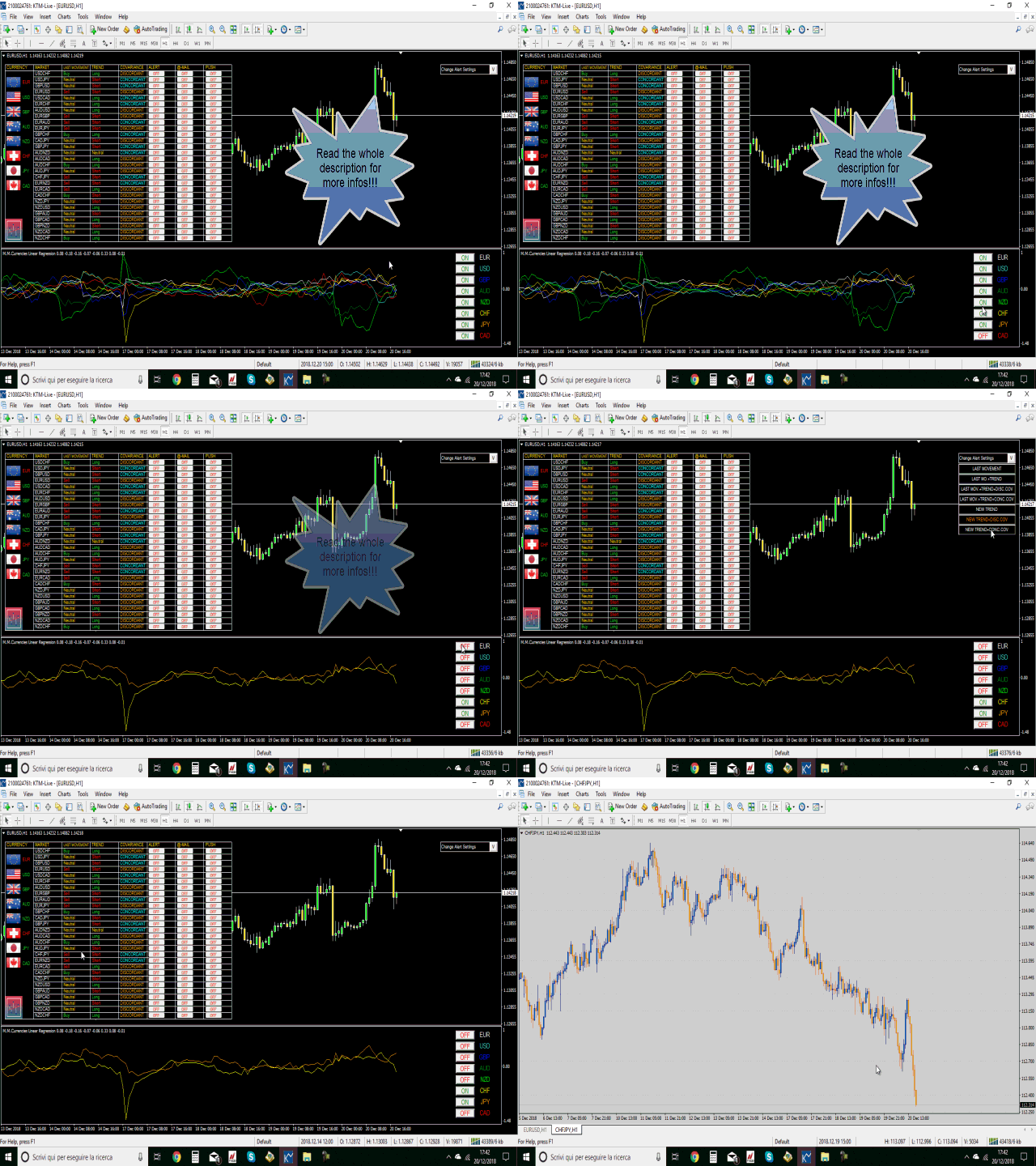
MM Currencies Linear Regression: Evaluate single currency linear regression with one click!! Link-> https://mql5.com/5t6np

Gann Section:
Square of 9 for all: The famous W.D.Gann's Square of 9. Link-> https://mql5.com/59h5x
Gann s heighth: This indicator will let you have at disposal Gann's Eight, with few clicks!! Link-> https://mql5.com/6r157
Gann Swing Chart Range: With this indicator you'll have a general reading of the market's range using Gann's calculating modes. Link-> https://mql5.com/6r15g
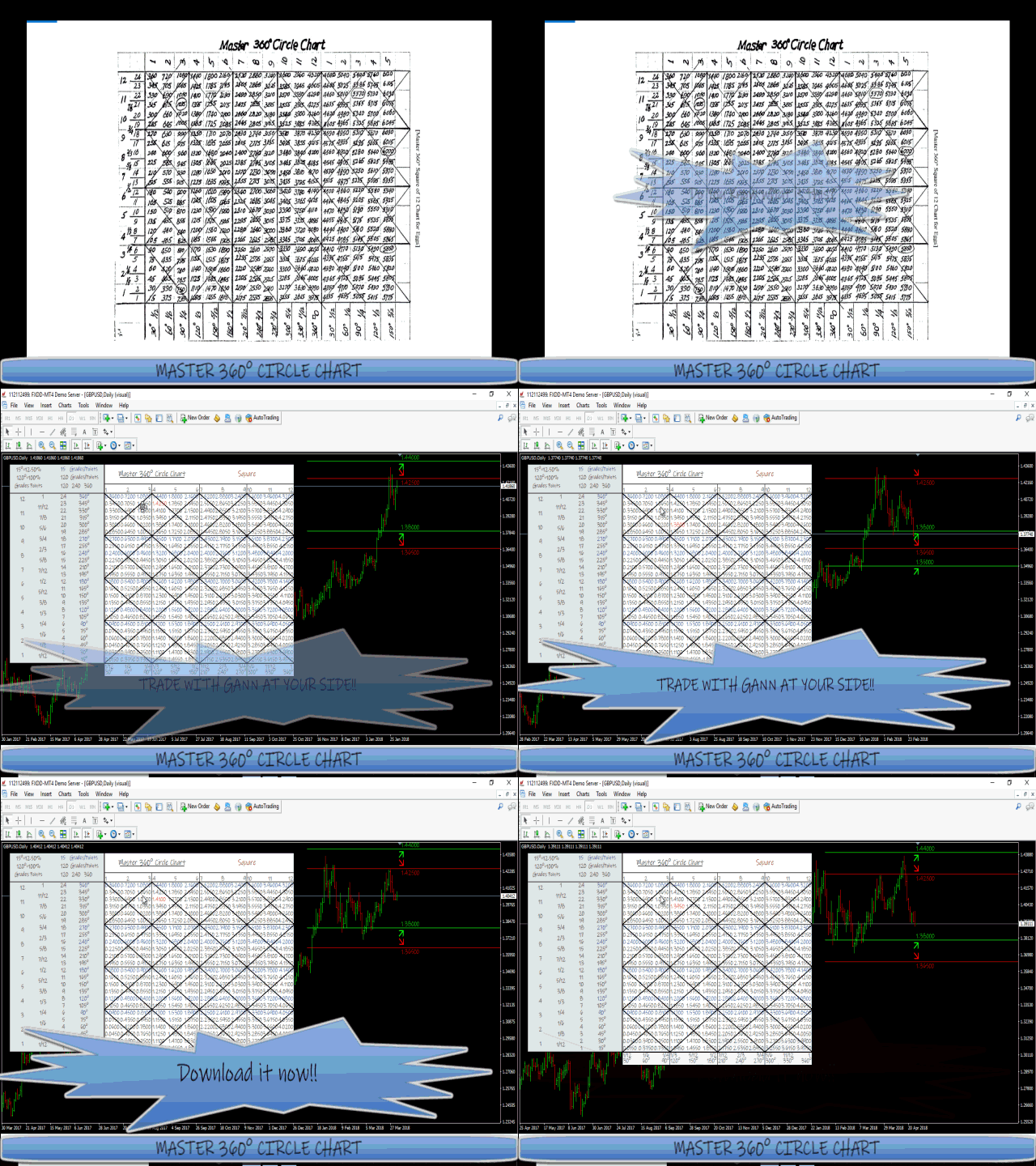
Master 360° Circle Chart with Arrows: Trade with Gann on your side!! Link: https://mql5.com/76ood

Our best Tools:

Custom Dashboard Wizard: Create your Dashboard with few clicks! Link-> https://mql5.com/6ms4h
Orders Assistant Robot: You'll have at your disposal 5 operative panels, each one of these have buttons that let you interact easily at market. Link-> https://mql5.com/59h6i
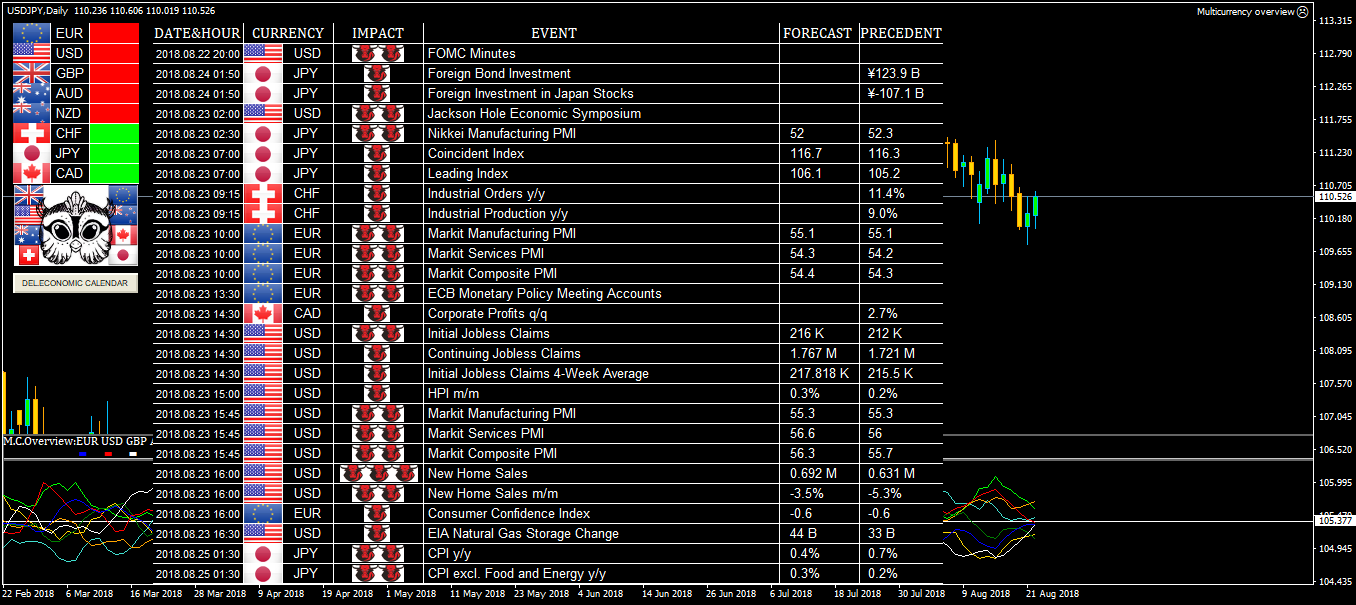
Multicurrency overview: Stay updated with Multicurrency Overview!! Link-> https://mql5.com/59h6u
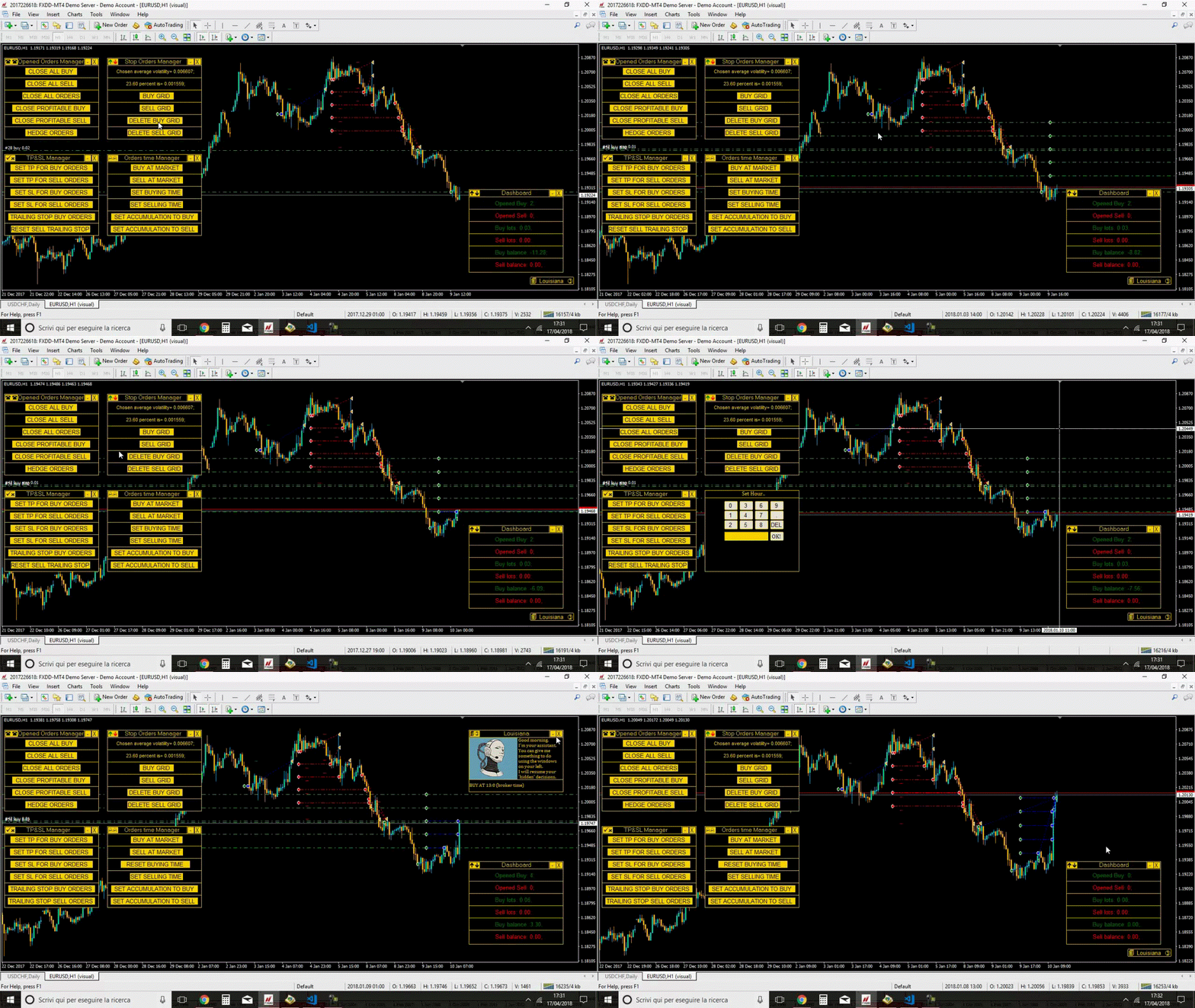
Louisiana: This software will give you the possibility to preset your management strategy (both in live markets and in strategy tester). Link-> https://mql5.com/59h6v
Currencies Cleaner: Currencies Cleaner panel will give you an overview of all the most traded market's currencies in a single click. Link-> https://mql5.com/59h6x

Our CodeBase:

Market Watch AUTO-CSV: Written in this code you can find a loop on your MarketWatch. It can be used to do a multi-market algorithm Link-> https://www.mql5.com/en/code/22326
Francesco Rubeo
Francesco Rubeo
Swing Reader is on sale until 2019.10.14!!! Don't miss this opportunity!!!!

Swing Reader
Read Elliott wave principle automatically!!!
https://mql5.com/4eqt7
MT5 Version-> https://mql5.com/7sb9f
Video -> https://www.youtube.com/watch?v=xZbnahupw6w;

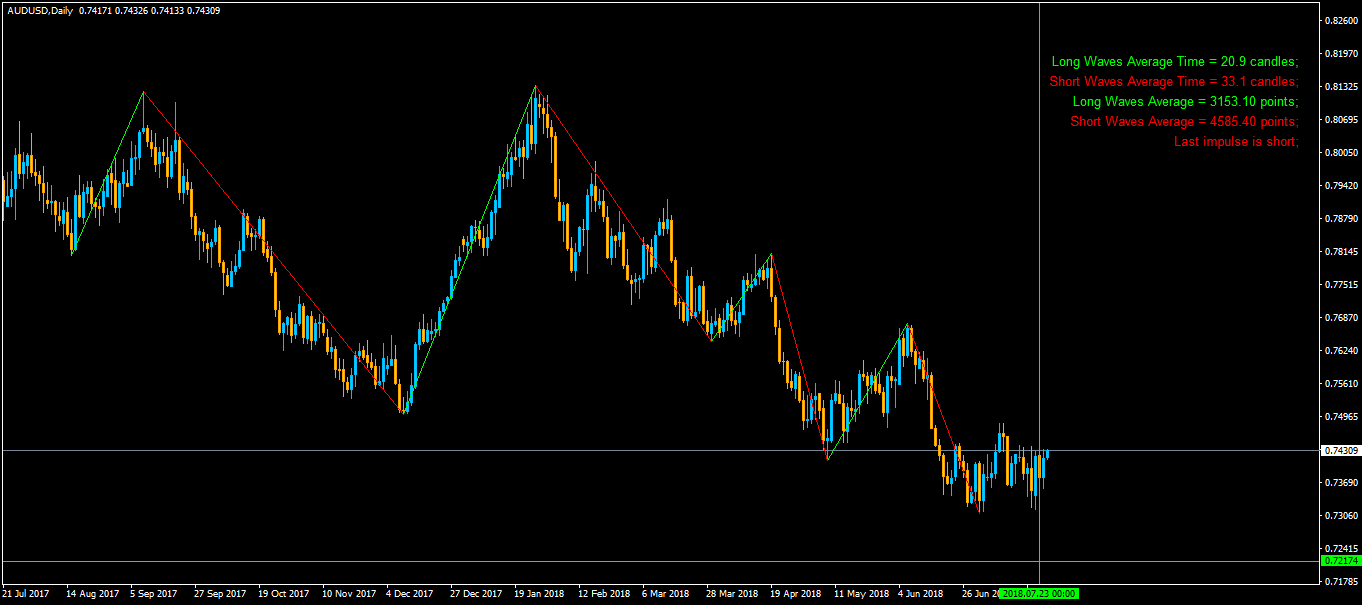
With the Swing Reader, you can easily read the Elliott Wave Principle through an automatic system. With swing, we mean a ZigZag market that is created by a breakout of its standard deviation. You can set the deviation manually, or you can let the indicator do it automatically (setting the deviation to zero).


Advantages you get
Never repaints.
Points showing a horizontal line, in which statistically a long wave ends.
Candles showing a vertical line in which statistically a long wave ends.
A horizontal line created using average points composing statistically short waves.
A horizontal line created using average points composing statistically long waves.
Possibility to optimize the indicator for each timeframe.
Above on the right, you will find very important information concerning the market movement:

Long Waves Average Time: number of candles composing statistically a LONG wave.
Short Waves Average Time: number of candles composing statistically a SHORT wave.
Long Waves Average: points composing statistically a LONG wave.
Short Waves Average: points composing statistically a SHORT wave.
Last impulse: If there is a long impulse, it means that the last long wave is bigger (in points) than the last short wave; if the impulse is short, it is the opposite.


Inputs
Deviation: Set your standard deviation to calculate the swing (if set to zero, the indicator will choose for you the standard deviation).
Average Method: Choose your favourite method to calculate the averages that you will find above on the right. You will have two options at your disposal:
Simple: Arithmetical average.
Linear Weighted: An average weighted by the latest waves (newest waves are more important!!).
Bulls Color: Choose your favourite color for long waves.
Bears Color: Choose your favourite color for short waves.
Swing Width: Choose your favourite waves width.
Nguyen Tuan
Nguyen Tuan 2018.12.21
nice
Vytautas Paliokas
Vytautas Paliokas 2019.01.13
Very good
Hiu Fung Gilbert Lo
Hiu Fung Gilbert Lo 2019.01.15
Nice
Produkt geteilt
Swing Reader is on sale until 2019.10.14!!! Don't miss this opportunity!!!!
Link -> https://mql5.com/4eqt7
MT5 Version-> https://mql5.com/7sb9f
Video -> https://youtu.be/xZbnahupw6w
Bewertungen: 1
99.99 USD

Lesen Sie das Elliott-Wellen-Prinzip automatisch. Mit dem Swing Reader können Sie das Elliott-Wellen-Prinzip ganz einfach durch ein automatisches System lesen. Mit Swing meinen wir einen ZigZag-Markt, der durch einen Ausbruch aus seiner Standardabweichung entsteht. Sie können die Abweichung manuell einstellen oder den Indikator dies automatisch tun lassen (indem Sie die Abweichung auf Null setzen). Die Vorteile sind Keine Neueinfärbung. Punkte, die eine horizontale Linie anzeigen, in der

Francesco Rubeo
Hat eine Bewertung über den Kunden hinsichtlich des Auftrags Modification project abgegeben
Francesco Rubeo
Francesco Rubeo
30 $!!!!!!!!!!
All the kind of average range in only one indicator!!
Link -> https://mql5.com/4vzh8
Vytautas Paliokas
Vytautas Paliokas 2019.01.21
Nice
Simon Loyo
Simon Loyo 2019.01.30
Look awesome
Produkt geteilt
Only for 30 usd your daily newspaper forever!!!
Enabling alerts or mails you will be updated on each candle about single currency trend.
Link -> https://mql5.com/4lvmb

Bleiben Sie auf dem Laufenden mit Multicurrency Overview!! Der Algorithmus dieses EA gibt einen Durchschnitt der prozentualen Bewegungen aller mit einer einzigen Währung verbundenen Devisen aus, isoliert sie und ermöglicht es uns, ihren realen und spezifischen Trend zu verstehen. Oben auf der linken Seite, ein Panel zeigen uns effizient den Trend der Währung, in dem Zeitrahmen tatsächlich verwendet. Das zweite Panel hält Sie über makroökonomische Nachrichten auf dem Laufenden. P.N.: Die Zeit der

Produkt geteilt
Evaluate single currency linear regression with one click!!

Mit diesem Indikator können Sie die lineare Regression für eine einzelne Währung auswerten. WAS IST LINEARE REGRESSION?(ABB.3) Die lineare Regression ist ein Versuch, eine geradlinige Gleichung zwischen zwei Variablen unter Berücksichtigung einer Reihe von Datenwerten zu modellieren. Das Ziel des Modells ist es, die beste Anpassung zu finden, die den beiden unbekannten Werten gerecht wird, ohne die andere zu benachteiligen. In diesem Fall handelt es sich bei den beiden Variablen um den Preis

Produkt geteilt
With this indicator you'll have a general reading of the market's range using Gann's calculating modes!!
Link-> https://mql5.com/6r15g

Mit diesem Indikator erhalten Sie eine allgemeine Ablesung der Marktspanne unter Verwendung der Gann-Berechnungsmodi. Der Gann-Swing wird verwendet, um die letzten Marktbewegungen auf den ersten Blick zu erkennen. Die Grundlage dieser Swing-Berechnung ist die Anzahl der Kerzen in Bezug auf die Auf- und Abwärtsbewegung des Kurses. Wenn der Kurs das letzte Maximum nach oben durchbricht, wird der Swing nachgezeichnet, wenn eine bestimmte Anzahl von Kerzen vom letzten Minimum überschritten wird. Es

Francesco Rubeo
Francesco Rubeo
MASTER 360° CIRCLE CHART WITH ARROWS

Link-> https://mql5.com/76ood
Hiu Fung Gilbert Lo
Hiu Fung Gilbert Lo 2019.04.09
nice
Simon Loyo
Simon Loyo 2019.04.24
nice
Produkt geteilt
Improve your Trading Arsenal!!!!
Link ->https://mql5.com/582x0
Video -> https://www.youtube.com/watch?v=HXHE8O-FXX4;
Bewertungen: 1
74.99 USD

Mit den "M.M. Deepness Arrows" erhalten Sie einen einfachen Zugang zu einem tiefen Wissen über die Marktbewegung! Dieser Indikator wird Ihnen Kauf- und Verkaufsempfehlungen geben, nachdem er die Tiefe des Marktes analysiert hat. Der "Trigger" für den Einstieg wird nach dem Studium der Höchst- und Tiefstwerte jeder Kerze gegeben, um so die irreführenden Daten der Eröffnungs- und Schlusskurse (die von den Brokern angegeben werden) zu vermeiden. Dank dieser Pfeile können Sie leicht erkennen, ob es

lizhi fu
lizhi fu 2018.12.18
可以学习一下
Francesco Rubeo
Francesco Rubeo
Currencies Cleaner
FREE VERSION -> https://mql5.com/5hfk3

COMPLETE VERSION-> https://www.mql5.com/en/market/product/26366
Video -> https://www.youtube.com/watch?v=WVgkHwQRBjI;

Currencies Cleaner panel will give you an overview of all the most traded market's currencies in a single click.

First of all the panel will refresh all your charts, opening them four times in all timeframes needed.


1 - CURRENCIES
It uses a complex algorithm to study the movement of 17 different indicators. It means that the algorithm not only "reads" the actual value of an indicator, but also creates a probability of success using the position of this value on the indicator and the last movement of the same indicator. After doing this (for each one of the indicators), the algorithm will study the smaller timeframes of the markets, measuring how many times a market has broken the volatility of the indicator on top and on the bottom. The final part consists in isolating the markets of a particular currency and gathering all the probabilities studied before, giving us a numerical results.

Currencies with positive numbers means that one currency, statistically, will have a bull market. On the other hand, currencies with negative numbers means that this currency, statistically, will have a bear market. The higher is the absolute value, the higher is the probability of success.


2 - A.M. and B&B DISTRIBUTIONS
Now we have the second information, the answer to the question: How I read those previous numbers?

You'll get the answer reading this:

B&B Distributions tells you how much bears and bulls are distributed in markets.

A.M. gives us the maximum and minimum value reachable by a single currency, showing also the 80% and the 70% of those values.

The nearer a currency is to the maximum or the minimum of the A.M., the more the currency, statistically, will follow the analysis during the following day. So if the value is (of the absolute value) less than the 70% of the minimum or less the 70% of the maximum, we have a lower probability to obtain our target.


3 - AVERAGE
The panel shows which moving average, statistically, is cut or touched by the market, starting a trend. So we have an higher probability to enter in a market which is starting a trend. Obviously, the lowest is the average value, the lowest are the pips of the target.


4 - DAILY SIGNAL
This panel shows candlesticks patterns in Daily time.

Patterns for Long:

ENGULFING, HAMMER, BIG HAMMER, LONG LINE, INVERTED HAMMER.

Patterns for Short:

ENGULFING, SHOOTING STAR, BIG SHOOTING STAR, LONG LINE, HANGING MAN.

P.N.: These figures are seen in the panel only if market has touched or broken the average.


5 - BACKGROUND
It simply shows the last candlesticks patterns info on the market in weekly time chart.


6 - LAST IMPULSE
An impulse is a ZigZag movement created by the market, called "swing". A market which has the last swing long, has the previous short and vice versa. The highest swing in pips is the Last Impulse.

If you click on a Symbol name, the current chart will switch to that symbol.
Ahmet Metin Yilmaz
Ahmet Metin Yilmaz 2018.09.02
good job
Francesco Rubeo
Francesco Rubeo 2018.09.03
Really thanks Ahmet!!
Vytautas Paliokas
Vytautas Paliokas 2019.01.17
Well done
Francesco Rubeo
Francesco Rubeo
Swing Reader

Read Elliott wave principle automatically!!!
https://mql5.com/4eqt7
MT5 Version-> https://mql5.com/7sb9f
Video -> https://www.youtube.com/watch?v=xZbnahupw6w;
Francesco Rubeo
Francesco Rubeo
Louisiana
Your order Management Robot!!
It works on strategy tester too!!!
https://mql5.com/48vyv
Video -> https://www.youtube.com/watch?v=zjqfTt79W8c;
Imam Badarudin Sholeh
Imam Badarudin Sholeh 2018.12.27
good
Simon Loyo
Simon Loyo 2019.01.16
Oh this looks nice
Hiu Fung Gilbert Lo
Hiu Fung Gilbert Lo 2019.02.10
nice management
Produkt geteilt
Create your Dashboard with few clicks!

Erstellen Sie Ihr Dashboard mit wenigen Klicks! Mit dem Custom Dashboard Wizard können Sie Ihr Dashboard auch ohne jegliche Programmierkenntnisse erstellen. Dieses Indikator/Panel gibt Ihnen die Möglichkeit, die Werte der Metatrader4-Standardindikatoren in jedem beliebigen Zeitrahmen, mit jedem beliebigen Wert und in jedem beliebigen Markt hinzuzufügen/zu entfernen. Achten Sie nur darauf, den Marktnamen genau so zu schreiben, wie er in der Liste Ihres Market Watch steht. Das Hauptpanel wird aus

Produkt geteilt
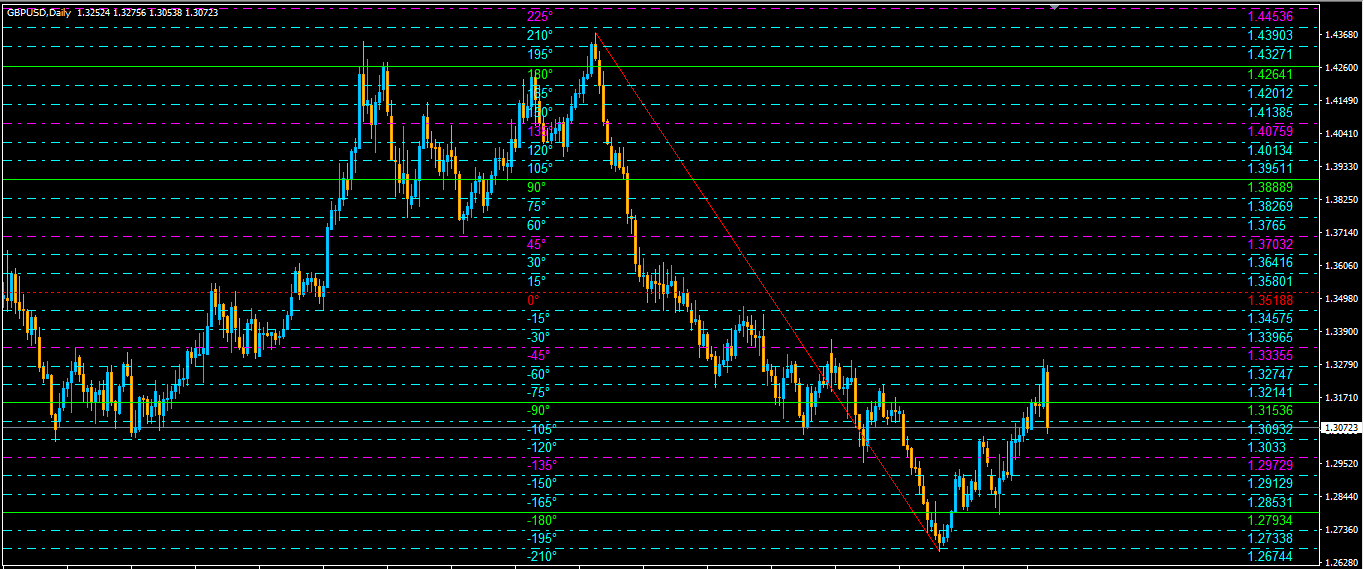
Welcome all to the "Square of 9"!!
Link -> https://mql5.com/514q7
Video -> https://www.youtube.com/watch?v=kpdmxiDDWVs;

Willkommen zum berühmten "Quadrat der 9" von Gann! Diese Methode wurde von einem der besten Trader in der Geschichte verwendet, einer Person, die ihren Weg unter die Top-Trader gemacht hat. Ein "Heiliger Gral" für jeden, der den Handel erlernen möchte. Das "Quadrat der 9" wurde von diesem Genie verwendet, um die zukünftigen Unterstützungen und Widerstände des Marktes zu finden. Heutzutage ist es möglich, diese mit einem Klick zu finden, dank der Software. Damals benutzte Gann nur sein Quadrat

Francesco Rubeo
Francesco Rubeo
Vitor Oliveira
Vitor Oliveira 2018.12.19
Good work! Is it available also for MT5? Thanks.
Francesco Rubeo
Francesco Rubeo 2018.12.19
Thanks a lot. Not yet, we would like to distribute all of our products on MT5 starting from next year.
Vytautas Paliokas
Vytautas Paliokas 2018.12.20
Very interesting ...
Francesco Rubeo
Francesco Rubeo
Welcome all to the "Square of 9"!!
Link -> https://mql5.com/514q7
Video -> https://www.youtube.com/watch?v=kpdmxiDDWVs;
altzspec
[Gelöscht] 2019.01.10
Interesting!
Vytautas Paliokas
Vytautas Paliokas 2019.01.20
Not bad
Francesco Rubeo
Francesco Rubeo
https://www.mql5.com/en/market/product/29043
Video -> https://www.youtube.com/watch?v=YSTDs9ngPgI;

It works on strategy tester too!!!
This software will give you the possibility to do different things.

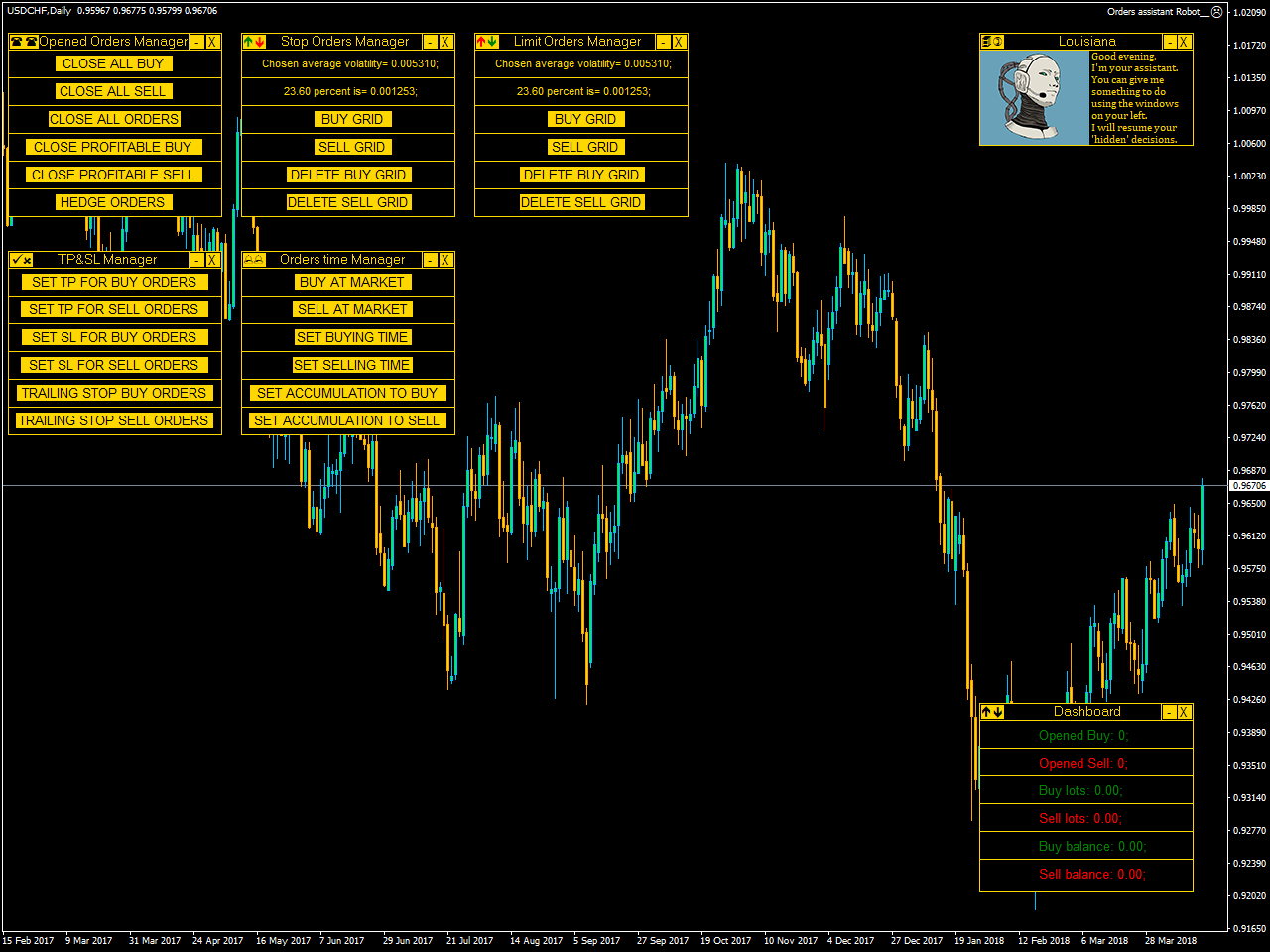
You'll have at your disposal 5 operative panels, each one of these have buttons that let you interact easily at market:


1. Opened Orders Manager (screenshot 1):

6 buttons:

Close all buy orders.
Close all sell orders.
Close all orders.
Close all profitable buy orders.
Close all profitable sell orders.
Hedge orders.
2. Stop Orders Manager (screenshot 1):

2 informative sections:

Numerical value of the average volatility chosen in the inputs section.
Numerical value of the average volatility chosen, based on the percentage chosen in the inputs section.
4 buttons:

Set a buy stop grid.
Set a sell stop grid.
Delete the buy stop grid.
Delete the sell stop grid.
3. Limit Orders Manager (screenshot 4):

2 informative sections:

Numerical value of the average volatility chosen in the inputs section.
Numerical value of the average volatility chosen, based on the percentage chosen in the inputs section.
4 buttons:

Set a buy limit grid.
Set a sell limit grid.
Delete the buy limit grid.
Delete the sell limit grid.
4. TP&SL Manager (screenshot 1):

6 buttons:

Set take profit for buy orders in points.
Set take profit for sell orders in points.
Set stop loss for buy orders in points.
Set stop loss for sell orders in points.
Set trailing stop for buy orders in points.
Set trailing stop for sell orders in points.
5. Orders time Manager (screenshot 1):

6 buttons:

Buy now at market.
Sell now at market.
Schedule a buy at a certain time (Hour and minute).
Schedule a sell at a certain time (Hour and minute).
Buy now at market and choose a time interval at which buy again. Once activated, button will change to allow you to stop accumulation.
Sell now at market and choose a time interval at which sell again. Once activated, button will change to allow you to stop accumulation.
Other than this, you'll have at your disposal two other panels on your right.

Starting from above you can find your personal assistant (screenshot 2), she will resume your scheduled decisions.

Scheduled decisions means your hypothetical 6 different choices:

You've scheduled a buy operation.
You've scheduled a sell operation.
Your set a buy accumulation.
Your set a sell accumulation.
Your set trailing stop for buy orders.
Your set trailing stop for sell orders.


Below, you have your Dashboard (screenshot 2) where you can find these infos:

Number of opened buy orders.
Number of opened sell orders.
Buy exposition (lots).
Sell exposition (lots).
Buy orders balance.
Sell orders balance.
Each panel can be iconified on chart bottom or closed.


Parameters
LOTS FOR TIME ORDERS: Set lots for Orders time Manager panel.
SLIPPAGE: Set slippage.
MAGIC BUY: Set magic number for buy orders.
MAGIC SELL: Set magic number for sell orders.
BUY COLOR: Set your favourite color for buy orders.
SELL COLOR: Set your favourite color for sell orders.
LOTS FOR PENDING ORDERS: Set lots for grid orders.
AVERAGE VOLATILITY BARS: Set average period.
AVERAGE VOLATILITY TIME: Set average volatility timeframe.
% FOR STOP & LIMIT ORDERS: Choose average volatility percentage to set the distance between grid orders (both limit and stop orders).
PENDING ORDERS NUMBER: Number of pending orders that the EA will put on the market when you set a grid.
BACKGROUND COLOR: Set background color.
FRONT COLOR: Set front color.


Setup
This panel is an EA. So you have to install it in your MQL4/Experts folder.
Hiu Fung Gilbert Lo
Hiu Fung Gilbert Lo 2018.07.06
Great
Zheng Mao Nie
Zheng Mao Nie 2018.12.24
Do you have Chinese?
Francesco Rubeo
Francesco Rubeo 2018.12.24
No sorry
Francesco Rubeo
Francesco Rubeo
Welcome to MM Currencies Linear Regression!!
Link-> https://mql5.com/5t6hg
Video-> https://www.youtube.com/watch?v=0LXuoQC8TlA;
Francesco Rubeo
Francesco Rubeo
Stay updated with Multicurrency overview!!

https://mql5.com/4lvmb