Flexible Trade Manager
30 USD
Demo heruntergeladen:
124
Veröffentlicht:
21 Oktober 2022
Aktuelle Version:
5.2
Keinen passenden Roboter gefunden?
Geben Sie Ihren Eigenen in Auftrag
auf Freelance!
Gehen Sie zu Freelance
Geben Sie Ihren Eigenen in Auftrag
auf Freelance!
Wie man einen Roboter oder Indikator kaufen kann
Starte Deinen EA im
Virtual Hosting
Virtual Hosting
Teste einen Indikator/Roboter vor dem Kauf
Möchtest Du Geld im Market verdienen?
Wie man Produkte richtig präsentiert

Sie verpassen Handelsmöglichkeiten:
- Freie Handelsapplikationen
- Über 8.000 Signale zum Kopieren
- Wirtschaftsnachrichten für die Lage an den Finanzmärkte
Registrierung
Einloggen
Sie stimmen der Website-Richtlinie und den Nutzungsbedingungen zu.
Wenn Sie kein Benutzerkonto haben, registrieren Sie sich
Good tool one feature i like to see is it possible to put profit according to RRR like fixed profit of 4 R or 5 R etc
I will consider to include this to the next update
why i didn't see the info panel like it show on video?
why i didn't see the info panel like it show on video
Did you downloaded the Flexible Manager EA as well?
If yes and panel still not showing press the zero keyboard few times, there is shortcut that changes the modes of what is shown / hidden on the screen.
Did you downloaded the Flexible Manager EA as well?
If yes and panel still not showing press the zero keyboard few times, there is shortcut that changes the modes of what is shown / hidden on the screen.
No, i didn't downloaded the Flexible Manager EA. Let me download it and try again.
Hi there, please can you fix the following:
1) The yellow text (top-right) does not display clearly on a white chart
2) When you click on the "D" button the language is not English
3) The price is only displayed in "$", need to display in other local currencies
4) Pressing "F" does not display any fibs
5) The symbol changer currency pair box is too small and does not display currencies with a broker suffix properly
6) The X to hide the symbol changer is obscured by the "Delete All" button
7) Overall the buttons are too squashed up vertically, need a gap in between
No Fibo after pressing "F".
The Objects do not go away after removing the indicator and EA.
Good tool one feature i like to see is it possible to put profit according to RRR like fixed profit of 4 R or 5 R etc
Its planned for the next update
No Fibo after pressing "F".
The Objects do not go away after removing the indicator and EA.
Fibo feature was removed as its included in the ICT template. it was contradicting each others
Hi there, please can you fix the following:
1) The yellow text (top-right) does not display clearly on a white chart
2) When you click on the "D" button the language is not English
3) The price is only displayed in "$", need to display in other local currencies
4) Pressing "F" does not display any fibs
5) The symbol changer currency pair box is too small and does not display currencies with a broker suffix properly
6) The X to hide the symbol changer is obscured by the "Delete All" button
7) Overall the buttons are too squashed up vertically, need a gap in between
Will be fixed in the coming update
No Fibo after pressing "F".
The Objects do not go away after removing the indicator and EA.
As per your request, I will add the fibo back to the options. There was a collision with ICT Template. I have found the option to make it available for both.
Good tool one feature i like to see is it possible to put profit according to RRR like fixed profit of 4 R or 5 R etc
TP in RR profits is included in the latest update
I want to request a refund or correction of the product. The product is not doing what you advertised. I see no lower display of profit and loss nor does it take trades where the entry line is placed.
Fixed my friend , plese fix your review
No Fibo after pressing "F".
The Objects do not go away after removing the indicator and EA.
Objects bug fixed and fibo works too
I'm sorry but I cant figure out how to take an instant market trade. Instruction manual?
Thank you
I'm sorry but I cant figure out how to take an instant market trade. Instruction manual?
Thank you
This to is created mainly for pending orders if you want to take instant buy you must acivate trades when placed the trade projecton with B - buy or S - sell.
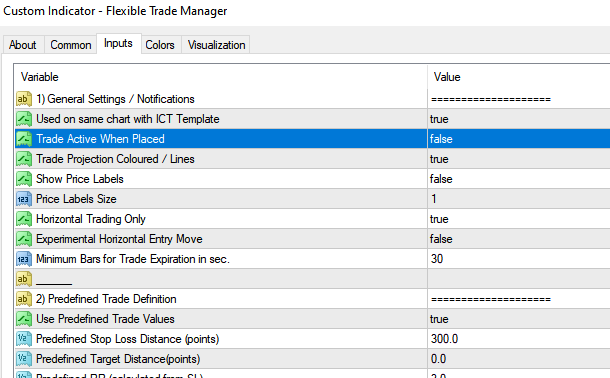
You mouse coursor should be on the current price as well predefine your risk before doing it. And ofcourse test on the demo first. You shuld practice a bit before going life with it.
Here is two video tutorials. Hope it helps
https://youtu.be/gIEUARXdgM8?si=4XKNJzovc_T9ZjSH
https://youtu.be/F5nlhGXMa-w?si=U9CdhlCy8gbzCWsC
This to is created mainly for pending orders if you want to take instant buy you must acivate trades when placed the trade projecton with B - buy or S - sell.
You mouse coursor should be on the current price as well predefine your risk before doing it. And ofcourse test on the demo first. You shuld practice a bit before going life with it.
Here is two video tutorials. Hope it helps
https://youtu.be/gIEUARXdgM8?si=4XKNJzovc_T9ZjSH
https://youtu.be/F5nlhGXMa-w?si=U9CdhlCy8gbzCWsC