Time And Sales Layout
49 USD
Demo heruntergeladen:
200
Veröffentlicht:
21 August 2018
Aktuelle Version:
1.2
Keinen passenden Roboter gefunden?
Geben Sie Ihren Eigenen in Auftrag
auf Freelance!
Gehen Sie zu Freelance
Geben Sie Ihren Eigenen in Auftrag
auf Freelance!
Wie man einen Roboter oder Indikator kaufen kann
Starte Deinen EA im
Virtual Hosting
Virtual Hosting
Teste einen Indikator/Roboter vor dem Kauf
Möchtest Du Geld im Market verdienen?
Wie man Produkte richtig präsentiert

Sie verpassen Handelsmöglichkeiten:
- Freie Handelsapplikationen
- Über 8.000 Signale zum Kopieren
- Wirtschaftsnachrichten für die Lage an den Finanzmärkte
Registrierung
Einloggen
Sie stimmen der Website-Richtlinie und den Nutzungsbedingungen zu.
Wenn Sie kein Benutzerkonto haben, registrieren Sie sich
Hi,
how can I setup the indicator to looks like figure 2?
Hi,
how can I setup the indicator to looks like figure 2?
I'm not sure I get you. The figure 2 is the same as figure 1 regarding the indicator settings, but the chart mode is changed to candles from bars.
Hello, I have rented your product for a month. I would like to know the following.
I guess the idea of the indicator is to draw large buy or sell orders. When I change the settings of the indicator the parameters I don't see anything change on the chart. I mean, can the indicator be modified in such a way that it finds only the large inflows of money? For example, do you stress your search so much that signals appear only once in a while and not all the signals you find?
On the other hand, does the indicator work on weekends or when there is no market? This is to be able to do analysis with the indicator when I have more time than it is on weekends or when there is no market.
Thank you.
M. Dorta.
Hello, I have rented your product for a month. I would like to know the following.
I guess the idea of the indicator is to draw large buy or sell orders. When I change the settings of the indicator the parameters I don't see anything change on the chart. I mean, can the indicator be modified in such a way that it finds only the large inflows of money? For example, do you stress your search so much that signals appear only once in a while and not all the signals you find?
On the other hand, does the indicator work on weekends or when there is no market? This is to be able to do analysis with the indicator when I have more time than it is on weekends or when there is no market.
Thank you.
M. Dorta.
Hi, the settings should normally change the behaviour of the indicator but it depends actually from specific settings - they could be incorrect or inapplicable for a symbol/market conditions. This is why you should send all details to me - parameters, instruments, logs, screenshots, etc.
The indicator shows ticks available from your broker. If it keeps trading on weekends, you'll see weekend data as well. If you actually mean volumes traded in past, you can view them by settings ShowHistoryFrom accordingly.
Hi, the settings should normally change the behaviour of the indicator but it depends actually from specific settings - they could be incorrect or inapplicable for a symbol/market conditions. This is why you should send all details to me - parameters, instruments, logs, screenshots, etc.
The indicator shows ticks available from your broker. If it keeps trading on weekends, you'll see weekend data as well. If you actually mean volumes traded in past, you can view them by settings ShowHistoryFrom accordingly.
Hello,
Agree. As soon as I can, I will send you the information you ask for. I normally trade Forex.
However, what happens today is that when I drag the indicator to the graph or double click it does not load on the graph. Do you know what the problem can be? Would I have to download or install it again?
Thank you.
M. Dorta.
Hello,
Agree. As soon as I can, I will send you the information you ask for. I normally trade Forex.
However, what happens today is that when I drag the indicator to the graph or double click it does not load on the graph. Do you know what the problem can be? Would I have to download or install it again?
Thank you.
M. Dorta.
You should look in the logs for errors. Make sure the indicator did not actually load and it's not the case that your settings are probably incorrect. For example, if you don't enable history, there will be no online ticks on weekends.
Apart from this, if the indicator worked before and do not load at the moment, think what has been changed - this could be an issue with your environment.
hi
How to set a minimum lot to show in chart?
How to set a minimum lot to show in chart?
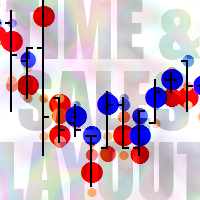
Use Threshold parameter - it means that this or higher volumes from ticks are displayed. The numbers from 1 to 10 inside bullets are embedded into the icons themselves and denote relative size of volumes, not values.