
75 USD
Demo heruntergeladen:
6 985
Veröffentlicht:
2 Februar 2012
Aktuelle Version:
26.326
Keinen passenden Roboter gefunden?
Geben Sie Ihren Eigenen in Auftrag
auf Freelance!
Gehen Sie zu Freelance
Geben Sie Ihren Eigenen in Auftrag
auf Freelance!
Wie man einen Roboter oder Indikator kaufen kann
Starte Deinen EA im
Virtual Hosting
Virtual Hosting
Teste einen Indikator/Roboter vor dem Kauf
Möchtest Du Geld im Market verdienen?
Wie man Produkte richtig präsentiert

Sie verpassen Handelsmöglichkeiten:
- Freie Handelsapplikationen
- Über 8.000 Signale zum Kopieren
- Wirtschaftsnachrichten für die Lage an den Finanzmärkte
Registrierung
Einloggen
Sie stimmen der Website-Richtlinie und den Nutzungsbedingungen zu.
Wenn Sie kein Benutzerkonto haben, registrieren Sie sich
Hi Vladislav
Hope you are well.
When i set a pending order using the magic target function. How do I set the pending order ONLY and not have to set the stoploss and take profit lines every time. I want to use the existing setting of 1000 pips I have already set or any other setting for both SL/TP already set by me.
So Just a pending order and using existing SL/TP settings as shown below.
Thanks
@Kalen
I checked. Everything works fine. Please check. and attach log file and screenshots.
I am hovering over the "BUY" button with my mouse, but the SL/TP lines are backwards....
I am hovering over the "BUY" button with my mouse, but the SL/TP lines are backwards....
Thank you. I saw the error.
Thank you. I saw the error.
Thank you. I saw the error.
While I have your attention, I might bring up this also. I don't know if my settings are wrong, or if this happens by default, but it is frustrating :)
Fixed information error on chart (Future SL TP deal)
please update
Fixed information error on chart (Future SL TP deal)
please update
Just updated, and it is working as intended. Thanks for the fast patch! Your products are amazing.
Hi Vladislav, I hope you're well.
Recently was trying to close all the Buy positions at a small loss using the CLP function, and I made a mistake and closed Sell positions as well, which were in much bigger loss! This mistake caused me a lot of money...
It is not the EA's mistake, it's my mistake; the EA did what it was supposed to do.
On the CLP panel I chose Seperate Buy&Sell, but when I ticked Loss -10$, it closed all positions, because Sell positions were in a bigger loss than Buy positions.
Is it possible to provide a range for Losses on the CLP panel,instead of just 1 figure for $, Pips and %, to avoid any confusions like that?
A range would also be useful when your buy trades are in the negative (say -100$), but you want to close them say when the loss is -50$ (By setting up the range as: -10$ to -50$). If your sell trades are much higher that -$50, they won't be affected and only the buy trades will be closed (Something like closing at minimum/small loss, without affecting other typse of trades).
Currently you can only close trades if the loss gets bigger (larger than a fixed number), with that function, you can close positions to minimise losses as well. And it would also help avoid mistakes like I did.
Regards, Atila
Hi Vladislav, I hope you're well.
Recently was trying to close all the Buy positions at a small loss using the CLP function, and I made a mistake and closed Sell positions as well, which were in much bigger loss! This mistake caused me a lot of money...
It is not the EA's mistake, it's my mistake; the EA did what it was supposed to do.
On the CLP panel I chose Seperate Buy&Sell, but when I ticked Loss -10$, it closed all positions, because Sell positions were in a bigger loss than Buy positions.
Is it possible to provide a range for Losses on the CLP panel,instead of just 1 figure for $, Pips and %, to avoid any confusions like that?
A range would also be useful when your buy trades are in the negative (say -100$), but you want to close them say when the loss is -50$ (By setting up the range as: -10$ to -50$). If your sell trades are much higher that -$50, they won't be affected and only the buy trades will be closed (Something like closing at minimum/small loss, without affecting other typse of trades).
Currently you can only close trades if the loss gets bigger (larger than a fixed number), with that function, you can close positions to minimise losses as well. And it would also help avoid mistakes like I did.
Regards, Atila
dear Vladislav Andruschenko
Dear Vladislav Andruschenko
Hello. Thank you for making a great program.
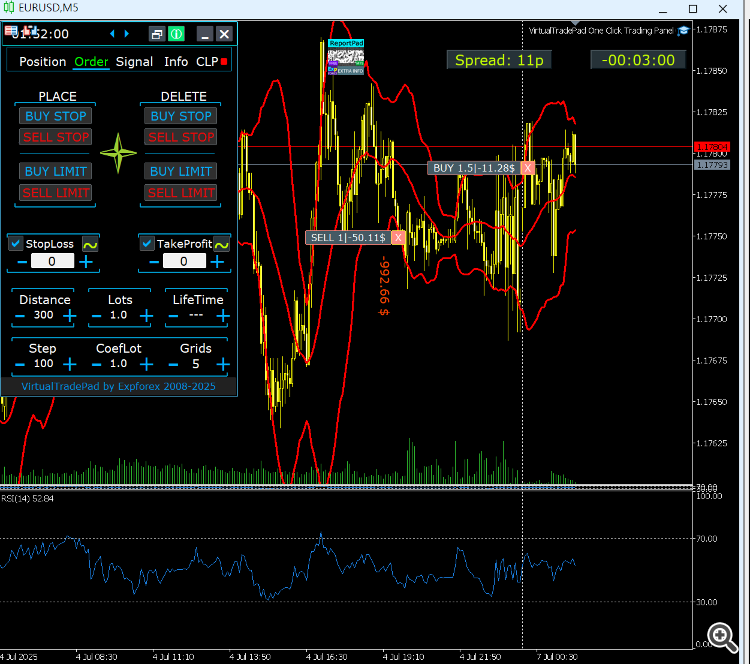
I need grid order, so I bought it. Is there a way to order grid at a fixed price instead of the current price? I can't find it even if I look for the menu. Currently, I make a separate modification after ordering.
If there is a way, please let me know. I've been using copylot well.
Thank you so much!!!
.

dear Vladislav Andruschenko
Dear Vladislav Andruschenko
Hello. Thank you for making a great program.
I need grid order, so I bought it. Is there a way to order grid at a fixed price instead of the current price? I can't find it even if I look for the menu. Currently, I make a separate modification after ordering.
If there is a way, please let me know. I've been using copylot well.
Thank you so much!!!
.
Hello Vladislov my friend.
I am back to ask you another question about an enhancement I would like or if you can add. I am willing to pay if need be. I want something I will call a DYNAMIC BREAKEVEN TAKE PROFIT/STOPLOSS . So the way it will work is say I set a normal stop loss at -100 pips ( I will call this a hard stop loss). So if price moves against me by -50 pips (ie 50 pips away from my hard stop loss) I want the DYNAMIC BREAK EVEN TAKE PROFIT/STOPLOSS to close the position at the entry price/break even if price returns to it.
So this is different to trailing, break even with profit etc. The TP will move to breakeven if price moves against me a set number of pips (in the example I used 50, however it must be a user configurable).
Hope to hear from you regarding this. Thanks
Hello all,
Eu estou usando apenas 1 das 10 ativações, mas já ativei 10 vezes, pois formatei meu computador algumas vezes. Como faço para soltar as outras 9 licenças que não estou usando, pois comprei o vitalicio e quero ativar outro MT5 agora e não tem disponibilidade.