Trend Vector
- 专家
- 版本: 1.0
- 激活: 15

Trend Vector is an Expert Advisor for MetaTrader 5 that uses Moving Averages and VWAP as the main components for market direction analysis.
The EA evaluates the relationship between the current market price and the enabled reference levels. Trading decisions are made using completed candles, helping the EA work with confirmed price data rather than relying on the current forming candle.
Trading Approach
Trend Vector combines configurable Moving Average references with an anchored VWAP calculation.
Depending on the selected settings, the EA can use one or two Moving Averages together with VWAP. The Moving Averages support different calculation methods and price sources, while VWAP can be configured with daily, weekly, or session-based anchoring.
The entry mode can be selected according to the user's preferred trading style. The EA can work with alignment changes, evaluate signals on new bars, or respond to directional reversals.
The exact combination of settings and entry behavior remains configurable through the input parameters.
Closed Candle Analysis
Signal evaluation is based on the completed candle of the selected entry timeframe.
This helps avoid using unfinished candle values for the main signal calculation. The selected Moving Averages and VWAP are evaluated against the completed market price before a directional condition is considered.
An optional candle-direction filter can also be enabled for additional confirmation.
Moving Average Settings
Each Moving Average can be configured independently.
Available options include:
-
Enable or disable each Moving Average
-
Period
-
SMA
-
EMA
-
SMMA
-
LWMA
-
Applied price
-
Chart display settings
This allows the EA to be adapted to different instruments and trading timeframes.
VWAP Settings
VWAP can be enabled or disabled independently from the Moving Average components.
The VWAP calculation provides several configuration options:
-
Daily anchoring
-
Weekly anchoring
-
Session anchoring
-
Session start time
-
Tick volume or real volume
-
Applied price
-
Maximum calculation bars
-
Chart display options
The VWAP line is calculated from the selected anchor and displayed as a changing VWAP path on the chart.
Risk and Trade Management
Trend Vector includes configurable trade and risk management features.
The position size can be calculated using either a fixed lot size or a percentage of account risk.
For trade protection, the EA includes:
-
ATR-based stop loss
-
Risk-to-reward based take profit
-
Optional break-even management
-
Optional ATR trailing stop
-
Maximum positions control
-
Maximum trades per day
-
Trade cooldown
-
Spread filter
-
Daily loss protection
-
Account drawdown protection
-
Friday trading filter
The EA also checks broker-specific trading conditions before sending an order, including volume limits, stop distances, available margin, and other execution requirements.
Chart Tools
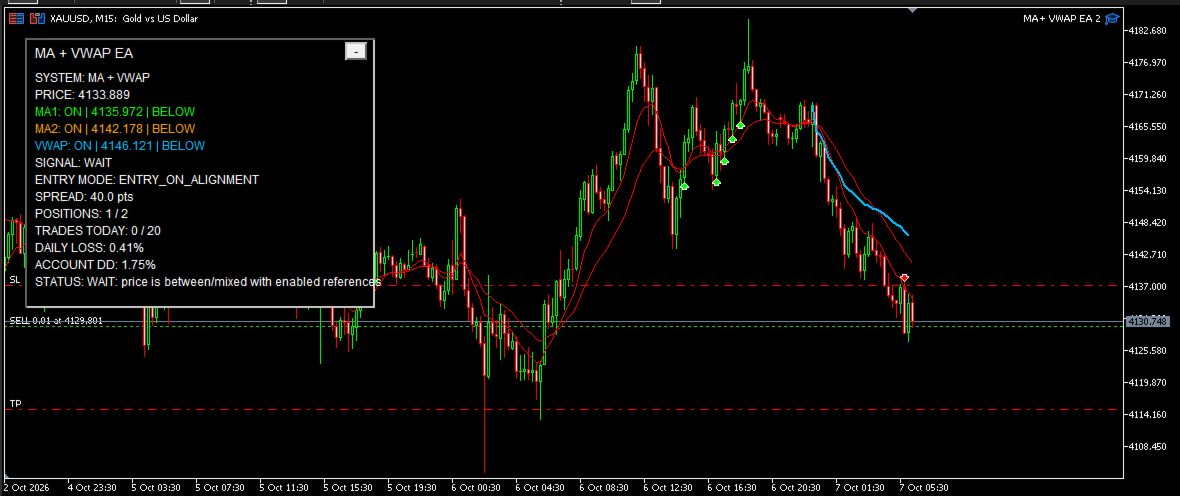
The EA can display the selected Moving Averages and VWAP directly on the chart.
Optional buy and sell signal markers can be displayed when a trading condition is detected.
A compact dashboard provides information about the current market state and EA status, including the selected references, current signal, spread, positions, daily trades, daily loss, and account drawdown.
The dashboard can be positioned on the chart and minimized when required.
Debug Information
An optional debugging system is included for users who want additional information while testing or monitoring the EA.
Separate controls are available for signal, trade, protection, and VWAP-related messages.
Debugging can be disabled during normal operation.
Flexible Configuration
Trend Vector is designed with configurable inputs so that users can adapt the EA to different symbols, timeframes, Moving Average configurations, VWAP anchoring methods, and risk-management preferences.
The EA does not require a fixed set of indicator parameters. Users can configure the available settings according to their own trading environment and risk preferences.
Important Information
Trend Vector is a technical trading tool. It does not guarantee profits or specific trading results.
Trading involves financial risk. Historical testing and optimization do not guarantee future performance.
Users should test the EA on a demo account and understand the selected settings before using it on a live trading account.