Dashboard TimeFrame 15

如果产品有任何问题或者您需要在此产品上添加功能,请联系我

Contact/message me if you encounter any issue using the product or need extra feature to add on the base version.


There is Demo version of this panel Dashboard Timeframe 15 Demo in my product list, please try it out to get familiar with all functionalities free, LINK.

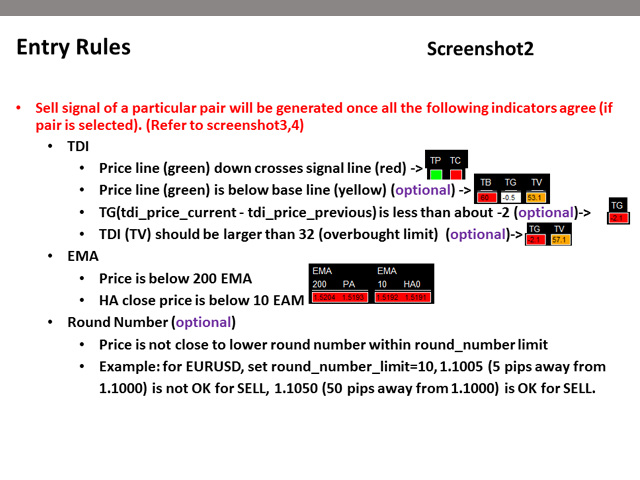
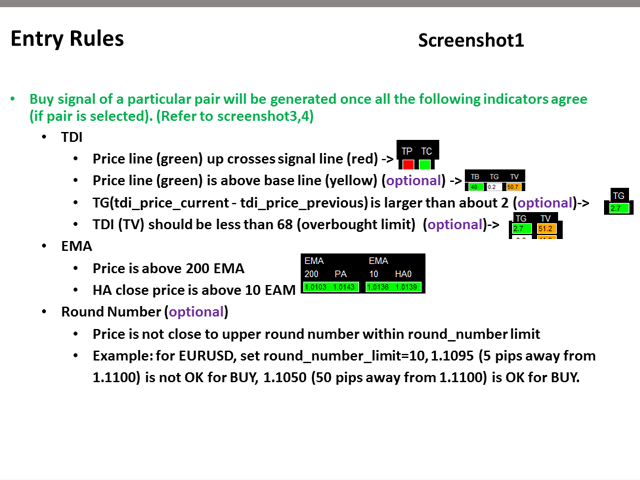
This system basically utilizes TDI as the core indicator to generate trading signal mainly on time-frame M15. The signal will be further filtered and trimmed by 1) 200 EMA and Price; 2) 10 EMA and Heiken Ashi Candle; 3) Round number.

To facilitate you to understand and trade this system quickly and effectively, the collection of PDF manual and all indicators are provided in my latest comment of this product.

For who cannot access Google Drive, please find these resources in the thread or PM me.

  • PDF Manual
  • Two Indicators: place them under /MQL4/Indicators/

Dashboard Timeframe 15 is an intuitive and handy graphic tool to help you to:

  • Have 28 pairs under control with one dashboard.
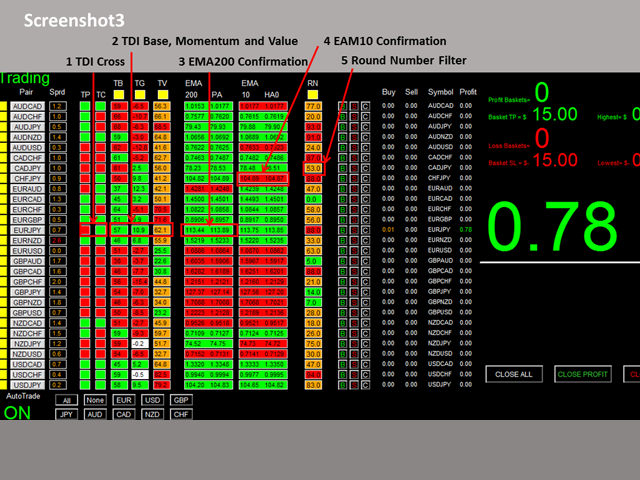
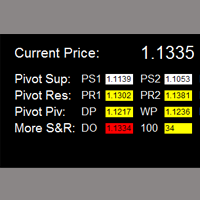
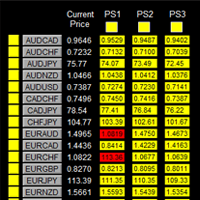
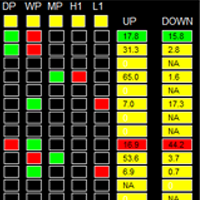
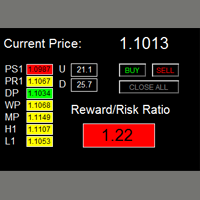
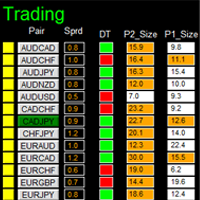
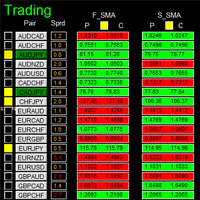
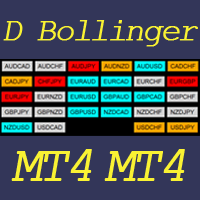
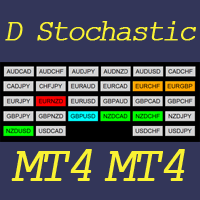
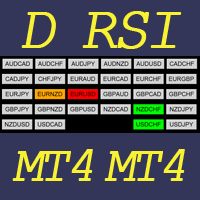
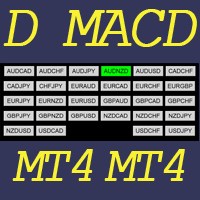
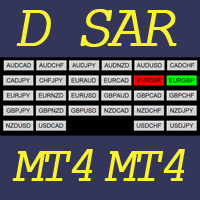
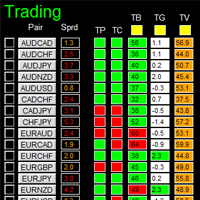
  • Monitor all 28 pairs and provide trading signals based on the Timeframe15 system rules (see screenshot 1, 2, 3, and 4).
  • Manage order automatically once signal are generated.
  • Monitor your positions easily with one glance to know status of all trading pairs.


Entry Rules

Refer to screenshot 1, 2, 3, and 4

Make sure completing the following action items to make this dashboard working.


Important Action Items before Using Dashboard

  1. Download historical data of all 28 pairs. Use this free tool to download historical data by simple one-drag, link.
  2. Make sure you have all 28 symbols in Symbol window.
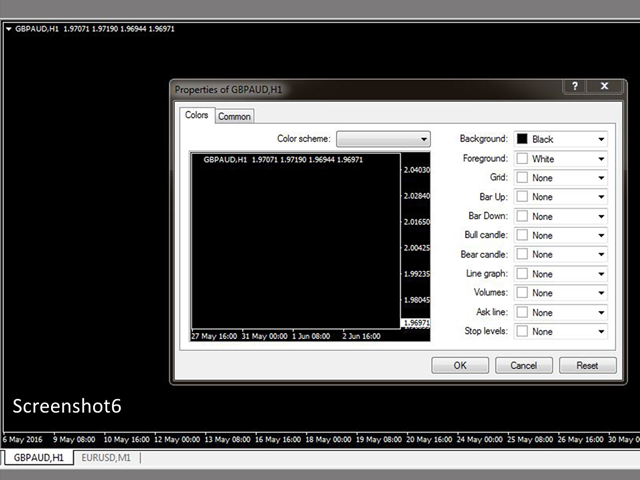
  3. To make your dashboard looks clear and neat, it’s better to apply the black template. Please refer to screenshot 6.


Input Parameters

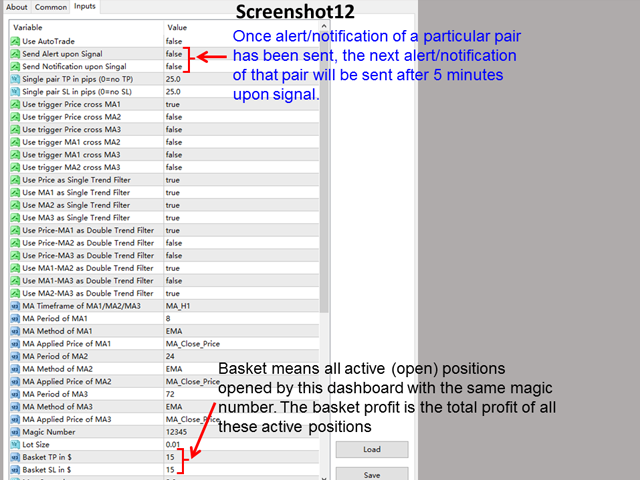
  • Use AutoTrade
  • Send Alert upon Signal (Refer to entry rule)
  • Send Notification upon Signal (Refer to entry rule)
  • Single pair TakeProfit in pips
  • Single pair StopLoss in pips
  • Use TDI Base Line
  • Use TDI Momentum Indi
  • TDI Momentum TH
  • Use TDI over bought/sell Limit
    • TDI overbought limit
    • TDI oversold limit
  • 200 EMA Period
  • 10 EMA Period
  • Use Round Number
    • Round Number Limit
  • Magic Number
  • Lot Size:
  • Basket TakeProfit in $:(see explanation in Note1)
  • Basket StopLoss in $
  • Max Spread
  • Trading Session, if time is out of session, no order will be sent
    • Close all trades after session(s)
  • Note that: starting and ending time is your computer/local time, not server time
  • Session Input, pls refer to other dashboard product description (Dashboard Super Currency Strength)
  • Time-frame of new chart
  • Suffix
  • X_axis
  • Y_axis


Dashboard Objects

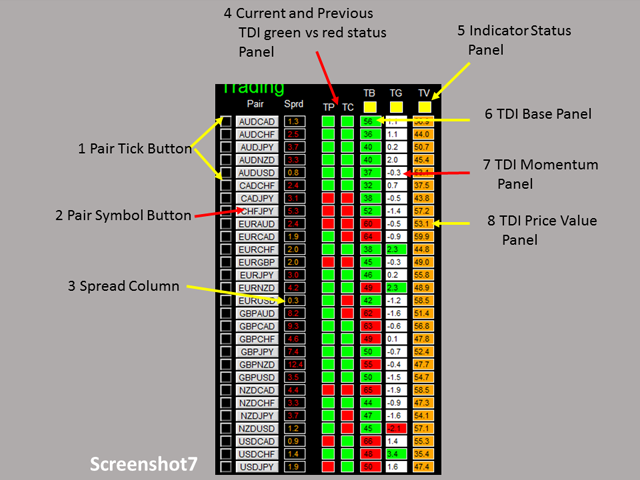
Please refer to screenshot 7 to 11.

  1. Pair Tick Button
    • Black->de-active
    • Yellow->active
  2. Pair Symbol Button:
    • Click on button to open a corresponding new window chart
  3. Spread column: show current spread of each pair.
  4. Current and Previous TDI green vs red status Panel:
    • TDI green>TDI red -> panel green
    • TDI red>TDI green -> panel red
  5. Indicator Status Panel: indicates which indicator is selected to generate signal
  6. TDI Base Panel
    • TDI price>=TDI base ->panel green
    • TDI price<TDI base -> panel red
  7. TDI Momentum Panel:
    • TDI momentum>Momentum limit -> panel green
    • TDI momentum<(-Momentum limit) -> panel red
    • Otherwise -> panel white
  8. TDI Price Panel
    • Value>TDI overbought limit -> panel red ->sell only
    • Value<TDI oversold limit -> panel green ->buy only
    • Otherwise -> panel orange ->both
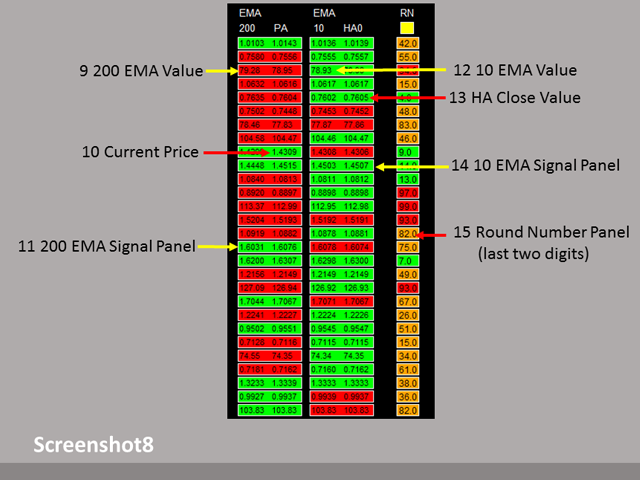
  9. 200 EMA Value
  10. Current Price
  11. 200 EMA Signal Panel
    • Current Price>=200 EMA: panel green
    • Current Price <200 EMA: panel red
  12. 10 EMA Value
  13. HA Close Value
  14. 10 EMA Signal Panel
    • HA Close>=10 EMA ->panel green
    • HA Close<10 EMA ->panel red
  15. Round Number Panel
    • (100-RN_limit) < Last two digit < upper 100 ->panel red
    • Lower 00 < Last two digit < RN_limit -> panel greed
    • Otherwise ->panel orange
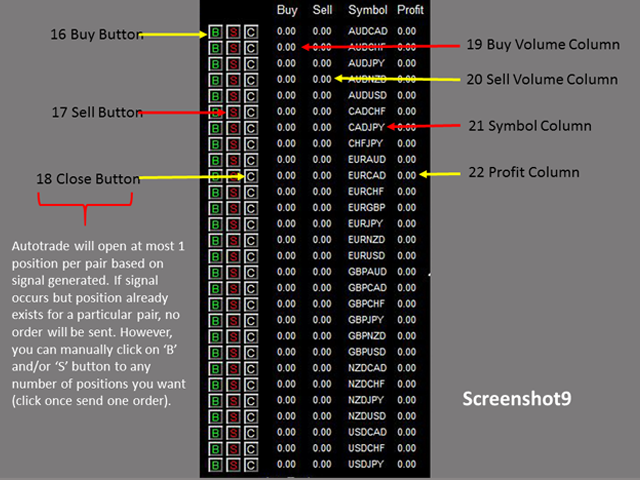
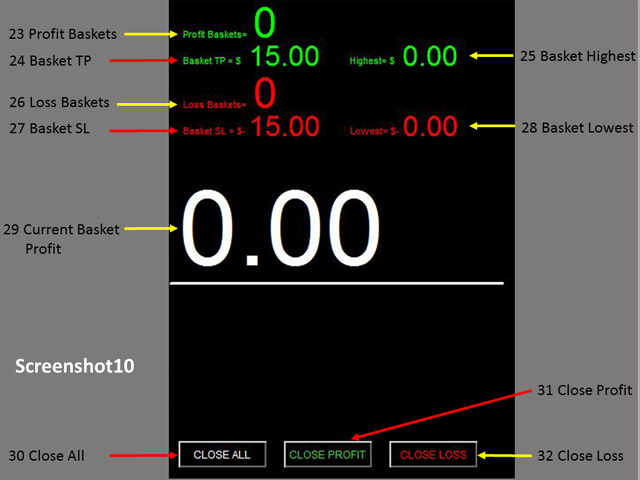
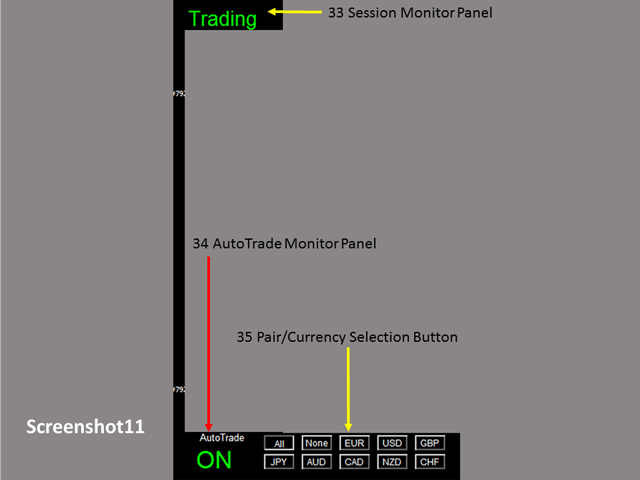
  16. For the rest objects description, please refer to other Dashboard product description (Dashboard Super Currency Strength), they are the same.

If you have any customized request and/or suggestion, please feedback to me.
推荐产品
Copy Trade EA(Expert Advisor)是一种自动交易软件,可以帮助投资者自动复制其他交易者的交易策略和操作,从而获得类似于其它交易者的交易结果。该软件基于MetaTrader平台,具有易于使用、高效、灵活和自适应的特点,为投资者提供了自动化交易的一站式解决方案。 该软件支持多种交易品种,包括外汇、商品、股票和指数。其主要功能包括: 复制交易:该软件可以在实时模式下复制其他交易者的交易操作,自动将交易操作应用到您的账户中。您可以根据其他交易者的历史表现选择要跟随的交易者,并设置复制比例和风险管理策略,以满足您的投资需求。 风险管理:该软件支持多种风险管理策略,如止损、追踪止损和限价订单,可以帮助投资者最大限度地降低风险和保护资金。此外,该软件还提供了实时的交易报告和交易统计信息,以便投资者对其交易行为进行分析和调整。 自定义设置:该软件支持用户自定义设置,包括复制比例、交易量、止损和追踪止损距离、交易时间和其他参数。这些自定义设置可以根据投资者的偏好和风险承受能力进行调整。 高效运行:该软件基于MetaTrader平台,具有高效、灵活和自适应的特点。该软件
Make grid trading safe again | Built by a grid trader >> for grid traders.    Walkthrough Video  <== Get Grid Rescue up and running in 5 minutes  This is MT4 version, click  here  for  BlueSwift GridRescue MT5  (settings and logics are same in both versions) BlueSwift Grid Rescue MT4  is a risk management utility  EA  (used together with other grid trading experts) that can help you trade aggressive grid systems with manageable drawdown, therefore reduce substanstially margin call risk as we
MARKET MAKER EXPERT is an customizable advanced, fully automated Grid Trading Expert Advisor developed to trade on MULTIPAIR MODE ( EURUSD,USDJPY,USDCHF,USDCAD,EURCHF ), by spreading out risks. Expanding Grid is its speciality. It focuses on opening a large number of orders. The currency pairs have been chosen carefully to run this system. Once it analyze the market, it does a hedge order immediately, (so margin levels are not affected on the initial trade) Starts grid when the price move aga
Auto Fibo Pro m
DMITRII GRIDASOV
“Auto FIBO Pro” Crypto_Forex 指标 - 是交易中的绝佳辅助工具! - 指标自动计算并放置在图表斐波那契水平和局部趋势线(红色)上。 - 斐波那契水平指示价格可能反转的关键区域。 - 最重要的水平是 23.6%、38.2%、50% 和 61.8%。 - 您可以将其用于反转剥头皮或区域网格交易。 - 还有很多机会可以使用 Auto FIBO Pro 指标来改进您当前的系统。 - 它具有信息价差掉期显示 - 它显示所连接的外汇对的当前价差和掉期。 - 显示屏还显示账户余额、净值和保证金。 - 可以将信息价差掉期显示定位在图表的任何角落: 0 - 左上角,1 - 右上角,2 - 左下角,3 - 右下角。 点击这里查看高质量的交易机器人和指标! 这是仅在此 MQL5 网站上提供的原创产品。
Monkey EA
Vojtech Svobodnik
Monkey EA is fully automatic Expert Advisor for trading on GBPUSD . It based on Exponential Moving Average and Bollinger Bands. Monkey EA has been tested from year 2003 to March 2021 . You can download the demo and test it yourself. My test used the real tick data with 99,90% accuracy. I made Monte Carlo test with 200 simulations used too. Monkey EA offers hight profit factor  and small drawndown . All trades are covers by TakeProfit  and StopLoss ! Doesn't use Martingale or other dangerous star
VR Cub
Vladimir Pastushak
VR Cub 这是获得高质量切入点的指标。该指标的开发是为了促进数学计算并简化对仓位入场点的搜索。多年来,该指标所针对的交易策略已被证明其有效性。交易策略的简单性是其巨大的优势,即使是新手交易者也能成功进行交易。 VR Cub 计算开仓点以及获利和止损目标水平,这显着提高了效率和易用性。查看使用以下策略进行交易的屏幕截图,了解简单的交易规则。 设置、设置文件、演示版本、说明、问题解决,可以从以下位置获取 [博客] 您可以在以下位置阅读或撰写评论 [关联] 版本为 [MetaTrader 5] 计算入场点的规则 开仓 要计算入场点,您需要将 VR Cub 工具从最后一个高点拉伸到最后一个低点。 如果第一个点在时间上早于第二个点,交易者等待柱线收于中线上方。 如果第一个点在时间上晚于第二个点,交易者等待柱线收于中线下方。 根据上述条件,严格在 柱线收盘 后建仓。 换句话说,如果我们在小时图上进行交易,那么从最高点到最低点的时间距离必须超过24小时,最高点和最低点之间的点数必须大于或等于平均价格变动每天。 维持和改变市场地位 可以有多个未平仓头寸;每个头寸都可以单独修改。 VR Cub
Trendiness Index
Libertas LLC
5 (3)
"The trend is your friend" is one of the best known sayings in investing, because capturing large trendy price movements can be extremely profitable. However, trading with the trend is often easier said than done, because many indicators are based on price reversals not trends. These aren't very effective at identifying trendy periods, or predicting whether trends will continue. We developed the Trendiness Index to help address this problem by indicating the strength and direction of price trend
这是一个常规面板,放置买卖订单网络。 这个专家顾问关闭设置中定义的利润订单。 然后,有一个名为Ladder的参数,其中包括订单之间的距离开始增加由梯形参数指示的点(这里,在主要设置中,它是10点),这意味着二阶是10点,三阶是20点,四阶 然后,你需要知道这个顾问是什么,因为这不是在设置中,但它会影响这个顾问提出的策略的逻辑。. 假设在这里的设置中,顾问将打开五个订单。.. 或购买。.. 或出售。.. 好。.. 但是,当打开订单时,它会将下一个打开订单的手数增加先前打开订单的一半。 也就是说,如果您在设置中设置了0.1手,那么根据方案将打开五个订单,第一个更接近当前价格的订单将以0.1手的价格打开。 第二,对于给定的步骤,这里50点的步骤将以0.15手的价格打开。 第三个,在另一个50点之后,将以大约0.22手的价格开盘。 第四个,以0.33手的价格通过50点的设定步骤。 第五个,以0.49手的价格设定50点。 也就是说,通过打开订单,这个顾问将增加每个后续订单的一半数量的前一个订单每次。 这种交易的逻辑是什么? (我通常使用日间交易和未平仓头寸,在上午10:00之前的某个时间。.
EX Pro EA
AL MOOSAWI ABDULLAH JAFFER BAQER
Time frame: M1                                                 Leverage : Higher the better Spread: Lower the better Account type : All types (EA may enter hedge positions, if you want to disable this feature deactivate either Buy, or Sell from the setting) Please please do not take unnecessary risks. (Trading is risky, and there are no guarantees for winning)   We wish you successful trading. (Trading is risky, and there are no guarantees for winning
Virtual Trendline Scalper
Antonis Michos
4.71 (14)
Telegram Group: Find the link in my profile   4 days to pass MyForexFunds phase 1 evaluation.( see screenshot below )   HERE is a FREE file  for use in a LIVE DEMO account. Welcome. Virtual Trendline Scalper is a scalping machine (trades quite often) that uses virtual trades in virtual trendlines before it opens a real one in decent to perfect places. IMPORTANT:Due to huge amount of variables that are used in the code of the EA and the many drawings in the chart,the EA's code became ver
News Scalping Executor Pro is an utility which helps to trade high impact and huge volatility   news . This utility helps to create two opposite orders with risk management and profit protection. It moves automatically stop loss level to avoid losses as much as possible by using many different algorithms. It helps to avoid trading the news if spread suddenly becomes very huge. It can lock profit by moving stop loss or partially closing of orders. To be profitable with this type of trading you
用於自動設置盈虧平衡水平的實用程序,在經過給定距離時將交易轉移到盈虧平衡點。讓您將風險降至最低。由專業交易者為交易者創建。該實用程序適用於交易者手動或使用顧問打開的任何市場訂單。可以通過幻數過濾交易。該實用程序可以同時處理任意數量的訂單。 MT5 版本 https://www.mql5.com/ru/market/product/57077 公用事業可以做什麼: 從 1 點設置虛擬盈虧平衡水平 設定盈虧平衡的實際水平 分別處理每個訂單(為每個訂單分別設置盈虧平衡水平) 處理一籃子單向訂單(盈虧平衡水平設置為所有訂單通用,分別買入和賣出) 處理一籃子雙向訂單(盈虧平衡水平為所有訂單設置通用,一起買入和賣出) 對於測試和工作,您可以使用圖表上的按鈕。 選項: BREAKEVEN_STOP - 將訂單移動到盈虧平衡點的點數; BREAKEVEN_STEP - 訂單關閉時的利潤點數; BASKET - 一籃子訂單或每個訂單單獨; MULTIDIRECTIONAL - 雙向或單向訂單; 虛擬 - 真實或虛擬的止損和止盈; MAGIC_NUMBER - 訂單的幻數,如果 = -1,則它
Order Panel 28
Pablo Sebastian Nequecaur
Order Panel 28 — Professional Manual Execution Panel for MT4 Trade 28 forex pairs from a single on-chart panel — with automatic lot sizing, split entries, auto break-even, and stealth SL management. Order Panel 28 is a precision execution tool built for manual traders who want full control over their entries while eliminating the repetitive calculations that slow you down and cause mistakes. No indicators, no black-box signals — just a clean, fast panel that does the math so you can focus on you
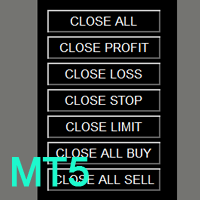
This utility allows you to easily close profit or loss positions. You can close profit or loss positions by clicking each buttons. If profit or loss positions reaches or exceed value specified as pips, they would be closed. This panel would be placed left bottom corner of the chart. If the users want to change the placement and functions contact me. Important :  -Check allow live trading. -Enable Auto Trade trading.

这是一个预测蜡烛收盘价的指标。 该指标主要用于 D1 图表。 该指标适用于传统外汇交易和二元期权交易。 该指标可以用作独立的交易系统,也可以作为您现有交易系统的补充。 该指标分析当前蜡烛,计算蜡烛本身内部的某些强度因素,以及前一根蜡烛的参数。 因此,该指标预测市场走势的进一步方向和当前蜡烛的收盘价。 由于这种方法,该指标既适用于短期盘中交易,也适用于中长期交易。 该指标允许您设置指标在分析市场情况期间将产生的潜在信号的数量。 在指标设置中有一个特殊的参数。 此外,该指标可以通过图表上的消息、电子邮件以及推送通知的形式通知新信号。感谢您的关注!交易愉快! 购买后一定要写信给我! 我会给你我的交易指标的建议! 还可以获得奖金!
Diamond Trend
Segundo Calvo Munoz
Indicator which identifies Trend and also buy/sell opportunities. Use for entries aligned to the Trend.  Although Diamond Trend is very accurate identifying entry points, it is always recommended to use a support indicator in order to reconfirm the operation. Remind to look for those Assets and Timeframes which best fit to your trader behavior/need... Valid for Scalping and Long Term operations. Please, set up a Bars Chart to be able to visualize the indicator properly...  ...And remind to give
如果产品有任何问题或者您需要在此产品上添加功能,请联系我 Contact/message me if you encounter any issue using the product or need extra feature to add on the base version. There is Demo version of this panel Dashboard Symphonie Trader System Demo in my product list, please try it out to get familiar with all functionalities free, LINK . This system basically utilizes Symphonie Indicator Set (Extreme, Emotion, Trend, and Sentiment) as the core indicators to generate trading signal mainly on time-frame M15. The signal will b
Smoothed Heiken Ashi with AC/AO Zones – Professional Trading Clarity Transform your Heiken Ashi analysis with intelligent smoothing that eliminates noise while preserving actionable signals. What Makes This Different? This isn't just another Heiken Ashi indicator. We've engineered a sophisticated smoothing engine that works with the Accelerator (AC) and Awesome Oscillator (AO) zone logic to give you cleaner entries and exits without sacrificing responsiveness. Four Smoothing Methods at Your Comm
| Fully-automated Smart Money Concept (ICT) inspired trading solution with multi-strategy capabilities | Built by a grid trader >> for grid traders.  This is MT4 version, click  here  for  Blue CARA MT5  (settings and logics are same in both versions)     Real monitoring signal  -->  Cara Gold Intro Blue CARA EA   ('CARA') - short for  C omprehensive  A lgorithmic R esponsive A dvisor is a next-gen  multi-currency    multi-timeframe  EA base on the widely known (and perhapse most popular) Inn
Transform Your MT4 Trading: From Chaos to Command Center in One Click! Struggling with manual position sizing? Losing track of multiple entries? Watching your basket trades spiral out of control? Stop the madness. The Trade Panel Manager MT4 is the professional-grade EA that elite traders use to dominate the markets. This isn't just another trade manager – it's your complete trading command center that handles everything from lightning-fast single trades to sophisticated multi-position basket
RTSPattern
Tomas Belak
The indicator provides a superior alternative to price action analysis. It enables the identification of normalized patterns, which are then transformed into a graphical representation to forecast future steps within a time series. In the top-left corner, you'll find information regarding the expected prediction accuracy, determined through a complex MSQE calculation. You have the flexibility to adjust the time window, making it easy to validate the indicator's performance. Additionally, you can
本エキスパートアドバイザ(EA)は、以下の条件をすべて満たした注文が決済された場合に、自動的に同一内容の注文を再設定します。 対象となるのは指値注文または逆指値注文で、必ずテイクプロフィット(TP)とストップロス(SL)が設定されているものです。 そして、その注文がTPまたはSLによって決済された際、同じロット数・価格・TP・SL・有効期限などの条件を引き継いだ注文を自動で再発注します。 これにより、一度設定した戦略を継続的に適用でき、裁量判断なしに取引を繰り返すことが可能となります。 ただし、ブローカーによっては再注文時にスリッページが発生する場合がありますので、必ずご利用環境をご確認の上、自己責任でお使いください。
P Y R A M I D   E X P E R T    This Forex utility is a complex exit strategy and order management tool that executes four trading methods; scalping, pyramid style, hedging, and scaling method to close trades with a profit.           V E R Y  I M P O R T A N T     This is not a stand alone expert advisor. Use it with your own volatility-based strategy. Once you found the currency pair to trade, you can just attach this tool to the chart of the chosen pair and it will do the
Moderate EA
AL MOOSAWI ABDULLAH JAFFER BAQER
Time frame: M1                                                 Leverage : Higher the better Spread: Lower the better Account type : All types (EA may enter hedge positions, if you want to disable this feature deactivate either Buy, or Sell from the setting) Please please do not take unnecessary risks. (Trading is risky, and there are no guarantees for winning)   We wish you successful trading. (Trading is risky, and there are no guarantees for winning
VirtualStops
Viktor Shpakovskiy
A utility for managing open positions using virtual (invisible to the broker) stops. Virtual stop loss and virtual take profit can be freely moved around the chart. If the price touches the virtual stop line (TP, SL, TS), the EA will close all orders of the same direction on the current chart. Closing orders by virtual take profit is possible only if there is a profit. With the help of the built-in trading simulator, you can, in the strategy tester, see how the adviser works. Parameters Block
Awesome Oscillator by Bill Williams with the ability to fine-tune and replace the averaging algorithms of the indicator, which significantly expands the possibilities of using this oscillator in algorithmic trading and brings it closer in its properties to such an indicator as the MACD. To reduce price noise, the final indicator is processed with an additional Smooth averaging. The indicator has the ability to give alerts, send mail messages and push signals when the direction of movement of th
Fibonacci Auto Drawing
Makarii Gubaydullin
根据指定时间范围内的最高价和最低价自动绘制斐波那契水平 多个K线   可以合并:例如,您可以基于10天的最高价和最低价绘制斐波那契水平 我的   #1   工具 : 66+ 功能,包括此指标  |   联系我  如有任何问题  |    MT5版本 帮助识别潜在的反转水平; 在斐波那契水平形成的形态往往更强; 显著   减少   手动绘制   所花费的   时间 ; 设置: 计算基准最高价和最低价的时间范围 计算基准价格的周期数量  当前(浮动)K线可以包含/排除 每个级别可以自定义或禁用(设置为0以关闭) 您还可以禁用整个级别组:分别为主要级别、向上和向下扩展 线条颜色、样式和粗细  可以启用/禁用水位价格 //--------- 我的   #1   工具 : 66+ 功能,包括此指标  |   联系我  如有任何问题  |    MT4版本
This PORTFOLIO of 3 strategies has been developed, tested and traded live on DAX H1 timeframe. Multiple EAs traded together will lead to a BIGGER PROFITS and SMOOTHER EQUITY CURVE. 3 not correlated EAs logics for DAX H1 timeframe merged to a single strategy. Very SIMPLE STRATEGIES with only FEW PARAMETERS. Every trade has his own logic for STOP LOSS. To catch the profits every strategy uses different approach - some has TAKE PROFIT, some uses TIME BASED EXITS or PROFIT TRAILING. EA has been back

This PORTFOLIO of 3 strategies has been developed, tested and traded live on DAX M30 timeframe. Multiple EAs traded together will lead to a BIGGER PROFITS and SMOOTHER EQUITY CURVE. 3 not correlated EAs logics for DAX M30 timeframe merged to a single strategy. Very SIMPLE STRATEGIES with only FEW PARAMETERS.  Every trade has his own logic for STOP LOSS. To catch the profits every strategy uses different approach - some has TAKE PROFIT, some uses TIME BASED EXITS or PROFIT TRAILING. EA has been

TradePilot
Hossein Khalil Alishir
TradePilot Expert Advisor (EA) for MetaTrader 4 TradePilot is a professional and user-friendly Expert Advisor (EA) for MetaTrader 4 (MT4) . It simplifies automated trading , risk management , and trade execution using a smart trading panel . Perfect for beginners and experienced traders looking for a reliable trade manager EA with automated lot size calculation . Key Advantages User-Friendly Trading Panel: Customizable panel with buttons and hotkeys. Smart Risk Management: Supports percen
该产品的买家也购买
Custom Alerts AIO:多市场智能监控,一键启动,无需设置 概述 Custom Alerts AIO 是一款“开箱即用”的高级市场扫描工具,无需额外安装任何其他指标或进行复杂设置。它内置了 Stein Investments 的所有核心指标(FX Power、FX Volume、FX Dynamic、FX Levels 和 IX Power),可帮助您轻松监控所有主要资产类别,如外汇、黄金、指数和加密货币。如果您的经纪商支持股票,您也可以手动添加个股进行监控。 1. 为什么选择 Custom Alerts AIO? 无需额外购买任何指标 • 所有关键指标均已内置,开箱即用。 • 专注于实时预警,不包含任何图形元素,性能高效,界面简洁。 全面覆盖所有主要市场 • 支持监控外汇、金属、加密货币和指数市场。 • 无需手动输入任何交易品种,只需在设置中勾选资产类别即可启用。 • 股票并不属于默认类别,如有需要可手动通过参数输入添加。 高效、专业、便捷 • 无需图表模板和手动加载,适合自动化或远程交易环境。 • 非常适合 VPS 上长期运行,或作为后台市场预警工具使用。 2
Unlimited Trade Copier Pro is a tool to copy trade remotely to multiple MT4, MT5 and cTrader accounts at different computers/locations over internet. This is an ideal solution for you if you are a signal provider and want to copy your trades to other receivers globally on your own rules. One provider can copy trades to multiple receivers and one receiver can get trade from multiple providers as well. The provider can even set the subscription expiry for each receiver, so that receiver will not b
The product will copy all telegram signal to MT4   ( which you are member  ) , also it can work as remote copier.  Easy to set up, copy order instant, can work with almost signal formats, image signal, s upport to translate other language to English Work with all type of channel or group, even channel have "Restrict Saving Content", work with  multi channel, multi MT5 Work as remote copier: with signal have ticket number, it will copy exactly via ticket number. Support to backtest signal. How to
Smart Channel M4
Vahidreza Heidar Gholami
The trend in the market can be predicted using trend lines but the problem is you don’t know where exactly the price is going to touch the trend line where you can put your pending orders on. Smart Channel Expert Advisor makes it possible to put an advanced channel around the price data, which can be configured to handle placing orders, opening and closing positions, managing risk per trade, spread, slippage, and trailing stop-loss and take-profit automatically. Features Money Management (Calcul
The product will copy all  Discord  signal   to MT4   ( which you are member  ) , also it can work as remote copier.  Easy to set up. Work with almost signal formats, support to translate other language to English Work with multi channel, multi MT4. Work with Image signal. Copy order instant, auto detect symbol. Work as remote copier: with signal have ticket number, it will copy exactly via ticket number. How to setup and guide: Let read all details about setup and download Discord To MetaTrader
Edge Zone EA
FXsolutions
5 (1)
With this Expert Advisor you will follow the sound trading principle Buy Low and Sell High by default ! And you can do that even with a normal day job . You will be even able to trade on lower timeframes which you could never do without such an Expert Advisor. And the best thing is that you are in control! You can tell the Edge Zone EA where it has to enter and where it has to exit. And you can do that even many hours before the trade will occur . This EA is therefore an excellent assistant for
Crystal Trade Manager PRO – 高级 MT4 风险与交易控制系统 免费版: https://www.mql5.com/en/market/product/150632 概述 Crystal Trade Manager PRO(CTM)是一款为 MetaTrader 4 打造的完整专业级风险管理与交易控制工具。 它专为需要严格执行、稳定风险保护和智能自动化的交易者而设计。 系统可全面管理风险、保护账户权益、执行每日限制、自动设置 SL/TP,并提供专业级的一键式快速交易面板。 非常适合参与 prop firm 挑战、日内交易、剥头皮交易以及专业资金管理的交易者。 同时提供完整的 MT5 版本。 核心亮点功能 1. 高级风险与回撤保护 支持每日回撤限制 1%–70% 。 一旦达到回撤上限,系统将立即平掉 所有仓位 。 可选:突破后自动删除 所有挂单 。 每日锁仓模式:当天达到限制后阻止新下单,次日自动恢复。 完全符合各大 prop firm 的规则与要求。 2. 日内盈利与亏损目标自动化 可设置每日 盈利目标 与 亏损限制 (账户货币,例如 USD)。 达到任何目
ManHedger MT4
Peter Mueller
5 (2)
THIS EA IS A SEMI-AUTO EA, IT NEEDS USER INPUT. Manual & Test Version Please TEST this product before   BUYING  and watch my video about it. Contact me for user support or bug reports, or if you want the MT5 version! MT5 Version I do not guarantee any profits or financial success using this EA. With this Expert Advisor, you can: Implement your own   Zone Recovery   strategy to capitalize on trending markets. Create   Grid   trading strategies, to profit from ranging markets. Place orders easil
欢迎使用 信号分析大师  使用教程视频 功能介绍:  本工具可以将MT4信号或者MT5信号的交易记录复盘到MT4图表上,方便直接观察信号的交易状况,从而了解信号的策略,比如可以比较容易看出是马丁策略,还是网格策略,还是早盘头皮策略,是否一次一单,或者带加仓等。 从而更好分析账号的安全性,稳定性等。 使用方法: 1.下载工具后,将它拖入MT4图表中(当成专家来使用,也就是方Experts目录里)。 2.到MQL5信号里面去下载信号 历史记录。 3.将下载好的历史记录文件粘贴到 MT4 文件->打开数据文件夹->MQL4->Files文件夹里面,并复制下文件的名字。 4.点击MT4上工具的笑脸图标,将复制文件名复制到  FIleName那一栏。 5.选择SignalType,默认MT4 信号复盘,如果是MT5信号复盘,请选择MT5_Signal. 6.点击确定,即可看到相应品种的交易记录状况。 7.如果需要切换查看品种的交易记录,可以直接将新的品种拖入已经加载了工具的图表上。
EasyInsight AIO MT4
Alain Verleyen
4 (2)
EASY Insight AIO – 全能智能交易一站式解决方案 概述 想象一下,您可以在几秒钟内扫描整个市场——外汇、黄金、加密货币、指数,甚至股票——无需手动筛选图表、繁琐安装或配置指标。 EASY Insight AIO 是您专为 AI 交易打造的即装即用数据导出工具。它将整个市场快照一次性输出为简洁的 CSV 文件,直接支持 ChatGPT、Claude、Gemini、Perplexity 等各类 AI 平台的即时分析。 无需窗口切换,无需图表叠加,也没有任何杂乱。只需纯净、结构化的数据自动导出,让您专注于基于数据的高效决策,无需再盯盘耗时。 为什么选择 EASY Insight AIO? 真正的一体化 • 无需设置,无需安装指标,无图表叠加。只需安装、运行并导出——就是这么简单。 多资产全覆盖 • 扫描分析外汇、金属、加密货币、指数、股票——您的券商所能提供的一切市场。 AI 专属数据导出 • 高度结构化、针对 AI 优化的 CSV 文件,直接适配主流智能工具和平台。 完整导出内容: • 三个可选周期的货币强度分析 • 净多头头寸变化体现市场情绪 • 成交量变化、
RedFox Copier Pro
Rui Manh Tien
4.7 (10)
Time saving and fast execution Whether you’re traveling or sleeping, always know that Telegram To Mt4 performs the trades for you. In other words, Our   Telegram MT4 Signal Trader  will analyze the trading signals you receive on your selected Telegram channels and execute them to your Telegram to MT4 account. Reduce The Risk Telegram To Mt4   defines the whole experience of copying signals from   Telegram signal copier to mt4 platforms. Users not only can follow all instructions from the signa
Dashboard.mq4 - 简单交易管理器 为那些喜欢手动交易并希望简化交易管理的交易者设计,这个强大的MQL4工具通过提供实时仪表盘来管理交易,提升了交易效率。它无缝集成到MetaTrader中,轻松计算仓位大小,并跟踪风险指标。 主要特点: 风险和保证金显示 :实时计算仓位大小、保证金要求和胜率,以便做出精确的交易决策。 交易管理按钮 :一键按钮用于下达买入/卖出订单、平仓(所有、盈利或亏损的交易)以及通过取消止盈或止损来修改订单。 可定制的胜率跟踪 :分析不同时间段的交易表现,包括当前月份、最近的交易或所有历史交易。 互动和直观的UI :清晰、易于导航的仪表盘,具有可定制按钮,方便快速操作。 准确的计算 :基于账户余额和风险百分比的内置仓位大小计算器。 这个工具非常适合那些希望在MetaTrader 4平台上直接管理交易并优化风险回报策略的交易者。
面板 FFx 隐藏管理 轻松帮助您在图表上直接管理您的订单。下面描述所有特征: 止盈, 止损和尾随停止均隐藏 每笔交易在图表上都有自己的指示线 可按您的需要拖拽任何线来改变止盈/止损 当止盈 #1 到达,自动将止损位移到盈亏平衡位置的选项 选择止盈/止损类型的选项 (通过点数或价格) 选择尾随停止类型的选项 (通过点数, MA, 分形, PSAR 或 ATR) 定义哪些订单您希望在当前图表上进行管理 (所有订单或特定单号) 最大化 / 最小化面板按钮 在图表上将面板拖拽到任意位置 显示交易信息的选项 如何使用它? (参看以下截图) 选择您希望管理的订单 (所有或特定的) 设置您的目标, 止损和尾随停止 … 之后点击 “放置”。它们都独立工作,这样您就只需设置一次。 如果您希望删除一个止盈, 止损或尾随停止, 选择正确的订单 … 然后点击 “删除” 当您选择设置 “所有当前符号”, 则 “当前设置”显示在面板里。这些设置将自动用于所有新开订单。若要重置/删除这些设置, 点击 “重置所有”。 如果 “显示交易信息”被选中, 一个新的小表格显示在面板之下, 包括每笔订单及其当前的目标和尾随停
FFx Risk Calculator panel will help you to calculate very easily your trades size, SL or the risk directly on the chart. All features are described below: Option to select which parameter to calculate: Risk, Stop Loss or Lot Size The panel will show if the lot size is allowed according to the current account free margin Button to maximize/minimize the panel Drag and Drop the panel anywhere on the chart How to use it? Select the parameter you want to be calculated. It will be based on the 2 other
Trade Copier Pro
Vu Trung Kien
4.57 (14)
Trade Copier Pro 是一个强大的工具,多账户之间进行远程复制的贸易超过互联网不同的位置。这是一个信号提供商的理想解决方案,谁想要与全球范围内对自己规则的人分享他的贸易。一个供应商的交易可以复制到多接收器和一个接收器可以得到贸易额从多供应商也是如此。 供应商和接收器可与供电内置的数据库管理系统来管理他的合作伙伴名单。 这个工具允许全局配置模式(copy过来互联网)和本地模式(在同一台PC/服务器内复制)之间进行选择。 要求: MetaTrader4的4.00版构建670或以上。 参考: 如果你只需要在本地复制与更低的价格,你可以检查Auto Trade Copier在: https://www.mql5.com/en/market/product/4676 以下是亮点功能:     在一个工具提供商或接收器之间转换角色。     一个供应商的交易可以复制到多接收器和一个接收器可以从多个供应商收到交易。     供应/接收器可通过供电数据库管理系统,而无需额外的工具管理自己的接收器/供应商名单(添加,删除,编辑,启用/禁用)。     全球模式(copy过来互联网)和本
News Trader Pro
Vu Trung Kien
4.38 (16)
新闻操盘手专业版 是一个独特的机器人,让您使用您预先定义的策略进行消息交易。它从几个流行的外汇网站加载的每条消息的片断。您可以选择任何消息和预设的策略进行交易,之后新闻操盘手专业版根据选定的策略,在新闻来临时自动进行交易。 新闻发布给出了赚点数的机会,因为在那个时刻,价格通常有大动作。现在,利用这款工具,新闻交易变得比以往任何时候更容易,更灵活,更令人兴奋。不要等待,不要错失,不要再迷惑了。每周只需针对重要新闻设置一次,这个工具将完全按照您的计划进行精准交易。 演示版: 由于这不是一个自动交易机器人 (它是半自动), 您需要下载单独的演示版本: https://www.mql5.com/zh/market/product/5931 参考: 如果您只需要加载新闻 (无需交易), 您可以购买新闻加载机专业版: https://www.mql5.com/zh/market/product/5463 功能 包括所有 新闻加载机专业版 的功能 (查看详情)。 针对每条新闻构建您自己的策略,具有非常灵活的参数。 支持五种高级策略,带有大量控制参数 (止损, 止盈, 尾随, 网格间隔, 手数缩放,
FFx Watcher PRO
Eric Venturi-Bloxs
The FFx Watcher PRO is a dashboard displaying on a single chart the current direction of up to 15 standard indicators and up to 9 timeframes. It has 2 different modes: 1. Watcher mode: Multi Indicators User is able to select up to 15 indicators to be displayed User is able to select up to 9 timeframes to be displayed 2. Watcher mode: Multi Pairs User is able to select any number of pairs/symbols User is able to select up to 9 timeframes to be displayed This mode uses one of the standard indicat
Transaction Repeater Full
Alexandr Bryzgalov
5 (4)
Copies transactions between MT4 terminals. Possibilities: quick copy start minimum processor load direct and reverse (reverse) copying. copying Take Profit and Stop Loss levels copying deferred and their changes copy transactions one to many copy trades many to one local copy only Attention: The product is designed for copying trades only within a single computer or VPS with access to the desktop. The product will not work on the built-in Virtual Hosting of the terminal. We will help you set up
The product combines a manual trade panel with the ability to perform actions automatically in a highly configurable way. Actions include capturing indicator values and then based on those values raising alerts, open/close or partially close trades, scale-in, setting up pending orders, adjusting stop loss, take profit and more. On-chart controls can be configured, such as tick boxes and buttons, so can be fully interactive. The EA also handles money management, news events, hidden stop loss, tak
Binary Options Copier Remote is an EA that allows to copy binary options trades between MT4 accounts at different computers. This is an ideal solution for signal provider, who want to share his trade with the others globally on his own rules. Provider can give free bonus license to 10 receivers. That means those 10 receivers can copy from provider by using Binary Options Receiver Free (no cost). From 11th one, receiver have to buy Binary Options Receiver Pro (paid version) in order to copy from
The Price Action Dashboard is an innovative tool to help the trader to control a large number of financial instruments. This tool is designed to automatically suggest signals and price conditions. The Dashboard analyzes all major Time Frame suggesting price action conditions with graphic elements. The Dashboard can suggest you the strength of the trend identifying directional movement, it is an indispensable tool for those who want to open position themselves using market trends identifiers. The
Elliott Wave Counter 是一个面板,用于快速和用户友好地手动标记 Elliott 波浪。可以选择一种颜色和一个级别的标记。还有用于删除最后一个标记和工具制作的整个标记的功能。一键制作标记。点击五次 - 有五波!艾略特波浪计数器对于艾略特波浪的初学者和专业分析师来说都是一个很好的工具。 艾略特波浪计数器安装和输入指南 如果你想得到   关于 EA 添加 URL (   http://autofxhub.com   ) MT5 终端的 通知 (见截图)。 MT4版本 https://www.mql5.com/en/market/product/14016 MT5版本 https://www.mql5.com/en/market/product/15081 一般输入: 波形类型按钮: 此按钮允许用户选择他们想要在图表上突出显示的波形类型。可用的选项包括推动波、调整波和其他自定义波模式。 波级按钮: 这个按钮   允许用户选择他们想要在图表上突出显示的波形级别。可用的选项包括初级、中级和次级波级别。 波浪颜色: 这个   按钮   允许用户选择他们想要在图表上突出显示的波浪图
If you wish to draw Support and Resistance lines, view: daily market opening, classical pivot levels, Fibonacci pivot levels, trend lines, Fibonacci levels, the remaining time to candle closing, and current spread. If you seek to place your orders with the exact lot that meets your desired stop loss risk. If you wish to do all this and more with just one click, then this is the perfect tool to use. This tool will allow you to feel more relaxed when deciding to open orders, as well as predicting
部分平仓专家 是一款将多种功能整合到一个自动化系统中的工具。该 EA 提供多种风险管理选项,并最大化潜在收益,从而帮助交易者更有效地管理仓位。 使用部分平仓专家,交易者可以设置   部分关闭   锁定利润的水平,     追踪止损   保护利润和限制损失的水平,     收支平衡   水平,以确保即使价格朝着不利于交易的方向变动,交易也能实现盈亏平衡,以及其他一些功能。 使用这款一体化智能交易系统,交易者可以节省时间和精力,因为他们无需时刻监控交易。相反,EA 会根据市场情况执行预设指令,从而为交易者提供更大的灵活性和对交易的控制力。 附加部分关闭专家,     按下键盘上的“p”   ,更改设置,然后就可以开始了。 部分关闭专家   安装和输入指南 如果您想收到有关 EA 的通知,请添加 URL(   http://www.betasoft.dev   )MT4/MT5 终端(见截图)。 MT4版本 https://www.mql5.com/en/market/product/14965 MT5版本 https://www.mql5.com/en/market/product/15
Master Trend Dashboard is a new generation indicator, compact, light and efficient. Each element of this Dashboard is designed to return specific signals as: Price Action, Breakout, Net Change (performance of the instrument), algorithmic studies, correlations and statistical calculations. This tool will change your way of trading allowing you to receive important information. See the Graphic Signals to understand every single signal below: Graphic Signals Symbol name and arrow color Green = Cur
Trade Copier Agent 旨在复制多个 MetaTrader(4/5) 账户/终端之间的交易。 使用此工具,您可以充当提供者(源)或接收者(目的地)。所有交易行为都将立即从提供者复制到接收者。 该工具允许您在同一台计算机上的多个 MetaTrader 终端之间复制交易,复制速度快如闪电,不到 0.5 秒。 贸易复印机代理安装和输入指南 请在开始复制之前或没有订单时在提供商帐户上应用设置! 有订单时的任何更改都会影响收款人帐户。 例如:如果提供者账户应用买单然后禁用接收者账户上的所有买单将被关闭。 如果您想获得有关 EA 添加 URL (   http://autofxhub.com   ) MT4 终端的通知(请参阅屏幕截图)。 MT5版本 https://www.mql5.com/en/market/product/77134 以下是亮点功能: 在 MT4 和 MT5 账户之间复制。 在一个工具内切换提供者或接收者。 每个账户既可以作为Provider又可以作为Receiver,因此账户之间可以通过2种传输方式相互复制。这就像一个贸易共享网络。 一个提供者可以将交易
Unlimited Binary Options Copier Remote is a powerful tool to copy binary options trades remotely between multiple accounts at different locations over internet. This is an ideal solution for signal provider, who want to share his binary options trades with the others globally on his own rules. One provider can copy trades to unlimited receivers and one receiver can get trade from unlimited providers as well. The provider can set the subscription expiry for each receiver, so that receiver will no
This is an Expert Adviser use for manual trading as a background EA or combine with external EA to open orders. Loss Recovery Trading is one of your options to handle the lose positions instead of using stop loss by setting a zone recovery area and target to exit the turn rounds sequence. How It Work? If the market goes against your first positions direction at the specific of losing points, the EA will open an opposite direction position with calculated larger lot size and also keep the first
Professional and highly customizable utility for automated trading. It can become an indispensable to any trader regardless of the skills. It will help to save the time that would be required for daily routine activities and it will allow to develop custom strategies. The utility can also work manually opened orders and orders opened by any other EAs. This can be applied to attempt to recover the losing trades or even save the trader form losing the deposit. The utility allows to automate the tr
Great for scalper/intraday weapon for your ease daily trading. Scalper weapon will suit's you for any trading condition, whether it's intraday / scalper this tool is important for you which providing the missing function on the native MT4 platform. You have to check Allow Auto Trading by pressing Ctrl+O, going to Expert Advisors tab, and checking " Allow automated trading" . also to ensure the " auto trading " is green. Input Parameters _MINIMIZED_AT_START: to chose whether the panel is minimiz
作者的更多信息
Close Button
Wang Yu
4.76 (38)
所有MQL5 EA产品,付费100RMB加入VIP会员即可全部无限制使用,详情请咨询客服QQ407776353 所有MQL5 EA产品,付费100RMB加入VIP会员即可全部无限制使用,详情请咨询客服QQ407776353 所有MQL5 EA产品,付费100RMB加入VIP会员即可全部无限制使用,详情请咨询客服QQ407776353 所有MQL5 EA产品,付费100RMB加入VIP会员即可全部无限制使用,详情请咨询客服QQ407776353 所有MQL5 EA产品,付费100RMB加入VIP会员即可全部无限制使用,详情请咨询客服QQ407776353 所有MQL5 EA产品,付费100RMB加入VIP会员即可全部无限制使用,详情请咨询客服QQ407776353 所有MQL5 EA产品,付费100RMB加入VIP会员即可全部无限制使用,详情请咨询客服QQ407776353
FREE
如果产品有任何问题或者您需要在此产品上添加功能,请联系我 Contact/message me if you encounter any issue using the product or need extra feature to add on the base version. You can get the free Close Button MT4 version at LINK . Close Button provides you an intuitive, effective, and handy way to close your orders and/or positions based on their type and their profit status. The tool provides seven close options: Close All: close all pending orders and positions. Close Profit: close all positions which are in profit. Close L
FREE
如果产品有任何问题或者您需要在此产品上添加功能,请联系我 Contact/message me if you encounter any issue using the product or need extra feature to add on the base version. PA Touching Alert is a tool to free you from watching price to touch certain critical price levels all day alone. With this tool, you can set two price levels: upper price and lower price, which should be greater than/less than the current price respectively. Then once price touches the upper price or lower price, alert and/or notification would be sent
FREE
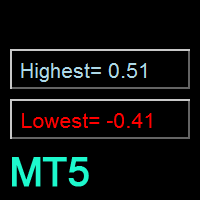
如果产品有任何问题或者您需要在此产品上添加功能,请联系我 Contact/message me if you encounter any issue using the product or need extra feature to add on the base version. Floating Highest Lowest MT5 provides you an intuitive and user-friendly method to monitor the floating highest (profit) and lowest (loss) that all your trades together ever arrive. For example, I opened 3 orders, which arrived at $4.71 floating profit when trade following trend. Later when the trend is against me, these 3 orders arrive $30 in loss, and a
FREE
如果产品有任何问题或者您需要在此产品上添加功能,请联系我 Contact/message me if you encounter any issue using the product or need extra feature to add on the base version. Session TakeProfit StopLoss is basically helping to set the take profit and stop loss in dollar for the total open orders (session). Once the total profit is greater than session_tp or less than session_sl, the EA will help to close all open orders acting similarly to a take profit/stop loss for a single order. Inputs session_tp: session take profit ses
FREE
所有MQL5 EA产品,付费100RMB加入VIP会员即可全部无限制使用,详情请咨询客服QQ407776353 所有MQL5 EA产品,付费100RMB加入VIP会员即可全部无限制使用,详情请咨询客服QQ407776353 所有MQL5 EA产品,付费100RMB加入VIP会员即可全部无限制使用,详情请咨询客服QQ407776353 所有MQL5 EA产品,付费100RMB加入VIP会员即可全部无限制使用,详情请咨询客服QQ407776353 所有MQL5 EA产品,付费100RMB加入VIP会员即可全部无限制使用,详情请咨询客服QQ407776353 所有MQL5 EA产品,付费100RMB加入VIP会员即可全部无限制使用,详情请咨询客服QQ407776353 所有MQL5 EA产品,付费100RMB加入VIP会员即可全部无限制使用,详情请咨询客服QQ407776353
FREE
如果产品有任何问题或者您需要在此产品上添加功能,请联系我 Contact/message me if you encounter any issue using the product or need extra feature to add on the base version. Session TakeProfit StopLoss is basically helping to set the take profit and stop loss in dollar for the total open orders (session). Once the total profit is greater than session_tp or less than session_sl, the EA will help to close all open orders acting similarly to a take profit/stop loss for a single order. Inputs session_tp: session take profit ses
FREE
所有MQL5 EA产品,付费100RMB加入VIP会员即可全部无限制使用,详情请咨询客服QQ407776353 所有MQL5 EA产品,付费100RMB加入VIP会员即可全部无限制使用,详情请咨询客服QQ407776353 所有MQL5 EA产品,付费100RMB加入VIP会员即可全部无限制使用,详情请咨询客服QQ407776353 所有MQL5 EA产品,付费100RMB加入VIP会员即可全部无限制使用,详情请咨询客服QQ407776353 所有MQL5 EA产品,付费100RMB加入VIP会员即可全部无限制使用,详情请咨询客服QQ407776353 所有MQL5 EA产品,付费100RMB加入VIP会员即可全部无限制使用,详情请咨询客服QQ407776353 所有MQL5 EA产品,付费100RMB加入VIP会员即可全部无限制使用,详情请咨询客服QQ407776353
FREE
By applying this expert onto any char window, you are able to force download the historical data upon all time-frame (PERIOD_M1, PERIOD_M5, PERIOD_M15, PERIOD_M30, PERIOD_H1, PERIOD_H4, PERIOD_D1, PERIOD_W1, PERIOD_MN1) of 28 major pairs. The 28 major pairs are the combination of the 8 major currencies. 8 major currencies "USD", "EUR", "GBP", "JPY", "AUD", "NZD", "CAD", "CHF" 28 pairs "AUDCAD","AUDCHF","AUDJPY","AUDNZD","AUDUSD","CADCHF","CADJPY" "CHFJPY","EURAUD","EURCAD","EURCHF","EURGBP","E
FREE
如果产品有任何问题或者您需要在此产品上添加功能,请联系我 Contact/message me if you encounter any issue using the product or need extra feature to add on the base version. Dashboard Super Candle is an intuitive, and handy graphic tool to help you to: Have 28 pairs under control with one dashboard. Monitor candle direction, identify possible price movement and trend. Provide trading signals based on the candle direction selected by you. Automatically manage order once signal are generated. Have the ability to select which p
如果产品有任何问题或者您需要在此产品上添加功能,请联系我 Contact/message me if you encounter any issue using the product or need extra feature to add on the base version. There is Demo version of this panel Dashboard Super MA RSI CCI Demo in my product list, pls try it out to get familiar with all functionalities free . Dashboard Super MA RSI CCI is an intuitive, and handy graphic tool to help you to: Have 28 pairs under control with one dashboard Monitor price movement, identify possible trend based on MA, RSI, and CCI i
如果产品有任何问题或者您需要在此产品上添加功能,请联系我 Contact/message me if you encounter any issue using the product or need extra feature to add on the base version. Critical Support and Resistance is an intuitive, and handy graphic tool to help you to monitor and manage critical support and resistance price point easily with one glance to know status of all important S&R. Price is likely to pullback or breakout at important support and/or resistance. This indicator is designed to help you monitor these critical supp
如果产品有任何问题或者您需要在此产品上添加功能,请联系我 Contact/message me if you encounter any issue using the product or need extra feature to add on the base version. Dashboard Super Currency Strength is an intuitive, and handy graphic tool to help you to: Have 28 pairs under control with one dashboard. Monitor price movement, identify possible trend based on currency strength gap of two currency on 3 timeframe. Provide trading signals based on the CSM (currency Strength Meter) selected. Manage order automatically onc
如果产品有任何问题或者您需要在此产品上添加功能,请联系我 Contact/message me if you encounter any issue using the product or need extra feature to add on the base version. To access the free demo version, please re-direct to this LINK . To access the single pair version, please re-direct to this LINK . Price is likely to pullback or breakout at important support and/or resistance. This dashboard is designed to help you monitor these critical support and resistance area. Once price moves close to these important support and
如果产品有任何问题或者您需要在此产品上添加功能,请联系我 Contact/message me if you encounter any issue using the product or need extra feature to add on the base version. Please re-direct to LINK for free demo version. There are two critical components in a profitable trading system, one is entry (place an order), and another one is exit (close an order). You can exit by time: closing order after London Close for example. You can also exit by position: closing an order when price reaches a certain support/resistance level
如果产品有任何问题或者您需要在此产品上添加功能,请联系我 Contact/message me if you encounter any issue using the product or need extra feature to add on the base version. There are two critical components in a profitable trading system. One is entry (placing an order) and another one is exit (closing an order). You can exit by time: closing order after London Close, for example. You can also exit by position: closing an order when price reaches a certain support/resistance level. Easy RR Monitor Panel is an intuitive, and
Contact/message me if you encounter any issue using the product or need extra feature to add on the base version. There is a demo version of this panel Dashboard Trading Made Simple Demo in my product list, please try it out to get familiar with all functionalities free, LINK . This system basically utilizes TDI as the main indicator to generate trading signal mainly on H1 and H4 timeframes. The signal will be further filtered and trimmed. Stochastic; Heiken Ashi candle direction and candle siz
如果产品有任何问题或者您需要在此产品上添加功能,请联系我 Contact/message me if you encounter any issue using the product or need extra feature to add on the base version. There is a Demo version of this panel Dashboard Currency Strength Meter AdvancedDemo in my product list, please try it out to get familiar with all functionalities free, LINK . The Dashboard Currency Strength Meter Advanced gives you a quick visual guide to which currencies are strong, and which ones are weak over the customized 4 time-frames and period.
如果产品有任何问题或者您需要在此产品上添加功能,请联系我 Contact/message me if you encounter any issue using the product or need extra feature to add on the base version. There is Demo version of this panel Dashboard Super Three MA Demo in my product list, please try it out to get familiar with all functionalities free, LINK . This system basically utilizes PA and three adjustable Moving Average as the main indicator set to generate trading signal. With the feature that all MA_timeframe, MA_period, MA_applied_price are ad
如果产品有任何问题或者您需要在此产品上添加功能,请联系我 Contact/message me if you encounter any issue using the product or need extra feature to add on the base version. There is Demo version of this panel Dashboard Genesis Matrix Trading Demo in my product list, please try it out to get familiar with all functionalities free, LINK . This system basically utilizes Genesis Indi Set (TVI, CCI, GannHilo, and T3) as the core indicators to generate trading signal mainly on time-frame M15. The signal will be further filtered a
如果产品有任何问题或者您需要在此产品上添加功能,请联系我 Contact/message me if you encounter any issue using the product or need extra feature to add on the base version. There is Demo version of this panel Dashboard Symphonie Trader System Demo in my product list, please try it out to get familiar with all functionalities free, LINK . This system basically utilizes Symphonie Indicator Set (Extreme, Emotion, Trend, and Sentiment) as the core indicators to generate trading signal mainly on time-frame M15. The signal will b
如果产品有任何问题或者您需要在此产品上添加功能,请联系我 Contact/message me if you encounter any issue using the product or need extra feature to add on the base version. There is Demo version of this panel Dashboard Extreme TMA System Demo in my product list, please try it out to get familiar with all functionalities free, LINK . This system basically utilizes 4 TMA (Triangular Moving Average) slope indicators on 4 time-frame and TMA Band as the core indicators to generate trading signal mainly on time-frame M15. The sig
如果产品有任何问题或者您需要在此产品上添加功能,请联系我 Contact/message me if you encounter any issue using the product or need extra feature to add on the base version. DIBS = Daily Inside Bar Setup This system basically utilizes the popular candle pattern Inside Bar to generate trading signal mainly on time-frame H1. To facilitate you to understand and trade this system quickly and effectively, the collection of PDF manuals and tips are provided in my latest comment of this product. For who cannot access Google Drive,
如果产品有任何问题或者您需要在此产品上添加功能,请联系我 Contact/message me if you encounter any issue using the product or need extra feature to add on the base version. This system basically utilizes two simple moving averages (10 SMA and 197 SMA) over 2 hours before Tokyo Open to generate trading signal mainly on timeframe H1. The signal will be further filtered by 1) M15 and M5 Fractals; 2) Stochastic To facilitate you to understand and trade this system quickly and effectively, the collection of PDF manuals and tips
如果产品有任何问题或者您需要在此产品上添加功能,请联系我 Contact/message me if you encounter any issue using the product or need extra feature to add on the base version. There is Demo version of this panel Dashboard Babon Scalping System Demo in my product list, please try it out to get familiar with all functionalities for free, LINK . This system basically utilizes TDI, Heiken Ashi Trend, Price Trend on H1 time-frame and TMA on H1&H4 time-frame to generate the trend (big picture). Then the system will zoom in to genera
This indicator helps to visualize the Bollinger Band status of 28 pairs. With the feature of color panel, alert, and notification features, user can catch the potential Bollinger Bounce opportunities from 28 main pairs on one Dashboard quickly. Dashboard Bollinger Band is an intuitive and handy graphic tool to help you to monitor all 28 pairs and provide trading signals based on the Bollinger Bounce Rules (Overbought/Oversold and Bollinger Band Cross). COLOR LEGEND: clrOrange: price is above the
This indicator helps to visualize the Stochastic status of 28 pairs. With the feature of color panel, alert, and notification features, user can catch the potential buy and sell opportunities when the 28 main pairs cross the oversold/overbought area on one Dashboard quickly. Dashboard Stochastic is an intuitive and handy graphic tool to help you to monitor all 28 pairs and provide trading signals based on the Stochastic Classic Rules (Overbought/Oversold and Stochastic Cross). COLOR LEGEND: cl
This indicator helps to visualize the RSI status of 28 pairs. With the feature of color panel, alert, and notification features, user can catch the potential buy and sell opportunities when the 28 main pairs cross the oversold/overbought area on one Dashboard quickly. Dashboard RSI is an intuitive and handy graphic tool to help you to monitor all 28 pairs and provide trading signals based on the RSI Rules (Overbought/Oversold and Stochastic Cross). COLOR LEGEND: clrOrange: RSI signal is above th
This indicator helps to visualize the MACD status of 28 pairs. With the feature of color panel, alert, and notification features, user can catch the potential buy and sell opportunities when the 28 main pairs’ fast EMA cross the slow EMA on one Dashboard quickly. Dashboard MACD is an intuitive and handy graphic tool to help you to monitor all 28 pairs and provide trading signals based on the MACD Rules (Fast EMA Cross Slow). COLOR LEGEND: clrRed: MACD fast EMA down cross MACD slow EAM and MACD f
This indicator helps to visualize the SAR status of 28 pairs. With the feature of color panel, alert, and notification features, user can catch the potential buy and sell opportunities when the 28 main pairs’ SAR dots are switching between the above/below of candles on one Dashboard quickly. Dashboard SAR is an intuitive and handy graphic tool to help you to monitor all 28 pairs and provide trading signals based on the SAR Rules (SAR dots are switching between the above/below of candles). COLOR
筛选:
无评论
回复评论