 MetaTrader 5
 专家
专家
 指标
指标
 程序库
程序库
 实用工具
实用工具
 窗口小部件
窗口小部件
 规则
规则
MetaTrader 5 交易实用工具 - 84
 以下是可在MetaTrader 5中简化交易的交易程序。将鼠标悬停在一个工具上,阅读它的描述和用途。
TradeProtector MT5 is a trade management utility for MetaTrader 5. It does not analyze the market and does not open positions automatically. The trader remains in control of every entry.
The panel can open a Buy or Sell position only after the user presses the corresponding button. Before entry, the user specifies the lot size, maximum loss amount and target profit amount. TradeProtector calculates the appropriate Stop Loss and Take Profit prices using the symbol specifications provided by the

MT5 to Telegram MultiChannel Sender 自动将您的 MetaTrader 5 交易信号发送到 Telegram —— 可发送到一个或多个频道、群组或私聊。每次开仓、SL/TP 修改、部分平仓、平仓和挂单都会在几秒内发布,图表上的面板让您用同一个账户同时运营 VIP 频道和免费频道。无需编程,也无需填写参数。 需要反方向,把 Telegram 信号复制到 MT5?请查看 Telegram to MT5 MultiChannel Copier 。 设置指南: https://www.mql5.com/en/blogs/post/776166 当前价格将来会上涨。 工作原理 通过 @BotFather 免费创建一个 Telegram 机器人,并将其添加为您频道的管理员。 将 EA 加载到您账户的任意一个图表上。 按照图表面板上的 3 个步骤操作:粘贴机器人令牌、检查连接、检测您的频道。 大约 5 分钟即可完成。此后,您或您的 EA 进行的每一笔交易都会自动发布。EA 不会交易,也从不触碰您的持仓 —— 它只负责报告。 VIP 频道与免费频道 每个频

SIZE FROM THE STOP. LOCK THE DAY. Most losing days do not start with a bad setup. They start with a lot size picked by feel, then a second trade to win the first one back. ATS Risk Desk sizes every trade from your stop, sends it in one click, manages it, and locks you out when the day's limit is gone. HOW IT WORKS Pick LONG or SHORT. A stop line and a target line appear on the chart. Drag them. Lots = your risk (percent of balance, percent of equity, or a fixed sum) divided by the stop distance,

Boletovisc MT5 Boletovisc MT5 is a manual trading, position management and technical analysis panel developed for MetaTrader 5. The tool brings execution, protection, position management and market analysis features into a single interface, allowing the user to control trades directly from the chart. Boletovisc does not automatically open trades based on Trend V2 . Buy, sell, hold and close decisions remain under the user's control. Main Features Market Buy and Sell directly from the panel. Conf

您的交易走势不及预期吗? 当您持有一笔或多笔处于浮亏状态的持仓,希望寻求整体盈利离场时,您需要清楚知晓:在哪里平仓、追加新订单需要多少手数,以及若再加仓,目标价格又会发生怎样的变化。 Trade Rescue Manager 助您在 MetaTrader 5 图表上直接规划解套恢复方案并管理其实施。自由选择要管理的持仓、设定目标,轻松安排整个持仓组合的整体出场。 灵活选择管理范围 单一独立持仓。 作为统一持仓组合(篮子)的多笔订单。 特定交易品种的所有持仓。 符合所选管理筛选条件的相关订单。 示例 1:化解单笔亏损持仓 您持有一笔做多订单,但行情下跌。您希望规划一笔加仓,以实现整体组合出场并赚取 500 USD 的目标利润。 在恢复(Recovery)模式下,设定入场点与目标。面板会自动根据策略计算所需的手数,并允许您发送市价单或挂单。在正式下单之前,您可以清晰审查建议的手数与关键价位。 当恢复开始执行后,EA 会结合篮子中所有持仓及实际成交数据计算出 RECOVERY TP(整体止盈线)。该价位即为按计划收益整体平仓的目标价。 示例 2:多笔持仓合并平仓 同一品种上有三笔持仓:两笔

Strategy Detective — Behavioral Strategy Analysis for MT5 How many times have you seen a strategy or Expert Advisor you would like to use, study, replicate, or develop — but had no clear idea how it actually works? Strategy Detective is a behavioral analysis utility for MetaTrader 5 designed to help traders, researchers, and developers study how a trading strategy behaves in real market conditions. It does not read or decompile another EA's source code. Instead, it observes trading activity, com

BacktestLab: a complete review of your Strategy Tester report, in one panel BacktestLab reads the HTML report exported by the MetaTrader 5 Strategy Tester and turns it into a full analysis dashboard, so you can judge a strategy the way an experienced trader would, not just look at profit and drawdown. It's organized into six panels, each answering one question: Summary : Is the strategy worth it? An overall 0 to 10 score built from five pillars (edge, risk, stability, robustness, reliability), t

[ 安装指南 | 更新指南 | 故障排除 | 常见问题 | 所有产品 ]
不要再盲目运行你的EA了
你的图表上运行着多个智能交易系统(EA)。但你真的知道它们此刻在做什么吗?是否交易过于频繁?是否有某个EA陷入了回撤?你的两个策略之间是否存在隐藏的冲突?
Corvux Monitor Premium 通过一个专业的仪表盘,为你账户上的每个EA提供实时可见性和控制。
它解决的问题
大多数交易者启动EA后便听天由命。问题往往在造成损失后才被发现:
• 某个EA突然交易频率达到平时的5倍 • 两个EA在同一品种上开立相反方向的仓位(冲突) • 某个EA几小时前就停止了交易(无活动) • 累积回撤失控式扩大
CORVUX MONITOR 的功能
它通过 Magic Number 自动发现你账户上的每个智能交易系统,并持续将其行为与自身的历史基线进行对比分析。
核心功能:
• 自动发现E

Tachi Prop Guard MT5 — Prop Firm Risk Manager with Drawdown Limits and Audit Log
Prop firm risk manager for MT5: transparent daily loss and max drawdown limits, SL projection, auto-close and a full audit log.
Trading a prop firm challenge or a funded account fails for one reason more than any other: a daily loss limit or maximum drawdown breach. Tachi Prop Guard is a lightweight risk management utility for MetaTrader 5 that watches your entire account in real time, shows exactly how much risk

EKAI Prop Guardian Pro The complete prop firm survival dashboard for MetaTrader 5 (Utility Expert Advisor — monitoring only, does NOT execute trades) Overview EKAI Prop Guardian Pro is the only MetaTrader 5 utility that combines three critical prop-firm survival engines in a single draggable, resizable, scrollable dashboard: a Rule Compliance Engine for 7 preset firms, a Behavior Engine that flags revenge trading and overtrading in real time, and a MAE/MFE Live Dashboard that measures the execut

IMD Fibo EA IMD Fibo EA 是一款适用于 MetaTrader 5 的交易辅助工具,用于寻找交易区域、分析市场方向,并基于分层 Fibonacci 结构生成清晰的交易计划。 该工具集成了: 多品种市场扫描器; 基于 EMA、MACD 和 ADX 的市场方向分析; 三级分层 Fibonacci 结构; Entry、Stop Loss 和 Take Profit 计算; 用于手动设置限价挂单的交易面板; 用于评估当前设置的虚拟统计功能。 IMD Fibo EA 并不是全自动交易机器人。
该工具不会在没有用户确认的情况下自动开仓。它负责分析市场并生成交易计划,而是否下单始终由交易者决定。 工具用途 IMD Fibo EA 适合需要以下功能的交易者: 快速扫描多个交易品种; 通过技术过滤器判断市场方向; 使用 Fibonacci 水平理解市场结构; 获得结构化交易计划; 通过内置面板手动设置限价挂单。 该工具适用于有纪律的手动交易:市场分析过程自动化,但最终交易决定由用户控制。 IMD Fibo EA 的工作方式 该工具分析选定的交易品种,并建立三级 Fibonacci

Are you tired of hesitating when entering trades? Do you lack the time to constantly monitor open positions? Or do you simply want to trade like a seasoned professional without staring at charts 24/7?
**Auto Risk Order Manager (AROM)** is your ultimate chart-side assistant designed to eliminate manual calculation stress, streamline entry execution, and protect your profits automatically.
---
### Key Features
- **Instant Risk-Based Lot Calculation:** Forget manual lot sizing. Type your ri

TradeVista Pro — Professional Trade & Risk Management Panel TradeVista Pro is a professional all-in-one trade execution and position management panel for MetaTrader 5 , designed for traders who want faster order management, precise risk control, and a cleaner way to manage open positions directly from the chart. Instead of constantly switching between the MT5 Trade tab, order windows, and chart controls, TradeVista Pro brings essential trading-management functions together in one intuitive inter

INTRODUCTORY LAUNCH OFFER: $139 • Exclusive introductory price for the first 10 copies only. • Price will be permanently adjusted to $279 after the first 10 activations. • Next price step: $199 -> Final price: $279. Fortress Risk Manager is an institutional-grade, all-in-one Capital Protection and Risk Management Cockpit built natively for MetaTrader 5. Engineered specifically for prop firm challenge accounts, funded trader programs, and discipl

ENTRY DISCIPLINE CHECKLIST PRO
Trade your plan, not your emotions.
Most losing trades don't come from a bad strategy — they come from breaking your own rules: entering early, chasing price, skipping your stop plan, trading out of session. Entry Discipline Checklist Pro puts your trading plan on the chart as a clean, modern checklist you confirm BEFORE every entry, so discipline becomes a habit instead of a hope.
This is a discipline and journaling tool. It does NOT send orders and does NOT dr

Trade History Analyzer MT5
Trade History Analyzer MT5 是一款用于 MetaTrader 5 的只读账户分析与交易历史分析工具。 它将您的交易历史、当前持仓和账户数据整合到一个全屏分析面板中,帮助您了解 交易表现、回撤、交易行为、策略结果、品种敞口和风险 ,无需将数据导出到电子表格或其他外部软件。 本工具不会开仓、修改订单或平仓。 它适用于主观交易、Expert Advisor、多 Magic Number、多品种账户以及 Prop Trading 账户。 主要功能 绩效分析 可按不同时间区间分析账户和交易表现,包括: 今天 最近 3 天 本周 本月 本年 全部历史 自定义日期范围 绩效统计包括: 净利润 总盈利和总亏损 胜率 Profit Factor 期望值 平均盈利和平均亏损 最佳和最差交易 多头与空头表现 交易频率 回撤统计 Equity 和账户信息 界面设计便于同时查看总体表现和单笔交易行为。 交易历史 可直接在工具内查看已平仓交易,并支持可排序列和详细交易信息。 交易可按以下条件筛选: 品种 Expert Advisor

Telegram Copier Signal Telegram Copier Signal 将信号执行与交易管理集中到一个图表内工作区。 TCS 适合希望在 MetaTrader 中处理受支持 Telegram 指令,同时又要清楚掌握品种、手数、缺失 TP/SL 和入场后管理的交易者。 它最大的优势是可见性。实时运行状态和实际使用的控制都被整理到专用 GUI 标签中,因此可以直接从图表管理整个流程,而不必把 EA Inputs 当作日常控制面板。 从收到信号到管理持仓 Current 标签显示连接、品种选择、running/pending 总数和手数模式。 Modify 加入 Auto TP/SL、Trailing Stop、Break Even 和 Cascade TP。 Features 加入 Close All、Close Profit、Close Loss、Hedge All 和删除挂单工具。三者共同覆盖从信号到交易的实际工作流程。 主要控制与功能 Current tab — 查看连接状态、当前品种范围、running/pending 总数、盈亏视图和当前手数模式。 Symbo

Smart Risk Panel Smart Risk Panel 为手动交易者提供直接位于 MetaTrader 图表上的控制中心。 无需在图表和 EA Inputs 之间不断切换,即可创建市价或挂单、管理入场后的持仓、执行批量操作并控制账户保护。 面板以速度和清晰度为重点:工具按任务分组,当前状态保持可见,活跃交易时段中经常使用的操作始终靠近图表。 从入场到保护 — 全部在图表上完成 使用 Trading Panel 准备并执行订单,使用 Modify Orders 管理入场后的持仓,使用 Telegram 访问五个受支持远程命令。Quick Actions 增加直接的批量控制,而 Profit Protection 则覆盖 Target Profit、Target Loss 和 Max Drawdown。 主要控制与功能 Trading Panel — 使用价格、手数、数量和间距控制创建 BUY、SELL、BUY LIMIT、BUY STOP、SELL LIMIT 和 SELL STOP。 Modify Orders — 直接从图表管理 Trailing Stop、Break E
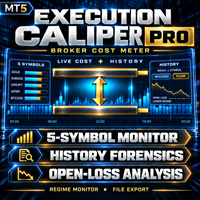
这是什么
Execution Caliper Pro 是一台测量仪器,不是交易机器人。它一次衡量您的账户在最多五个品种上收取多少执行成本,把每一笔成本除以您为该品种填入的止损宽度,再读取您自己的已平仓交易历史,显示同一套测量放在您已经做过的交易上是什么样子。它不发送订单,不开仓,也不触碰终端上属于其他EA的任何东西。它同样不对盈利做出任何声称。我们不说它会让您盈利、更安全或者成绩更好。它只是在您用昂贵的方式弄明白之前,告诉您您的账户收取了多少。
它为什么存在
本段的数字不是我们的。它们来自两个公开的 MQL5 信号,这两个信号在两家不同的经纪商上运行着同一个第三方EA;我们根据它们导出的交易列表自行重新核算。信号标识、重新计算过程,以及对我们自己更早期表格的修正,都写在本站作者的博客里。以两个账户各自的完整历史来看,获利系数分别是 1.79 和 2.40。若截取到两者真正重叠的时间段,两者都变成 2.40,且两家经纪商之间一一对应的成交,其成交价差异只有每盎司几美分。差异出在起始日期,而不是账户本身,我们在此说明是因为我们先前在免费版的页面上发布过这个故事更弱的版本,而那个页面与

The Bridge Between TradingView Charting and MT5 Execution Launch Offer $99 for the first 5 buyers. Price rises to $199 after. MetaTrader 5 remains the standard for broker execution, liquidity access, and reliability. But its charting tools lag behind what traders have come to expect from TradingView. The result: constant alt-tabbing between a TradingView browser tab for analysis and the MT5 terminal for order entry, with missed entries and execution delays during fast markets. KSQ ProDesk MT5 do

A professional risk management dashboard for prop firm traders and disciplined retail traders.
For the full user manual, installation guide, and recommended preset ( .set ) files, please visit our blog post here: https://www.mql5.com/en/blogs/post/776243 Overview RiskGuard is an Expert Advisor designed to help traders stay within the daily and total drawdown limits required by prop firms like FTMO, FundedNext, E8, The5ers, and others. It does not open trades for you. Instead, it monitors your

HighProb TP Alert GF – Signal Scanner for Manual Trading (MT5)
2026 George Francis ️ This EA does NOT trade automatically. It only sends signals. You decide whether to take a trade and open it yourself, using the Entry, TP and SL from the alert. It scans several pairs from one chart and alerts you when a trend-pullback setup is ready. Strategy Trend filter: H4 and H1 EMA 50/200 must agree, and H1 ADX must be above 20. Entry (M15): price pulls back to the EMA 20 without closing past the EMA 5

VISUAL STRATEGY BACKTESTER
This is a tool, which allows you to manually backtest your strategy on historical prices, and later shows you the results. If you have a strategy and want to do a quick backtest based on historical prices, without coding, this tool enables you to do so.
How it works 1. You have a strategy you want to test. 2. You launch the visual strategy backtester 3. Click add 'New Box' or type the keyboard shortcut for adding a new position box 4. Adjust its stoploss and take pro

Running more than one EA on the same account creates a blind spot: nobody adds up the total risk across strategies, and nobody notices when two EAs quietly work against each other. Tachi Portfolio Sentinel watches the whole account, groups your EAs into strategy groups, applies a risk budget to each group, and flags exposure conflicts between them — with every number traceable back to the exact tickets behind it.
What it does
- Groups multiple Magic Numbers, comment patterns or symbols into

TradeAssist Pro v1.06 Overview TradeAssist Pro is an all-in-one manual trading assistant and technical analysis toolkit for MetaTrader 5. It provides a modular, interactive on-chart dashboard designed for rapid execution, advanced trade management, and automated Smart Money Concepts (SMC) charting.
Dashboard Structure & Tabs 1. Trade Tab (Execution & Orders)
1-Click Trading: Execute Buy/Sell market orders instantly.
Dynamic Position Sizing: Toggle between fixed lot sizes or auto-calculated l

首发价:前 10 份仅需 30 USD。之后价格:59 USD。
Lotwise Trade Manager MT5 Risk Calculator 是一款适用于 MetaTrader 5 的简单交易面板和手数计算器。
您选择愿意承担多少资金风险,移动止损,面板会自动为您计算手数(仓位大小)。 然后,您可以一键保护、管理和平仓:保本、移动止损、部分平仓等。
打造属于您的面板 - 点击"#"查看所有按钮。按钮分为五组:Order、Aggressive Trade、Close、Manage、Risk。 - 关闭不需要的按钮。面板会变小,只显示您的工具。 - 面板会记住您的选择。 - 可将面板移动到图表任意位置,并用锚点按钮锁定。 - 点击"x",面板会缩小为一个"LW"小按钮。点击"LW",完整面板即恢复。
设置风险 - 按账户百分比或固定金额设置风险。 - 四个快捷按钮,用于常用风险值(可自行修改)。 - 只需设置一次盈亏比(例如 1:2),每个止盈都会按此设置。 - 手数根据您的风险和止损计算,并已包含佣金。 - 手数绝不会超过您的风险允许范围。
快速开仓 - Market(

PositionSizer Z Pro MT5 PositionSizer Z Pro MT5 是一款用于 仓位计算、风险控制和多目标交易管理 的 MT5 工具,帮助交易者更快速、更清晰地规划每一笔交易。 无需手动计算手数,PositionSizer Z Pro 会根据你的 账户余额、风险百分比、入场价格和止损位置 ,自动计算合适的总仓位。 你只需要选择交易方向、设置止损、选择要拆分成几笔仓位,系统就会自动计算仓位大小和对应的止盈目标。 主要功能 自动仓位计算 根据账户余额、风险百分比和止损距离,自动计算交易手数。 自动识别当前交易品种 工具会直接读取当前图表上的交易品种,并使用经纪商提供的品种参数进行计算。 自动识别点值 / Pip 显示 可适配常见外汇报价、JPY 货币对以及黄金报价方式,让止损距离显示更直观。 图表拖动式止损 选择 BUY 或 SELL 后,可直接在图表上拖动止损线。 入场价、止损距离、仓位大小和止盈目标会自动更新。 支持 2、3 或 4 个分仓 可将总仓位拆分成多笔订单,方便设置不同的止盈目标。 多级 R 倍数止盈 支持: TP1、TP2、TP3、TP4 每个目

Aurum brings a clean, visual R:R position tool to MetaTrader 5 - and goes further. Plan a trade on the chart, send it with the exact lot size in one click, manage it automatically once it is open, and backtest your setups on history with every box scoring itself.
PLAN - Place a risk box anywhere on the chart and drag the stop loss, take profit, entry and box length directly on the chart. - Lot size is calculated live from your risk (percent of balance/equity or a fixed amount) using your broke

Turn any MT5 backtest into a monthly return and drawdown report, and combine several EAs into one portfolio. Free three-day trial on ea-backtest-analyzer.com - no card, no email, no account to create. WHAT IT DOES The strategy tester gives you one number: net profit . It does not tell you what the year of losses looked like, which month nearly broke the account, or what happens when you run three EAs together. This tool does. Export your backtest and it reads it straight away. You get the report

20 Pip Challenge Trade Manager EA Trade the Challenge. Follow the Levels. Stay Disciplined. The ElohimFX 20 Pip Challenge Trade Manager is a professional manual trade management EA designed for traders who want to follow a structured 20-pip challenge while keeping position sizing and level progression organized. This is NOT an automatic trading robot . You remain in control of your entries by using the built-in BUY and SELL buttons. The EA handles the challenge calculations, level progression, t

Do you follow signals or copy trades from a provider and worry that a single position could spiral out of control before you can react? CopyRiskGuard watches every open position in your account independently and automatically closes it as soon as its loss exceeds the risk percentage you define — without you needing to be in front of the screen. How does it work?
The EA does not open or modify trades: it only monitors. Every few seconds it checks all open positions, and if any one of them accumu

Overview QuoteCycler is a lightweight, draggable on-chart panel that displays a rotating collection of curated trading quotes — paired with a tiny, living ecosystem of pixel-art bugs that wander, hunt, and interact with your mouse in real time. It's part trading companion, part desktop pet, and part visual stress-relief for traders who spend long hours staring at charts. Key Features Rotating Quote Engine Loads quotes from multiple text files organized via a simple manifest.txt Supports 1,000+ q

One missing stop-loss. One oversized position. One revenge trade after a bad morning. That is all it takes to lose a funded account.
AxiomSuite Enterprise enforces your risk plan on every position of your MetaTrader 5 account — automatically, in real time — and Axiom AI explains every decision in plain language.
It does not trade for you and gives no signals. It makes sure your own rules are respected. Every time.
WHAT IT ENFORCES

适用于 MetaTrader 5 的 Dhan 市场数据工具
直接将 Dhan 账户中的实时市场数据和历史 K 线(candles)数据流式传输并下载到 MetaTrader 5 中。该工具利用 Dhan v2 数据 API,为 NSE、BSE 和 MCX 交易所创建自定义交易品种,通过 WebSocket 接收实时逐笔报价(tick)并构建实时 K 线,同时回补历史数据。本工具仅处理市场数据,不执行任何交易操作。
功能特点
基于 Dhan 官方品种列表,在“Dhan”文件夹下为 NSE、BSE 和 MCX 创建自定义交易品种。
支持按交易所(NSE/BSE/MCX)、品种类别(股票/期货/期权/指数)或名称(精确匹配或部分匹配)筛选并创建品种。
实时逐笔报价(Tick)数据流(支持 Ticker/Quote/Full packet 模式),具备自动心跳保活(ping-pong)和自动重连功能。
实时 K 线构建功能,可更新当前 K 线并在周期结束时生成新 K 线。
历史数据下载功能(支持 1/5/15/25/60 分钟及日线),可通过图表按钮手动触发或设置为定时自动更新模

Trade Reporter isn't a trading robot. It watches your account and posts what happens to your Telegram chats or channels and your Discord server. It never opens, closes or modifies a trade.
It's for signal providers, prop-firm traders sharing their progress, trading groups, and anyone who wants their trades on their phone as they happen.
WHAT IT POSTS - Open: side, symbol, entry, stop and target (with distance in pips), lot size, and the risk at the stop in money and % of balance. - Stop / tar

Gold Live Position Executor Category: Utilities (Order management, Risk management, Panels) "The disciplined trader's shortcut — proper position sizing, every single trade, without doing the math yourself." A risk-management and order-execution utility , not an autonomous robot. Drag from entry to stop-loss and it calculates your exact lot size, risk, and reward — then places the trade with one click, exactly when and how you decide. No spreadsheets, no mental math under pressure.
This is a uti

Aura Lot Calculator – know your exact position size in one second.
Stop guessing your lot size. Set your risk, place your stop loss, and Aura Lot Calculator instantly shows the correct lot – so every trade risks exactly what you planned, nothing more.
HOW IT WORKS - Choose your risk: % of balance or a fixed money amount (one click to switch) - Enter your stop loss in points – or turn on the SL Line and simply drag it on the chart - The calculator detects BUY or SELL automatically from the lin
FREE

# LBU Trading Console
LBU Trading Console is a unified MetaTrader 5 utility for visual trade planning, position management, equity protection and multi-symbol RSI monitoring. Its tabbed interface keeps four practical workflows in one chart and one EX5 file.
## Main modules
### Trade
- Draw and drag Entry, Stop Loss and Take Profit levels directly on the chart. - Calculate volume from the selected account risk percentage. - Support market, limit and stop orders. - Validate volume, margin and
FREE

RiskCompass Panel MT5 1. Overview RiskCompass Panel is a chart utility for MetaTrader 5 that keeps essential account-risk numbers in view while you work. It renders a compact 13-row dashboard directly on the chart showing balance, equity, floating result, day result, margin availability with margin level, open-position exposure, spread, a risk-based lot calculator with margin-affordability verdict, and server time. It also draws colored background boxes for the Asian, London and New York session
FREE

VolumeMonitorUtility — professional real-time volume monitoring tool VolumeMonitorUtility is a service utility for the MetaTrader 5 terminal that displays key volume analysis metrics directly on the chart as a compact information panel. The utility was created by a practicing trader and developer with 10 years of experience in financial markets and 51 MQL5 certificates. The utility is built on top of the open-source VolumeAnalysis library and is designed for traders who make decisions based on
FREE

把它挂到一张图表上,它就会在整个账户范围内强制执行您的日亏损限额和最大回撤,不论交易是谁开的:是您手动开的、用手机应用开的、另一个 EA 开的,还是跟单信号开的。一到限额,它就平掉所有持仓,删除所有挂单,并在锁定结束之前把新开的任何交易继续平掉。它在您设在限额之前的一条线上就动手,而不是等越过限额之后,并用直白的话说明它做了什么。 风控工具出问题,很少是因为缺了某个功能。 问题在于:限额触发得太晚,设置的实际含义与名称不符,改一下输入参数就把锁定悄悄撤销了,或者平掉了谁都没料到它会去碰的交易。下面对每一种都有直白的回答。 开始设置 无论是用于自营交易公司(prop firm)的考核,还是用于您自己的限额,要紧的是下面这几项设置: Account size (账户规模):考核账户的规模,例如 100000,或者您希望据以计算自己限额的规模。保持为 0,它就会在第一次运行时取您的余额。 Daily loss limit 和 Overall loss limit :也就是您的日亏损限额和最大回撤。 Loss limits are set in 这项设置用来在以账户货币计的金额和百分比之间选择
MetaTrader市场提供了一个方便,安全的购买MetaTrader平台应用程序的场所。直接从您的程序端免费下载EA交易和指标的试用版在测试策略中进行测试。
在不同模式下测试应用程序来监视性能和为您想要使用MQL5.community支付系统的产品进行付款。
