News Robo

58 USD
Demo indirildi:
147
Yayınlandı:
24 Nisan 2018
Mevcut sürüm:
1.2
Uygun bir robot bulamadınız mı?
Freelance üzerinden kendi
robotunuzu sipariş edin
Freelance'e git
Freelance üzerinden kendi
robotunuzu sipariş edin
Bir alım-satım robotu veya gösterge nasıl satın alınır?
Uzman Danışmanınızı
sanal sunucuda çalıştırın
sanal sunucuda çalıştırın
Satın almadan önce göstergeyi/alım-satım robotunu test edin
Mağazada kazanç sağlamak ister misiniz?
Satış için bir ürün nasıl sunulur?

Alım-satım fırsatlarını kaçırıyorsunuz:
- Ücretsiz alım-satım uygulamaları
- İşlem kopyalama için 8.000'den fazla sinyal
- Finansal piyasaları keşfetmek için ekonomik haberler
Kayıt
Giriş yap
Web sitesi politikasını ve kullanım şartlarını kabul edersiniz
Hesabınız yoksa, lütfen kaydolun
Dear traders,
If you set EA parameter for trading, after job done please kindly remove expert from the chart. If you having another news for trading at same day, please follow that way. I mean always use it as fresh!!! but you can use saved set file.
Thank you.
Have a great day!
V1.1 under testing. It will more advanced. It will available within 1-2 weeks. If you having news ideas to improve it, let me know.
Thank you.
so i have been up for two days awating the progress of the robot news ea. Where i am the mrket is an totally diffrent time. and my results are 0 out of 4 of the high impack news for wensday. im so levid right now not for just lossing sleep but for believing in a product that did not work. please is there something i am doing wrong? please help me!!!!!!!!!!!!!!!!
so i have been up for two days awating the progress of the robot news ea. Where i am the mrket is an totally diffrent time. and my results are 0 out of 4 of the high impack news for wensday. im so levid right now not for just lossing sleep but for believing in a product that did not work. please is there something i am doing wrong? please help me!!!!!!!!!!!!!!!!
I will help you to quickly fix this problem.
First load the News Robo EA to demo account chart. After that set Quick Trade as "false". Then click ok.
After that you can see 3 times on the chart.
Local : Your computer Time
Server : Your Broker Server Time (This is is very important)
News@ : News Time.
Now time to set your computer time match to your broker server time. You can't change your broker server time. So what we do, we change our computer time. If you did it correctly you can see your "Local" time = "Server" time. You can see my image. It is totally correct.
After that try to get forex news times using your broker time. Then you will never missed news events.
However if you not like to change your computer time to your broker server time, then try to understand what kind of deference having with your Local time and Broker time. You only need to think about your Broker time. Use your Broker time to set News time.
Please let me know if anything not clear. You can test it now with demo account. Try to put pending order using fake news times. And try to understand how it work.
Thank you.
Dear traders,
If you set EA parameter for trading, after job done please kindly remove expert from the chart. If you having another news for trading at same day, please follow that way. I mean always use it as fresh!!! but you can use saved set file.
Thank you.
Have a great day!
News Robo Expert Advisor update to v1.1. Now that problem is fixed and you can use it as your own way.
Thank you.
News Robo Trades For USD Crude Oil Inventories 2018-07-11
This is one of my real accounts. I trade for USD Crude Oil Inventories 2018-07-11 with the News Robo Expert Advisor. This is my input parameters for this successes news event.
Trailing Stop: 10pips, Stop Loss: 15pips, Take Profit: 40pips, Distance: 15pips
I think (Distance 15pips) is very important for getting good results. As well as Trailing Stop mode. In that event, I can not able to take 40pips. You can see the price comes to that TP level. But not taken. However Trailing Stop is activated quickly with reversal stage. So finally my order taken 23pips.
Another important thing is that happened before the news event. 17.29.57. With the news event, price moved as BUY Trend. However, we have already taken our profit activating one pending order and quickly exit from the market.
News Robo Trades For USD Retail Sales 2018-07-16
Result : Unsuccessful
Today i trade for USD Retail Sales 2018-07-18 with Gold. My target is 40pips. But i can not able to success with my Distance. This is my input parameters for this news event.
Trailing Stop: 10pips, Stop Loss: 15pips, Take Profit: 40pips, Distance: 15pips
So that Distance value is risky with GOLD. Next time i planed to use 20-25pips for Distance.
Remember: All input parameters are depend on your broker!
1. Changed 3 input parameters. Now you can put pending order by Seconds. "Minute" to "Seconds". As an example:
Delete Pending Orders After [1] Minute to Delete Pending Orders After [60] Seconds
Set Pending Orders Before [2] Minute to Set Pending Orders Before [120] Seconds
News Robo Trades For GBP Retail Sales 2018-07-19
Result : Successful
Today i trade for GBP Retail Sales 2018-07-19 with USD. My target is 30pips. But i can not able to hunt maximum profit with low market movements. I already taken 20pips for Distance. This is my input parameters for this news event.
Trailing Stop: 5pips, Stop Loss: 10pips, Take Profit: 30pips, Distance: 20pips and Minimum lot size.
You can see the SELL STOP order activated as SELL ORDER at the correct place. At that time market moved slowly and touched the pending order price.
v1.2 Features
v1.2 Parameters
I didn't execute any trades when the news came on i followed the instructions
I previously reached out to you privately regarding this matter and I am still awaiting your response to my last message. It's important to note that the EA does not support setting a "0" value for Stop Loss. Furthermore, using a lot size of 0.5 with a smaller balance account is not recommended due to the EA's built-in money management system. This system automatically adjusts the lot size to the minimum acceptable level based on your account balance.
If you didn't execute any trades during news events, there are a few crucial steps to consider before using the EA on a live account:
Strategy Tester Testing: Begin by testing the EA using the strategy tester, simulating past news events. It's important to compare event times with chart data, adjusting the EA's settings according to your broker and local time. This is a critical aspect.
Learning from Strategy Tester: Conduct several rounds of testing in the strategy tester. This will give you insights into how the EA operates and help you determine suitable input parameters for different news events.
Demo Account Testing: Proceed to test the EA on a demo account using the refined input parameters. In this context, you don't need to wait for real news events. You can set your preferred times for testing the EA and ensure it places pending orders as anticipated.
Testing Non-News Times: Evaluate the EA's performance during non-news times. The EA will place pending orders and automatically close them when necessary. This functionality should align with your expectations.
Focus on News Times: Transition to testing the EA during actual news events on your demo account. Apply the previously tested input parameters and observe the EA's behavior.
Troubleshooting Errors: If the EA fails to execute pending orders during news events, examine your terminal's log file for any error records. If you encounter errors, please share the details with me via a private message, and I'll be glad to help resolve them.
Untriggered Orders: If the EA successfully places pending orders during news events but these orders aren't triggered as Buy or Sell orders, this might be due to rapid price fluctuations and spreads during such times. This issue doesn't necessarily indicate a problem with the EA itself.
In conclusion, I strongly recommend thoroughly testing the EA on a demo account until you're satisfied with its performance and you have a comprehensive understanding of its operations. Keep in mind that results on demo accounts may differ from real accounts. Exercise caution and diligence when transitioning to live trading.
The parameters of the News Robo EA are categorized into two main sections: Quick Trading Parameters and Time Trading Parameters. Each trading scenario is associated with a distinct Magic Number for identification.
In the Quick Trading Parameters section, the focus is on situations where you may not have set up the EA ahead of the news event with the exact release time. For instance, if you find yourself just 20 seconds before the news event, you can promptly open two pending orders using the "Magic Number 1," along with inputs such as "Delete Pending Orders After [x] Seconds," Lots, Trailing Stop, Stop Loss, Take Profit, and Distance. It's important to note that enabling Quick Trading Parameters (Quick Trade=true) results in the EA opening two pending orders swiftly. However, this approach might not be suitable if you plan to run the EA on a VPS or aim to set up the EA at least 10 minutes before the news time.
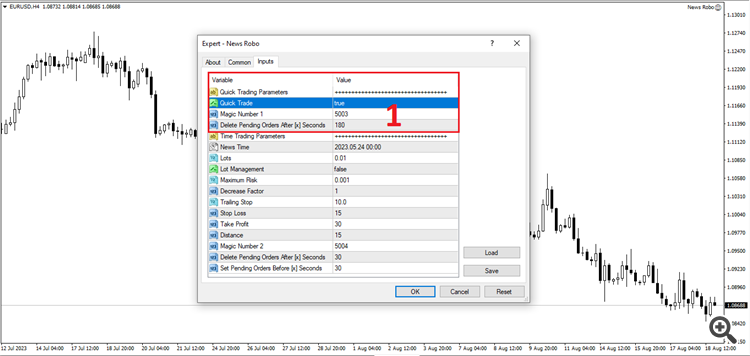
If you're aiming to set up the EA several minutes before the news event, disable the "Quick Trade" (Quick Trade=false). In this scenario, the EA follows the "News Time" specified in your input parameters. It opens two pending orders based on the provided "Magic Number 2," Lots, Trailing Stop, Stop Loss, Take Profit, Distance, "Delete Pending Orders After [x] Seconds," and "Set Pending Orders Before [x] Seconds" inputs. Here, the EA sets the pending orders a certain number of seconds before your specified News Time.
It's crucial to bear in mind that the EA's time value is based on the trade server's time and is independent of your computer's time settings. Therefore, always cross-reference the time on your broker's chart and adjust the EA's "News Time" to match your chart time.
In conclusion, drawing from my experience in news trading with this EA, success can be challenging for newcomers. I strongly recommend conducting Strategy Tester Testing several times to comprehend the EA's functioning and become familiar with its operations before trading during news events, either in demo or real environments. It's worth noting that each news event can result in different market movements, and the default take profit and stop loss parameters might not be suitable for every event. Therefore, conducting thorough research on news trading using historical chart data and leveraging the Strategy Tester Testing feature is highly advisable.