Red Zone Detector
- Yardımcı programlar
- Deepak
- Sürüm: 5.10
- Etkinleştirmeler: 5
Red Zone Detector — Real-Time Margin Protection Expert Advisor for MetaTrader 5
Important Note — Strategy Tester Limitation This Expert Advisor cannot be evaluated using the MetaTrader 5 Strategy Tester. Backtesting environments do not simulate real-time High Margin Requirement (HMR) events — also referred to as Red Zone conditions — because these are unexpected broker-side margin changes that occur only on live trading servers. The Red Zone Detector EA reads live margin conditions directly from the broker's server in real time. Therefore, its protection features must be evaluated on a demo or live trading account, not in the Strategy Tester.
Overview
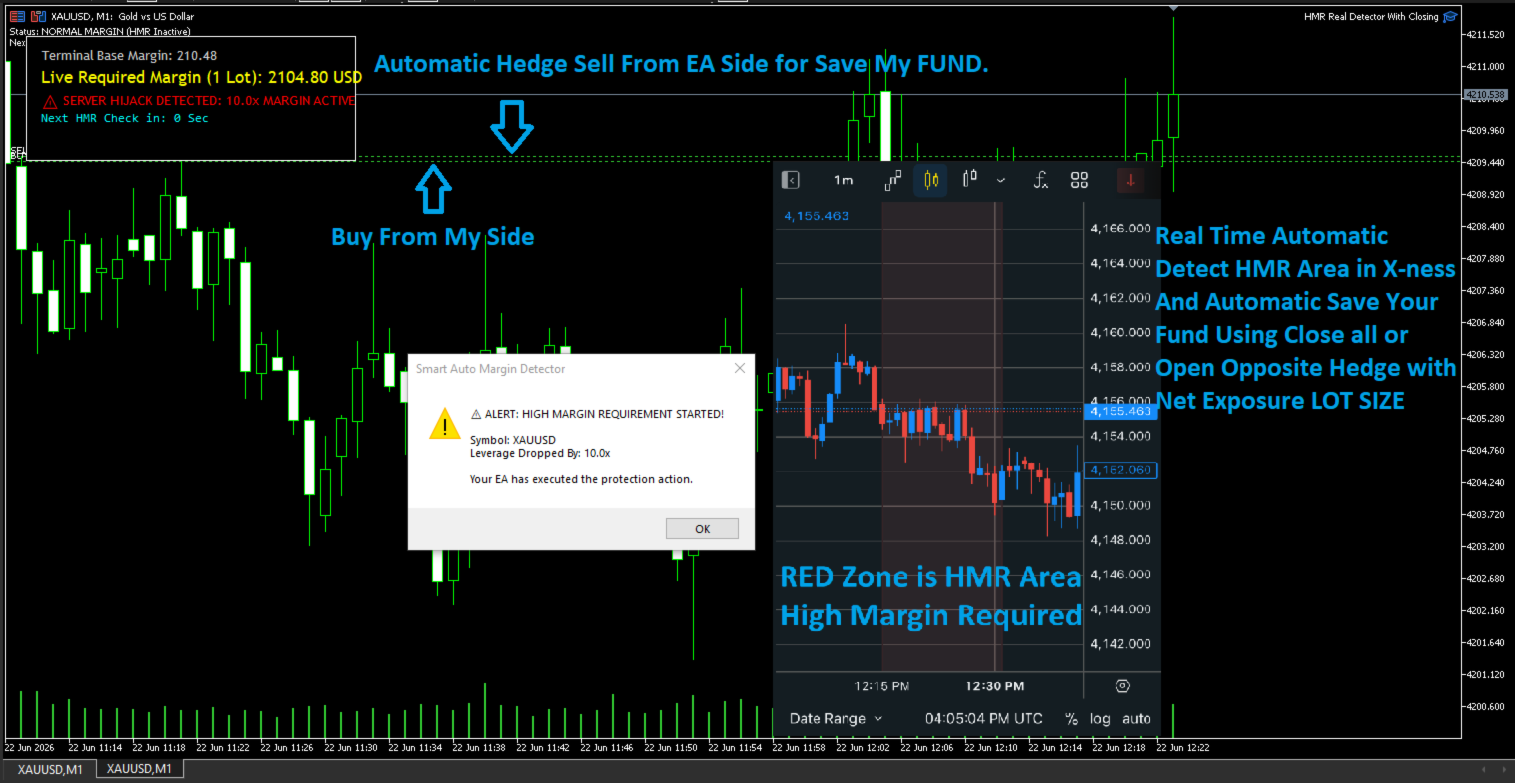
Red Zone Detector EA is a professional risk-protection Expert Advisor designed for MetaTrader 5. Its primary objective is to continuously monitor the margin requirements imposed by the broker in real-time and detect situations where the broker suddenly increases the required margin for open positions. These sudden margin increases — known as Red Zone events or High Margin Requirement (HMR) events — frequently occur during major news releases, periods of high market volatility, weekend holding, holiday sessions, or broker-side leverage changes. The EA identifies these abnormal margin spikes and automatically executes protective actions before the account faces excessive margin pressure, margin calls, or stop-outs.
The EA works by comparing the margin value calculated by the MetaTrader terminal (the expected margin) with the actual margin currently blocked by the broker's server (the real margin). When the real margin requirement exceeds the expected margin by a predefined threshold — by default 1.5 times — the EA declares a Red Zone condition and triggers its protection mechanism. This continuous monitoring and automatic response make the EA an essential risk management tool for serious retail traders, prop firm participants, and anyone trading through high-impact news windows.
Why Red Zone / HMR Detection Matters
Many traders are unaware that brokers can dynamically change the margin requirement on an open position at any time, without prior notice. This typically happens during:
- High-impact news events such as NFP, FOMC, CPI, and central bank rate decisions
- Weekend holding periods when brokers increase swap and margin buffers
- Sudden volatility spikes caused by geopolitical events or flash crashes
- Broker-side leverage reductions on specific instruments
- Holiday periods with reduced liquidity
- Cryptocurrency and commodity volatility bursts
When the broker raises the margin requirement on an existing position, the free margin available on the account drops sharply. If the trader is unaware of this change, the account can quickly slip into a margin call or stop-out, even when the original trade was well within risk limits. This is particularly dangerous for prop firm traders, who operate under strict drawdown rules, and for traders running multiple open positions during news windows.
Red Zone Detector EA solves this problem by continuously monitoring the live margin state and reacting in milliseconds to any abnormal spike. Instead of discovering the margin change only after a stop-out email arrives, the trader is protected proactively — the EA can hedge, close, or alert before the damage is done.
How It Works
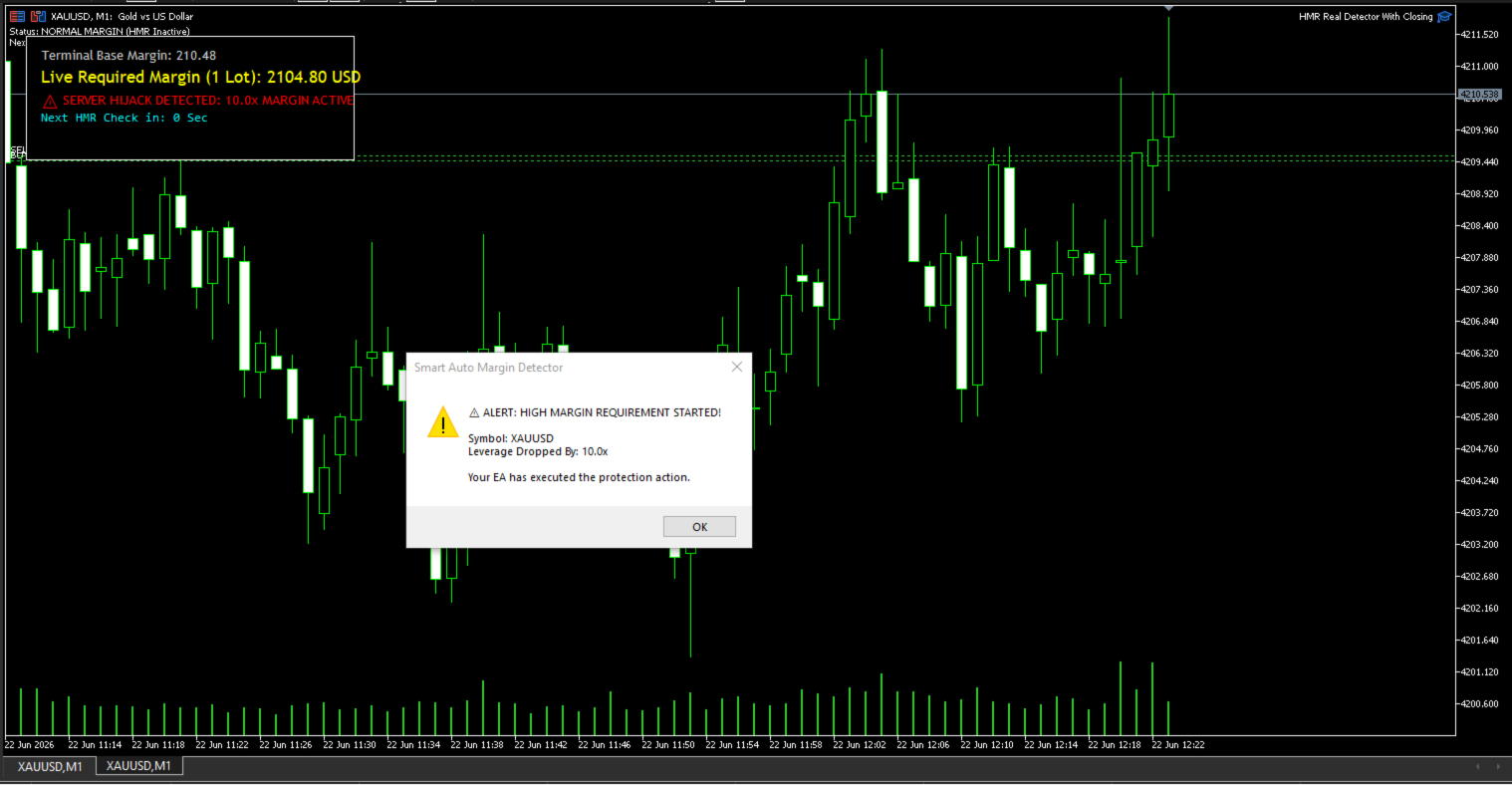
The EA uses standard MetaTrader 5 functions to read the live account state every second. It computes the expected margin for open positions using the terminal's own margin calculation engine, then compares this value to the actual margin reported by the broker's server. The full result is displayed on the chart dashboard in real-time, giving the trader complete visibility into the current margin state.
When the actual margin divided by the expected margin exceeds the configured threshold (default 1.5x), the EA flags a Red Zone condition. Once Red Zone is active, the EA executes the selected protection mode — No Action, Hedge, or Close — based on the trader's settings. The dashboard updates continuously to reflect the expected margin, the actual broker-side margin, the learned normal margin level, and the current protection status.
HMR Detection Example
The Red Zone detection logic is straightforward and transparent:
- Normal Margin: $100 | Actual Margin: $100 → Status: Normal
- Normal Margin: $100 | Actual Margin: $120 → Status: Normal
- Normal Margin: $100 | Actual Margin: $200 → Status: Red Zone Detected (HMR)
In the third case, the broker has doubled the margin requirement on the open position. Without protection, the account's free margin would drop by an additional $100 instantly. With Red Zone Detector EA active, the configured protection mode fires immediately, neutralizing the exposure before the broker can issue a margin call.
Main Features
Real-Time Margin Monitoring The EA continuously reads account margin usage using standard MetaTrader 5 functions, updating calculations every second. The full margin state — including expected margin, actual broker-side margin, learned normal margin level, and current protection status — is displayed clearly on the chart dashboard.
Automatic Margin Learning The EA automatically learns the broker's actual margin requirements by continuously comparing the expected terminal margin with the real blocked margin. This allows the EA to adapt to any broker, any account type, and any leverage setting without manual configuration.
Configurable Red Zone Threshold The multiplier at which the EA considers a Red Zone active is fully adjustable. The default value of 1.5x is suitable for most trading styles. Conservative traders can lower it to 1.2x or 1.3x for earlier warnings, while traders on brokers with frequent fluctuations can raise it to 2.0x to avoid false triggers.
Hedge, Close, or Alert Modes Traders can choose between three protection modes depending on their risk appetite and trading style. Each mode is described in detail in the Protection Modes section below.
No Repainting, No Tick-Drop Sensitivity The EA's calculations are based on the live account state, not on price history. There is no repainting and no sensitivity to missing ticks. The protection logic is deterministic and reliable.
Protection Modes
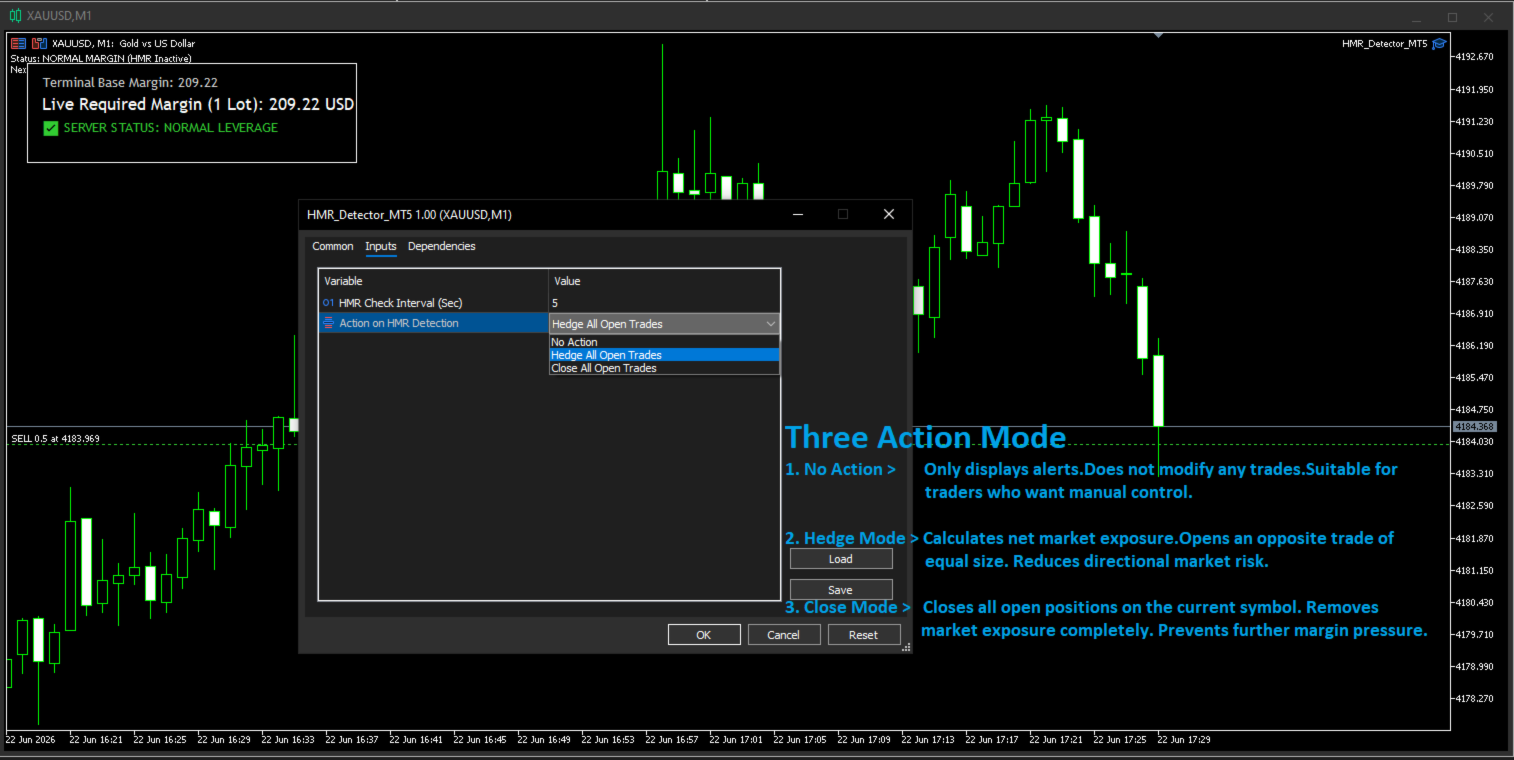
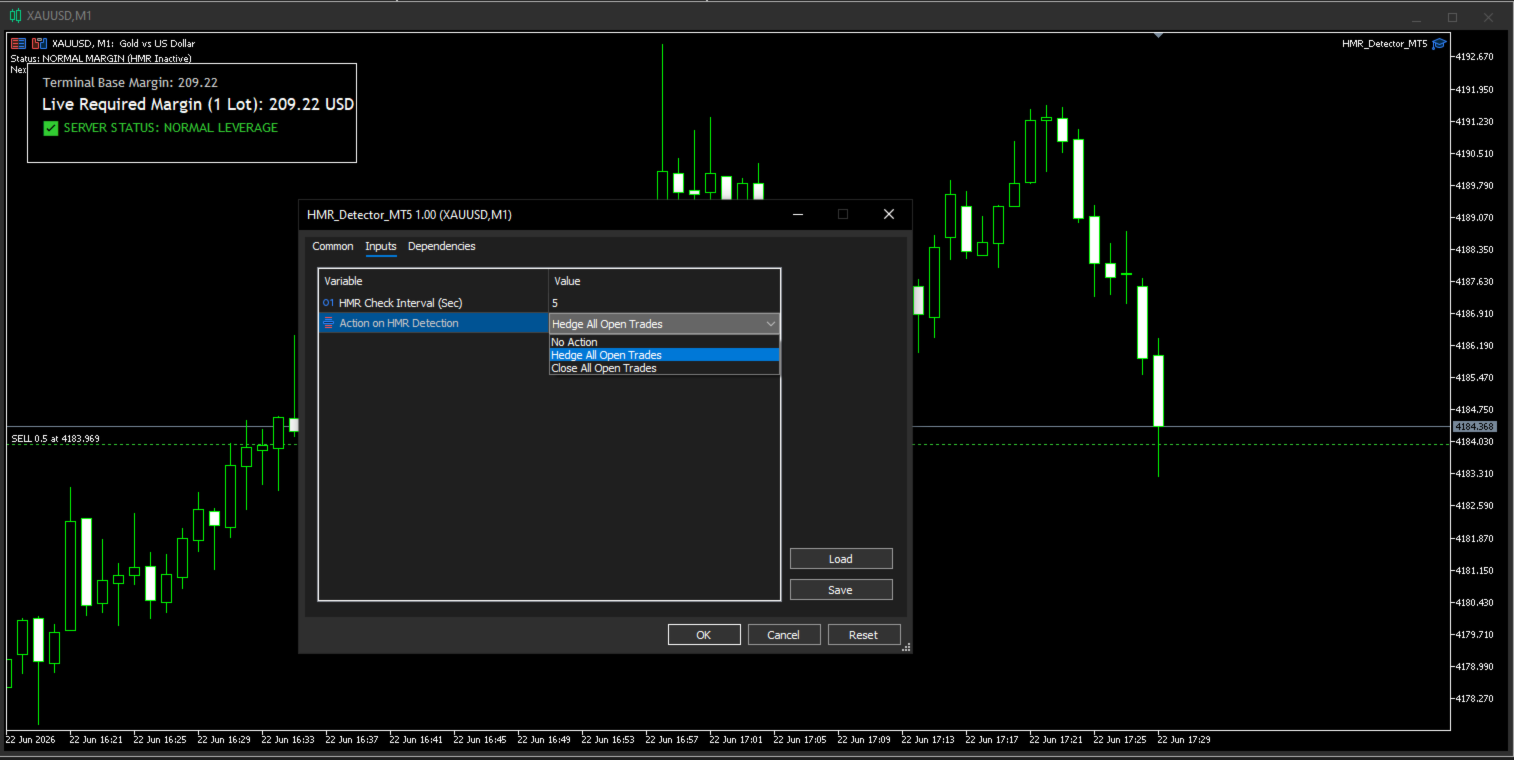
When a Red Zone condition is detected, the EA can perform one of the following actions depending on the trader's settings:
No Action Mode The EA only displays alerts on the chart and in the terminal without modifying any open trades. This mode is suitable for traders who prefer full manual control and want to use the EA primarily as an early-warning margin monitor.
Hedge Mode (Default) The EA calculates the net market exposure across all open positions on the current symbol and opens an opposite trade of equal size to neutralize directional risk. For example, if a trader holds a Buy 3 Lots EURUSD position and a Red Zone condition is detected, the EA will immediately open a Sell 3 Lots EURUSD position to hedge the exposure. This brings the net market exposure to zero, preventing further directional loss while the Red Zone condition persists.
Hedge Mode is the default because it preserves the original position while eliminating market risk, allowing the trader to manually unwind the hedge once conditions normalize.
Close Mode The EA closes all open positions on the current symbol, removing market exposure completely and preventing further margin utilization. This mode is the most aggressive and is suitable for traders who want absolute protection during extreme volatility or news events, with no intention of re-entering until conditions stabilize.
Close Mode is recommended for prop firm traders who cannot afford any drawdown during high-impact news windows, and for accounts operating close to their maximum drawdown limit.
Broker and Instrument Compatibility
Red Zone Detector EA is built using standard MetaTrader 5 functions and does not rely on any broker-specific configuration. It automatically adapts to different leverage settings, margin policies, and account currencies.
Supported Account Types: ECN, STP, Market Maker, Prop Firm, Raw Spread, Standard, Cent, Hedging, and Netting accounts.
Supported Instruments: Forex pairs (majors, minors, exotics), Gold (XAUUSD), Silver (XAGUSD), global indices (US30, NAS100, SPX500, GER40, UK100), commodities (oil, natural gas, wheat, copper), cryptocurrencies (BTCUSD, ETHUSD and other major pairs), and CFDs on stocks and ETFs.
Typical Use Cases
- News traders holding positions through NFP, FOMC, CPI, and central bank rate decisions
- Prop firm participants who need to protect funded accounts from unexpected margin spikes and drawdown breaches
- Swing traders holding positions over the weekend when brokers frequently adjust margin
- Gold and index traders who experience frequent leverage changes during volatility
- Automated trading system operators who need a safety net above their strategy logic
- Manual traders who want a real-time margin dashboard with auto-protection fallback
Important Risk Disclaimer
Trading foreign exchange, CFDs, and cryptocurrencies carries a high level of risk and may not be suitable for all investors. Red Zone Detector EA is a risk-protection tool and does not guarantee profitable trading outcomes or complete loss prevention. The EA reduces the probability of margin-call and stop-out events caused by sudden broker-side margin changes, but it cannot eliminate all trading risk. Past performance is not indicative of future results. Always test the EA on a demo account before deploying on a live account, and never trade with capital you cannot afford to lose.
Developer Profile & Other Tools
You can view my seller profile on MQL5 for more trading tools and utilities: https://www.mql5.com/en/users/deepak89kumar/seller