Tüm siparişler
 Kurallar
Şartname
🎯 EA Objective
Semi-Automated Reversal Trading: The Expert Advisor (EA) opens trades in the opposite direction of the previous price movement (e.g., after a strong upward move → open short), expecting a potential reversal.The trader controls entry visually through the chart panel, while the EA handles position sizing, order placement, management of multiple entries, and automatic closing at SL or TP.
🧩 Structure Overview
1. Chart Panel (User Interface) – Interactive panel on the chart for visual control.
2. EA Input Menu – Contains adjustable parameters for risk, RRR, target, distance, and position count.
3. Trading Logic – Handles position sizing, order management, and synchronization with chart lines.
🖱 Chart Panel – Functions
Button 'Show RRR: Displays two lines, SL (Stop Loss) and TP (Take Profit), based on the set RRR value.
Button 'Lock' (On/Off):
- Lock = On: SL and TP move together, maintaining equal distance.
- Lock = Off: SL and TP move independently.
Button 'Place Order': Executes a market order. Direction is detected automatically:
- TP above SL → Long
- SL above TP → Short
Lines are draggable, with real-time display of RRR, distances, and estimated risk/reward.
⚙️ EA Input Parameters
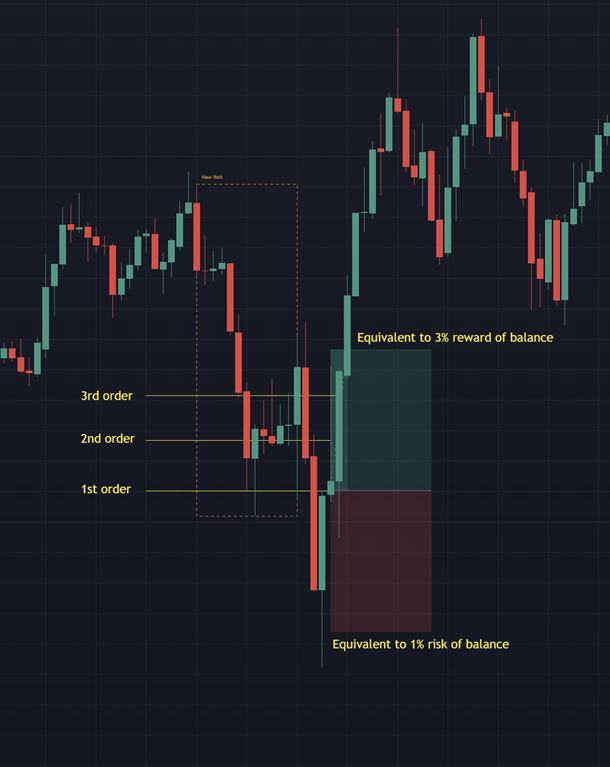
• RiskPercent – Account risk per trade in % (e.g., 1%)
• TargetPercent – Desired total profit in % (e.g., 3%)
• DefaultRRR – Default Risk Reward Ratio (e.g., 1.0)
• DefaultSLDistance – Default SL distance in points (e.g., 500)
• MaxPositions – Maximum number of equally sized positions to open en route to TP (e.g., 3)
🔁 Step-by-Step Operation
1. EA launch → Panel loads with default input values.
2. Trader clicks 'Show RRR' → SL and TP lines appear according to set RRR.
3. Lines can be moved with or without lock.
4. Direction automatically recognized:
- TP > SL → Long
- SL > TP → Short
5. Trader clicks 'Place Order': EA calculates lot size so SL loss equals set risk (%), then opens a market order.
6. If TargetPercent > RiskPercent and MaxPositions > 1, EA opens multiple equally sized positions between entry and TP.
7. All positions share one SL; all close together at TP or SL.
🔐 Safety & Convenience Features
• Automatic direction detection based on SL/TP line positions.
• Dynamic recalculation of RRR, risk, and lot size when lines are moved.
• Real-time display of RRR, distances, and estimated profit/loss on the panel.
⚙️ Technical Implementation Notes
• Language: MQL5
• Platform: MetaTrader 5
• Order Type: Market Orders, Limit Orders if MaxPositions >1 for the further positions
• SL/TP Objects: Movable horizontal lines or handles
• Lot Calculation: Based on account balance and risk percentage, Target and MaxPositions (same distance)
• Panel: Simple clickable GUI (no external DLLs)
• Price Reference: Uses current Bid/Ask prices
- The EA must be easy to use
Attached in the picture you will find an example of how the EA should work:
(Is it possible to use the long/short positioning tool from Tradingview in Metatrader 5? Or something similar?