Tüm siparişler
 Kurallar
Şartname
Breakout EA
1. Strategy Overview
The Expert Advisor (EA) shall implement a daily and sessions breakout strategy with. It uses the previous days and sessions price levels to set breakouts for the current day. Orders are managed on the M1 timeframe and reset daily.
2. Core Logic & Trading Rules
2.1. Data Collection & Level Calculation
- At the start of each new trading day, the EA shall collect the previous day's Daily candle OHLC data.
- It shall also identify the Session High and Low
- Using this data, the EA shall calculate two sets of price levels:
- Previous Day High/Low
- Session High/Low
2.2. Order Placement
- At a specific, user-configurable time, the EA shall place two pending orders:
- A Buy Stop order at the higher level between the Previous Day High and the Session High.
- A Sell Stop order at the lower level between the Previous Day Low and Session Low.
- The orders shall be executed only once per day.
2.3. Trade Management (Default settings upon order activation)
- Take Profit (pips):
- Initial Stop Loss (pips):
- Breakeven: Enabled.
- Breakeven Start (pips):
- Trailing Stop: Enabled
- Trailing Start (pips):
- Trailing Step (pips):
2.4. Daily Reset & Order Cancellation
- All pending orders shall be deleted daily at 23:30 (UTC+3)
2.5. Skip Conditions (Do Not Trade)
- The EA shall NOT place orders if the market opened with a gap up beyond the calculated breakout levels.
- The EA shall NOT place orders if the price has already touched and breached a breakout level before the order placement time.
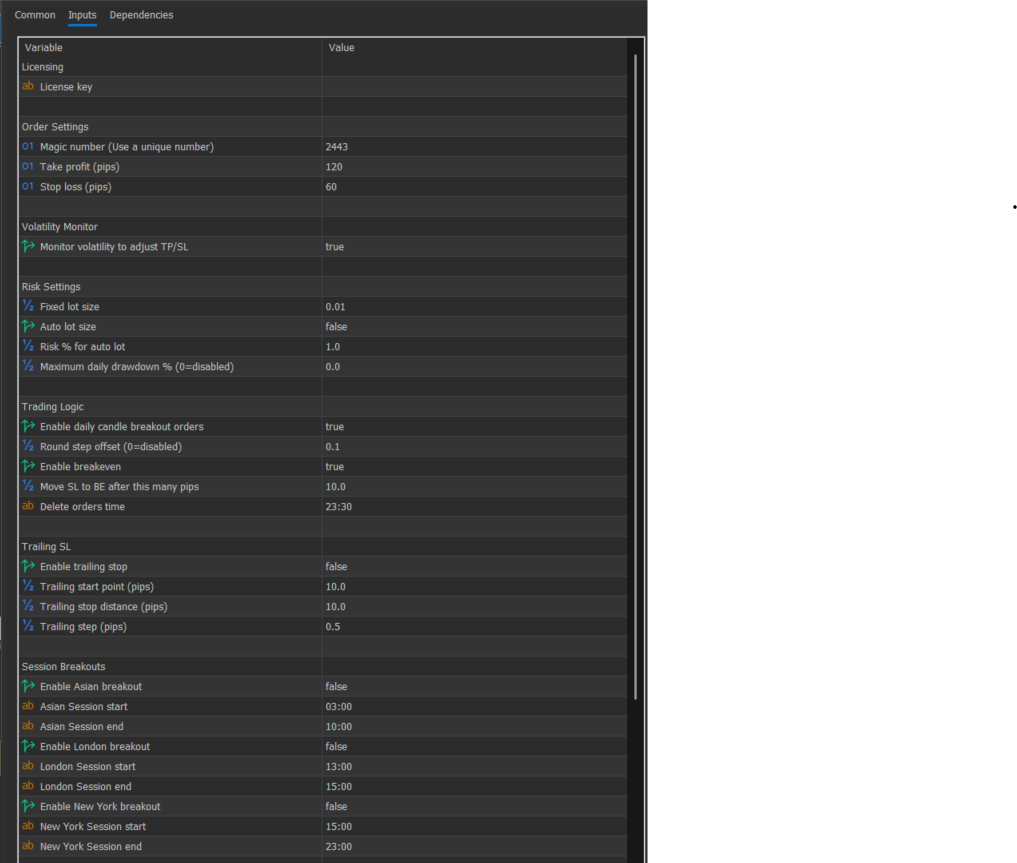
3. Input Parameters (User Configurable)
Common Inputs
- Order Settings
- Magic Number:
- Take Profit (pips):
- Stop Loss (pips):
- Risk Settings
- Fixed Lot Size: 0.01
- Auto Lot Size: true/false
- Risk for auto lot (%):
- Maximum Daily Drawdown % (0=disabled):
Trading Logic
- Enable Daily Candle Breakout Orders: true/false
- Price Round Step Offset: 0.1
- Enable Breakeven: true/false
- Move SL to BE after (pips):
- Delete Orders Time: 23:30 (UTC+3)
Trailing Stop Loss
- Enable Trailing Stop: false/true
- Trailing Start Point (pips):
- Trailing Stop Distance (pips):
- Trailing Step (pips):
Session Breakouts (High and Low)
- Enable Asian Breakout: true/false
- Asian Session Start: 03:00 (UTC+3)
- Asian Session End: 10:00 (UTC+3)
- Enable London Breakout: true/false
- London Session Start: 13:00 (UTC+3)
- London Session End: 15:00 (UTC+3)
- Enable New York Breakout: true/false
- New York Session Start: 15:00 (UTC+3)
- New York Session End: 23:00 (UTC+3)
- Volatility Monitor
- Pause trading on low volatility: true
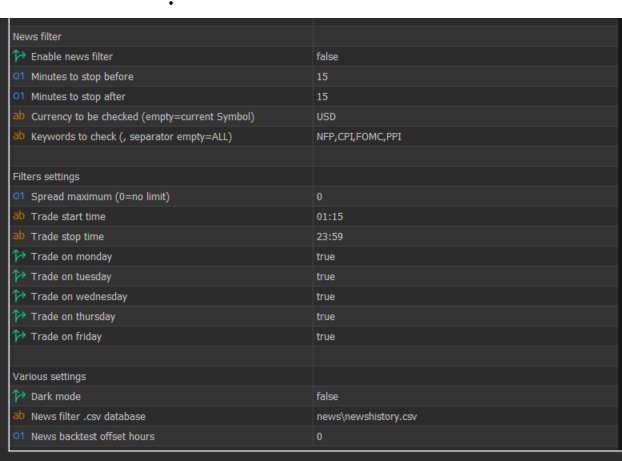
News Filter
- Enable News Filter: true/false
- Minutes to Stop Before News: 15
- Minutes to Stop After News: 15
- Currency to be Checked: USD
- Keywords to Check: NFP, CPI, FOMC, PTI
- News Filter .csv Database:
- News Backtest Offset Hours: 0
General Filters Settings
- Maximum Spread (0=no limit): 0
- Trade Start Time: 01:15 (UTC+3)
- Trade Stop Time: 23:59 (UTC+3)
- Trade on Monday: true
- Trade on Tuesday: true
- Trade on Wednesday: true
- Trade on Thursday: true
- Trade on Friday: true
- Trade on Saturday: true
- Trade on Sunday: true
4. Visual Features
4.1. Chart Drawing
- The EA shall draw horizontal lines on the chart to mark Daily and Sessions highs and lows.
- Lines must update automatically with each new day.
4.2. Dashboard / Informational Panel
A visual dashboard on the chart shall display:
- EA state: Trading or off
- Active sessions: 1,2,3, or 4
- Risk per trade (in %)
- Account Balance - (monetary value)
- Floating P/L (Equity) - (in % and monetary value)
- Daily P/L Change (in % and monetary value)
WATCH VIDEO BELOW TO SEE HOW EA SHOULD WORK:
https://youtu.be/X4wRs-1YXBE
FINAL DELIVERY WILL INCLUDE COMPILED MT5 EA AND SOURCE CODE