Tüm siparişler
 Kurallar
İş tamamlandı

Şartname
Hello programers! I have taken many days to flesh this out in words for our communication to be successful.
This is a decent size project so please bid appropriately.
I have an idea for a "modified" GRIDish program. This listing is for "Version 1" and once complete I plan on launching multiple revisions and conversions to MT5 after the bot works as anticipated, each with their own separate order and negotiable price.
Please be available for revisions after this project is complete!
Please read the entire description before applying. I will want to have a meaningful discussion to make sure you understand the scope of the work. I also expect this project to finish quickly and not be dragged out unnecessarily. Hit all tasks, test, revise, payment.
Programming quality must pass the requirements for commercial release by MQL5.com. I must retain the rights to the final product, the code within, and be able to rewrite, recode, destroy or distribute without further considerations.
//////////Let's get started!///////////
The EA in words:
- The EA will reference the chart it's loaded on and it's timeframe (ie, if the EA is on the 1h chart EURUSD, it will use the 1h EURUSD data only to make decisions).
- Upon initialization, the bot will need to figure out if it can start the process from the beginning or needs to pick up an already in play process (such as MT4 restart, or accidental chart timeframe modification).
- Menu item: Use Hedge: Default True
- The intention of the bot is to open buys and sells together, but some accounts do not allow for hedging such as American accounts.
- If this variable is false, the bot can simply only enter orders on the buy side, or the sell side at one time.
- It can identify which direction to start by finding a trend on the current time fame and making a purchase in that direction. All other logic below should remain the same.
- Author is free to suggest how they determine a trend.
- If Use Hedge is true, no trend is needed - we will always have a buy and sell order open.
- If it can start the process from the beginning, it will start by opening a BUY or a SELL, or if this is the first run with no positions opened or all positions have been closed and hedging is on, a BUY and SELL position are opened all according to parameters in the settings.
- The process is also similar when after we take profit. If we close a trade at 5:33, we will not open a new trade (starting over) until the new candle forms at the top of the time frame.
- Menu item: Starting Lot Size: Default 0.01
- BUYS will be managed separately from SELLS, but the logic will remain the same for both, just logically reversed appropriately.
- For example, this means that when a BUY set closes, it does NOT close any SELL series.
- At the start of a new candle, the bot will look at the price action relative to the open positions.
- let us assume a buy. The opposite would be true for a sell (you are a programer, I think you know what I'm saying, this will be the last time that I go back and forth between buy and sell and we will assume buy for these examples)
- If the price action is lower than the lowest open position, open a new position taking into consideration the martingale multiplication factor.
- Menu item: Lot Size Multiplier or Martingale: Default 1.20
- Menu item: Max Martingale steps: Default 20
- Example: If the lowest open price is 1.00, but the pair price is 0.99, a new position is opened with the lot size calculated in this way:
- Martingale Step Number (in this case 1) * Starting Lot Size variable *Lot Size Multiplier variable = lot size of new position.
- (step: 1) * (Starting Lot Size: 0.01) * (Multiplier: 1.20) = 0.012, Rounded, this againresults in a lot size of 0.01.
- A new position is open via market order with a lot size of 0.01.
- The value of Martingale step is increased by +1
- Example 2: If we are on step 3 with 3 positions opened, 1.00, 0.99, 0.98, the price action is currently 0.99125, no new position would be opened because the price action is not lower than that lowest order.
- Example 3: If we are on step 3 and the 4th order is ready to open but the user has inputed MAX Martingale steps to 3, we do not open any more orders.
- SPECIAL NOTE: It may be necessary to use a global variable to keep track of the number of "steps" instead of counting orders opened since below, in other logic, we may spit orders up. See the SPECIAL NOTE in the "Unique" sections of the logic below.
- Setting and Adjusting Taking Profit (in points)
- Menu item: Take Profit: Default 120
- This is the amount of points that must be collected as a sum of all open positions of the same buy or sell direction.
- That's right, if some of the positions are in negative points but the collective sum of open positions is at the Take Profit value, we close all trades in that set for a profit of 120 points.
- Example: Lets say there are 3 positions opened. Position 1 is +72 points, Positions 2 is +68 points, and Positions 3 is -20 points. 72+68-20=120 and so all 3 positions are closed.
- Example 2: Lets say there are 3 positions opened. Position 1 is +150 points, Positions 2 is +120 Points, and positions 3 is -170 points. 150+120-170 = +100 points so the positions would not close until together they collected another +20 points, even though some positions are over the 120 point threshold. Together is what is key.
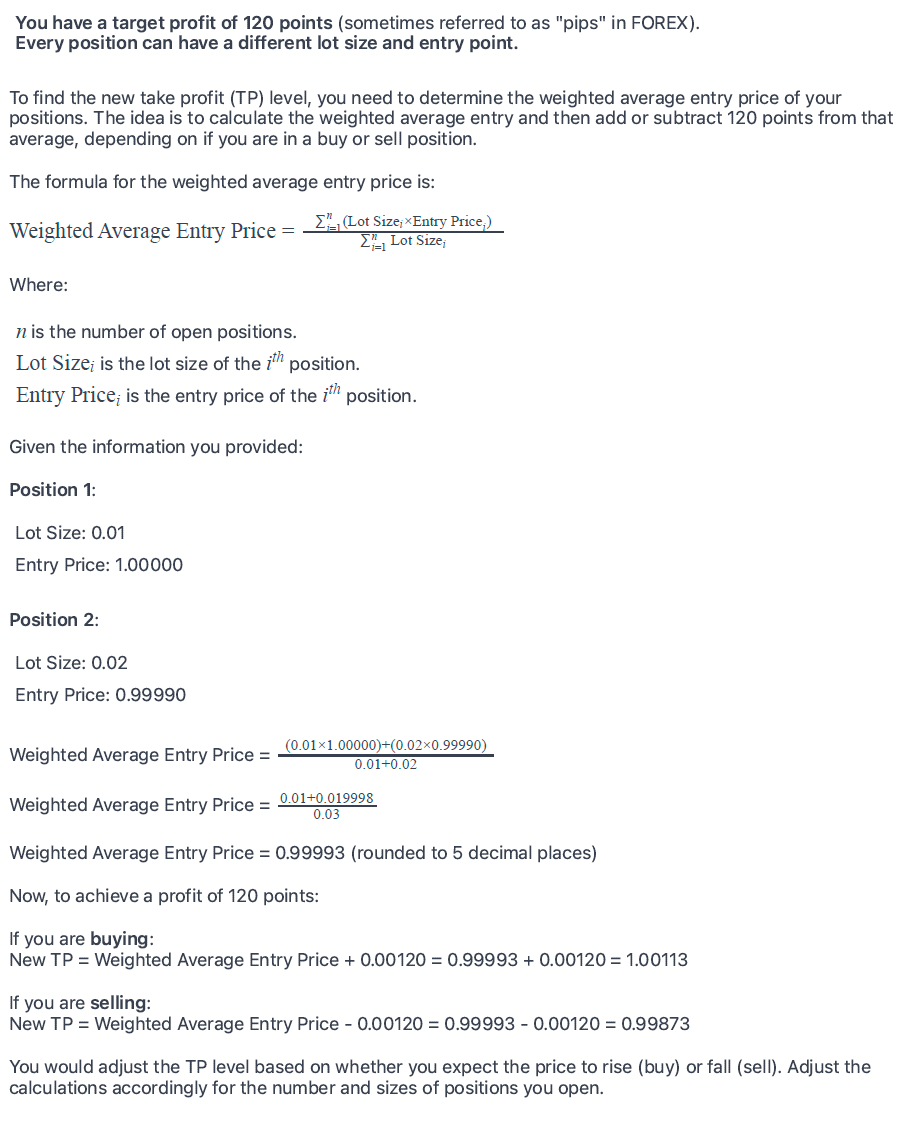
- The way we find what our TP value will be is by using a weighted average formula. You will find this calculation as an attachment to this posting. Please review it!
- During the process of a new order, this calculation should be made so that this TP level can be sent to all orders open in this set.
- Be sure to verify that the profit target calculated/considering the proper Bid or the Ask. We want to make sure that this strategy works even with wide spreads.
- Trailing Stop (unique, please read carefully)
- Menu item: Use Trailing Stop?: Default True
- Menu item: Start Trailing (Points): Default 60
- Menu item: Trail by: Default 20
- Menu item: Trail step: Default 5
- The trailing stop will have to be a calculated based on the total number of collected pips and not relative to any one particular position, so you'll need to add everything up like we did above.
- As you know by now, it is possible to have several orders opened at the same time. When we take into consideration, the appropriate adjusting SL and TP levels to simulate a Trailing Stop, all orders in the group are modified at the same time, even if some positions are at a loss as long as the collective pips are correct and collected.
- Example: Lets assume 3 positions are opened and the collected number of pips between the 3 positions is 60. This triggers the Start Trailing. The SL is moved up to a number short of the "Start Trailing (60)" by the "Trail By (20)" value. A simple calculation would be to subtract the Trail by of 20 from the Start Trailing of 60. This means the new stop loss is at the collective +40 pips and moves up every time the "Trail Step (5)" value is achieved.
- Unique Mode (a way to help prop firm traders get similar action by placing unique trades to avoid violating the trade copy rule).
- I'm open to ideas outside of those listed below
- 0 is off
- Menu item: Unique Mode: Default False
- Turns on or off the features below
- Menu item: Unique - MAX Delay (Seconds): Default 0
- If Unique Mode is true, and this value is something other than 0, the process to calculate a new order is delayed by a random value between 0 and the user inputed value in seconds.
- Example: The user has input 300. It's time check to see if it's time to open a new order, but that that process will be delayed by randomly finding a value between 0 and 300 seconds and only starting the process after the time has elapsed. The RNG generates 65 seconds. The process of opening a new order is delayed by 65 seconds. This number will change each time.
- Menu item: Unique - MAX Splitting of an Order: Default 0
- Turns on split orders. This means that the intended order is split into a random number of orders but no more than the value of what the user has input, if possible.
- If the user has input 4 for this value, it is acceptable to split the orders into 1 (no split), 2, 3, or 4 orders.
- Just because an order CAN be split into 4 orders doesn't mean it has to be split into 4. Let the RNG determine this.
- Example: The order size to open is 1.0 lots and the user has inputed 4 for the value of MAX Splitting of an Order. Using a random number generator, split the 1.00 lots into 4 different orders of different random sizes that equal 1.00 lot, such as Order 1: 0.43, Order 2: 0.02, Order 3: 0.11, Order 4: 0.44.
- Example 2: The order size to open is 0.01 lots and the user has inputed 4 for the value of MAX Splitting of an Order. The number 0.01 is the minimum lot size and therefore the spitting is ignored.
- Each order should be queued with delay according to the function of the Unique - Max Delay routine previously discussed.
- SPECIAL NOTE: A split order should count as only 1 order in the logic to consider what step of the Martingale we are in. This is why I suggested a global variable to count the order process
- Example: We are in step 2 of the Martingale process and there are two orders opened: Position 1: 0.01 Position 2: 0.01. The next order in the Martingale is 0.02 and the logic is going to split this order into 2. The result is Position 1: 0.01, Position 2: 0.01, Position 3: 0.01, Position 4: 0.01. The next step in the Martingale will be STEP 3 even though we have 4 positions opened.
- Menu item: Unique - Max chance a trade is skipped (%): Default 0
- This turns on the chance that a trade is skipped.
- Before a trade is opened, we run the RNG to see if we are going to skip this trade.
- If spit trades is turned on and skip returns true, ALL TRADES IN THE SPLIT ARE SKIPPED.
- Example: the user has 2% input here. The RNG generates a 1 and so we are going to skip the trade. Split trade is also true and we were going to open up 4 trades for this order set. Because we are skipping this trade, all 4 trades are skipped and the Martingale counter variable is not modified.
- Menu item: Unique - Max chance per candle a random trade is added (%): Default 0
- This turns on the chance that a random trade is made once per candle.
- This trade DOES NOT modify the Martingale Step value
- This trade is:
- Always 1 trade
- The size is randomly selected from a lot size of 0.01 and the value below under "Max Lot Size for random trade".
- This trade if true is never skipped.
- This trade may be delayed if the above Unique parameters is turned on for delay.
- Menu item: Unique - Max lot size for random trade: Default 0.05
- Prop Firm Money Guard:
- Menu item: Close all of this EA's positions at this equity level: Default 0
- Menu item: Close all positions and other EAs on this terminal: Default False *(I'm not sure this is possible or allowable on MQL5, let me know, I may want a personal version that can do this)
- The bot should close all positions if the equity level meets the level inputed by the user.
- If this equity limit is hit, in the on-chart status screen (details below), a button should appear asking to reset the EA.
- Example: The user has input 47500. The equity level is at 47560. A few minutes later the equity level drops to 47500 and all the positions are closed and the bot is turned off. A notice on the control panel should read "Equity breach. Adjust Equity Level in Settings" and a button populates that reads "Reset EA" If Close all positions and other EAs on this terminal, the EA should shutdown ALL positions regardless of who opened them up and terminate the other EAs.*
- Acknowledgment: there may be a better way to accomplish all this, i'm open to ideas
- The control panel:
- I'm interested in a Simple visual control panel viewable on the chart that reports the following useful information:
- What martingale step variable we are on for buy and the variable for the sell
- Are there any delays in trades going on and a timer that tells us when the next trade is going to hit and what size, as well as other trades in the queue (like when we split up trades).
- Something like Buys in Queue: 2. Sells in Queue: 0 Next BUY trade in: 1:15 (and counting down) Next SELL trade in: 0:00
- An area for the reset button to populate.
- A running profit loss in POINTS for the current open buy set and open sell set such as: Buy: -140/+120 Sell: +69/+120
- A flashing green text area that reads "Trailing Buy!" and "Trailing Sell!" when a trailing Stop is engaged.
Other considerations:
Every so often, the bot needs to check if the take profit in the settings have been manually adjusted by the user while positions are opened, and if it has, it needs to recalculate the TP levels and modify the orders. Same thing for the Stop Loss/trailing etc.
This seems like a solid version one. Lets get to work!
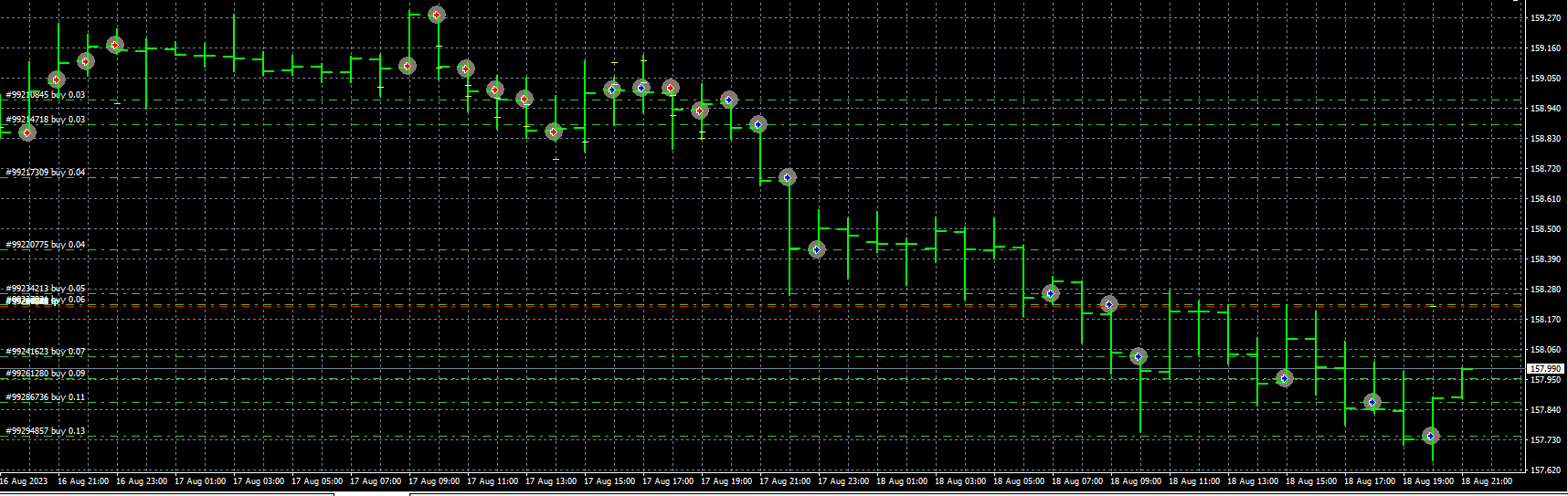
Here is an example of how how the EA might look after opening up 10 trades in a downtrend: