Bid Ask Radar
- Утилиты
- Версия: 1.0
- Активации: 5

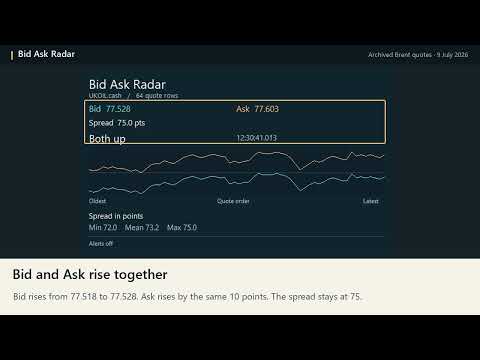
Bid Ask Radar shows which side of your broker’s quote just moved. When Bid rises, did Ask rise too, or did the spread narrow? The desktop MT5 panel compares consecutive Bid and Ask quotes and plots both on the same price scale.
Read the panel
Attach Bid Ask Radar to a separate chart for the symbol you want to monitor. The turquoise line follows Bid and the amber line follows Ask. The newest quote is on the right. Horizontal spacing follows quote order, so a quiet period and a busy period can cover different amounts of clock time.
The panel shows the current prices, spread in symbol points, latest movement and its broker timestamp in milliseconds. It distinguishes eight movements: both sides rising or falling, either side moving alone in either direction, and the two sides moving toward or away from each other. Minimum, average and maximum spread cover the displayed quote window. The average gives each valid quote equal weight.
Choose your alerts
In the inputs, choose a movement such as “Bid up only,” or select any change. Enable a desktop popup, mobile push or both. Alerts are off by default. For mobile push, configure Notifications in the desktop terminal and keep MT5 running. The panel runs on desktop and sends text alerts to mobile.
The display refreshes twice per second. Alerts follow changes in the latest movement observed at each refresh. Repeated observations of the same state are suppressed. The first observation establishes the starting state. Short-lived changes between refreshes can appear in the price lines without generating their own alerts. Set a cooldown from 10 to 3,600 seconds.
The default window contains the latest 128 quote rows. Adjust it from 8 to 2,000. The utility reads broker tick data and works with Algo Trading switched off.