Andrei Novichkov / Perfil
- Informações
|
9+ anos
experiência
|
18
produtos
|
38
versão demo
|
|
6
trabalhos
|
0
sinais
|
0
assinantes
|
Translations from Pine.
Telegram: https://t.me/fxstill (Literature on cryptocurrencies, development and code)
YouTube: https://www.youtube.com/@FxStill
Discord: https://discord.gg/EejeSfqU
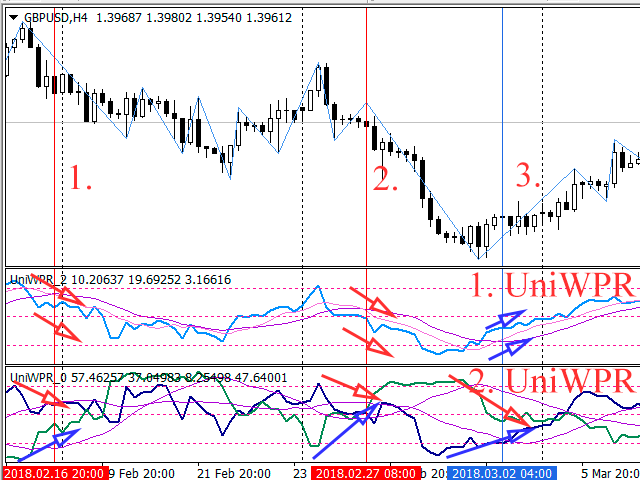
Seguindo o nosso artigo anterior, sobre os princípios de negociação de cestas de moeda, vamos analisar os padrões que os traders podem detectar. Também consideraremos as vantagens e desvantagens de cada padrão e forneceremos algumas recomendações sobre seu uso. Os indicadores baseados no oscilador Williams, serão utilizados como ferramentas de análise.
If a complex grid with specified stop loss and take profit levels has been created in the wrong place by mistake, it is not necessary to remove it and start over again. The grid can be moved to a new place using the mouse. Drag the script to the chart and drop it where the grid should be moved. The grid will be moved, keeping the distance between orders, distances to stop loss and take profit. The script works exclusively with pending orders , market orders will be left unchanged. Input
The script allows to use the mouse for placing a grid of orders with fixed or variable step quickly and with as few mistakes as possible. Drag the script to the chart using the left mouse button and release. The grid will be plotted starting from that point. If the current price is lower than the grid start point, the grid will be placed "to the north" towards the buys, and if higher - towards the sells, "to the south". Setting take profit and stop loss is left to trader's discretion. Input
Модифицируйте тейк профит и стоп лосс сети ордеров с помощью мыши. Перетащите скрипт на график левой кнопкой мыши и отпустите. Скрипт выставляет всем рыночным и отложенным ордерам раздельно, единый стоп лосс и единый тейк профит, используя величину цены в точке окончания перетаскивания. Входные параметры Buy or sell - Ордера какого типа подлежат модификации. Возможны два варианта: All BUY - все ордера на покупку All SELL - все ордера на продажу По умолчанию значение этого параметра All BUY. What
Modify the take profit and stop loss of orders grid using the mouse. Drag the script to the chart using the left mouse button and release. The script sets a single stop loss and take profit to all positions and pending orders separately, using the price value at the final point of dragging. Input Parameters Buy or sell - the type to be modified. There are two options: All BUY - all buy orders and positions (this parameter is set to All BUY by default.) All SELL - all sell orders and positions
O artigo descreve como os pares de moedas podem ser divididos em grupos (cestas), bem como a forma de obter dados sobre o seu status (por exemplo, compradas e vendidas) usando certos indicadores e como aplicar esses dados na negociação.
O artigo descreve a aplicação de arquivos de texto para armazenar objetos dinâmicos, arrays e outras variáveis, as quais são utilizadas como propriedades dos Expert Advisors, indicadores e scripts. Os arquivos servem como um complemento útil para a funcionalidade das ferramentas padrão oferecidas pelas linguagens MQL.