RFX EasyTrade
49 USD
Download demo:
300
Publicado:
16 fevereiro 2015
Versão atual:
2.40
Não encontrou o robô certo? Encomende um para você
no serviço Freelance.
Ir para o Freelance
no serviço Freelance.
Como comprar um robô de negociação ou indicador?
Execute seu EA na
hospedagem virtual
hospedagem virtual
Teste indicadores/robôs de negociação antes de comprá-los
Quer ganhar dinheiro no Mercado?
Como apresentar um produto para o consumidor final?

Você está perdendo oportunidades de negociação:
- Aplicativos de negociação gratuitos
- 8 000+ sinais para cópia
- Notícias econômicas para análise dos mercados financeiros
Registro
Login
Você concorda com a política do site e com os termos de uso
Se você não tem uma conta, por favor registre-se
Scalping Tick Charts using RFX EasyTrade
Scalping USDJPY (7.5 USD Commission) using RFX EasyTrade
The pannel font sizes are adjusted for 100% size of fonts on the screen. You need to set your windows OS screen font size percentage to 100%,
I purchased the EA, the pending orders you can enter the price instead of the distance from Bid / Ask?
I don't undestand how setup correctly:
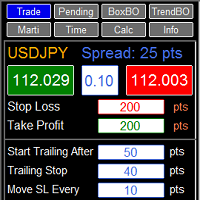
Start Trailing After
Trailing Stop
If I want to put breakeven after 7 pips gain how do I set?
I don't undestand how setup correctly:
Start Trailing After
Trailing Stop
If I want to put breakeven after 7 pips gain how do I set?
Hi, i purchased the EA. Great work!
But can you add a real Martingale function? when i am using the BO function ,i cant use then the Martingale function e.g, 0.01 Lot buy Stop when losing 0.02 Sell Stop, when losing 0.04 Buy Stop and so on.
The Martingale you have is only like Grid, Buy Buy Buy and not Buy, Sell, Buy, Sell.
Sorry 4 my bad English.
Best Regards
Hi, i purchased the EA. Great work!
But can you add a real Martingale function? when i am using the BO function ,i cant use then the Martingale function e.g, 0.01 Lot buy Stop when losing 0.02 Sell Stop, when losing 0.04 Buy Stop and so on.
The Martingale you have is only like Grid, Buy Buy Buy and not Buy, Sell, Buy, Sell.
Sorry 4 my bad English.
Best Regards
Hi Zorks,
Thanks for purchasing RFX EasyTrade Panel, and I hope that the features of the panel help you to trade easily and profitably.
As you know, there are two types of Martingale strategy, one type is the method currently implemented in the panel, which is to open a Buy (Sell), and if the price goes down (up) X pips then we open another Buy (Sell) position with doubling the bet size. Another type is to open a Buy position, and if the price goes down X pips, we will open a Sell position, and now if the price goes up X pips we will open another Buy position and repeat this pattern with proper lot size adjustments. The latter method has not been yet implemented in the current version of the Panel. In the next versions of the panel, however, I am planning to implement this type of Martingale strategy.
Please feel free to ask me any question regarding my products.
Best regards,
Rasoul
Hello
I can not install the expert advisor how to do I have a mac
Hello,
I purchased recently this utility. I've been using in different currency pairs. I've been trying to use the basic trade with Trailing Stop. I noticed that in some cases when the profit is in my favor it does not proceed to move on to the Trailing Stop. My setting are the following:
Stop Loss: 200 pts
Take Profit : 40 pts
Start Trailing after: 20
Trailing Stop : 10
Move Stop Loss Every : 5
So , if this doesn't work then what would be the fixed value in order to take 40 pips and 200 stop loss to use a trailing stop ?
Hello,
I purchased recently this utility. I've been using in different currency pairs. I've been trying to use the basic trade with Trailing Stop. I noticed that in some cases when the profit is in my favor it does not proceed to move on to the Trailing Stop. My setting are the following:
Stop Loss: 200 pts
Take Profit : 40 pts
Start Trailing after: 20
Trailing Stop : 10
Move Stop Loss Every : 5
So , if this doesn't work then what would be the fixed value in order to take 40 pips and 200 stop loss to use a trailing stop ?
Hello,
Thanks for purchasing RFX EasyTrade Panel.
The trailing stop algorithm works as below:
When the position (opened by the panel) reaches to a profit of "Start Trailing After" (in your example, 20 points) for the first time, the panel moves the stop loss to "current price" minus "Trailing Stop" (in your example, 10 points), and then every time the price moves in profit zone "Move Stop loss Every" points, the trailing stop loss algorithm moves the stop loss 10 points behind the current price.
However, it depends on your broker's settings that how much Take Profit and Stop Loss can be set close to the current price. Please check this with your broker. If, for example, your broker for some Symbols has set 40 points minimum distance between Stop Loss (and also Take Profit) and the current price, the trailing stop loss algorithm cannot move the stop loss to the desired place due to limitations set by your broker.
Best regards,
Rasoul
Hello,
Thanks for purchasing RFX EasyTrade Panel.
The trailing stop algorithm works as below:
When the position (opened by the panel) reaches to a profit of "Start Trailing After" (in your example, 20 points) for the first time, the panel moves the stop loss to "current price" minus "Trailing Stop" (in your example, 10 points), and then every time the price moves in profit zone "Move Stop loss Every" points, the trailing stop loss algorithm moves the stop loss 10 points behind the current price.
However, it depends on your broker's settings that how much Take Profit and Stop Loss can be set close to the current price. Please check this with your broker. If, for example, your broker for some Symbols has set 40 points minimum distance between Stop Loss (and also Take Profit) and the current price, the trailing stop loss algorithm cannot move the stop loss to the desired place due to limitations set by your broker.
Best regards,
Rasoul
Hello,
After reading your advice, I played another round with a currency pair AUD/CAD H1 Time Frame. I used EMA 60, EMA 15 and EMA 5 indicators to make sure I was going to the right direction. The trade took a positive hit, but my trailing stop didn't move on as the resistance was going all the way up. This is a 5 digit Meta Trade 4. So, either the trailing stop is not working properly or it's ignoring completely. It took only $45.96 and it was in my favor to get more profit. Please check my screen shot.
Hello,
After reading your advice, I played another round with a currency pair AUD/CAD H1 Time Frame. I used EMA 60, EMA 15 and EMA 5 indicators to make sure I was going to the right direction. The trade took a positive hit, but my trailing stop didn't move on as the resistance was going all the way up. This is a 5 digit Meta Trade 4. So, either the trailing stop is not working properly or it's ignoring completely. It took only $45.96 and it was in my favor to get more profit. Please check my screen shot.
Hello,
Could you please take a screenshot of the "info" tab of the panel and upload it here? If you click on "info" tab, you will see some page like this:

I want to see what is your broker's settings for minimum SL/TP.
A demo of trailing stop work:
Hi Rasoul,
Have you made any changes lately to RFX Trading Tool ? When I'm trying to set a Buy or Sell, I don't see anymore the stop loss or profit signal anymore. I uninstalled the Meta Trader and reinstalled again, I set the charts again and this is what I'm getting everytime I try to trade. Also it cost me another license when I'm using the same account and same computer. 7 out of 10 and it should be 8 out of 10.
No line signal when trading, just a blue dash in the corner. Please advice. Thank you.
Hi Rasoul,
Have you made any changes lately to RFX Trading Tool ? When I'm trying to set a Buy or Sell, I don't see anymore the stop loss or profit signal anymore. I uninstalled the Meta Trader and reinstalled again, I set the charts again and this is what I'm getting everytime I try to trade. Also it cost me another license when I'm using the same account and same computer. 7 out of 10 and it should be 8 out of 10.
No line signal when trading, just a blue dash in the corner. Please advice. Thank you.