Price Action Toolkit
99 USD
Download demo:
363
Publicado:
23 fevereiro 2022
Versão atual:
1.7
Não encontrou o robô certo? Encomende um para você
no serviço Freelance.
Ir para o Freelance
no serviço Freelance.
Como comprar um robô de negociação ou indicador?
Execute seu EA na
hospedagem virtual
hospedagem virtual
Teste indicadores/robôs de negociação antes de comprá-los
Quer ganhar dinheiro no Mercado?
Como apresentar um produto para o consumidor final?

Você está perdendo oportunidades de negociação:
- Aplicativos de negociação gratuitos
- 8 000+ sinais para cópia
- Notícias econômicas para análise dos mercados financeiros
Registro
Login
Você concorda com a política do site e com os termos de uso
Se você não tem uma conta, por favor registre-se
Liking this Price Action Toolkit so far. However, the Opening Ranges and Candlestick labels are not showing up. Tried various things and even putting the EA on a fresh chart and none of that data shows.
I have the same issues and same problem solving, only 1 chart open, no indicators, all I get is the vertical lines for Frankfurt and New York; unable to set for other openings such as Hong Kong. Lee suggested that it is possibly broker related. With IC Markets, the index trading by CFDs, with the minimum being 1 lot, so I was told to try a broker that will trade Mini Lots. However, that doesn't explain why these are not displaying on Forex pairs which trade down to 0.01. mini lots.
One thing I figured out, when you apply the EA the 1st time, default settings, for my broker the sessions are off by 1 hour. Then going into the settings and change them, they don't function. The only way is to remove the EA, then when adding it on again, do the changes right there at the initial instance when the Settings window pops up.
Correct. You need to adjust the settings to be correct when adding to the chart. The lines are drawn when the EA initialises. What you have suggested is the correct thing to do.
This is what I see for Opening Range, is there a setting for points or pips for FX that I am missing?
Dont know will do tome testing. This is designed for indicies not FX so may be an issue with FX. Will have a look into it.
Liking this Price Action Toolkit so far. However, the Opening Ranges and Candlestick labels are not showing up. Tried various things and even putting the EA on a fresh chart and none of that data shows.
They will show when there are some and when you are trading at the open. It will not draw in retrospecively.
I have the same issues and same problem solving, only 1 chart open, no indicators, all I get is the vertical lines for Frankfurt and New York; unable to set for other openings such as Hong Kong. Lee suggested that it is possibly broker related. With IC Markets, the index trading by CFDs, with the minimum being 1 lot, so I was told to try a broker that will trade Mini Lots. However, that doesn't explain why these are not displaying on Forex pairs which trade down to 0.01. mini lots.
Seems to have resolved itself by the NY open today. All good. Thank you!
They will show when there are some and when you are trading at the open. It will not draw in retrospecively.
That's a bit disappointing from a Forex perspective. I like to do visual backtesting and it would be great to be able to scroll back to see the price movement from the Hong Kong opening 1 or 2 hour range over the last few weeks, and especially if there are breakouts or reversals on candles marked as Strong Close.
That's a bit disappointing from a Forex perspective. I like to do visual backtesting and it would be great to be able to scroll back to see the price movement from the Hong Kong opening 1 or 2 hour range over the last few weeks, and especially if there are breakouts or reversals on candles marked as Strong Close.
Put it in the backtester. Will draw all in there and can visualy backtest for as many years as you like there.
Greeting Lee, how to adjust the Button so that every wording is perfectly fit in the buttons?
Greeting Lee, how to adjust the Button so that every wording is perfectly fit in the buttons?
Need to adjust the resolution, looks like yu are on high res monitor.
https://www.youtube.com/watch?v=3T3XZDy5Vk0
Greeting Lee, how to adjust the Button so that every wording is perfectly fit in the buttons?
Tq...its work!!!
Hi, LEE SAMSON and every one.
This tool is perfect. Save me time and very useful!
I recommend for this money it does a great service.
Personally, I use a strategy that starts with a session and works amazingly.
The advantage doesn't have to be complicated to count the loot size everything it does for me and it's really cool.
I'm testing on a Demo account like FULL EA Trading US30 and yet I can't make an objective conclusion but I'm sure I'll know next month.
Many thanks great work
Hi Lee,
I love the feature on breakout trading after 15 minutes or 90 minute on market opens.
Will try on Hong Kong/ other Asian market by replacing Frankfurt market to see it works or not.
Thank you.
Hi Lee,
I have installed the Price toolkit on MT4.
However the buttons are just in one long column. I can not see the whole column if I have the terminal open at the bottom.
Can these buttons be changed to perhaps a row along the bottom of the chart? Or maybe two columns? I see no way to change the button size.
Thanks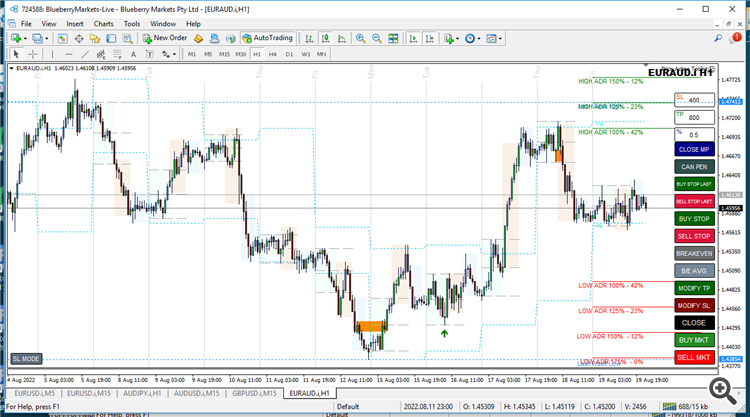
Hi Lee,
I have installed the Price toolkit on MT4.
However the buttons are just in one long column. I can not see the whole column if I have the terminal open at the bottom.
Can these buttons be changed to perhaps a row along the bottom of the chart? Or maybe two columns? I see no way to change the button size.
Thanks
No they are only one column. Close the terminal. You must have an extremely old machine there running very low resolution if they dont fit. Maybe 800x600 or something. Time for an upgrade!
I'm running 1366x768 resolution.
I'm running 1366x768 resolution.
Yes 768 is tiny. Like the old 1200x800 laptops we used to run many years ago. :)
I am running The toolkit EA on a VPS server. I am not able to change the display configuration.
Unknown what the resolution is. The 1366x768 is for my desktop computer.