Risk Panel MT4

  • Utilitários
  • Ravi Shakya
    Ravi Shakya
    I’m Ravi Shakya, an MT5 developer with 5 years of trading experience in NEPSE and Forex. I use Smart Money Concepts (SMC) and price action to create simple and useful trading indicators, tools, and Expert Advisors.
  • Versão: 3.84
  • Ativações: 10

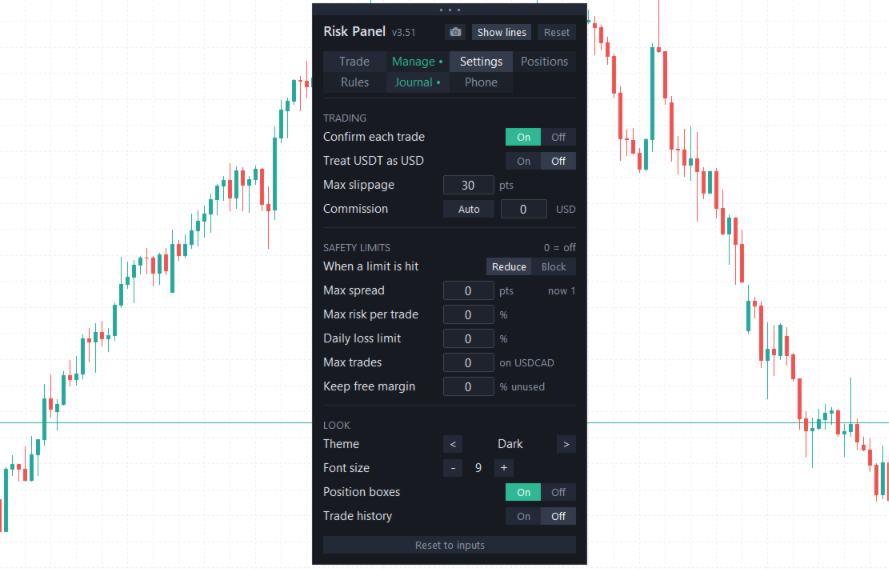
Risk Panel MT4 is a trade panel for MetaTrader 4 that sizes every trade from the risk you choose and then manages it from entry to exit. It is built for manual traders on forex, gold, indices and prop-firm accounts, and it works with any MT4 broker.

You plan the trade on the chart, the panel shows exactly what you risk and what you can win, and one click places it. After that, the panel takes care of partial take-profits, breakeven, trailing and your own safety rules, so you can focus on the market instead of the calculator.

Plan and place trades

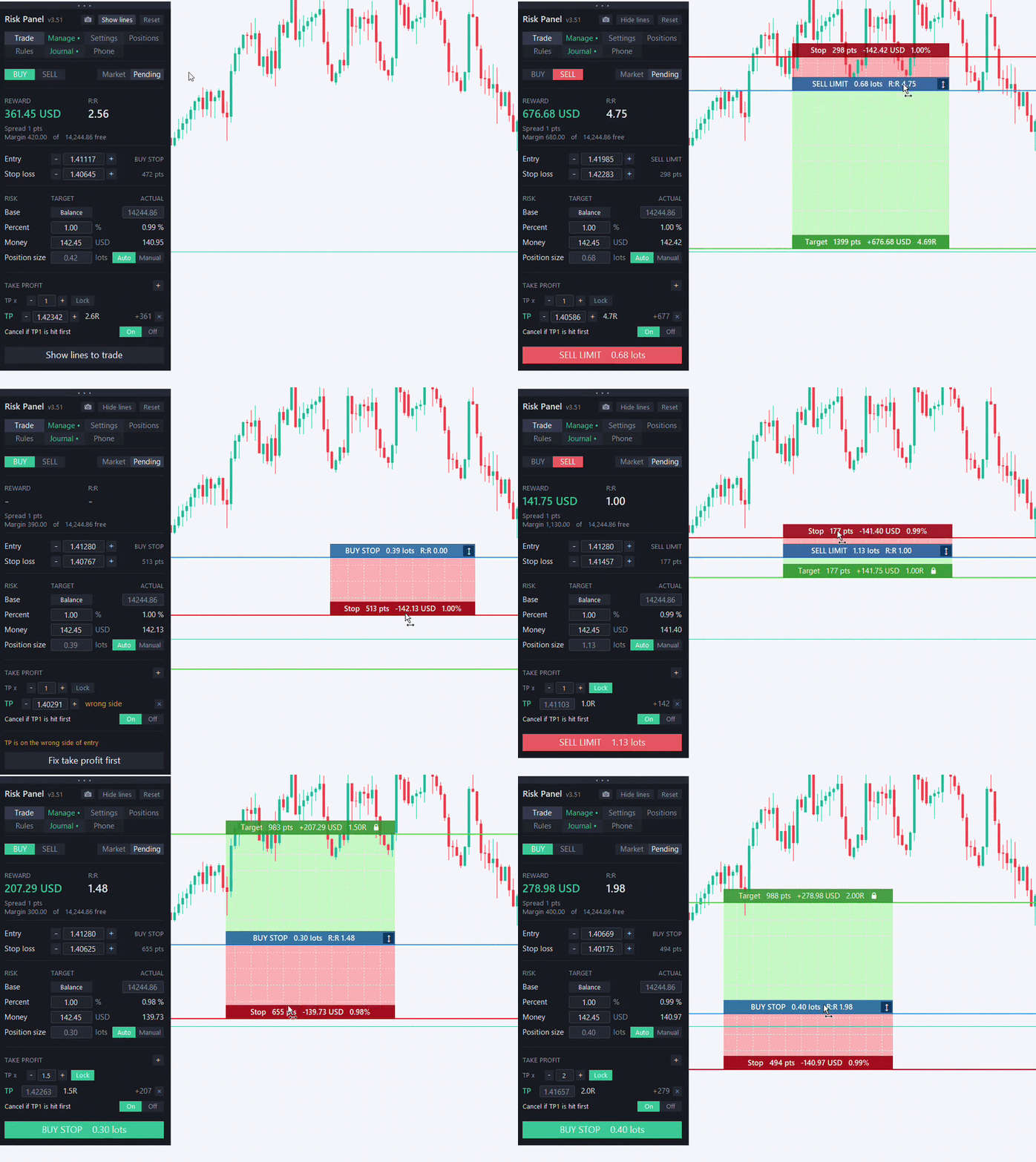
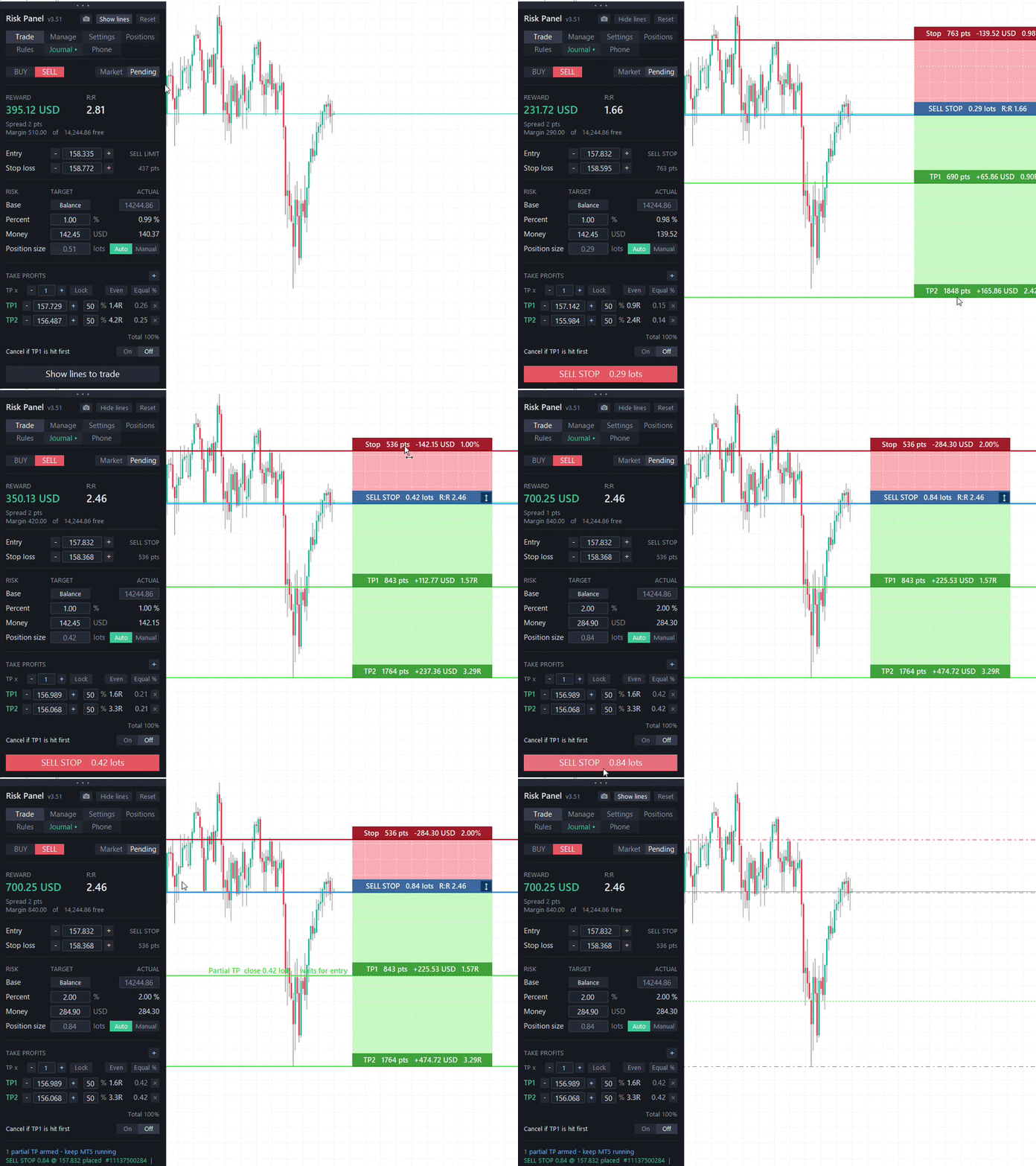
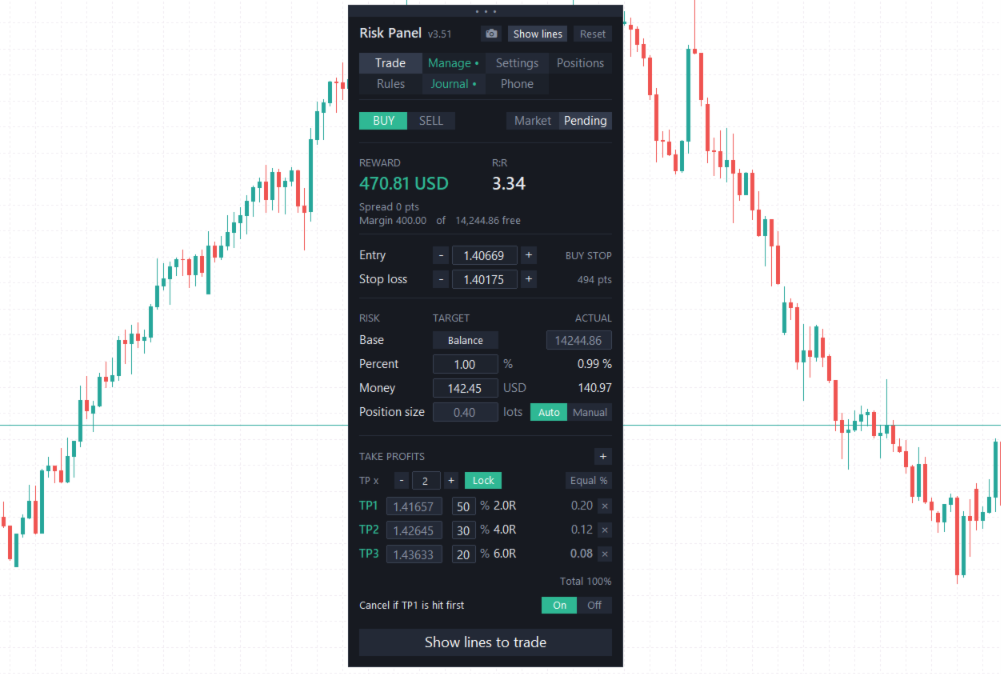
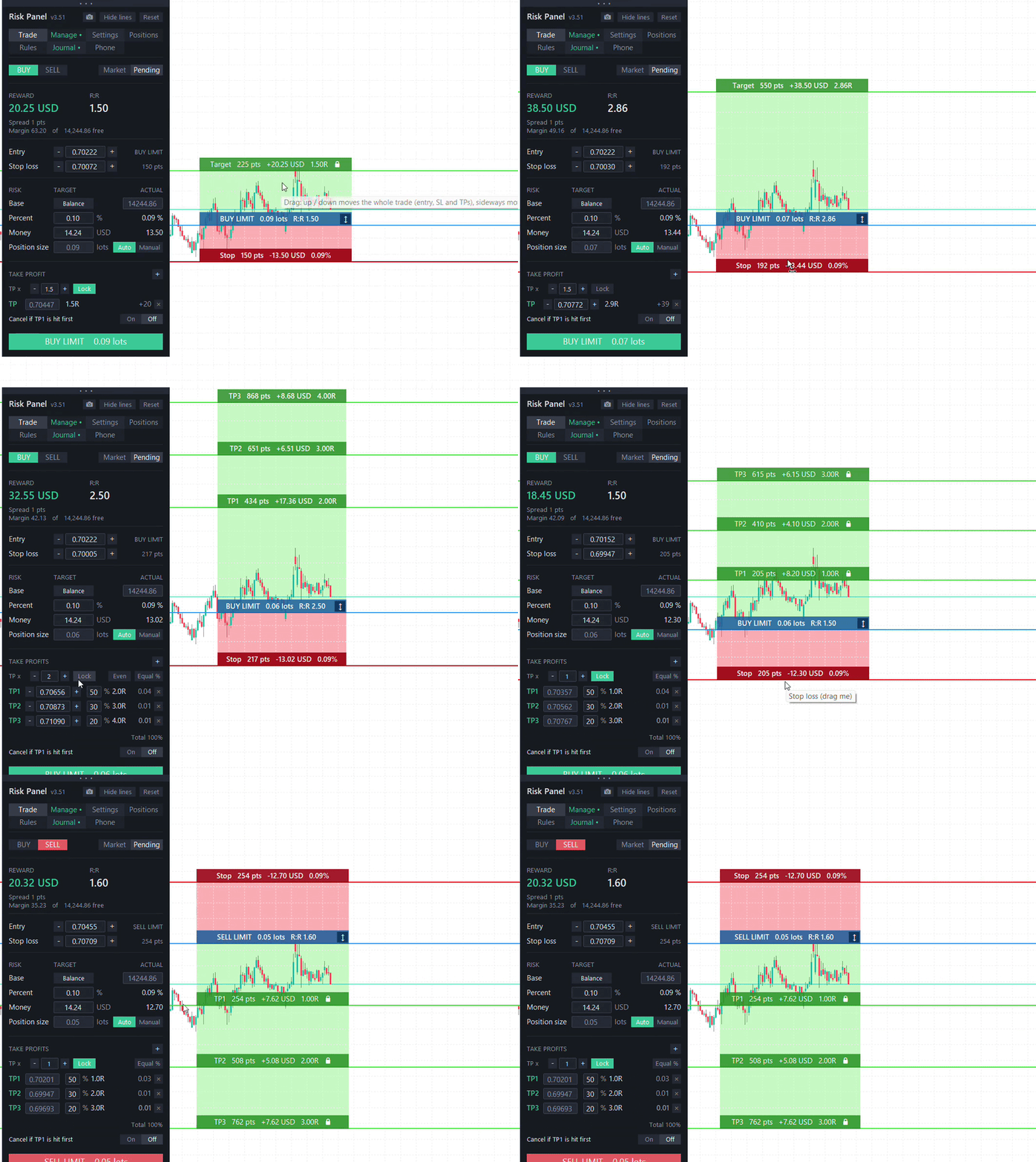
Choose your risk as a percent of balance, equity or free margin, or as a fixed amount of money. The panel works out the lot size from your stop distance, including the commission you set. Entry, stop loss and take-profit are lines on the chart, and the position boxes show the risk, the reward and R:R live while you move them.

  • Market and pending orders, with up to five take-profit levels and their own close percentages
  • Drag the lines or the boxes to move a level; dragging the entry switches a market trade to pending
  • Take-profits locked to the stop distance (1R, 2R ...) or set freely
  • Optional confirmation before every order
  • Cancel a pending order if TP1 is hit before it fills

Protect open trades

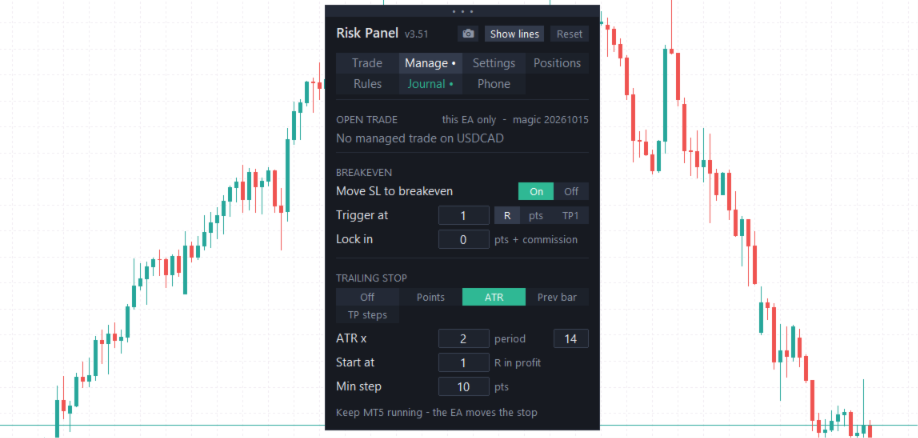
Breakeven can move the stop to entry (plus commission) at a profit in R, in points, or after the first partial take-profit. Trailing can follow the price by fixed points, by ATR, by the previous bar, or step to the previous take-profit after each partial close.

Manage positions

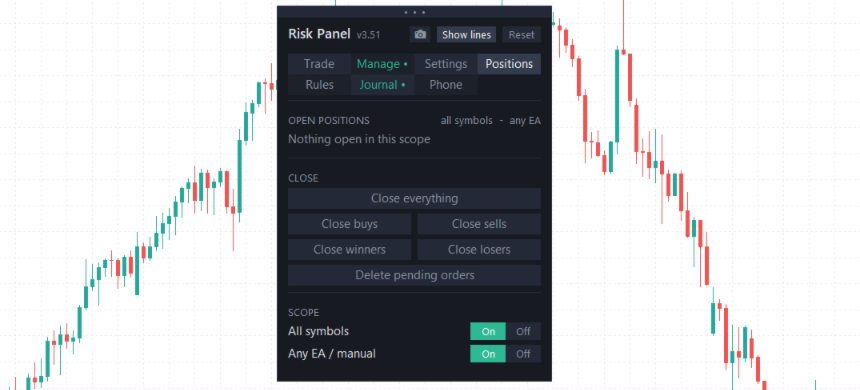
The Positions tab lists your open trades with their result in money and R. Select a trade to edit its stop and targets, move it to breakeven, close part of it or close it completely. Trades opened by hand or by another EA can be adopted, so breakeven and trailing manage them too. Close everything, buys, sells, winners or losers with one click, or delete all pending orders.

Rules that work for you

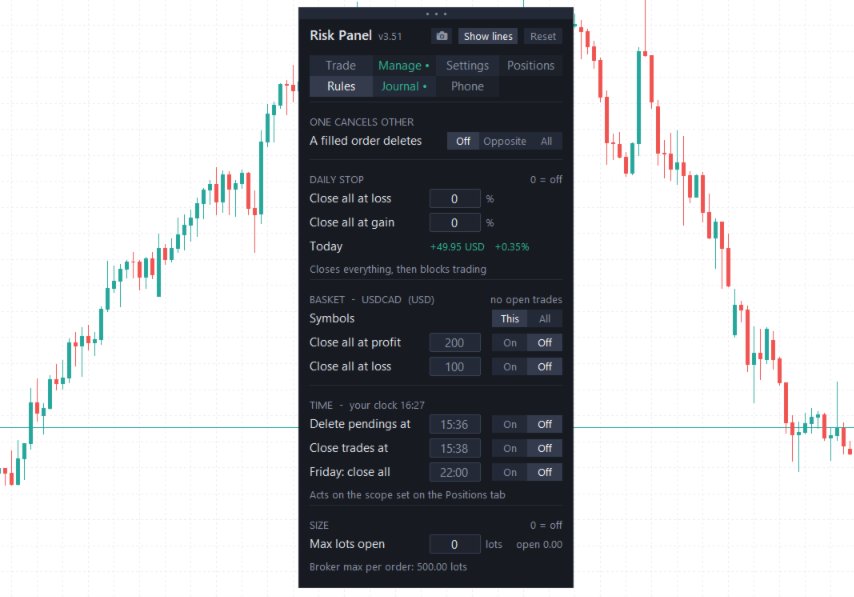
  • Daily stop - close everything and stop trading for the day at a loss or gain percent
  • Basket - close all trades of a symbol, or of all symbols, at a profit or loss in money
  • One cancels other - when one pending order fills, the opposite ones are deleted
  • Time rules - delete pending orders, close trades, or close everything on Friday at a set time
  • Size limits - maximum lots open at once

Journal and report

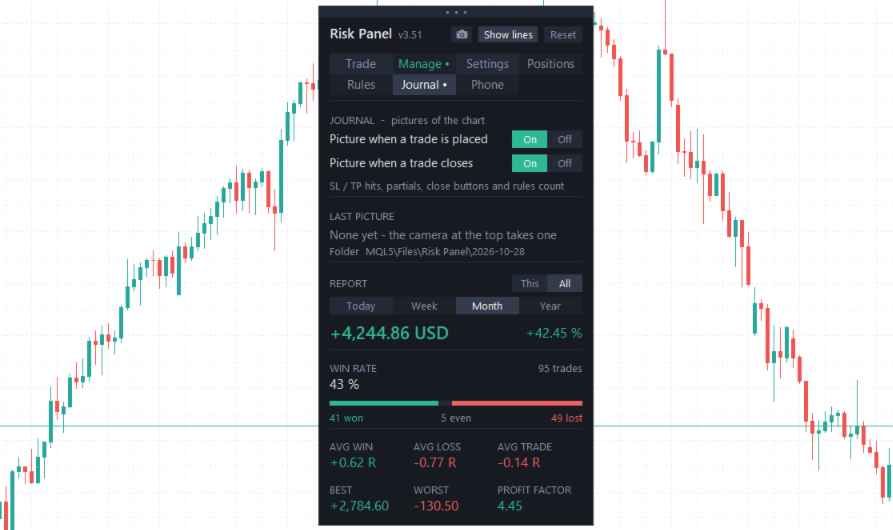
The panel can save a picture of the chart when a trade is placed and when it closes. The close picture shows the entry and exit, every level, taken targets with a tick, a hit stop with a cross, and a short summary of the result. The report shows your result in money and percent, win rate, average R, profit factor, best and worst trade, for today, this week, month or year.

Trades from your phone

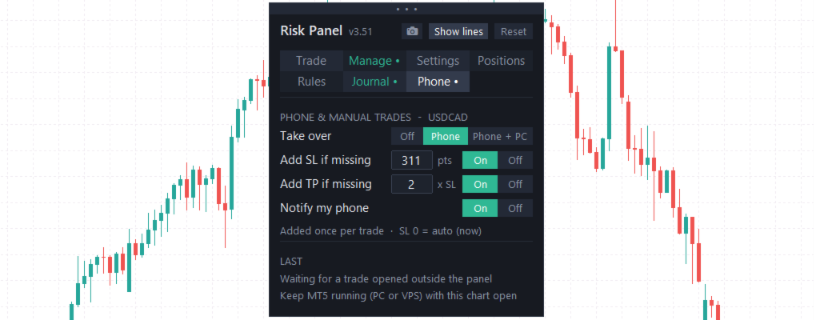
The Phone tab can take over trades you open by hand, for example from the MT4 mobile app: it adds a missing stop loss and take-profit and sends a push notification to your phone. MT4 does not record whether a trade was opened on the phone or on the PC, so on MT4 every manual trade is treated the same way.

Safety first

Before every order the panel checks the spread, the margin, the risk of the trade, the total open risk, the number of trades and the daily loss. If it cannot convert the risk into your account currency, it refuses to trade instead of guessing.

Good to know

  • Partial take-profits, breakeven, trailing and the rules run while MetaTrader 4 is open. For 24/5 management use a VPS. The final stop loss and take-profit are always held by the broker.
  • Push notifications need MetaTrader 4 notifications turned on: Tools > Options > Notifications, with your MetaQuotes ID from the phone app.
  • Pictures are saved in the MQL4\Files\Risk Panel folder of your terminal.

Also available for MetaTrader 5 as Risk Panel MT5.
Mais do autor
SMC Market Structure MT5 PRO is a chart-based analysis indicator for MetaTrader 5 designed for traders who use Smart Money Concepts (SMC), Inner Circle Trader (ICT) concepts, market structure, liquidity analysis, and multi-timeframe price action. The indicator brings a comprehensive collection of SMC and ICT tools into a single chart, including Market Structure, Break of Structure (BOS), Change of Character (CHoCH), Order Blocks (OB), Fair Value Gaps (FVG), Inverse Fair Value Gaps (IFVG), Balanc
An ICT / SMC indicator for MetaTrader 5. It waits for a liquidity sweep of PDH or PDL, then a market structure shift back inside the range, and plots the trade. Full documentation: Complete User Guide Chart Timeframe : 5 MIN Symbols : EURUSD How the model works The indicator marks the previous day high (PDH) and previous day low (PDL) from the completed daily candle, then waits for a liquidity grab: buy-side liquidity taken above PDH or sell-side liquidity taken below PDL. A stop hunt into the l
SMC Market Structure MT4 PRO is a chart-based analysis indicator for MetaTrader 4 designed for traders who use Smart Money Concepts (SMC), Inner Circle Trader (ICT) concepts, market structure, liquidity analysis, and multi-timeframe price action. Buy Now |  MT5 version  | Download Demo Version (Only for Demo Accounts)  | User Guide  | Contact Us The indicator brings a comprehensive collection of SMC and ICT tools into a single chart, including Market Structure, Break of Structure (BOS), Change o
A volatility-contraction breakout EA built around a linear regression channel, with independent trend confirmation and a trading-session filter. Designed for GBPUSD on the H1 timeframe, trading the European/London session. Recommended Settings Symbol : GBPUSD Timeframe : 1H or 1 Hour HOW IT WORKS A linear regression channel is fitted to price over a configurable lookback period. The EA tracks the channel's bandwidth against its own recent range to distinguish between a market that is compressing
Read the full documentation on the product blog: [ Complete User Guide ] How to Use it Chart Timeframe : 5 MIN Recommended Symbols : EURUSD, GBPUSD, NZDUSD, EURAUD The default settings are optimized for EURUSD on the 5-minute timeframe. For other symbols, you can download the corresponding .set files here . Marks the Asian session, waits for a liquidity sweep, and calls the entry the moment market structure confirms it. The SMC/ICT Asian Sweep Entry Model watches the Asian session range on your
CISD Detector MTF marks Change in State of Delivery (CISD) levels on any symbol and timeframe, and shows the delivery state across eight timeframes in one panel. Overview In Smart Money Concepts (SMC) and ICT methodology, a CISD marks the moment price stops delivering in one direction and starts delivering in the other. It is often an early confirmation of a market structure shift (MSS) or change of character (CHoCH), and it usually appears before a classic break of structure (BOS). How it works
Session Range Breakout EA trades the opening range of a session and waits for price to come back before it commits. It does not enter on the break. When displacement takes price out of the range, the robot arms a pending limit order at the level and only takes the trade if price retests it. Default settings are built for GBPUSD on the M15 opening range timeframe. Other symbols and timeframes are supported, but the stop buffer, minimum stop and session times should be adjusted for the instrument'
Volume Divergence Pro shows whether volume confirms the trend and marks regular and hidden divergences on price and indicator. Volume Divergence Pro measures the direction of price with linear regression over a fast and a slow window, and checks whether trading volume is supporting that move or fading away from it. Swings in the indicator are compared with swings in price to find divergences, which are drawn both in the indicator window and directly on the candles. How it works The fast regressi
CISD - Change in State of Delivery indicator for MetaTrader 4. In Smart Money Concepts (SMC) and ICT methodology, a Change in State of Delivery (CISD) marks the moment price stops delivering in one direction and starts delivering in the other. It is often the first confirmation of a market structure shift (MSS) or change of character (CHoCH), and it usually appears before a classic break of structure (BOS) forms. This indicator detects CISD objectively on any symbol and timeframe, and shows the
SMT Divergence Multi Pair compares the swing highs and swing lows of the chart symbol with up to two correlated symbols and marks the places where they disagree. This is the Smart Money Technique (SMT) divergence used in ICT and Smart Money Concepts analysis: one market moves beyond a previous high or low while its correlated market does not confirm the move. How it works The indicator finds confirmed swing highs and swing lows on the chart symbol and compares each new swing with the previous on
A dual-timeframe trend engine with volume-weighted divergence and market structure confluence. Volume Divergence Pro plots two linear-regression trend readings — a fast one and a slow one — and colors each by whether the volume actively participating in that move is building or fading. On top of that trend picture, it detects regular and hidden divergences between price and momentum, and can require those divergences to agree with the prevailing market structure before showing them. Built for tr
CRT Sweep Model EA is a fully automated Expert Advisor built on Candle Range Theory (CRT) and Smart Money Concepts (SMC) . It turns every higher-timeframe candle into a dealing range, waits for a liquidity sweep (stop hunt) of the range high or low, and enters only after price is rejected back inside the range and a shift in delivery is confirmed on a lower timeframe. Symbol : USDJPY Timeframe : 5MIN / 5 Minutes The default settings are optimized for USDJPY for 5MIN / 5 Minutes The model follows
SMT Divergence Multi Pair compares the swing highs and swing lows of the chart symbol with up to two correlated symbols and marks where they disagree. This is the Smart Money Technique (SMT) divergence used in ICT and Smart Money Concepts trading: one market sweeps a previous high or low while its correlated market fails to confirm the move. Discount Ends Soon — Next Price: $99 HOW IT WORKS The indicator finds confirmed swing highs and lows on the chart symbol and compares each new swing with th
Gold Smart Entry is a chart indicator for Gold (XAUUSD) based on Smart Money Concepts (SMC) and ICT ideas. It marks liquidity sweeps, confirms the reversal that follows, and highlights the entry zone at a Fair Value Gap (FVG) or Inverted Fair Value Gap (IFVG). For every setup it draws the suggested entry price, stop level and three target levels directly on the chart. The indicator does not open or manage trades. It is a visual analysis tool that shows where a setup forms and how it developed. I
HTF Candles PO3 SMC shows candles from a higher timeframe directly on your current chart, to the right of price. You can follow the forming 4H candle, or any other timeframe, while you trade on M5 or M15, without switching charts. The indicator is built for traders who use the Power of 3 concept (accumulation, manipulation and distribution) and Smart Money Concepts. Next to the candles it shows the levels that matter for this approach, so you can read the higher timeframe context at a glance. Wh
Symbol: EURUSD Timeframe: 30 minutes (M30) For other symbols or timeframes, adjust the settings to match the market. Volume Profile POC Breakout builds a volume profile from recent candles, finds the Point of Control (POC) and marks clean breakouts of that level. Each breakout is shown as a complete trade plan with entry, stop loss and three take profit levels, filtered by the higher timeframe trend and rated by a quality score. The indicator does not open trades. It is a visual and analysis to
VWAP Breakout Entry draws an anchored VWAP from market structure pivots and marks trade entries when price retests it after a breakout. Every signal comes with a stop loss and three take-profit levels, and the chart shows the full trade the way a charting platform would. Symbol : GBPUSD Timeframe : M15 / 15 Minutes Default settings are optimized for GBPUSD on M15 How it works The indicator detects swing highs and lows and anchors a VWAP to the latest structure leg. When price breaks structure a
Risk Panel is a trade panel for MetaTrader 5 that sizes every trade by your risk and manages it from entry to exit. Drag the stop loss on the chart, and the lot size, money at risk and reward-to-risk update instantly. When the numbers look right, place the trade with one click. It is made for manual traders who want the same risk on every trade, on forex, gold, indices and prop-firm accounts. It works with any broker, on netting and hedging accounts. Plan and place the trade Type your risk as a
Filtro:
Sem comentários
Responder ao comentário